
What Is an AI Agent? Types, Examples, and How They Work
Learn what AI agents are, how they work, the 5 main types, and how they differ from chatbots and AI assistants. Practical examples for non-technical teams.

By: Deepit Patil
Co-Founder and CTO
Published
Updated
Edited by Craze Editorial Team · See our Editorial Process
You ask your AI tool to research competitors, pull their pricing, organize the findings in a spreadsheet, and email a summary to your team. It can help you draft the email, sure. But it cannot do the whole thing end to end.
An AI agent can.
That is the core difference most explanations skip. AI agents are not just smarter chatbots. They are software systems that can reason through a problem, decide which tools to use, and take action across multiple steps without you guiding each one.
This guide explains what AI agents actually are, how they work under the hood, the main types you will encounter, and where they fall short. Whether you are evaluating agents for your team or just trying to make sense of the hype, you will walk away with a practical understanding of what matters and what does not.
TL;DR
- An AI agent is software that can perceive its environment, reason about what to do, and act autonomously to complete tasks, often using a large language model (LLM) as its reasoning engine.
- Chatbots follow scripts. AI assistants help you do tasks. AI agents do tasks for you. The difference is not branding; it is a real gap in capability and autonomy.
- Five classical types exist (simple reflex, model-based, goal-based, utility-based, learning), but in practice you will encounter agents as research tools, workflow automators, coding assistants, and customer service systems.
- The market is growing fast: The AI agents market was valued at $7.63 billion in 2025 and is projected to reach $182.97 billion by 2033. But only 17% of organizations have actually deployed agents so far.
- Agents are powerful but imperfect: They can hallucinate, cost more than simpler tools, and need human oversight for anything high-stakes.
What Is an AI Agent?
An AI agent is an autonomous software system that perceives its environment, reasons about what actions to take, and acts to achieve specific goals with minimal human oversight.
That definition sounds abstract, so here is what it looks like in practice. Imagine a customer support agent that receives a new ticket. It reads the customer’s message, looks up their order history in your database, checks your return policy, drafts a response, and escalates to a human if the issue is complex. No one told it which steps to follow for this specific ticket. It figured that out on its own.
Most modern AI agents use a large language model (LLM) as their reasoning engine. The LLM is the “brain” that understands context and plans next steps. But the brain alone is not enough. Agents also connect to external tools (email, databases, APIs, spreadsheets) that act as their “hands,” letting them take real actions in the world.
This creates a continuous loop:
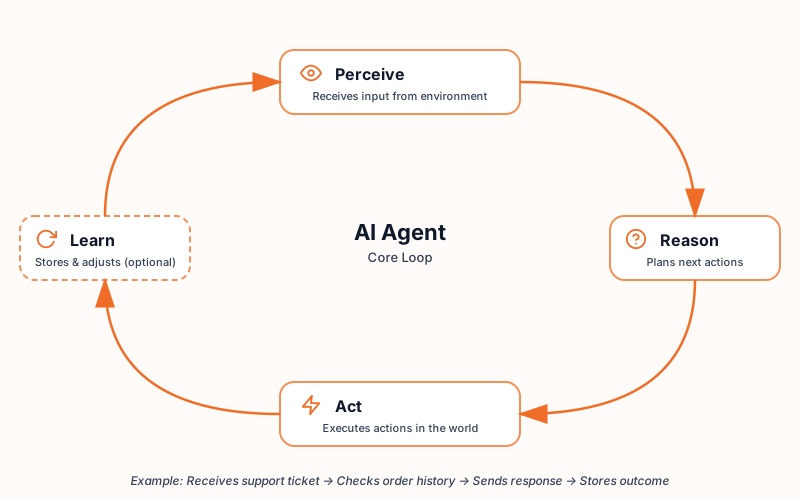
- Perceive: The agent receives input from its environment, whether that is a user message, a data feed, a calendar event, or a system alert.
- Reason: The LLM processes the input, considers the goal, and plans which actions to take.
- Act: The agent executes those actions: calling an API, sending a message, updating a record, or generating a report.
- Learn (in some cases): Advanced agents store results and adjust their behavior over time.
You might also hear the term “agentic AI” used interchangeably with “AI agents,” but they mean slightly different things. An AI agent is a single autonomous unit that handles a defined task. Agentic AI is the broader system that coordinates multiple agents, data sources, and tools to execute complex, multi-step workflows. Think of agents as individual workers and agentic AI as the management layer that orchestrates them.
That distinction matters because the terms show up everywhere in product marketing, and knowing the difference helps you evaluate what a tool actually does versus what it claims to do.
AI Agent vs Chatbot vs AI Assistant
This is the question most people are really asking: how is an AI agent different from ChatGPT, Siri, or the chatbot on my bank’s website?
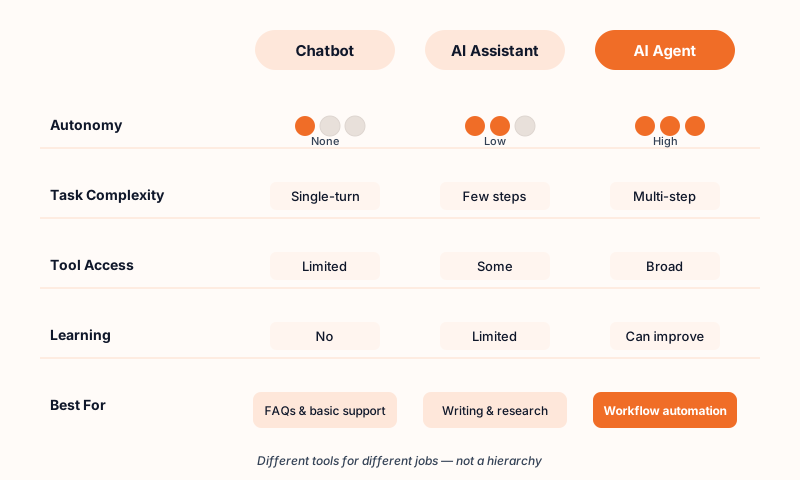
The short answer is autonomy and scope. But the longer answer matters more.
Chatbots follow predefined scripts or decision trees. They are great for answering common questions like “What are your business hours?” or “How do I reset my password?” But the moment a question goes off-script, they break. A chatbot does not reason. It matches patterns.
AI assistants use AI (usually an LLM) to respond to your requests. They are reactive: you ask, they answer. You stay in control of each step. ChatGPT drafting an email for you, Siri setting a timer, or Alexa playing a song are all assistant behavior. They make you faster at doing tasks, but you are still doing the tasks.
AI agents autonomously plan, reason, and act across multiple steps and tools. You define the goal (“schedule a meeting with the marketing team this week”), and the agent figures out how to get there: checking calendars, finding open slots, sending invites, handling conflicts. You are not directing each step. The agent is.
Here is how the three compare across key dimensions:
| Dimension | Chatbot | AI Assistant | AI Agent |
|---|---|---|---|
| Autonomy | None. Follows scripts | Low. Responds to requests | High. Plans and acts independently |
| Task complexity | Single-turn, simple | Single or few steps | Multi-step, complex workflows |
| Tool access | Limited or none | Some (search, plugins) | Broad (APIs, databases, email, tools) |
| Learning | No | Limited | Can improve over time |
| Typical use | FAQ, basic support | Writing, search, reminders | Workflow automation, research, operations |
So is ChatGPT an AI agent? Standard ChatGPT is an AI assistant. You prompt it, it responds. But ChatGPT with browsing, code interpreter, and plugin capabilities moves closer to agent behavior because it can take multiple steps and use external tools. OpenAI’s dedicated agent product, Operator, is designed to function as a true agent: it browses the web, fills out forms, and completes tasks autonomously.
The line between assistant and agent is blurring. What matters is not the label but whether the system can independently plan, use tools, and complete multi-step tasks without you managing each step.
Types of AI Agents
AI agents come in several forms. The academic taxonomy lists five classical types, and while they are useful for understanding how agent intelligence has evolved, the practical categories you will actually encounter at work look different.
The 5 Classical Types
These five types come from AI research and describe increasing levels of sophistication:
-
Simple reflex agents act on current input only, using if-then rules. A spam filter that blocks emails containing certain keywords is a simple reflex agent. It does not learn or adapt.
-
Model-based reflex agents maintain an internal model of the world that helps them handle situations they cannot fully observe. A smart thermostat that adjusts temperature based on learned usage patterns and current occupancy is a good example.
-
Goal-based agents evaluate which actions move them closer to a defined goal. A GPS navigation system calculating the fastest route while considering traffic conditions works this way.
-
Utility-based agents go further by optimizing for the best outcome among several options. A dynamic pricing engine that adjusts prices based on demand, competitor pricing, and inventory levels is making utility-based decisions.
-
Learning agents improve their performance over time by observing results and adjusting their approach. A recommendation engine that gets better at suggesting content the more you interact with it is a learning agent.
Categories You Will Actually Use
In practice, modern AI agents combine multiple classical types and show up in recognizable work categories:
-
Conversational agents handle customer interactions end to end. Unlike basic chatbots, these agents can access order histories, process refunds, and escalate complex cases, all within a single conversation.
-
Research and data agents automatically search multiple sources, cross-reference information, and produce structured summaries or reports. Instead of spending hours gathering data manually, you point the agent at a question and review its findings.
-
Workflow automation agents connect multiple tools and execute multi-step business processes. Think of an agent that monitors your CRM, identifies deals that have stalled, drafts follow-up emails, and logs the activity, all without manual intervention.
-
Software development agents write code, debug errors, run tests, and suggest improvements. They work inside your development environment and handle repetitive coding tasks so developers can focus on architecture and design decisions.
-
Personal assistant agents manage calendars, prioritize emails, schedule meetings, and handle routine administrative tasks. They go beyond reminders by actually taking actions on your behalf.
-
Multi-agent systems involve multiple agents working together on complex tasks. One agent might gather research, another might analyze it, and a third might draft a report based on the analysis. Each agent handles its part, and an orchestration layer coordinates the workflow.
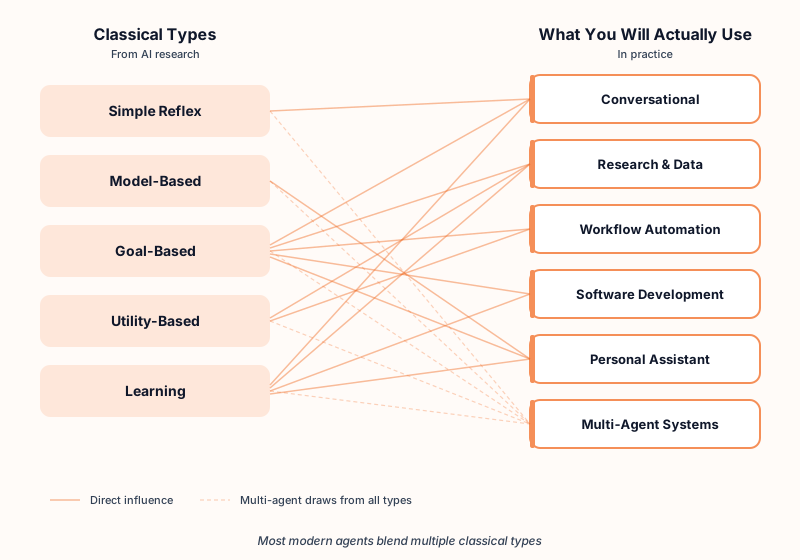
The classical types help you understand what is happening under the hood. The practical categories help you understand what you can actually do with agents today.
Real-World Examples of AI Agents
Types and definitions are useful, but they don’t click until you see agents in the context of actual work. Here are scenarios that show what AI agents look like in practice.
Customer support triage and resolution
Before: A support team member reads each incoming ticket, looks up the customer’s account, checks order status, reviews the return policy, drafts a response, and escalates complex cases manually.
After: A conversational agent reads the ticket, pulls the customer’s order history from your database, checks your policy docs, drafts a contextual response, and sends it, escalating to a human only when the issue requires judgment. Routine tickets are resolved in seconds instead of minutes.
Market research and competitive analysis
Before: An analyst spends half a day searching for competitor pricing, reading industry reports, cross-referencing data across sources, and assembling findings in a slide deck.
After: A research agent searches across specified sources, extracts pricing data, compares it against your current positioning, and produces a structured report with key takeaways. The analyst reviews and refines instead of gathering.
Meeting scheduling across teams
Before: Three rounds of back-and-forth emails to find a time that works for six people across two time zones.
After: A personal assistant agent checks all participants’ calendars, identifies available slots, proposes options ranked by convenience, sends calendar invites, and handles rescheduling if conflicts arise.
Content creation workflows
Before: A marketer researches a topic, outlines an article, writes a first draft, checks brand guidelines manually, formats for the CMS, and queues it for review.
After: A workflow automation agent pulls research from approved sources, generates a structured draft following brand guidelines, flags sections that need human review, and queues the approved version for publishing.
Code review and testing
Before: A developer manually writes unit tests, runs them, reviews results, fixes failures, and documents changes.
After: A software development agent generates tests based on the codebase, runs them, identifies failures, suggests fixes, and creates a summary of what changed and why. The developer reviews the output instead of building it from scratch.
Each of these examples represents a different agent category, but they share a common pattern: the agent handles the multi-step execution, and the human handles the judgment, review, and final decision.
Benefits and Limitations of AI Agents
AI agents offer real advantages, but they also come with real constraints. Understanding both helps you make better decisions about where to deploy them.
Benefits
- Productivity gains on repetitive multi-step tasks: Agents handle the kind of work that eats hours: gathering data, processing requests, coordinating across tools, and generating reports. This frees your team for work that requires creativity and judgment.
- 24/7 availability: Agents don’t take breaks, call in sick, or forget. They can monitor inboxes, process requests, and respond to events around the clock.
- Consistency: A well-configured agent follows the same process every time, reducing the variability that comes with manual work.
- Scalability: Agents can handle growing workloads without proportional headcount increases. One agent can process hundreds of support tickets in the time it takes a human to handle a few.
- Faster decision support: Agents that analyze data in real time can surface insights, flag anomalies, and recommend actions faster than manual analysis.
Limitations (and What to Do About Them)
This is where most explanations stop at a bullet list. But knowing the risks without knowing the mitigations is not very useful.
-
Hallucinations: LLM-powered agents can generate information that sounds right but is wrong. This is especially dangerous when agents produce customer-facing responses, financial analysis, or legal summaries.
What to do: Build verification steps into the workflow. Use human-in-the-loop review for any output that has real consequences. Cross-reference agent outputs against source data.
-
Cost: Running agents involves LLM API calls, tool integrations, and infrastructure. For high-volume tasks, costs can add up quickly, especially with large context windows or complex reasoning chains.
What to do: Start with high-ROI, high-volume tasks where the time savings clearly justify the cost. Monitor token usage and set spending limits. Use smaller, faster models for simple subtasks.
-
Security and privacy risks: Agents that access sensitive data (email, databases, customer records, internal documents) create potential data exposure. An agent with broad permissions can access more than it should.
What to do: Apply the principle of least privilege: give agents only the permissions they need for their specific task. Use audit logs to track what agents access. Keep sensitive workflows behind human approval gates.
-
Reliability: Agents can fail silently, take unexpected paths, or produce inconsistent results across runs. Unlike traditional software that either works or throws an error, agent failures can be subtle.
What to do: Set guardrails that define acceptable actions and block dangerous ones. Build fallback behaviors for common failure modes. Set up alerting so you know when an agent goes off track.
-
Overreliance: Teams that treat agent outputs as final without review risk publishing errors, sending wrong information to customers, or making decisions based on flawed analysis.
What to do: Establish a review process for anything customer-facing, legal, or financial. Treat agent outputs as drafts, not finished products.
According to Gartner, over 40% of agentic AI projects may be canceled by the end of 2027 due to escalating costs, unclear business value, or inadequate risk controls. The agents that survive will be the ones deployed with clear guardrails, measurable ROI, and realistic expectations.
The AI Agent Landscape in 2026
AI agents are not a future concept. They are a current market with real investment and real adoption, though both are earlier than the hype suggests.
The global AI agents market was valued at $7.63 billion in 2025 and is projected to reach $182.97 billion by 2033, growing at a 49.6% CAGR. That growth reflects strong enterprise demand for automation and intelligent decision-making.
Adoption tells a more nuanced story. Only 17% of organizations have deployed AI agents so far, though over 60% expect to within the next two years. Organization-wide AI adoption is reaching 40% in 2026, up from 22% in 2025, driven largely by agentic workflows.
The tooling ecosystem has matured rapidly. Every major AI lab now has an agent framework : OpenAI’s Agent SDK, Google’s Agent Development Kit, Anthropic’s Claude Agent SDK, and Microsoft’s AutoGen. Beyond the big labs, the landscape includes over 120 production-ready tools across categories from no-code builders to enterprise orchestration platforms.
Interoperability is emerging too. Standards like Google’s Agent2Agent (A2A) protocol and Anthropic’s Model Context Protocol (MCP) are creating ways for agents built on different platforms to communicate and work together. This matters because most real workflows cross system boundaries.
Gartner’s 2026 Hype Cycle places agentic AI at the “Peak of Inflated Expectations.” That means interest and investment are high, but so is the risk of disillusionment for teams that deploy without clear use cases or governance. The technology works. The question is whether organizations can deploy it with enough discipline to capture real value.
How to Get Started with AI Agents
If you’re ready to experiment, here is a practical starting point.
Identify your best candidate tasks: Look for work that is repetitive, multi-step, and rule-based. Data entry across systems, report generation, meeting scheduling, and customer request routing are all strong candidates. Avoid starting with tasks that require significant creative judgment or high-stakes decision-making.
Try a no-code builder first: You don’t need to write code to create useful agents . No-code and low-code platforms let you define a goal, connect your tools, and set guardrails without engineering resources. This lets you test the concept before committing to custom development.
Start small: One agent, one workflow, one team. Measure whether it actually saves time and improves output quality before scaling. Many organizations make the mistake of deploying agents broadly before they understand how to manage them.
Set guardrails early: Before your agent goes live, define what it can and cannot do, who reviews its outputs, and how failures are handled. Good guardrails include action boundaries (what the agent is allowed to do), approval gates (which outputs require human sign-off), and fallback behaviors (what happens when the agent is unsure).
Platforms like Craze let you create AI agents and run multi-model workflows in one workspace, so you can test different approaches without switching between tools. The key is to start experimenting with real workflows rather than waiting for the technology to feel “ready.” It already is, for the right use cases.
Conclusion
AI agents represent a meaningful step beyond chatbots and AI assistants. They can reason, plan, and act across multiple tools and systems, handling the kind of multi-step work that used to require a person managing each step manually.
But the technology is early. Most organizations are still experimenting, and the ones seeing real results are the ones that start with clear, bounded use cases instead of trying to automate everything at once.
The practical path forward: identify one repetitive workflow, set clear guardrails, and let an agent handle the execution while your team handles the judgment. As your confidence grows, expand from there.
Try it yourself
Build your first AI agent in minutes
Craze is the AI workspace where agents, models, and your connected apps work together to get real work done. Describe what your agent should do, and it is ready to act. No code, free to start.
FAQs
Is ChatGPT an AI agent?
Not by default. Standard ChatGPT works as an assistant: you prompt, it responds. It becomes more agent-like when you enable browsing, code interpreter, or plugins, since those let it chain steps and use external tools. OpenAI's Operator is their dedicated agent product built for autonomous task completion.
What are the 5 types of AI agents?
Simple reflex, model-based reflex, goal-based, utility-based, and learning agents. Each represents a step up in sophistication, from basic if-then rules to systems that improve from experience. Most production agents today blend multiple types rather than fitting neatly into one category.
What is the difference between agentic AI and AI agents?
Scope. An AI agent is one autonomous unit doing a defined job. Agentic AI is the orchestration layer above it: routing tasks to multiple agents, managing handoffs between them, and coordinating data flow across systems. You can have an AI agent without agentic AI, but you cannot have agentic AI without agents.
Can you build an AI agent without coding?
Yes. No-code and low-code platforms now let non-developers create agents for common workflows like research, customer support, scheduling, and data processing. You define the goal, connect the tools the agent can use, and set guardrails for what it can and cannot do. The platform handles the technical orchestration.
Are AI agents safe to use?
Safe enough for production if you set them up right. The short checklist: limit permissions to what the agent actually needs, require human sign-off on anything customer-facing or financial, log every action for auditing, and define what the agent should do when it is unsure.
Who are the Big 4 AI agents?
The Big 4 typically refers to the four major AI labs investing most heavily in agent technology: OpenAI (Operator, Codex), Google DeepMind (Gemini-powered agents), Anthropic (Claude agents and Claude Code), and Microsoft (Copilot agents). This is not a formal industry designation, and the competitive landscape is shifting quickly.
More Articles
The 8 Best Lindy AI Alternatives in 2026 (Tested & Compared)

The 8 best Lindy AI alternatives for 2026, anchored to why people leave Lindy, with current pricing, third-party ratings, honest pros and cons, and the best pick for each reason to switch.
The 7 Best Make Alternatives in 2026 (Tested & Compared)
The 7 best Make.com alternatives for 2026, anchored to why people leave Make, with current pricing, third-party ratings, honest pros and cons, and the best pick for each reason to switch.
The 8 Best Zapier Alternatives in 2026 (Tested & Compared)
The 8 best Zapier alternatives for 2026, anchored to why people leave Zapier, with current pricing, third-party ratings, honest pros and cons, and the best pick for each reason to switch.


