
Payroll Automation: What It Is, How It Works, and Where AI Helps
Learn how payroll automation works, where AI can support payroll workflows, and what teams should keep human-reviewed for compliance.

By: Deepit Patil
Co-Founder and CTO
Published
Updated
Edited by Craze Editorial Team · See our Editorial Process
Month-end payroll can feel like controlled chaos. HR and finance teams chase attendance corrections, leave adjustments, reimbursements, contractor invoices, and last-minute salary changes. The complexity increases further when payroll must stay aligned with local tax rules, social contributions, wage regulations, and location-specific reporting requirements.
Payroll automation reduces this burden by turning payroll into a connected, repeatable workflow. Instead of collecting inputs across spreadsheets and separate tools, an automated setup pulls data from HR, attendance, leave, and claims, applies payroll and compliance rules, and generates outputs like payslips, bank advice files, and audit-ready reports.
AI can now support parts of this workflow too, especially the repetitive coordination around checklists, policy summaries, exception notes, and variance review. Payroll remains a high-trust financial and compliance process, so AI works best when it handles the preparation, documentation, and review layers while your payroll system handles the calculations, filings, and payouts.
This guide explains what payroll automation is, what it includes, how it works in practice, where it typically breaks, and how teams can evaluate both payroll systems and AI-assisted workflow automation.
Key takeaways
-
Payroll automation uses software to run payroll with minimal manual intervention, from data capture to payouts and reporting.
-
True payroll automation connects payroll inputs such as attendance, leave, salary changes, reimbursements, and contractor payouts, rather than relying on uploads and spreadsheets.
-
Payroll automation must handle tax withholding, social contributions, deductions, and reporting rules based on the locations where people work.
-
Many payroll setups fail because of exceptions such as arrears, retro revisions, and location changes, not because of salary calculation complexity.
-
The best systems are exception-driven, meaning your team reviews variances and approvals, while the system handles repeatable calculations and outputs.
-
AI agents add the most value in payroll checklists, policy questions, variance-review notes, and recurring coordination, while your payroll engine stays responsible for calculations and compliance.
What is payroll automation?
Payroll automation is the use of software to systematise payroll operations and complete recurring payroll tasks with minimal manual effort. It replaces spreadsheet-based workflows and manual re-entry by automating salary calculations, compliance deductions, payslip generation, and payroll reporting.
Payroll automation is not the same as having payroll software. A payroll tool can calculate salaries, but automation requires connected inputs and controlled outputs. In practical terms, automation means payroll data flows from upstream systems, calculations run based on defined rules, and outputs are produced in standardised formats, with checks, approvals, and audit trails built in.
Payroll automation typically also includes compliance logic for tax withholding, social contributions, wage deductions, reimbursements, benefits, and contractor payments.
Also read: Recruitment Process Automation: Benefits, Examples, and Steps and AI Agents for Recruiting: What They Are and How Teams Use Them
Now that the definition is clear, the next step is to break payroll automation down into the specific tasks it covers.
What does payroll automation include?
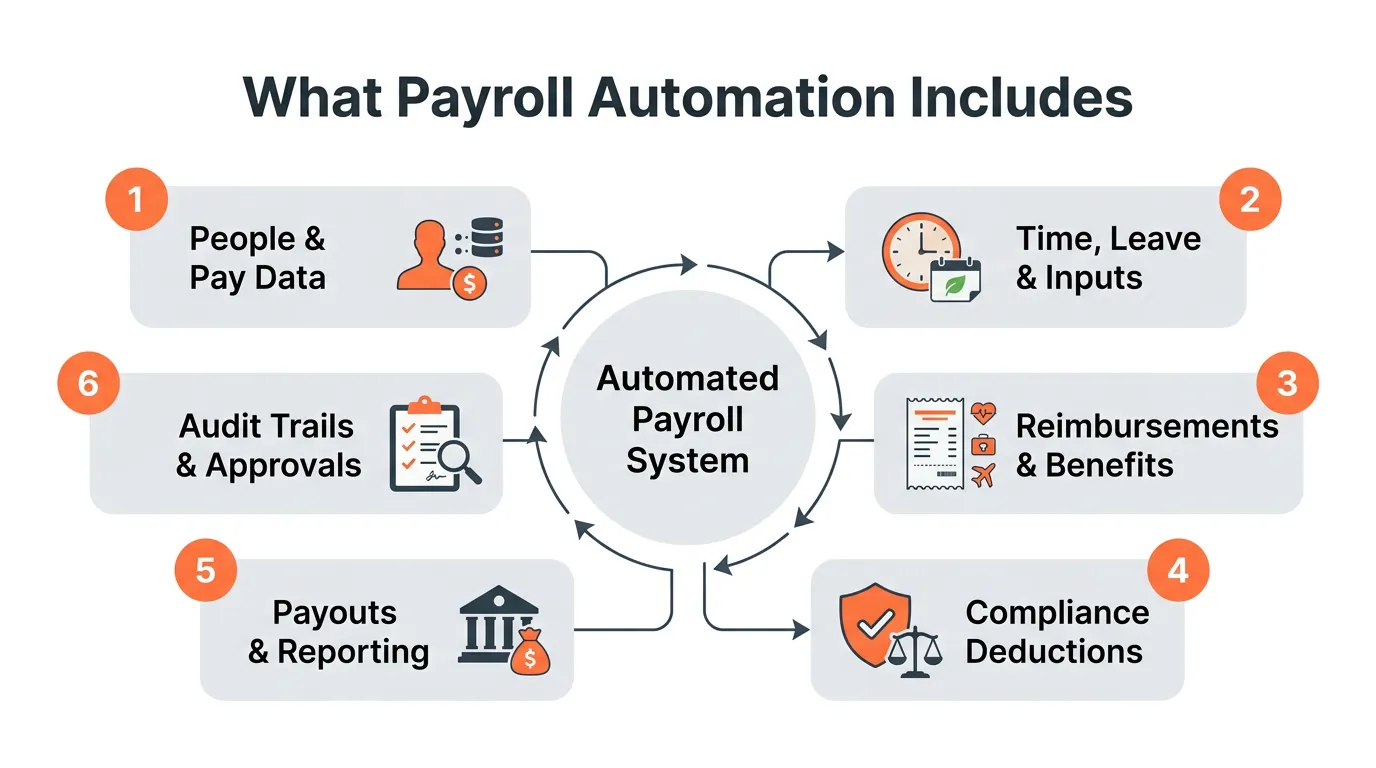
Payroll automation covers multiple stages of the payroll cycle. The easiest way to assess whether a system is genuinely automated is to map inputs, processing, and outputs.
| Payroll stage | What gets automated | Typical data source | Output |
|---|---|---|---|
| Employee master and salary structures | Salary components, effective dates, role changes, increments | HR records | Updated salary computation base |
| Attendance and leave | Worked days, loss of pay, overtime, shift rules, holidays | Attendance and leave systems | Attendance-derived payroll inputs |
| Reimbursements and benefits | Approved claims, taxable treatment, non-taxable treatment | Claims and approvals | Pay additions with correct taxability |
| Compliance deductions | Tax withholding, social contributions, benefit deductions, and local payroll tax calculations | Payroll rules, employee declarations, location | Deduction and contribution amounts |
| Payroll outputs | Payslips, payout files, pay registers | Payroll finalisation | Payslips and payout instructions |
| Reporting and registers | Payroll summaries, compliance reports, audit logs | Payroll records | Audit-ready reporting pack |
| Employee self-service | Payslip access, payroll history, tax documents where supported | Employee portal | Fewer payroll queries and faster visibility |
This table also highlights a common gap. Many organisations automate the calculation step but still handle inputs and exceptions manually. The flow below shows how automation works when these stages are connected.
How payroll automation works (simple 5-step flow)
An automated payroll workflow typically follows five steps. The steps remain consistent across organisations, even if policies and pay structures differ.
1) Data capture
The system collects payroll inputs from connected sources:
-
Employee changes such as new joiners, exits, salary revisions, role changes, and location changes
-
Attendance, approved leave, holidays, weekly offs, and overtime
-
Approved reimbursements and flexi benefit claims
-
Contractor invoices or payout schedules, where applicable
When data capture is automated, payroll teams stop spending the first few days of the cycle collecting and reconciling inputs. That creates a cleaner foundation for computation.
2) Rules and salary calculations
The payroll engine applies configured rules to compute pay:
-
Earnings and deductions based on salary structure
-
Proration for joiners and exits
-
Loss of pay based on attendance and leave policy rules
-
Overtime and shift-related calculations
-
Arrears and effective date changes, where supported
At this stage, rule quality matters as much as automation. If salary structures and policy rules are inconsistent, payroll automation can reproduce errors faster. Once the pay computation is stable, taxes, contributions, and deductions become the next high-impact layer.
3) Compliance and deductions
The system computes taxes, employee deductions, and employer contributions:
-
Income tax or payroll tax withholding based on applicable rules
-
Social security, pension, insurance, or provident-fund style contributions where applicable
-
Benefit deductions and employer contributions
-
Local wage, employment, or occupational taxes based on work location
Compliance logic is not a one-time setup. Thresholds, eligibility, and reporting requirements can change, and multi-location companies must apply location-specific rules consistently. That is why review and controls remain essential even in automated payroll.
4) Review, approvals, and controls
Payroll automation still requires oversight. Good systems are designed so your team reviews exceptions rather than redoing calculations.
Typical controls include:
-
Variance reports comparing current payroll to the previous cycle
-
Approval steps for unusually large changes or high-impact exceptions
-
Payroll locking after finalisation to prevent silent edits
-
Role-based access to limit who can change structures, deductions, and payouts
Controls make payroll predictable. Without them, teams still end up doing manual cross-checking and post-pay corrections. Once payroll is reviewed and locked, the final step is output generation and record-keeping.
5) Payout, records, and reporting
After approval, the system produces outputs:
-
Payslips for employees
-
Bank advice files or payout instructions
-
Accounting entries or exports, where supported
-
Reports and registers for audit and compliance
At this point, payroll automation delivers its main value: repeatability. Instead of rebuilding payroll every month, your team runs a defined process and focuses on exceptions. To understand how far you can take this, it helps to view automation as a maturity journey.
Payroll automation maturity model
Many organisations believe they have payroll automation because they use payroll software. In reality, maturity depends on whether payroll inputs and outputs are connected, controlled, and traceable.
Level 1: Spreadsheet payroll
-
Payroll is built in Excel.
-
Compliance calculations are manual or consultant-led.
-
There is little audit traceability.
At this level, risk is high because calculations, approvals, and change history are difficult to track reliably.
Level 2: Payroll software with manual inputs
-
A payroll tool is used for salary calculation.
-
Inputs like attendance, reimbursements, and changes arrive through uploads and emails.
-
Errors persist due to hand-offs and reconciliations.
This level often feels better than spreadsheets, but it still creates rework because upstream inputs remain fragmented.
Level 3: Integrated payroll inputs
-
Attendance and leave data flows into payroll automatically.
-
Claims and reimbursements are connected to payroll.
-
Manual uploads reduce significantly.
This is usually the first point where teams notice a clear drop in payroll cycle time, because data collection and reconciliation reduce.
Level 4: Exception-driven payroll
-
Payroll runs automatically for most employees.
-
The team focuses on variances, approvals, and exceptions such as arrears or location changes.
-
Payroll locking and audit logs reduce compliance risk.
At this level, automation is no longer about calculation speed. It is about governance, controls, and avoiding avoidable corrections.
Level 5: Continuous compliance and audit-ready payroll
-
Compliance reporting is generated as part of payroll closure.
-
Accounting sync and payout workflows are integrated.
-
The system maintains full traceability for audits without manual compilation.
The key shift at Level 5 is that payroll records are audit-ready by default, rather than assembled after the fact.
A practical way to identify your maturity level is to ask one question: how many inputs are still coming through spreadsheets? Once you know your level, the benefits of moving up become easier to quantify.
Benefits of payroll automation
Payroll automation delivers benefits that scale with headcount. The bigger the organisation, the higher the cost of errors and manual rework.
Accuracy and fewer reversals
Automated calculations reduce common errors such as incorrect loss of pay, missed reimbursement adjustments, or wrong compliance deductions. As accuracy improves, you also reduce downstream issues like reversals, bank corrections, and employee escalations.
Faster payroll closure
When inputs flow into payroll automatically, payroll teams spend less time collecting and reconciling data. This also shortens the time spent on internal coordination, because approvals happen against a single version of payroll.
Stronger compliance confidence
Compliance errors can lead to notices, interest, penalties, and employee trust issues. Automation reduces risk by applying consistent rules and producing standard reports and registers. This matters most when your workforce spans locations, salary bands, and employment types with different eligibility rules.
Better employee experience
Employees benefit from accurate, on-time payments and accessible digital payslips. When self-service is available, payroll queries reduce and resolution times improve, which also frees your team from repetitive support work.
Lower operational cost
Automation reduces the number of hours spent on repetitive payroll tasks and lowers dependency on external support for monthly execution. Over time, it also reduces the opportunity cost of senior HR and finance leaders spending time on payroll troubleshooting.
Payroll automation KPIs to track
If you want to measure improvement, track these metrics before and after automation:
-
Payroll cycle time (days from cut-off to payout)
-
Number of payroll corrections per cycle
-
Number of payroll tickets raised by employees
-
Compliance incidents or rework due to tax, contribution, or reporting errors
-
HR and finance hours spent on payroll execution
These benefits are compelling, but they only materialise when automation holds up during real-world edge cases. That is where most systems are tested.
Where payroll automation breaks (and how good systems handle it)
Payroll automation fails most often because of exceptions and weak controls, not because the system cannot calculate salaries.
Common payroll exceptions
-
Retro salary revisions that require arrears and backdated recalculation
-
Mid-month joiners and exits needing proration
-
Location changes that affect tax, contribution, or reporting rules
-
Leave reversals after payroll cut-off
-
Attendance corrections submitted late
-
Reimbursements approved after cut-off
-
Contractor misclassification affecting withholding, reporting, and worker classification
-
One-off payouts such as retention bonuses or variable pay with different tax implications
These exceptions are common in growing organisations. As headcount increases, even a small exception rate can translate into significant monthly rework.
Controls that protect payroll automation
A reliable automated payroll system includes operational controls that keep payroll accurate and auditable:
-
Clear cut-off rules for attendance, leave, and claims
-
Approval workflows for sensitive changes and exceptions
-
Change logs for salary structures, employee master updates, and compliance settings
-
Payroll locking after finalisation
-
Variance reporting to highlight outliers and unusual changes
-
Role-based permissions that restrict who can modify payroll rules and outputs
Controls do not slow payroll down. They allow payroll to run faster because teams can trust outputs and focus on outliers. With controls in place, the next decision is which type of solution best fits your organisation.
Types of payroll automation solutions
Payroll automation can be achieved through different solution types. The right choice depends on headcount, operational complexity, compliance exposure, and how much control you need in-house.
All-in-one HR platforms
These combine HR, payroll, attendance, leave, and sometimes reimbursements and accounting exports. They are most effective when you want payroll inputs captured in one operating system instead of moving through spreadsheets and emails.
Best for:
-
Organisations that want end-to-end automation across HR and payroll
-
Teams that want to reduce tool fragmentation and manual uploads
A key advantage here is fewer integration gaps, because payroll inputs are captured in the same system or through tightly connected modules.
Payroll-only software
These tools focus mainly on payroll processing and compliance outputs. They can work well if your upstream systems integrate cleanly.
Best for:
-
Organisations with stable, well-integrated attendance and HR systems
-
Teams that can manage integrations and data hygiene consistently
The trade-off is that automation quality depends on integration reliability. If your inputs still arrive through uploads or manual spreadsheets, payroll-only tools can feel less automated in practice.
Managed payroll services
A provider runs payroll on your behalf, usually with a mix of software and manual processes. This can reduce in-house workload but may limit speed, control, and transparency.
Best for:
-
Teams without a dedicated payroll owner
-
Organisations that prefer outsourcing execution
Managed services can work, but you should still validate how inputs are collected, how changes are controlled, and whether you get the audit trail you need.
Workflow automation and AI assistants
Workflow automation tools and AI assistants sit alongside your payroll system. They handle the work around payroll: preparing monthly checklists, summarising policy changes, drafting exception notes, creating variance-review prompts, documenting approvals, and helping teams coordinate recurring tasks.
Best for:
-
Teams that already have a payroll system but still coordinate payroll through chats, emails, and spreadsheets
-
Operators who want repeatable review workflows while keeping compliance calculations and payouts in their payroll system
This layer is useful when payroll execution is technically automated but monthly coordination is still manual. Your payroll engine stays the source of truth for calculations and compliance, and AI-assisted workflows improve preparation, review, and documentation.
If you are planning a new rollout or migration, document the project steps, owners, dependencies, and validation plan before switching live payroll cycles. For day-to-day operations, the next section focuses on what makes payroll automation complex across teams, locations, and worker types.
Payroll automation compliance (what makes it complex)
Payroll automation is not just salary processing. It must address local compliance and the operational realities of diverse employee types, entities, currencies, and work locations.
Before diving into individual compliance components, it is helpful to recognise the broader challenge. Payroll data is spread across HR, attendance, claims, and finance workflows. Automation only works when these inputs are reliable and policy rules are clear.
Tax withholding automation
Tax withholding requires accurate computation across the year, aligned with employee declarations, benefit choices, and local rules. Automation should support:
-
Tax rule selection based on employee location and employment type
-
Handling declarations, benefits, and proof-based adjustments where relevant
-
Consistent monthly withholding and year-end statement preparation
In practice, withholding errors often come from missing or late employee inputs and inconsistent handling of one-off payouts. Automation can reduce these issues when workflows and cut-offs are defined clearly.
Social contribution automation
Social contribution automation requires:
-
Eligibility logic based on applicable criteria
-
Accurate employee and employer contributions
-
Payroll registers and contribution reporting outputs
Contribution automation is also closely linked to salary structure design. If components are structured inconsistently across teams, contribution computation can become harder to standardise.
Benefit and insurance deduction automation
Benefit and insurance deduction automation requires:
-
Eligibility determination based on wage thresholds and rules
-
Automatic deduction and employer contribution calculation
-
Reporting outputs for compliance documentation
Here, the main operational risk is misclassification. Automation must consistently identify eligible employees and apply the correct contribution logic without manual overrides.
Local payroll tax automation
Local payroll taxes and employment-linked deductions vary by jurisdiction. Automation should support:
-
Location-specific rules based on employee work location
-
Correct monthly deductions and limits
-
Handling location changes with appropriate rule updates
This becomes particularly important in multi-location and hybrid organisations. Location changes that are not reflected quickly can cause incorrect deductions and follow-up corrections.
Attendance and leave complexity
Attendance and leave influence payroll through paid days, loss of pay, overtime, and shift rules. Automation must handle:
-
Policy-driven leave impacts
-
Cut-offs and late changes
-
Holidays and weekly offs aligned to location or business rules
-
Overtime eligibility based on company policy
This is often where payroll teams spend the most manual time. If attendance is captured in one tool and payroll runs in another, reconciliation becomes a recurring monthly project. Integration and cut-offs are the two biggest levers for improvement.
Contractors and interns
Contractors and interns often sit outside standard payroll workflows. Automation should support:
-
Separate classification and payout logic
-
Withholding and reporting aligned to contractor type and thresholds
-
Unified reporting for audit and reconciliation
The point here is not to force contractors into employee payroll rules. It is to keep payouts, deductions, and records structured and traceable in one workflow.
Audit readiness and traceability
Organisations often face audits, reviews, and regulatory inspections. Automation must maintain:
-
Change history for payroll and employee master data
-
Approval trails for exceptions and adjustments
-
Standard registers and exportable reports
When audit readiness is built into payroll operations, your team does not need to rebuild evidence later. That is a major advantage of end-to-end automation.
These requirements make it easier to see why some tools feel automated on paper but still leave teams doing manual work each month. The checklist below helps you evaluate systems specifically through an automation lens.
Payroll automation software checklist (automation-first)
Use this checklist to assess whether a payroll system will actually reduce manual work.
A useful way to apply this checklist is to start from your current monthly workflow. Identify which inputs still require uploads or manual reconciliation, then validate whether a tool can eliminate those steps without creating new dependencies.
Integrations and data flow
-
Attendance and leave integration that removes manual uploads
-
Claims or reimbursements integration with approvals and taxability logic
-
Accounting export or sync to reduce manual journal entries
-
Bank advice file generation and payout workflow support
Strong integrations reduce time, but they also reduce error surface area. When inputs are system-driven, payroll teams can spend more time validating outputs and less time fixing upstream inconsistencies.
Rules engine depth
-
Multiple salary structures with effective dates
-
Proration for joiners and exits
-
Arrears and retro recalculations
-
Overtime and shift-based policy rules
-
Handling of one-off payments with correct tax impact
Rules depth is where many systems look similar on a demo but behave differently in real operation. The best validation is to map your actual exceptions and ensure the tool can handle them without spreadsheet overrides.
Compliance engine and reporting
-
Rule updates and location-specific applicability for local payroll taxes
-
Social contribution and benefit eligibility rules
-
Withholding computation aligned with employee declarations and local rules
-
Standard compliance reports, payroll registers, and year-end outputs
Compliance automation is only as reliable as its update mechanism and reporting coverage. If the system cannot generate the outputs your auditor or consultant expects, teams often revert to manual work.
Controls and governance
-
Approval workflows for critical changes
-
Variance reporting to surface exceptions
-
Payroll locking after finalisation
-
Role-based permissions and audit logs
Controls are what convert payroll automation into a dependable operating process. Without controls, automation can produce outputs quickly, but teams still have to validate everything manually.
Employee experience
-
Payslip access and payroll history
-
Clear breakdown of earnings and deductions
-
Reduced payroll tickets due to transparency
Employee experience is not just a nice-to-have. When employees can see payslips and history clearly, your team spends less time answering repetitive payroll questions.
Scalability
-
Multi-location handling for local rules
-
Support for contractors and interns alongside employees
-
Ability to scale without adding monthly manual work
Scalability is best assessed by looking at what increases complexity for you today. For many businesses, it is location growth, multiple salary structures, and higher exception volume.
AI workflow support
-
Payroll checklist generation for each monthly cycle
-
Policy and SOP summaries for payroll, leave, reimbursements, and contractor payouts
-
Exception-review notes for items such as arrears, late attendance changes, location updates, and one-off payments
-
Variance-review prompts that help the team investigate large changes before approval
-
Audit-preparation summaries based on approved records and human-verified inputs
AI workflow support is most useful when it helps teams prepare, review, explain, and document payroll work, while your payroll system remains the source of truth for compliance rules, salary calculations, filings, and payment approval.
Once you have a checklist like this, it becomes easier to distinguish between tools that only calculate payroll, systems that run payroll as a connected workflow, and AI assistants that improve the operating rhythm around payroll.
Where Craze fits in AI-assisted payroll workflows
Craze is a multi-model AI workspace where teams can work with different AI models, create AI agents, and run repeatable AI-assisted workflows. It fits around payroll operations by handling the preparation, review, and documentation layers.
For payroll-adjacent work, teams can use an AI workspace to support tasks such as:
-
Turning monthly payroll SOPs into reusable checklists
-
Summarising payroll policies, reimbursement rules, and exception-handling notes
-
Drafting variance-review questions before payroll approval
-
Creating explainers for payroll changes, deductions, or process updates
-
Comparing approaches across AI models before finalising internal guidance
Your payroll system handles the calculations, filings, payslips, payouts, and audit records. Craze-style AI workflows handle the repeatable thinking, writing, review, and coordination work that surrounds payroll.
FAQs
What is the difference between payroll software and payroll automation?
Payroll software can calculate salaries, generate payslips, and support compliance reporting. Payroll automation goes further by connecting upstream inputs such as attendance, leave, reimbursements, and employee changes, then applying rules and controls to produce payroll outputs with minimal manual intervention.
Is payroll automation compliant?
Payroll automation is compliant when the system applies the relevant tax, social contribution, wage, and reporting rules correctly, maintains audit trails, and generates the required records. Compliance depends on correct configuration, rule updates, and operational controls.
Can payroll automation handle tax and social contribution rules?
Yes, a payroll automation system can determine eligibility, compute employee and employer contributions where applicable, and generate the reports and registers needed for compliance when it is configured correctly and reviewed regularly.
Can payroll automation handle arrears and retro salary revisions?
It can, but not all systems handle retro changes well. Look for features such as effective-date salary structures, automated arrears computation, and clear audit logs for backdated changes and recalculations.
How are reimbursements taxed in payroll automation?
Payroll automation should classify reimbursements and benefits as taxable or non-taxable based on applicable rules, then include the correct amounts in payroll so that net pay and withholding are calculated accurately.
Can payroll automation handle contractors?
Yes, payroll automation can support contractor payouts using separate logic for classification, withholding, approvals, and reporting while keeping reconciliation structured.
Is payroll automation suitable for startups?
Yes. Payroll automation is often most valuable for startups as headcount grows, because it prevents payroll work from scaling linearly with the number of employees. It improves consistency, reduces compliance risk, and lowers operational burden.
Can AI agents automate payroll?
AI agents can support payroll-adjacent work such as checklist preparation, policy summarisation, exception notes, variance review prompts, and recurring workflow coordination. Your payroll system and human review stay responsible for compliance calculations, payouts, filings, and final payroll approval.
More Articles
The 8 Best Lindy AI Alternatives in 2026 (Tested & Compared)

The 8 best Lindy AI alternatives for 2026, anchored to why people leave Lindy, with current pricing, third-party ratings, honest pros and cons, and the best pick for each reason to switch.
The 7 Best Make Alternatives in 2026 (Tested & Compared)
The 7 best Make.com alternatives for 2026, anchored to why people leave Make, with current pricing, third-party ratings, honest pros and cons, and the best pick for each reason to switch.
The 8 Best Zapier Alternatives in 2026 (Tested & Compared)
The 8 best Zapier alternatives for 2026, anchored to why people leave Zapier, with current pricing, third-party ratings, honest pros and cons, and the best pick for each reason to switch.


