
AI Agent Architecture: 4 Patterns That Actually Work
Learn the 4 core AI agent architecture patterns: ReAct, Plan-and-Execute, Tool-Use, and Reflection. Diagrams, selection criteria, and design decisions inside.

By: Deepit Patil
Co-Founder and CTO
Published
Updated
Edited by Craze Editorial Team · See our Editorial Process
An AI agent is only as good as the pattern that controls how it thinks and acts. Two agents can use the same LLM, the same tools, and the same data, yet produce wildly different results depending on how their control loop is structured.
That control loop is the architecture. It determines how your agent reasons, when it acts, what it does with the results, and when it stops. The components (LLM, memory, tools) are the anatomy. Architecture is how those pieces are wired together. Get the wiring right, and the agent solves problems reliably. Get it wrong, and it burns through tokens in aimless loops.
Four architecture patterns handle the vast majority of production agent systems today: ReAct, Plan-and-Execute, Tool-Use, and Reflection. This guide breaks down each pattern, explains when it works best, and provides a framework for choosing between them.
TL;DR
- Architecture is about the control loop, not the components. The same LLM, memory, and tools produce very different agents depending on how you wire them together.
- Four patterns dominate production systems: Tool-Use (structured function calling), ReAct (interleaved reasoning and action), Plan-and-Execute (plan first, execute second), and Reflection (generate then self-critique).
- Start with the simplest pattern that could work. Tool-Use handles most structured tasks. Move to ReAct or Plan-and-Execute only when the task demands it.
- Cross-cutting design decisions matter more than pattern choice. Memory strategy, tool integration depth, error recovery, and context management determine whether your agent survives production.
- These patterns compose. Most production systems combine two or three patterns into a hybrid tuned for their specific use case.
What Makes an AI Agent Architecture
At its core, every AI agent runs a control loop: perceive input, decide what to do, take an action, observe the result, repeat until done. What makes one architecture different from another comes down to three things:
- How it reasons. Does the agent think and act on every step? Plan everything upfront? Skip explicit reasoning and rely on structured function calls? The reasoning strategy shapes how flexible or predictable the agent is.
- How deeply it connects to tools. Read-only API calls are simple and safe. File writes, code execution, and database mutations give agents real power but introduce real risk. Deeper tool access means the architecture needs sandboxing, permissions, and rollback built in.
- What it remembers. A short conversation buffer works for quick tasks. Longer workflows need persistent memory, retrieval-augmented storage, or external knowledge stores to stay effective across steps and sessions.
These three dimensions determine your token cost per task, latency budget, failure modes, and how easy the system is to debug. Picking the wrong pattern is expensive, not because it fails completely, but because it works just well enough to ship and poorly enough to drain your budget at scale.
This article focuses on single-agent patterns. Multi-agent orchestration , where multiple agents coordinate on a shared task, is a different problem entirely.
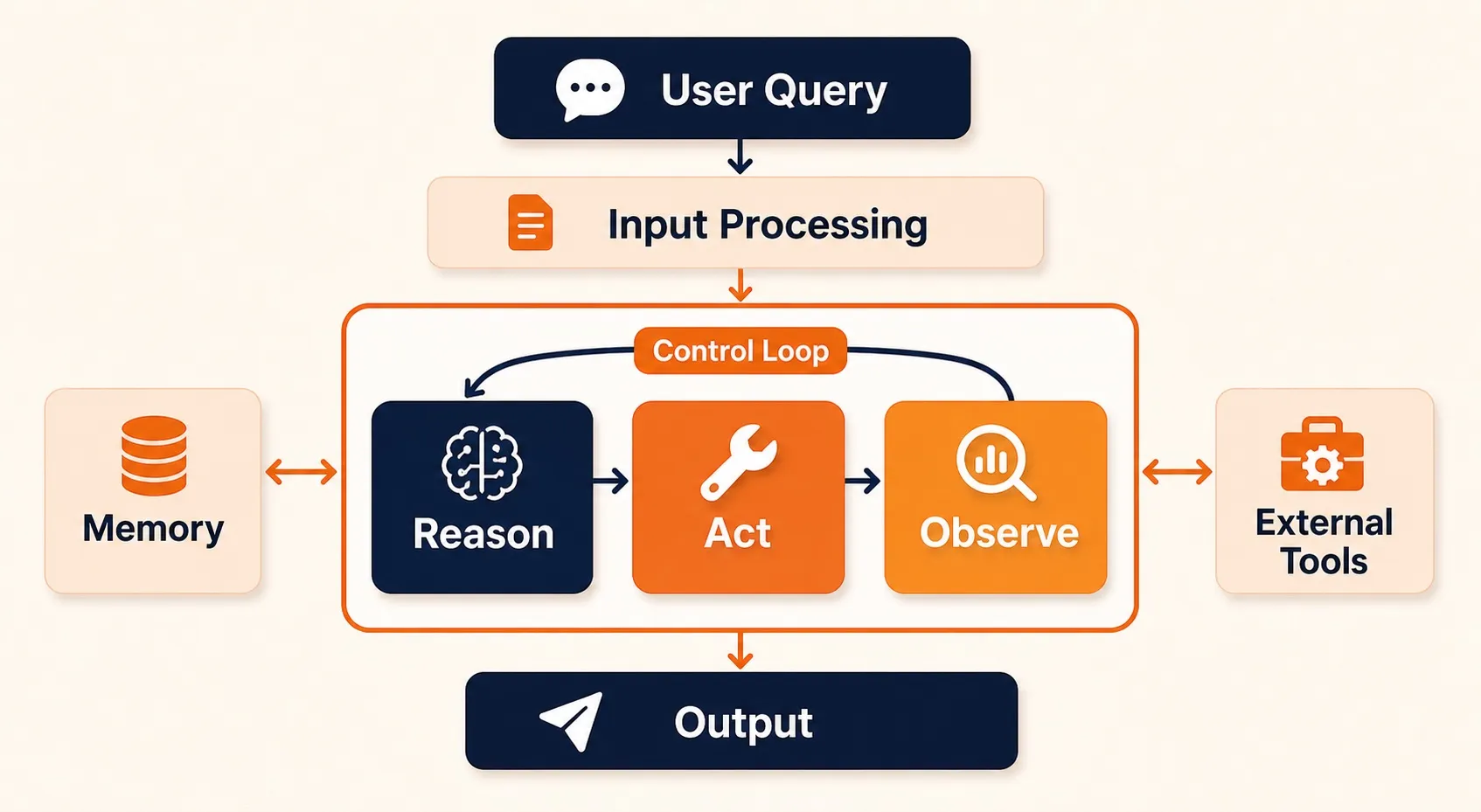
With the building blocks clear, the question becomes how to wire them together. Four patterns cover the vast majority of production agent systems.
The Four Core Architecture Patterns
Every production agent system uses one or more of these four patterns. Each one structures the control loop differently: how the agent reasons, when it acts, and what happens between steps. The patterns range from simple (Tool-Use, a single structured call) to complex (Plan-and-Execute, a full planning phase before execution), and they often combine in production.
The ReAct Pattern
ReAct, short for Reasoning and Acting, is the pattern most developers encounter first. Introduced in a 2022 research paper by Shunyu Yao and collaborators , it interleaves reasoning traces with tool actions in a single continuous loop.
How ReAct Works
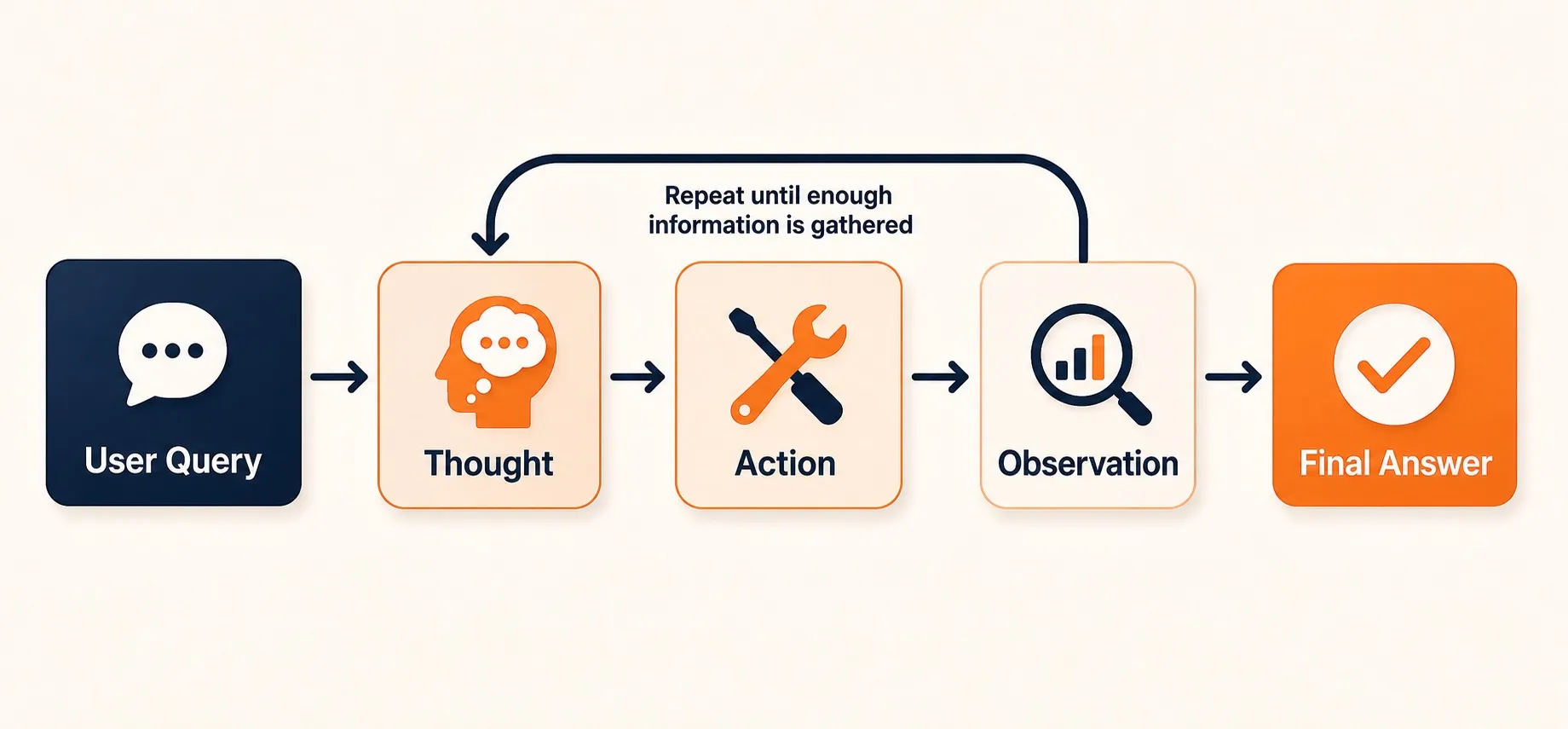
The agent receives a user query and enters a loop with three steps:
- Thought. The LLM generates an explicit reasoning trace, what it knows, what it needs to find out, and what action to take next.
- Action. The LLM selects and calls a tool based on its reasoning.
- Observation. The tool returns a result, which the LLM incorporates into its next reasoning step.
This loop repeats until the LLM determines it has enough information to produce a final answer, or until it hits a maximum iteration limit.
What makes ReAct architecturally distinct is that the LLM controls both the reasoning and the stopping condition. There’s no external planner or evaluator telling it what to do next. The same model that picks the action also decides when it’s done.
When to Use ReAct
ReAct works well for open-ended research tasks, multi-step question answering, and exploratory workflows where the agent can’t predict how many steps it needs. It’s the default pattern in most agent frameworks, including LangChain agents, LangGraph’s basic agent, and many custom implementations.
Strengths:
- Simple to implement, the loop logic fits in under 50 lines of code
- Flexible, handles unpredictable, branching tasks
- Transparent, reasoning traces make debugging easier than black-box approaches
Weaknesses:
- No upfront planning, the agent can wander, especially on complex tasks
- Token cost scales linearly with loop iterations, long tasks get expensive fast
- Can loop indefinitely without convergence if the stopping condition is poorly calibrated
- Context window fills up as reasoning traces accumulate
The Plan-and-Execute Pattern
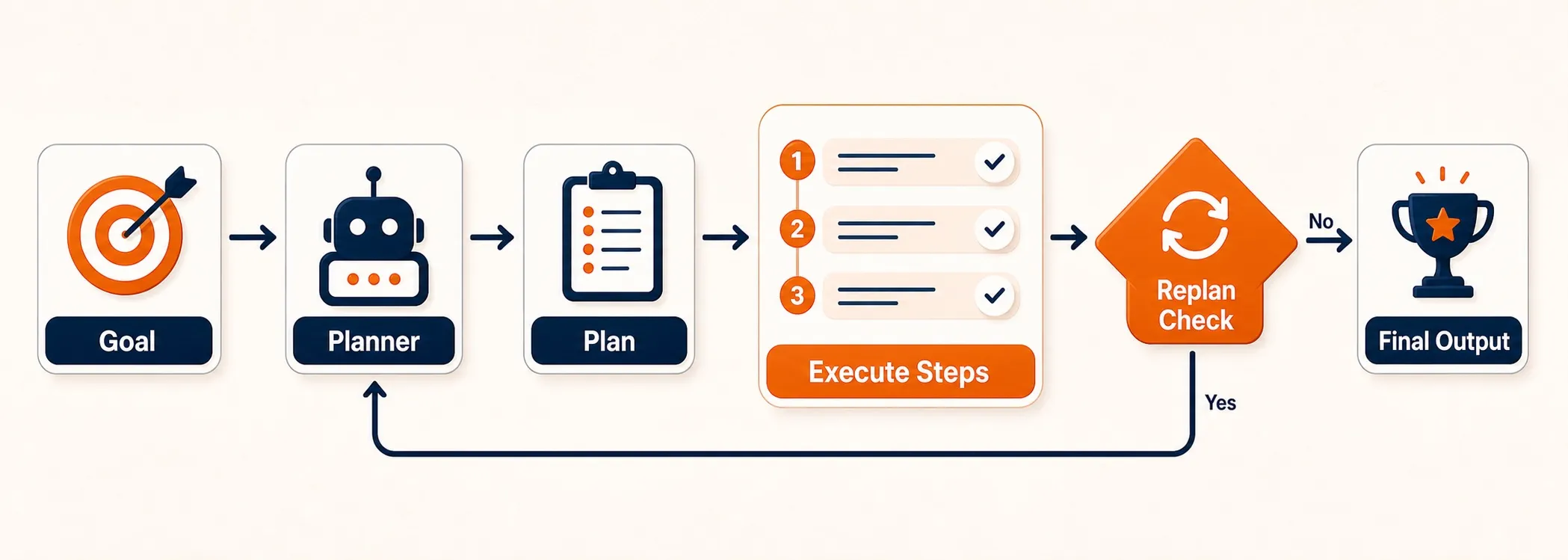
Plan-and-Execute separates thinking from doing. Instead of interleaving reasoning and action on every step, the agent first creates a complete plan, then executes it step by step.
How Plan-and-Execute Works
The architecture splits into two components:
- Planner. A dedicated LLM call receives your query and produces an ordered list of steps. It reasons about the full task upfront and breaks it into subtasks.
- Executor. A simpler agent (often using Tool-Use) runs each step in sequence, feeding results back to the system.
After each execution step, a replanning check asks whether the original plan still holds. If a step produces unexpected results, the planner revises what comes next. This replanning loop is what separates Plan-and-Execute from a static pipeline.
When to Use Plan-and-Execute
This pattern fits multi-step tasks with known structure: report generation, data pipeline construction, complex form filling, or any workflow where the steps are broadly predictable but details depend on intermediate results.
Strengths:
- Predictable execution, you can inspect and approve the plan before running it
- Easier to debug, failures localize to specific steps
- Better cost control, planning is cheap (one LLM call), and execution targets each step
- Supports human-in-the-loop review of the plan before execution begins
Weaknesses:
- Upfront planning can be wrong, if the task is poorly understood, the plan is garbage
- Replanning adds latency, every replan is another LLM call
- Less adaptive than ReAct for truly open-ended exploration where the path is unknown
The Tool-Use Pattern
Tool-Use is the simplest agent architecture, and often the most practical. The LLM acts as a smart router: it receives a request, decides which tools to call, structures the function calls, and synthesizes the results.
How Tool-Use Works
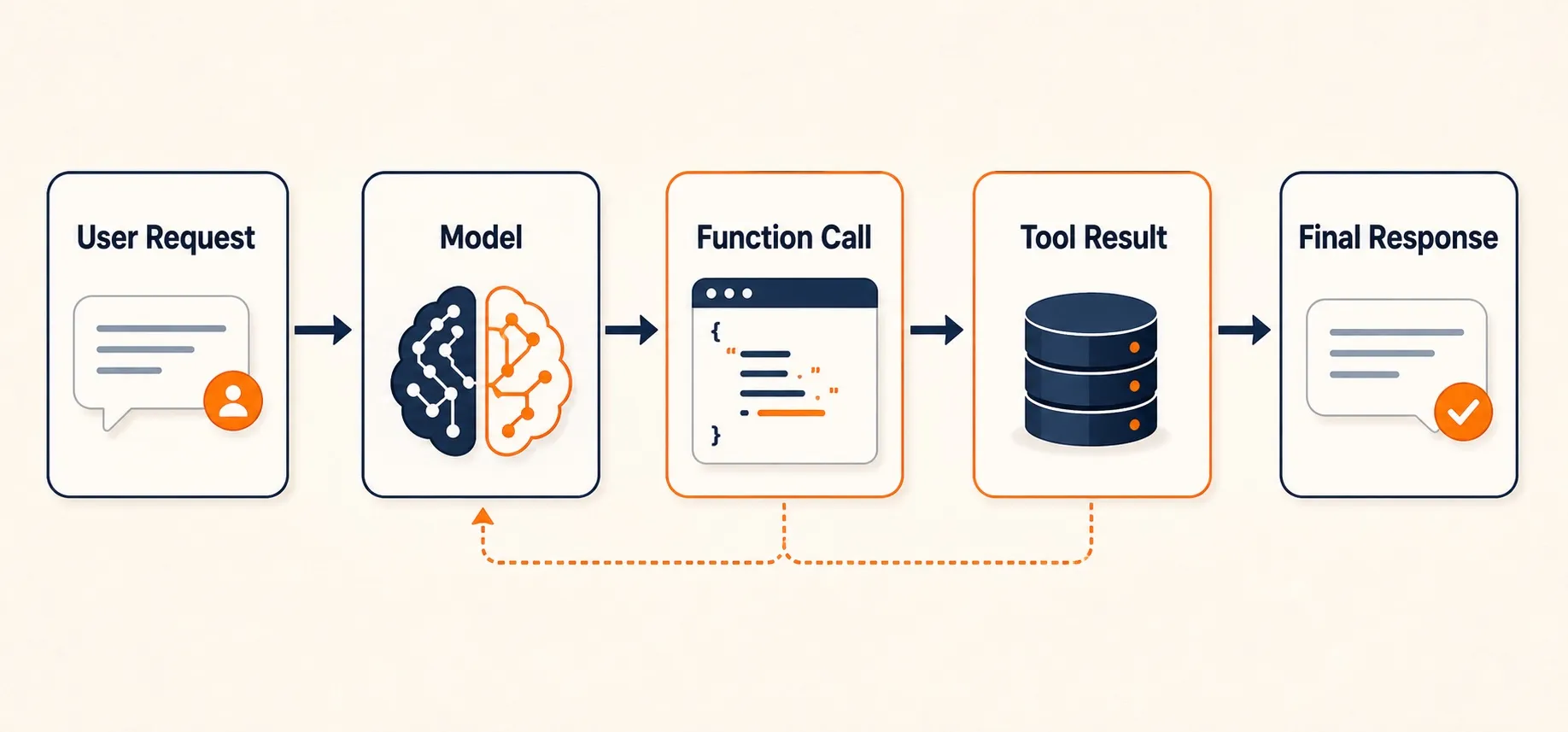
The architecture is a single pass (or a short sequence) with no explicit reasoning loop:
- The LLM receives a user request along with descriptions of available tools (functions).
- It generates one or more structured function calls, selecting the right tool, filling in parameters.
- The system executes the tool calls and returns results to the LLM.
- The LLM formats a final response from the combined results.
In some implementations, the LLM can make a second round of tool calls if the first results are insufficient. But there’s no open-ended loop, the interaction is bounded by design.
If you’ve used OpenAI’s function calling , Anthropic’s tool use , or Google’s function calling APIs, you’ve already worked with this pattern. You don’t need a framework beyond the LLM’s own API.
When to Use Tool-Use
Tool-Use is the right starting point for structured tasks: API orchestration, data retrieval, calculations, format conversions, and any task where the agent knows what tools are needed and the main decision is which ones to call with what parameters.
Strengths:
- Fastest pattern, one or two LLM calls total
- Lowest token cost, no reasoning traces, no loop overhead
- Most predictable, bounded execution, deterministic tool selection
- Easy to test, you can validate tool calls as structured data
Weaknesses:
- Limited reasoning depth, can’t handle tasks requiring multi-step logic or exploration
- No self-correction, if the first tool call is wrong, the agent has no built-in recovery
- Scales poorly to tasks with many possible tool combinations and complex dependencies
The Reflection Pattern
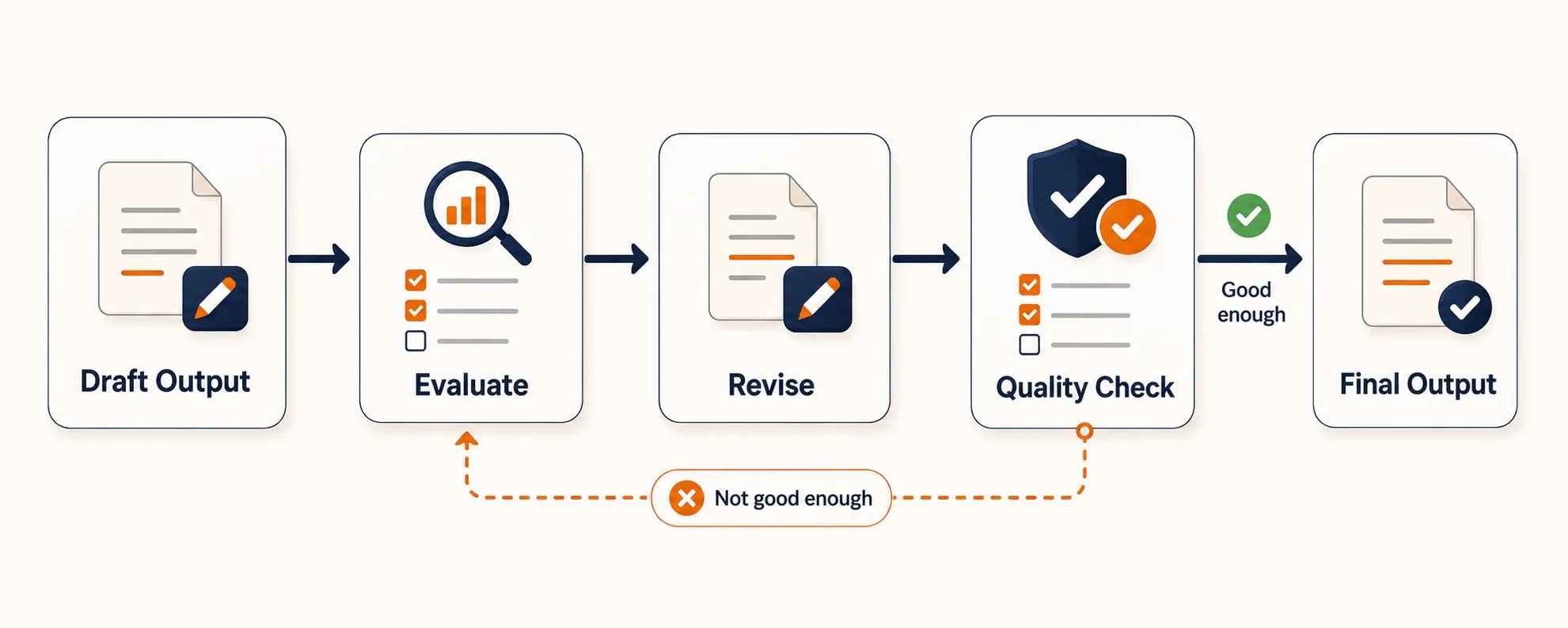
Reflection adds a self-critique loop to any agent output. The agent generates a response, evaluates it against explicit criteria, and revises iteratively until the output meets a quality threshold.
How Reflection Works
The architecture adds an evaluation step between generation and delivery:
- Generate. The LLM produces an initial output based on your request.
- Evaluate. The same LLM (or a separate evaluator) critiques the output against defined criteria: accuracy, completeness, format compliance, code correctness.
- Revise. If the critique finds issues, the generator gets the feedback and produces an improved version.
- Loop. Steps 2 and 3 repeat until the evaluator passes the output or the system hits a maximum iteration count.
You can implement this in two ways. Single-agent reflection uses the same LLM for both generation and evaluation, which keeps things simple but means the model is grading its own work. Dual-agent reflection brings in a separate critic model, sometimes a smaller, cheaper one fine-tuned specifically for evaluation. The dual-agent approach tends to catch more issues because the critic brings a different perspective, but it adds infrastructure complexity.
When to Use Reflection
Reflection is the right pattern when output quality is critical and objectively evaluatable: code generation (run tests as evaluation), content production (check against style guides), data transformation (validate output schema), or any task where you can define clear pass/fail criteria.
Strengths:
- Measurable quality improvement per iteration, each loop provably reduces errors
- Catches mistakes that single-pass generation misses
- Works with any generator pattern, you can add Reflection on top of ReAct, Tool-Use, or Plan-and-Execute
Weaknesses:
- Token cost multiplied by iteration count, 3 loops means 3x the cost
- Requires well-defined evaluation criteria, vague criteria produce vague feedback
- Diminishing returns, most improvement happens in loops 1-2; loops 3+ rarely justify the cost
- Risk of over-refinement, the agent polishes endlessly instead of delivering
Each pattern has clear strengths, but picking one depends on the specific constraints of your task.
Choosing the Right Pattern
There’s no universally best pattern. The right choice depends on your task type, latency requirements, token budget, and the failure modes you can tolerate. This matrix is a good starting point:
| Pattern | Best For | Reasoning Depth | Token Cost | Latency | Complexity |
|---|---|---|---|---|---|
| Tool-Use | Structured tasks, API calls, data retrieval | Low | Lowest | Fastest | Simple |
| ReAct | Open-ended exploration, research, multi-step Q&A | High | Medium-High | Medium | Moderate |
| Plan-and-Execute | Multi-step workflows, report generation, pipelines | High | Medium | Medium-High | Moderate-High |
| Reflection | Quality-critical outputs, code gen, content gen | Medium (meta) | High (multiplied) | High | Moderate |
Start with Tool-Use if your task is structured and well-defined. Most production agent systems begin here because it’s the cheapest, fastest, and most predictable.
Move to ReAct when the agent needs to explore, when it can’t predict upfront how many steps it needs or which tools it will call.
Use Plan-and-Execute when the task has multiple dependent steps and you want predictability. This is the pattern for workflow automation where the steps are broadly known but details depend on data.
Add Reflection when output quality is critical and you can define evaluation criteria. Reflection is rarely a standalone pattern, it layers on top of the others.
These patterns also compose. A Plan-and-Execute agent might use Tool-Use for each execution step. A ReAct agent can include a Reflection pass before returning its final answer. Production systems frequently combine two or three patterns into a hybrid architecture tuned for their specific use case.
Selecting the right pattern is only half the job. Several design decisions cut across all four patterns and determine whether your agent actually survives production.
Principles of Building AI Agents: Key Design Decisions
Architecture patterns give you the control loop. But several design decisions cut across all four patterns and determine whether your agent infrastructure actually works in production.
Memory Strategy
Every agent needs to decide what to remember and for how long. A short conversation buffer (the last N messages) works fine for simple, single-session tasks. But multi-session agents need persistent memory, typically a vector store for semantic retrieval combined with structured storage for facts the agent has learned.
The harder question is where memory sits in your loop. In ReAct, observations pile up in the context window. In Plan-and-Execute, step results feed back to the planner. Both approaches hit context window limits on long tasks, which forces a choice: summarize aggressively, use retrieval to pull in only relevant history, or accept the cost of large context windows.
Tool Integration Depth
Shallow tool integration (read-only API calls, web searches, database queries) is safe and easy to test. Deep integration (file writes, code execution, system commands, database mutations) gives your agent real capability but introduces real risk.
Your architecture has to account for that gap. Deep integration requires sandboxing, permission boundaries, rollback mechanisms, and audit logs. These aren’t optional extras you bolt on later; they’re architectural constraints that shape how tools connect to the agent loop from day one.
Error Recovery
Agents fail. Tools return errors. LLMs produce malformed output. External APIs time out. Your architecture needs a recovery strategy:
- Retry with modified prompt works for parsing failures and ambiguous tool selections
- Fallback to simpler pattern, if ReAct loops too long, switch to direct Tool-Use
- Escalate to human for high-stakes decisions or unrecoverable errors
- Budget-aware cutoffs, set maximum retries and token caps per task to prevent runaway costs
Context Management
Every looping pattern (ReAct, Plan-and-Execute, Reflection) grows its context with each iteration. This is a fundamental constraint because every LLM has a finite context window, and performance starts degrading well before you hit the hard limit.
Three approaches help: sliding window (keep only the most recent N interactions), summarization (compress older context into summaries), and retrieval-augmented context (store everything externally and pull in relevant pieces per step). Most production systems combine two or all three.
These cross-cutting concerns are what separate a demo agent from one that runs reliably at scale.
The Bottom Line
AI agent architecture comes down to one decision: which control loop fits your problem. The four patterns, Tool-Use, ReAct, Plan-and-Execute, and Reflection, aren’t competing standards. They’re building blocks. Start with the simplest pattern that could work, measure where it fails, and layer in complexity where the data tells you to.
The architecture decisions that matter most aren’t which pattern you pick but how you handle the cross-cutting concerns: memory that scales, tools with proper boundaries, error recovery that doesn’t drain your budget, and context management that keeps the LLM focused as tasks grow. Get those right, and the pattern choice becomes a matter of tuning rather than survival.
For a broader view of what AI agents are and how they fit into the technology landscape, the pillar guide covers the fundamentals.
FAQs
What is the best architecture for an AI agent?
There is no single best architecture. Tool-Use is best for structured tasks with clear tool boundaries. ReAct suits open-ended exploration where the agent cannot predict the path. Plan-and-Execute fits multi-step workflows with known structure. Reflection improves output quality when you can define evaluation criteria. Production systems often combine two or more patterns.
What is the ReAct pattern in AI agents?
ReAct (Reasoning + Acting) is an AI agent architecture pattern where the LLM alternates between generating explicit reasoning traces (Thoughts) and taking tool actions. The cycle runs as Thought, Action, Observation, repeating until the agent reaches an answer. It was introduced in a 2022 research paper by Shunyu Yao and collaborators, and has become the default pattern in most agent frameworks.
How do you design an AI agent system?
Start by classifying your task to select the right pattern. Define your tool boundaries. Choose a memory strategy based on whether the agent needs to remember across sessions. Set token and latency budgets before building. Define evaluation criteria for your agent's outputs. Build the simplest version first (usually Tool-Use), test with adversarial inputs, and add reasoning complexity only when the simpler approach falls short.
More Articles
The 8 Best Lindy AI Alternatives in 2026 (Tested & Compared)

The 8 best Lindy AI alternatives for 2026, anchored to why people leave Lindy, with current pricing, third-party ratings, honest pros and cons, and the best pick for each reason to switch.
The 7 Best Make Alternatives in 2026 (Tested & Compared)
The 7 best Make.com alternatives for 2026, anchored to why people leave Make, with current pricing, third-party ratings, honest pros and cons, and the best pick for each reason to switch.
The 8 Best Zapier Alternatives in 2026 (Tested & Compared)
The 8 best Zapier alternatives for 2026, anchored to why people leave Zapier, with current pricing, third-party ratings, honest pros and cons, and the best pick for each reason to switch.


