
How to Build an AI Agent (Even If You Can't Code)
Learn how to build an AI agent using no-code tools, frameworks like LangChain, or custom Python. Covers scoping, costs, and mistakes to avoid.

By: Deepit Patil
Co-Founder and CTO
Published
Updated
Edited by Craze Editorial Team · See our Editorial Process
A chatbot answers a question. An AI agent does a job. That’s the difference that matters, and it’s why everyone from solo founders to enterprise teams is building agents right now. The real challenge isn’t choosing a framework or writing code. It’s picking the right workflow to automate and getting something reliable into production. This guide covers three build paths for every skill level, helps you figure out what to automate first, and shows you what actually breaks once your agent hits real work.
TL;DR
- An AI agent combines an LLM (the brain), memory, tools (APIs, databases, search), and a run loop that keeps going until the job is done. It completes tasks, not just answers questions.
- Before building anything, pick a workflow that’s high-frequency, repeatable, and easy to measure. Don’t start with something complex.
- Three paths: no-code (15-60 minutes), framework-based (1-2 days), or custom code (weeks). Pick based on your skills and how much control you need.
- Costs range from $0 on free tiers to $500K+ for enterprise multi-agent systems. Most first agents cost almost nothing to build.
- Most agent projects fail for organizational reasons, not technical ones. Ship one workflow, make it reliable, then expand.
What Makes an AI Agent Different from a Chatbot
Every AI agent has four parts working together:
- LLM (the brain): reasons, plans, and decides what to do next.
- Memory: stores what the agent knows, both within a session and across sessions.
- Tools: the APIs, databases, search engines, and file systems that let the agent take real actions instead of just generating text.
- Run loop: ties it all together. Observe the situation, reason about it, act, check the result, repeat until the job is done.
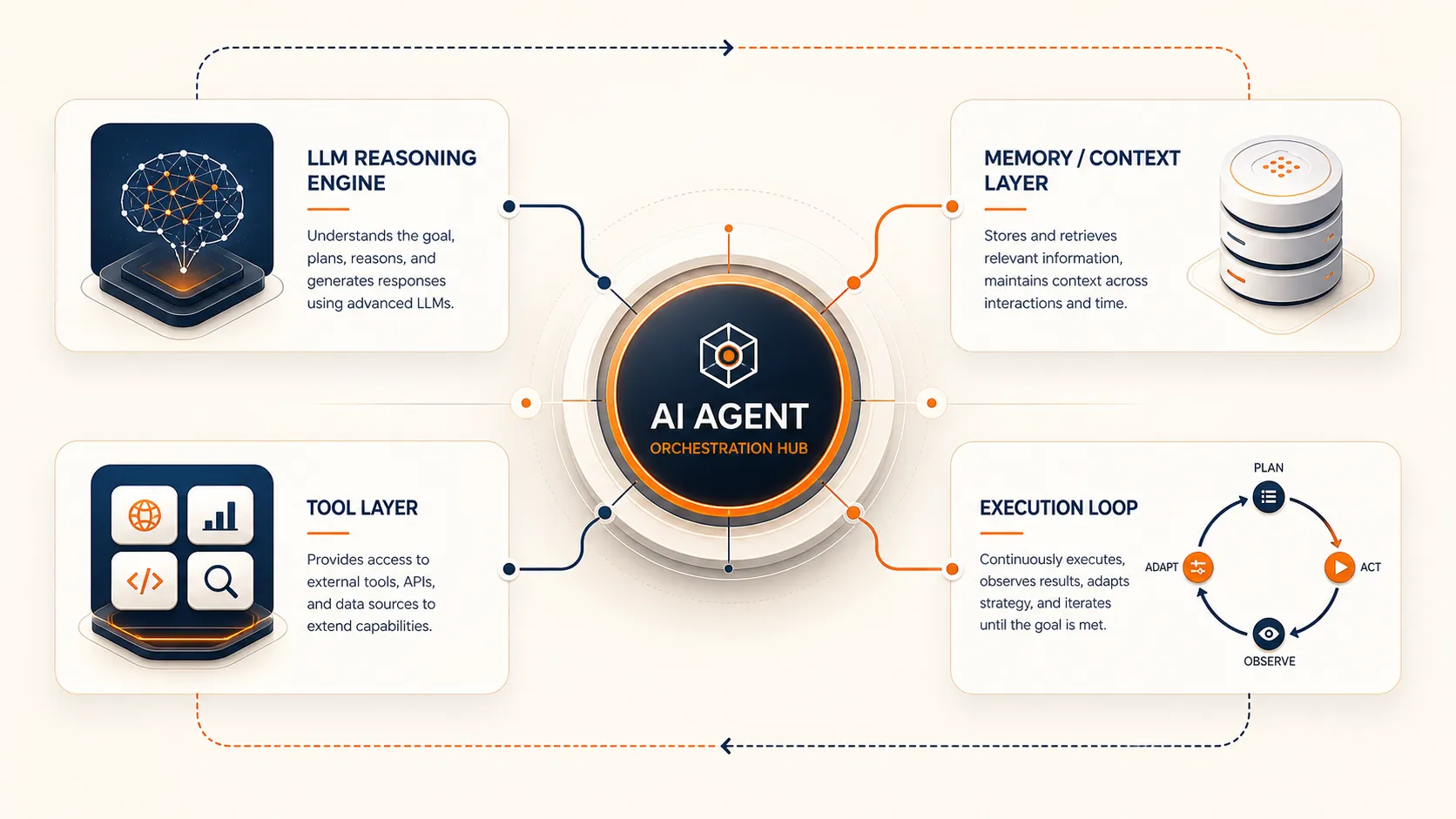
Here’s what that looks like in practice. You ask ChatGPT to draft an email, and it gives you a paragraph. That’s a chatbot. An agent reads your inbox, identifies which leads need follow-up, drafts personalized replies based on your past tone, logs everything in your CRM, and flags anything that needs your actual attention. Same underlying technology. Completely different category of output.
If you want the full breakdown of agent types and how they work, the complete AI agent guide covers it in depth. For now, the important thing is understanding what you’re building: a system that completes tasks autonomously, not one that just responds to prompts.
Once you know what an agent is, the next question is what yours should actually do.
What Should Your First Agent Actually Do?
This is the step that separates agent projects that ship from ones that stall. Most people jump straight into choosing a framework or watching tutorials. But the highest-leverage decision is picking the right workflow to automate.
Good first agents share three traits. Ask yourself:
- Do I do this at least weekly? High frequency means fast feedback and clear ROI.
- Could I teach an intern to do it in 30 minutes? If the task has clear rules and a predictable flow, an agent can handle it.
- Can I tell if the output is right or wrong? You need a way to verify quality without spending more time than the agent saves.
Good first agents: email triage and prioritization, CRM data enrichment (pulling company info from LinkedIn and populating missing fields), meeting prep (gathering context on attendees and recent conversations), daily report generation from multiple data sources, and lead qualification from inbound form submissions.
Bad first agents: strategic planning, creative campaigns, anything requiring subjective judgment on ambiguous inputs, or tasks you do once a quarter. If the workflow is too complex or too rare, the cost of building and maintaining the agent outweighs the time saved.
There’s a useful framework for this called the 10-20-70 rule: 10% of AI project success comes from the technology, 20% from data quality, and 70% from people, processes, and change management . Getting the scoping right is part of that 70%.
Once you know what to build, the next question is how.
Three Ways to Build an AI Agent
There’s no single right way to build an agent. The best path depends on your technical skills, how much control you need, and how quickly you want something working.
| Path | Best for | Time to first agent | Control level |
|---|---|---|---|
| No-code | Business users, first agents | 15-60 minutes | Low-medium |
| Framework-based | Technical users, production agents | 1-2 days | Medium-high |
| Custom code | Security/compliance requirements | Weeks | Full |
A good rule of thumb: start with no-code to understand what agents can do. Move to a framework when you need production reliability or custom logic. Go custom only when you have specific security, compliance, or integration requirements that frameworks can’t handle.
Path 1: No-Code (Build in Minutes)
No-code agent building means using visual workflow builders or platform-native tools to create agents without writing any code. You define the trigger, set the rules, connect your tools, and test.
The main options right now:
- OpenAI GPT Builder creates conversational agents with custom instructions and connected tools. Best for personal assistants and internal Q&A.
- n8n is a workflow automation platform where you build agents by connecting nodes visually. It’s strong when your agent needs to interact with existing business tools like CRMs, email, Slack, or payment systems.
- Dify is a visual agent builder that gives you more control over reasoning steps and tool selection than GPT Builder.
- Craze is a multi-model AI workspace where you can create agents that work across different LLMs in one place, without writing code.
Here’s what building a no-code agent looks like. Say you want an agent that triages your email every morning:
- Connect your email account as the input source
- Set the trigger (new emails received overnight)
- Define classification rules (urgent, needs reply, FYI, spam)
- Connect your task management tool as the output
- Test with 10-20 real emails to calibrate
The whole process takes 15 to 60 minutes depending on the platform and how many tools you’re connecting.
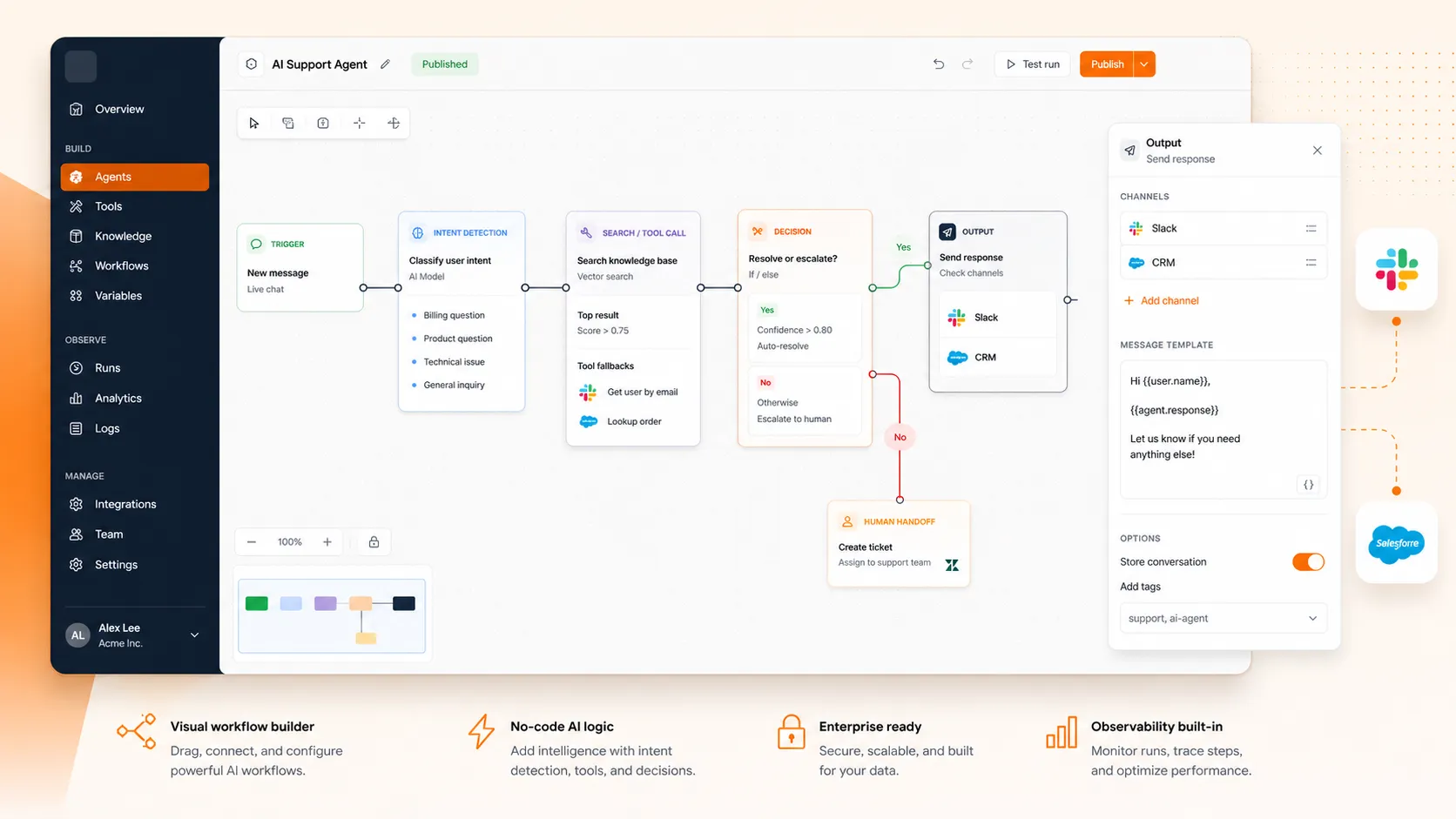
The tradeoff: no-code agents are fast to build but give you less control over reasoning. Debugging is harder when something goes wrong, and you’ll hit platform limits on complex, multi-step workflows. For most first agents and straightforward automation, though, no-code is more than enough.
Path 2: Framework-Based (Build with Structure)
When you need custom logic, production reliability, or the ability to debug exactly what your agent is doing at each step, frameworks give you the structure without forcing you to build everything from scratch. They handle the agent loop, tool integration, memory management, and prompt templating so you can focus on the workflow.
The main frameworks in 2026:
- LangChain/LangGraph has the largest ecosystem and models agent workflows as directed graphs. If you need audit trails, rollback points, or complex conditional logic, LangGraph is the most production-ready option.
- CrewAI is the easiest to learn. It uses a “crew” metaphor where specialized agents collaborate on tasks. If your workflow is naturally multi-role (one agent researches, another writes, a third reviews), CrewAI gets you to a working prototype faster than anything else.
- OpenAI Agents SDK is the simplest option if you’re already using OpenAI models. Less flexible than LangGraph but faster to start.
- AutoGen (AG2) is Microsoft’s multi-agent framework, built around a GroupChat pattern where multiple agents coordinate in a shared conversation.
For a deeper comparison of how these frameworks stack up, the AI agent frameworks guide breaks down each one by architecture, learning curve, and when to use it.
The recommended starting pattern is ReAct (Reasoning + Acting). It’s the most flexible, has the best documentation, and teaches you the fundamental agent loop: the model reasons about what to do, calls a tool, observes the result, and decides the next step.
A quick example: say you’re building a research agent that takes a topic, finds relevant information, and produces a structured summary. The flow looks like this: the agent receives the topic, decides it needs to search the web, calls a search tool, reads the results, decides it needs more specific data, calls a database API, combines everything, and generates the final report. Each step is a reason-act-observe cycle.
This path typically takes one to two days to get something working, assuming basic Python familiarity.
Path 3: Custom Code (Build from Scratch)
Building an agent from scratch means calling LLM APIs directly, writing your own tool functions, managing your own run loop, and handling everything else yourself. It’s the hardest path, but it gives you complete control over every decision.
When this makes sense: you have specific security requirements (data can’t leave your infrastructure), compliance constraints (every decision must be auditable in a specific format), proprietary model fine-tuning needs, or unique integration patterns that no framework supports.
Here’s the core logic of a custom agent, stripped to essentials:
define your tools and describe them to the model
set the system prompt with behavior rules and tool instructions

while task is not complete:
    send the conversation context to the LLM
    if the model requests a tool call → execute it, add the result to context
    if the model returns a final answer → done
    if the step limit is reached → stop and report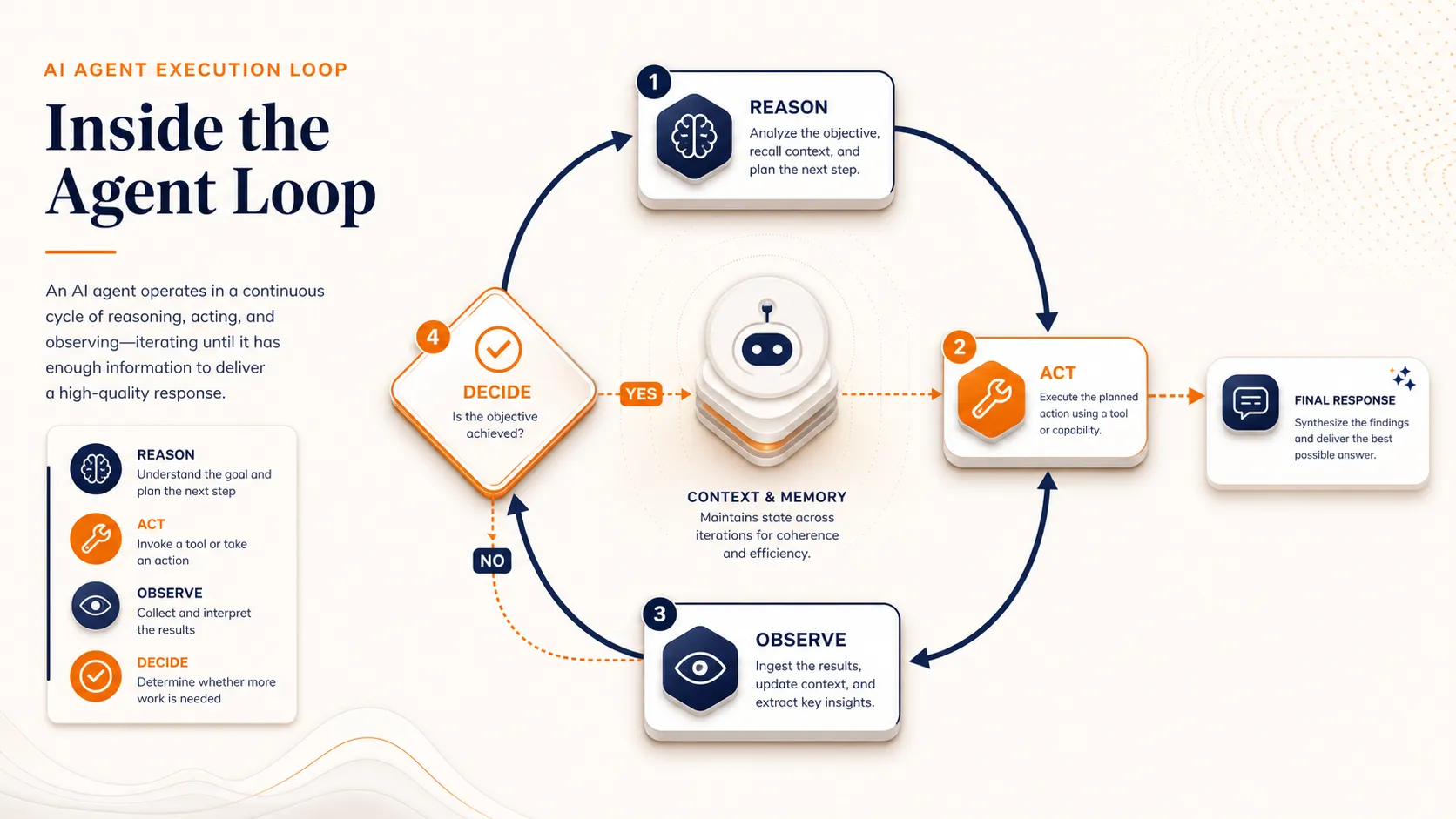
That loop is the engine. Everything else is configuration, error handling, and guardrails.
What you’re responsible for that frameworks handle automatically: retry logic when API calls fail, token counting to stay within context window limits, rate limiting to avoid hitting API quotas, structured logging for debugging, context management as conversations grow long, and state persistence if the agent needs to pick up where it left off.
This path takes weeks for a production-ready agent. Don’t choose it for your first build unless you have a specific reason that no-code and framework options can’t satisfy.
For the architecture patterns behind custom builds, the AI agent architecture guide covers the design decisions in detail.
With your build path chosen, the next thing to plan for is what it’ll cost.
What It Costs to Build and Run an AI Agent
Agent costs vary widely depending on complexity, and it helps to know the ranges before you commit to a path.
Building costs depend on complexity:
- Simple, single-purpose agent (email triage, data enrichment): $5K-$15K if you hire it out, or effectively $0 if you build it yourself using free tiers on no-code tools.
- Multi-step reasoning agent with tool integration: $20K-$80K with a development team.
- Full multi-agent enterprise system with custom training and security: $100K-$500K+.
Running costs are separate. LLM APIs charge per token (the chunks of text the model processes). Input tokens (what you send) are cheaper than output tokens (what the model generates). A simple agent handling 100 tasks per day on a mid-tier model might cost $30-100 per month in API fees. Heavy usage with premium models can run significantly higher.
The cost optimization trick: build your prototype using the most capable model available (like GPT-5.5 or Claude Opus 4.7). Once the workflow works reliably, swap in a smaller, cheaper model and see if quality holds. Many teams find they can cut running costs significantly without rebuilding anything, since smaller models handle well-scoped tasks just as well.
For most people reading this, the first agent is practically free. No-code tools have free tiers, most model APIs offer free credits to start, and simple agents don’t process enough tokens to generate meaningful costs.
Costs rarely kill agent projects. What does kill them is getting the fundamentals wrong.
Mistakes That Kill Most AI Agent Projects
A significant share of enterprise AI agent initiatives fail to reach production. The failures are rarely about the technology. They’re about scoping, process, and expectations. Here are the ones that come up most often.
Building before scoping
Teams pick a framework, build a demo that impresses stakeholders, and then discover the demo doesn’t map to any actual business process. Answer the three scoping questions (weekly frequency, teachable, verifiable) before touching any tool.
Automating the wrong task
The instinct is to tackle the biggest, most complex workflow first. But complex tasks have ambiguous success criteria and too many edge cases for a first agent. Pick high-frequency, repeatable workflows where success is obvious.
Skipping guardrails
Giving an agent unrestricted access to live systems leads to unintended emails, duplicate CRM records, or wrong transactions. Start with read-only access. Let the agent observe and recommend before it acts. Add human-in-the-loop approval for anything high-stakes or irreversible.
No monitoring
Without tracing every agent run end-to-end, you can’t tell what’s working, what’s failing, or why. Agents repeat the same mistakes indefinitely without structured feedback. Log every run from day one. Track what input the agent received, which tools it called, what it returned, how long each step took, and what it cost.
Overbuilding v1
Trying to create a general-purpose AI assistant instead of something that solves one specific problem. Ship one workflow. Make it reliable. Then expand.
Ignoring the people side
The 10-20-70 rule exists for a reason. Even a perfectly built agent fails if the team doesn’t know how to use it, doesn’t trust it, or hasn’t adjusted their processes around it. Budget 70% of your effort for documentation, training, and change management, not just the code.
Start Small, Ship Fast, Expand Later
The best first agent isn’t the most ambitious one. It’s the workflow you already do manually every day, the one that’s slightly boring, completely repeatable, and takes longer than it should.
Pick that workflow. Choose the path that matches your skills: no-code if you want something working in an hour, a framework if you need production reliability, or custom code if you have specific security requirements. Build it this week, not next month.
Every successful agent deployment starts the same way: one workflow, one agent, one reliable result. Everything else is expansion.
Try it yourself
Build your first AI agent in minutes
Craze is the AI workspace where agents, models, and your connected apps work together to get real work done. Describe what your agent should do, and it is ready to act. No code, free to start.
FAQs
How can I make my own AI agent?
Pick a repeatable workflow you do at least weekly, then choose your build path. For the fastest start, use a no-code platform like OpenAI's GPT Builder or n8n to connect your tools visually. If you want more control, use a Python framework like CrewAI or LangChain. Define what the agent should do, connect the tools it needs, test with real inputs, and iterate until it's reliable.
What is the 10-20-70 rule for AI?
The 10-20-70 rule says that 10% of AI project success comes from technology, 20% from data quality, and 70% from people, processes, and change management. For agent building, this means the framework and model you choose matter less than how well you scope the problem, train your team to work with the agent, and adjust your workflows around it.
How much does it cost to build an AI agent?
It depends on complexity. A simple single-purpose agent built yourself on free tiers costs effectively nothing. Hiring a team to build a multi-step agent with custom integrations runs $20K-$80K. Full enterprise multi-agent systems range from $100K to $500K+. Running costs (API token fees) are separate and typically $30-100 per month for moderate usage.
Can you build an AI agent without coding?
Yes. No-code platforms like OpenAI's GPT Builder, n8n, Dify, and Craze let you build working agents using visual interfaces. You connect your tools, set the rules, and test. No-code agents work well for straightforward workflows like email triage, data enrichment, and report generation.
What is the best AI agent framework for beginners?
CrewAI has the easiest learning curve and uses an intuitive crew metaphor where specialized agents collaborate on tasks. LangChain has the largest community and most documentation. If you're already using OpenAI models, their Agents SDK is the simplest option. Start with CrewAI for your first framework-based agent, then explore LangGraph when you need more control.
More Articles
The 8 Best Lindy AI Alternatives in 2026 (Tested & Compared)

The 8 best Lindy AI alternatives for 2026, anchored to why people leave Lindy, with current pricing, third-party ratings, honest pros and cons, and the best pick for each reason to switch.
The 7 Best Make Alternatives in 2026 (Tested & Compared)
The 7 best Make.com alternatives for 2026, anchored to why people leave Make, with current pricing, third-party ratings, honest pros and cons, and the best pick for each reason to switch.
The 8 Best Zapier Alternatives in 2026 (Tested & Compared)
The 8 best Zapier alternatives for 2026, anchored to why people leave Zapier, with current pricing, third-party ratings, honest pros and cons, and the best pick for each reason to switch.


