
AI Agent Builders: How to Pick the Right Approach for Your Team
Compare no-code AI agent builders, developer frameworks, and custom approaches. Includes a decision matrix, cost ranges, and production readiness checklist.

By: Deepit Patil
Co-Founder and CTO
Published
Updated
Edited by Craze Editorial Team · See our Editorial Process
The AI agent builder market is moving fast. Gartner predicts 40% of enterprise apps will include task-specific AI agents by end of 2026, up from less than 5% in 2025. And yet, industry estimates suggest roughly 88% of agent pilots never make it to production.
The technology is not the problem. The problem is fit. Teams pick a builder or approach that does not match their skills, budget, or production requirements. They scope too broadly, skip testing, and treat a working demo as a finished product. Then they wonder why the agent breaks the first week it handles real work.
This guide compares three categories of AI agent builders: no-code platforms, developer frameworks, and custom development. It helps you figure out which approach fits your team, what it will cost, and what it takes to get from prototype to production. If you are looking for a hands-on, step-by-step build tutorial instead, the How to Build an AI Agent guide walks you through each path.
TL;DR
- Three build paths exist: no-code builders, developer frameworks, and custom/from-scratch development. Your team, budget, and use case determine which one fits.
- No-code platforms handle roughly 80% of common agent use cases without writing a line of code. You only need code when you hit complex logic, custom integrations, or enterprise-scale production.
- Costs range from near-zero to $500K+. A simple no-code agent costs almost nothing. An enterprise multi-agent system can run into six figures for development alone.
- 88% of agent pilots fail to reach production, mostly due to poor scoping and skipping testing, guardrails, and monitoring.
- This guide helps you pick the right path before you start building, so you do not waste weeks on the wrong approach.
What Every AI Agent Builder Needs to Handle
Before comparing builder categories, it helps to understand the four things any AI agent needs to work. Every builder, whether it is a visual canvas or a Python library, has to handle these:
- LLM core: The reasoning engine that interprets instructions, plans actions, and makes decisions.
- Memory: Stores context within a session and, in more advanced setups, across sessions using a vector database or persistent storage.
- Tools: The APIs, databases, search engines, and file systems that let the agent take real actions instead of just generating text.
- Planning loop: Ties it all together. Observe the situation, decide what to do, take an action, check the result, repeat.
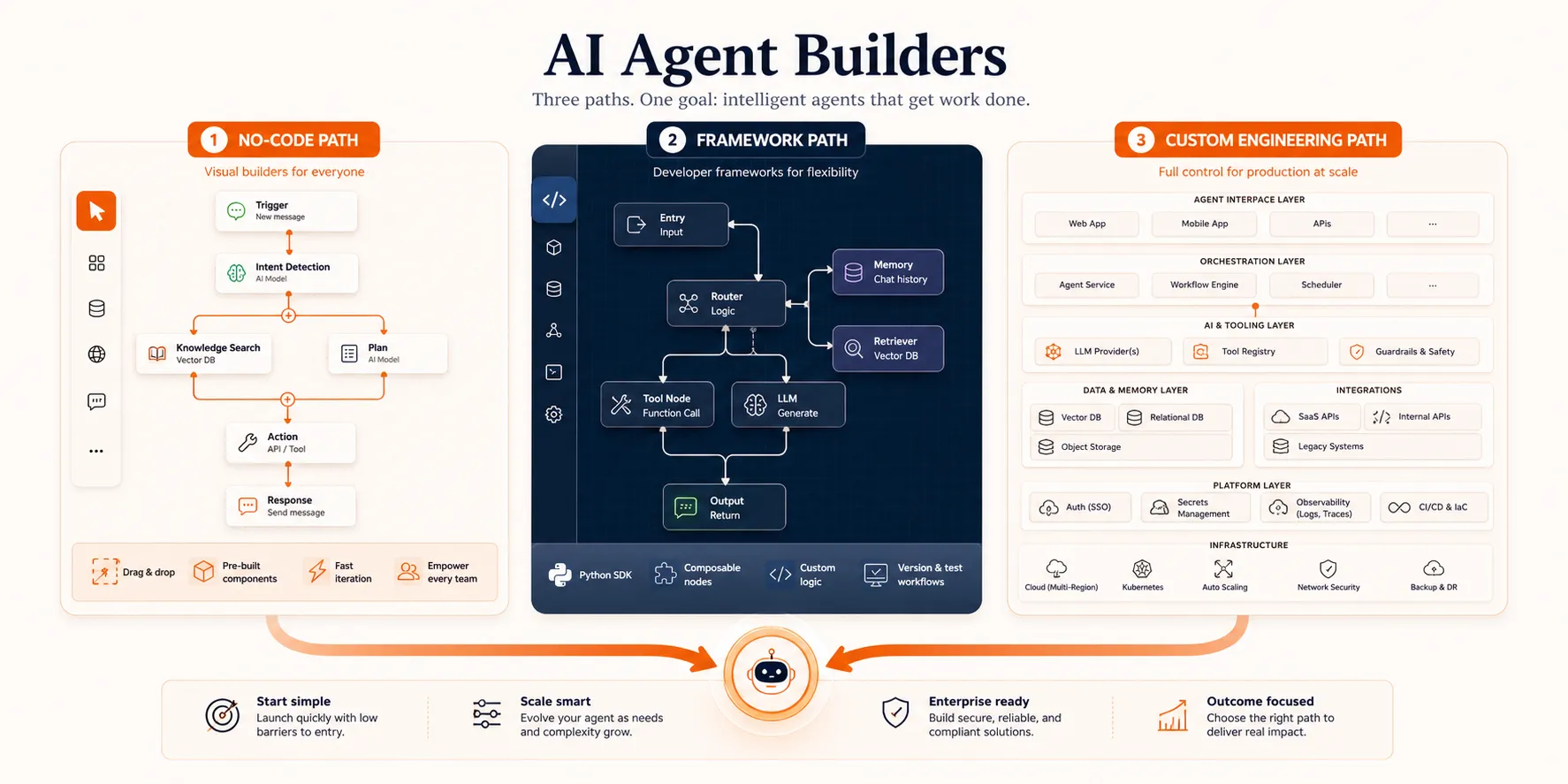
The difference between builder categories comes down to how they handle these four pieces. No-code platforms abstract them behind a visual interface. Frameworks give you templates and pre-built patterns. From-scratch development gives you full control over every layer. For a deeper explanation of agent architecture, the AI agent guide covers the foundations.
The real question is: which type of builder handles these for your situation?
Three Categories of AI Agent Builders
This is where most of the decision happens. Each category serves a different type of team, and picking the right one up front saves you from rebuilding later.
No-Code Builders
No-code AI agent builders are visual platforms where you create agents by connecting components, defining logic flows, and deploying, all without writing code. You connect an LLM, set up tools and integrations, define the agent’s behavior through a visual interface, and hit deploy.
Who they are for: Non-technical users, operations teams, founders who want to validate an idea before investing in development, and any team that needs a working agent in hours rather than weeks.
Here are the main platforms worth evaluating in 2026:
- OpenAI Agent Builder provides a visual canvas for building agents using OpenAI models. It includes a workflow builder, built-in tool connections, and access to GPT-4o and newer models. Best for teams already using the OpenAI ecosystem.
- n8n is an open-source workflow automation platform with over 600 integrations. You build agents by connecting nodes visually, which makes it strong for agents that need to interact with CRMs, email, Slack, databases, or payment systems. The open-source model also means no vendor lock-in.
- Craze is an AI platform where you can chat, build agents, run workflows, and schedule automations using any AI model. It’s free to use and gives you the flexibility to pick the right model for each task instead of being locked into one provider.
- Microsoft Copilot Studio is the enterprise option. Over 160,000 organizations use it, with more than 400,000 custom agents in production. If your team already runs on Microsoft 365, the deep integration makes it a natural fit.
- Relevance AI focuses on multi-department agent teams for technical and operations teams. It supports building agents that coordinate across different business functions.
- Lindy takes a personal AI assistant approach, letting you build agents for individual productivity tasks like email management, scheduling, and research without code.
What no-code handles well: Customer support agents, data lookup bots, workflow automation across business tools, internal Q&A assistants, scheduling and email triage, and report generation from multiple sources. These are high-frequency, rule-based agent use cases that benefit from speed of deployment.
Where no-code breaks down: Complex conditional logic with many branching paths, custom integrations beyond the platform’s pre-built connectors, enterprise-scale production with strict latency or reliability requirements, and multi-agent orchestration where several agents need to coordinate on a single task.
The practical split is roughly 80/20. No-code platforms handle about 80% of common agent use cases well. The remaining 20%, which involves complex branching, custom error handling, or tight integration requirements, needs code. For most teams, the right move is to start with no-code, prove the use case works, and graduate to code only when you hit a specific limitation.
Developer Frameworks
Frameworks are pre-built libraries and patterns that handle the orchestration plumbing so developers can focus on agent logic. They sit between no-code simplicity and from-scratch control, giving you more flexibility than a visual builder while saving you from reinventing the agent loop yourself.
Who they are for: Developers and technical teams building mid-complexity agents, and teams that need more control than no-code provides but do not want to build everything from zero.
The main frameworks in 2026:
- LangChain/LangGraph has the largest ecosystem and models agent workflows as directed graphs. LangGraph is particularly strong for production use cases that need audit trails, rollback points, and complex state management.
- CrewAI uses a role-based approach where specialized agents collaborate on tasks. If your workflow is naturally multi-role (one agent researches, another writes, a third reviews), CrewAI gets you to a working prototype faster than most alternatives.
- AutoGen is Microsoft’s multi-agent framework built around a group-chat pattern where multiple agents coordinate in a shared conversation.
- Google ADK (Agent Development Kit) is newer, but it is Google’s play for developers building agents on their cloud platform. Worth evaluating if you are already on GCP.
What frameworks handle well: Custom tool integration, multi-step reasoning chains, prototyping complex workflows quickly, model switching (using different LLMs for different tasks), and building agents that need detailed logging and debugging.
Where frameworks break down: Production at enterprise scale often requires additional infrastructure on top of the framework. Framework lock-in is real: migrating from one framework to another is painful once you are invested. And the rapid pace of framework evolution means today’s dominant framework may be deprecated or fundamentally restructured within a year.
For a detailed comparison of how these frameworks stack up by architecture, learning curve, and production readiness, the AI agent frameworks guide covers each one in depth.
Custom Development
Custom development means building your own orchestration loop with direct LLM API calls. You use tools like the Anthropic Agent SDK, OpenAI Assistants API, or raw API calls to build exactly the agent architecture you need, with no framework abstractions in between.
Who it is for: Teams with strong engineering capacity building production-critical systems, organizations with strict security and compliance requirements, and anyone who needs full control over data flow, model selection, and the agent’s decision-making process.
What custom development handles well: Production at scale with predictable performance, custom security and compliance requirements (SOC 2, HIPAA, data residency), zero framework lock-in, full observability and audit control, and tight integration with existing internal systems.
Where custom development breaks down: It’s slow to prototype, high in upfront cost, and requires ongoing maintenance. For simple use cases, it’s overkill. You’ll spend weeks building infrastructure that a no-code platform gives you in hours.
The tradeoff is straightforward: maximum control for maximum effort.
So which builder category fits your situation? That depends on four factors.
How to Choose the Right Build Path
The decision comes down to four things: your team’s technical skill, the complexity of what you are building, your budget, and how much production reliability you need.
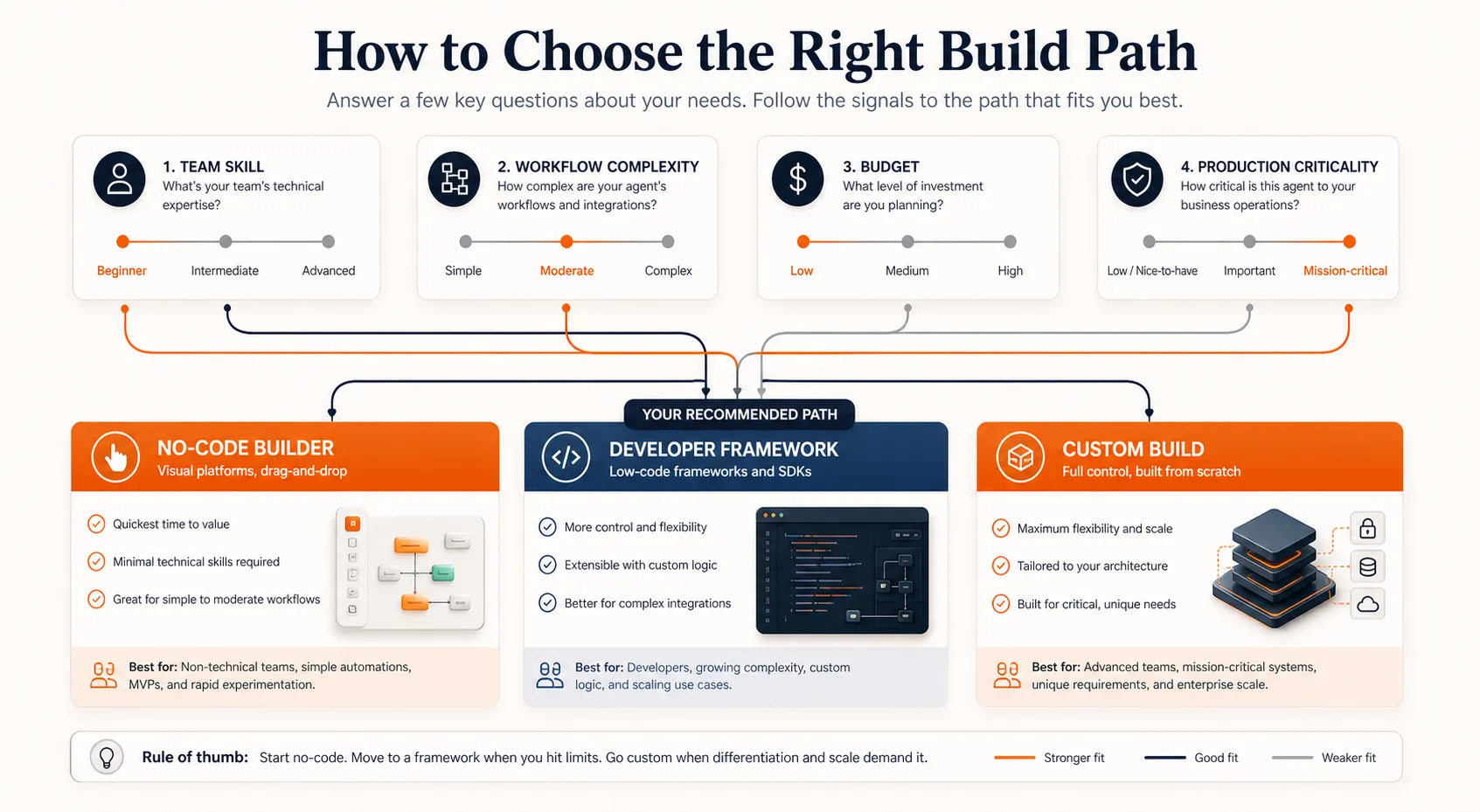
| Factor | No-code builder | Framework | Custom |
|---|---|---|---|
| Team | Non-technical or small ops team | Developers with Python experience | Engineering team with AI/ML experience |
| Complexity | Single-task, straightforward logic | Multi-step, moderate branching | Complex, multi-agent, or compliance-critical |
| Budget | $0 to $500/mo (platform fees) | $5K to $50K development + hosting | $50K to $500K+ development + infrastructure |
| Production needs | Internal tools, low-stakes automation | Customer-facing but not mission-critical | Mission-critical, regulated, or enterprise-scale |
| Time to first agent | Hours to days | Days to weeks | Weeks to months |
A few honest notes on using this matrix:
Most teams should start with no-code. If you are building your first agent, a no-code platform is almost always the right starting point. You validate the use case, learn what agents can and cannot do, and build organizational confidence before investing in code. You can always graduate later.
The lines between categories are blurring. Many no-code platforms now support custom code blocks for edge cases. Some frameworks have visual debugging tools. The categories are useful for decision-making, but real projects often blend approaches.
Budget is not just development cost. A no-code agent that costs nothing to build still has LLM API costs, and those scale with usage. A custom agent that costs $200K to develop may actually be cheaper per-task at scale than a no-code agent that charges per execution. Factor in the total cost of ownership, not just the build cost.
The build path choice matters, but it is only half the equation. The other half is what happens after you have a working prototype.
Getting From Prototype to Production
Building a working demo takes days. Getting it production-ready takes months. Industry estimates put enterprise implementation costs at 5 to 10 times higher than pilot costs. This is the gap that kills most agent projects, and it applies regardless of whether you built with no-code, a framework, or custom code.
Four things determine whether your agent makes it to production or stays a demo.
Scoping: The Number One Killer
The most common reason agent projects fail is not bad technology. It is bad scoping. Teams try to build an agent that handles an entire department’s workflow instead of one specific, well-defined task.
There is a useful way to think about this. Consider a 5-step workflow where the agent is 85% accurate at each step. The overall success rate is not 85%. It is 0.85 raised to the fifth power: 44%. A 10-step workflow at the same accuracy drops to roughly 20%. Compound accuracy decay is what turns a promising demo into a production failure.
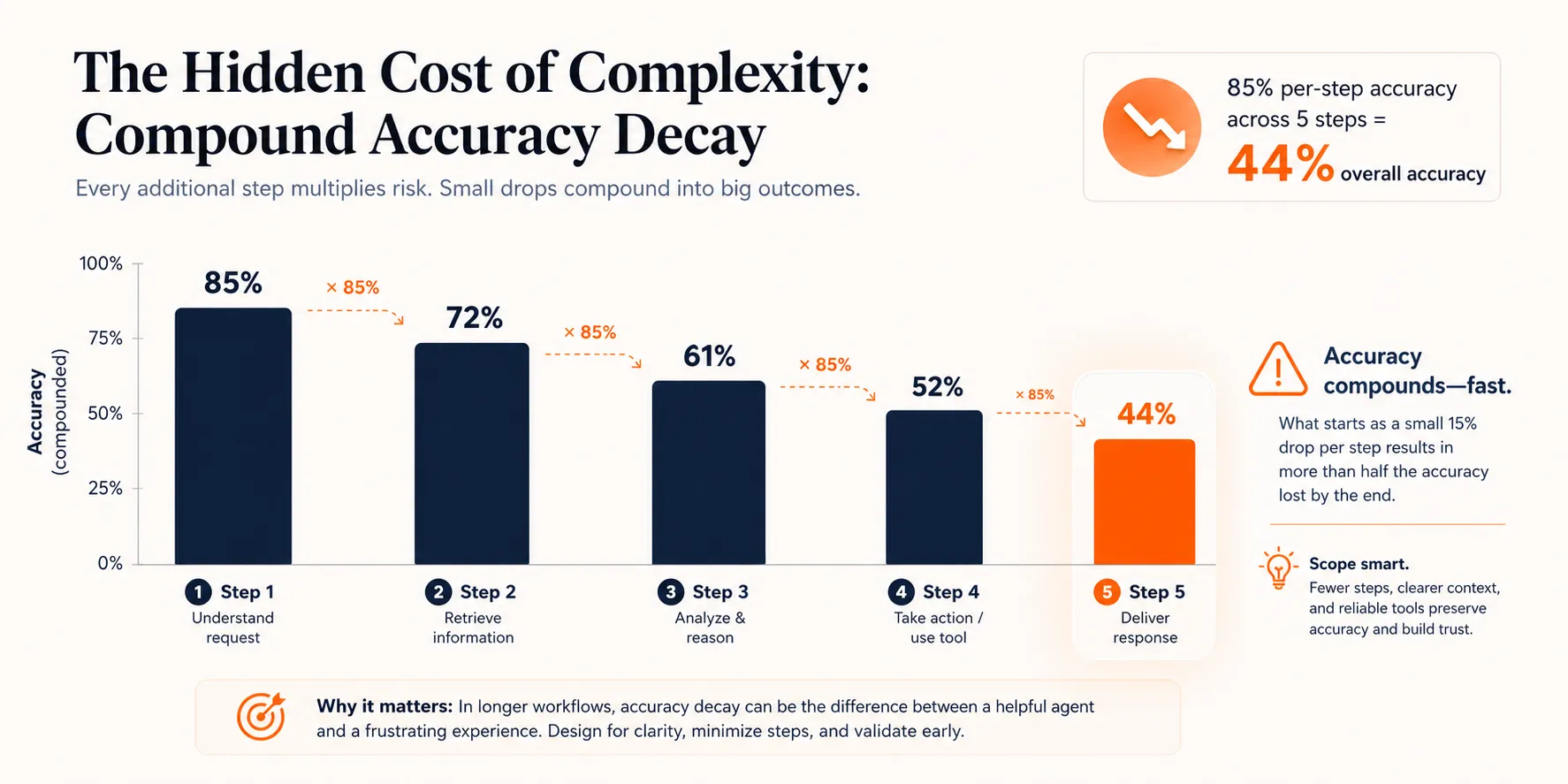
The fix is to start with the smallest useful task. One agent that reliably triages incoming support tickets is worth more than a multi-agent system that tries to handle the entire support workflow but fails half the time. Prove it works, measure the results, then expand scope incrementally using proven agent workflow patterns .
Testing and Evaluation
According to industry surveys, 64% of leaders cite evaluation gaps as a top production blocker. It’s not enough to test whether the agent produces reasonable-looking output. You need to measure whether it is actually completing tasks correctly.
What to test:
- Task success rate: Did the agent accomplish what it was supposed to?
- Tool correctness: Did it call the right tools with the right parameters?
- Trajectory analysis: Did it take a reasonable path, or did it loop and waste tokens?
- Token usage and cost: Is the agent efficient, or is it burning through API credits?
- Response quality: For agents that produce text output, is the quality consistent?
Evaluation shouldn’t be a one-time check before launch. It should run in development, in your CI/CD pipeline, and continuously in production. Observability platforms like Braintrust and Maxim AI are built for this kind of continuous agent evaluation.
Security and Guardrails
Only 14.4% of organizations deploy agents with full security and IT approval. The rest ship agents with partial or no security review, which creates real risk.
Three types of failures to plan for:
- Structural failures: The agent produces malformed outputs that break downstream systems. An agent that generates JSON with missing fields can crash the application consuming its output.
- Content failures: Hallucinations, PII leaks, or responses that violate company policy. An agent with access to customer data and a tendency to hallucinate is a liability incident waiting to happen.
- Security failures: Prompt injection, unauthorized tool access, or privilege escalation. In May 2026, Microsoft disclosed remote code execution vulnerabilities in AI agent frameworks, highlighting how real these risks are.
The right order is: define ownership first (who is responsible when the agent makes a mistake), then set constraints (what the agent is and is not allowed to do), then add monitoring (how you detect when something goes wrong). Gartner predicts AI-related legal claims will exceed 2,000 by end of 2026, so the governance layer is not optional.
Monitoring in Production
According to industry surveys, roughly 89% of organizations have now implemented some form of agent observability. In the agent era, you monitor decisions, not just server health.
Key metrics to track:
- Task success rate over time (is it degrading?)
- Tool call accuracy (is it using tools correctly?)
- Latency (how long does each task take?)
- Cost per task (are API costs predictable?)
- Error rate and error types (are failures clustered or random?)
This connects back to your build-path choice. No-code platforms often include basic monitoring dashboards. Framework-based agents can integrate with observability tools through plugins. Custom-built agents give you full control over monitoring, but you have to build or integrate that layer yourself.
Getting the production layer right is what separates a demo that impresses in a meeting from an agent that runs reliably for months. Budget the time for it, and budget the money too.
What It Costs to Build an AI Agent
Cost is one of the first questions teams ask, and one of the hardest to answer precisely. The range is wide because it depends on the build path, the complexity of the use case, and the scale of production.
Here are industry estimates by build path:
| Build path | Development cost | Monthly running cost | Timeline |
|---|---|---|---|
| No-code builder | $0 to $2K (setup and config) | $50 to $500/mo (platform + LLM API) | Days to 1 week |
| Framework-based | $5K to $50K (development) | $200 to $2K/mo (hosting + API) | 2 to 6 weeks |
| Custom enterprise | $50K to $500K+ (development) | $2K to $20K+/mo (infrastructure + API) | 2 to 6 months |
These are industry estimates, not fixed prices. Every project is different.
What drives cost up: The number of tools and integrations the agent needs, LLM model choice (frontier models like GPT-5 or Claude Opus cost significantly more per call than smaller models like GPT-4.1 mini or Claude Haiku), data volume, compliance requirements, and multi-agent coordination where several agents need to work together.
Hidden costs most teams miss: Ongoing maintenance as LLM providers update their models and APIs. Prompt engineering iteration, because your first prompts will not be your final prompts. Monitoring infrastructure. And the human time spent reviewing agent output during the first few months of production.
One honest note: the per-API-call cost of LLMs is dropping fast. But integration costs, maintenance costs, and the human oversight required to run agents reliably aren’t dropping at the same rate. Budget for the full picture, not just the API bill.
With the costs in mind, here’s how to put it all together.
Conclusion
The right AI agent builder depends on your team, the complexity of what you are building, your budget, and how much production reliability you need. There is no universal best choice.
For most teams starting out, a no-code builder is the fastest path to a working agent. You validate the use case in hours or days, learn what agents can and cannot do, and build confidence before investing in code. Graduate to frameworks when you need more control, and to custom development when you have specific compliance or scale requirements that nothing else can meet.
The prototype is the easy part. What separates agent projects that ship from ones that stall is the production layer: proper scoping, evaluation, guardrails, and monitoring. Budget the time for those, regardless of which builder you choose.
When you are ready for the hands-on build process, the step-by-step build guide walks you through each path.
FAQs
How much does it cost to build an AI agent?
It depends on the build path. A no-code agent can cost $0 to $2K to set up with $50 to $500 per month in running costs. Framework-based agents typically run $5K to $50K in development plus $200 to $2K monthly. Custom enterprise agents range from $50K to $500K+ in development with $2K to $20K+ monthly for infrastructure and API costs. These are industry estimates. The per-call cost of LLMs is dropping, but integration, maintenance, and monitoring costs add up.
Can you build an AI agent without coding?
Yes. No-code AI agent builders like OpenAI Agent Builder, n8n, and Craze let you create agents through visual interfaces without writing code. These platforms handle roughly 80% of common agent use cases, including customer support, workflow automation, data lookup, and email triage. You only need code when you hit complex conditional logic, custom integrations beyond pre-built connectors, or enterprise-scale production requirements.
What is the best AI agent builder platform?
There is no single best platform. The right choice depends on your team and use case. OpenAI Agent Builder works well for teams already in the OpenAI ecosystem. n8n is strong for workflow automation with its 600+ integrations and open-source model. Microsoft Copilot Studio fits enterprise teams on Microsoft 365. Craze is a good pick if you want one AI platform for chat, agent building, workflows, and scheduling with the freedom to use any AI model, and it is free to use.
How long does it take to build an AI agent?
A no-code agent can be up and running in hours to days. A framework-based agent typically takes days to weeks. A custom-built agent takes weeks to months. But those timelines are for a working prototype. Getting to production adds significant time. Industry data from BCG and Forrester puts the median time-to-value on agent deployments at 5.1 months, mostly because of the testing, security, and monitoring work that comes after the initial build.
What is the difference between an AI agent builder and an AI agent framework?
A builder is a visual, typically no-code platform where you configure agents through a UI (like n8n, Craze, or OpenAI Agent Builder). A framework is a code library with pre-built patterns that developers use to build agents programmatically (like LangChain, CrewAI, or AutoGen). Builders are for non-technical users who want speed. Frameworks are for developers who want control. Both produce AI agents; the difference is who builds them and how much flexibility they have over the agent's behavior.
More Articles
The 8 Best Lindy AI Alternatives in 2026 (Tested & Compared)

The 8 best Lindy AI alternatives for 2026, anchored to why people leave Lindy, with current pricing, third-party ratings, honest pros and cons, and the best pick for each reason to switch.
The 7 Best Make Alternatives in 2026 (Tested & Compared)
The 7 best Make.com alternatives for 2026, anchored to why people leave Make, with current pricing, third-party ratings, honest pros and cons, and the best pick for each reason to switch.
The 8 Best Zapier Alternatives in 2026 (Tested & Compared)
The 8 best Zapier alternatives for 2026, anchored to why people leave Zapier, with current pricing, third-party ratings, honest pros and cons, and the best pick for each reason to switch.


