
HR Automation: Meaning, AI Examples, Benefits & ROI
Learn what HR automation means, which workflows to automate first, where AI assistants and agents fit, and how to measure ROI while keeping sensitive decisions human-reviewed.

By: Deepit Patil
Co-Founder and CTO
Published
Updated
Edited by Craze Editorial Team · See our Editorial Process
HR teams spend a large part of their week coordinating repeatable work: collecting documents, answering policy questions, chasing approvals, updating spreadsheets, and moving information between tools. That work is necessary, but it does not always need to be handled manually.
HR automation turns those recurring tasks into structured workflows. A good setup can route requests, trigger reminders, collect inputs, update records, and give employees faster answers while keeping sensitive decisions in human hands.
AI adds another layer. Assistants and agents can help draft messages, summarize policies, prepare onboarding checklists, classify requests, and coordinate recurring workflows. The goal is not to remove HR judgment. It is to reduce the manual work around HR so teams can spend more time on people, decisions, and better employee experiences.
This guide explains what HR automation means, which workflows to automate first, where AI fits, how to measure ROI, and what should stay human-led.
Quick Summary
-
HR automation uses software, workflows, and AI-assisted systems to reduce repetitive manual work across HR operations.
-
The best starting points are high-volume, rule-based workflows such as onboarding tasks, employee questions, approvals, document collection, and reporting updates.
-
AI assistants and agents can support HR automation by drafting, summarizing, routing, checking, and coordinating work.
-
Sensitive employee relations, disciplinary decisions, wellbeing concerns, and final people decisions should remain human-led.
-
ROI should be measured through time saved, fewer errors, faster cycle times, better self-service, and reduced rework.
-
The strongest automation programs start small, define clear ownership, protect employee data, and improve workflows over time.
What HR Automation Really Means
HR automation is the use of technology to complete repeatable HR tasks with less manual effort. It can include simple rules, workflow builders, integrations, templates, approvals, notifications, self-service portals, analytics, and AI-assisted systems.
At a practical level, HR automation helps teams move from “someone needs to remember and chase this” to “the workflow runs the next step automatically.” For example, a new hire workflow can request documents, notify IT, send manager reminders, prepare welcome messages, and track completion without a person rebuilding the checklist every time.
The value is not only speed. Automation also creates consistency. When approvals, reminders, handoffs, and records follow a defined flow, HR teams can reduce missed steps, duplicate work, and avoidable back-and-forth.
Also read: How Automation and AI Are Transforming HR Practices
Once the definition is clear, the next question is how HR automation is changing now that AI is part of everyday work.
HR Automation Trends Shaping Modern Teams
HR automation is moving beyond static workflows. Teams now expect automation to understand context, draft useful outputs, and coordinate work across tools. These trends matter most:
-
AI assistants for everyday HR work: Assistants can draft policy explanations, interview notes, onboarding emails, manager reminders, and internal announcements. HR still reviews the output, but the first draft no longer starts from a blank page.
-
AI agents for repeatable workflows: Agents can follow instructions across a defined workflow, such as preparing onboarding tasks, summarizing employee requests, routing a question to the right owner, or maintaining a recurring checklist.
-
Employee self-service: Employees increasingly expect quick answers to common questions about policies, benefits, documents, time off, and internal processes. Automation can answer routine questions while escalating sensitive cases.
-
Workflow orchestration across tools: HR work often touches multiple systems. Automation is most useful when it connects handoffs between hiring, onboarding, documents, payroll inputs, access requests, and manager approvals.
-
Privacy and governance by design: HR data is sensitive. Modern automation needs clear permissions, audit trails, data retention rules, and human review for high-impact decisions.
These trends show why HR automation is no longer only about replacing spreadsheets. It is about designing better operating flows for work that repeats every week.
How HR Looks When You Move from Manual to Automated Workflows
In a manual setup, HR work depends heavily on memory, inboxes, spreadsheets, and individual follow-ups. Someone has to notice a missing document, remind a manager, update a tracker, answer the same question again, and check whether every step is complete.
In an automated setup, the workflow itself carries more of that load. It can trigger the next step, assign owners, send reminders, collect standard inputs, create a record, and show where work is stuck.
Key advantages include:
-
Fewer manual handoffs and missed steps
-
Faster response times for employees and managers
-
More consistent onboarding, offboarding, document, and approval workflows
-
Better visibility into workload, bottlenecks, and completion rates
-
More time for HR teams to focus on judgment-heavy work
Once you see how automation transforms day-to-day operations, the next question naturally arises: where should you start? Let’s explore which HR processes are ideal candidates for automation and why.
Which HR Processes Should You Automate First?
HR automation delivers the biggest impact when it is applied to frequent, rule-based work with clear inputs and outputs. Start with processes where manual coordination creates delays, errors, or repetitive questions.
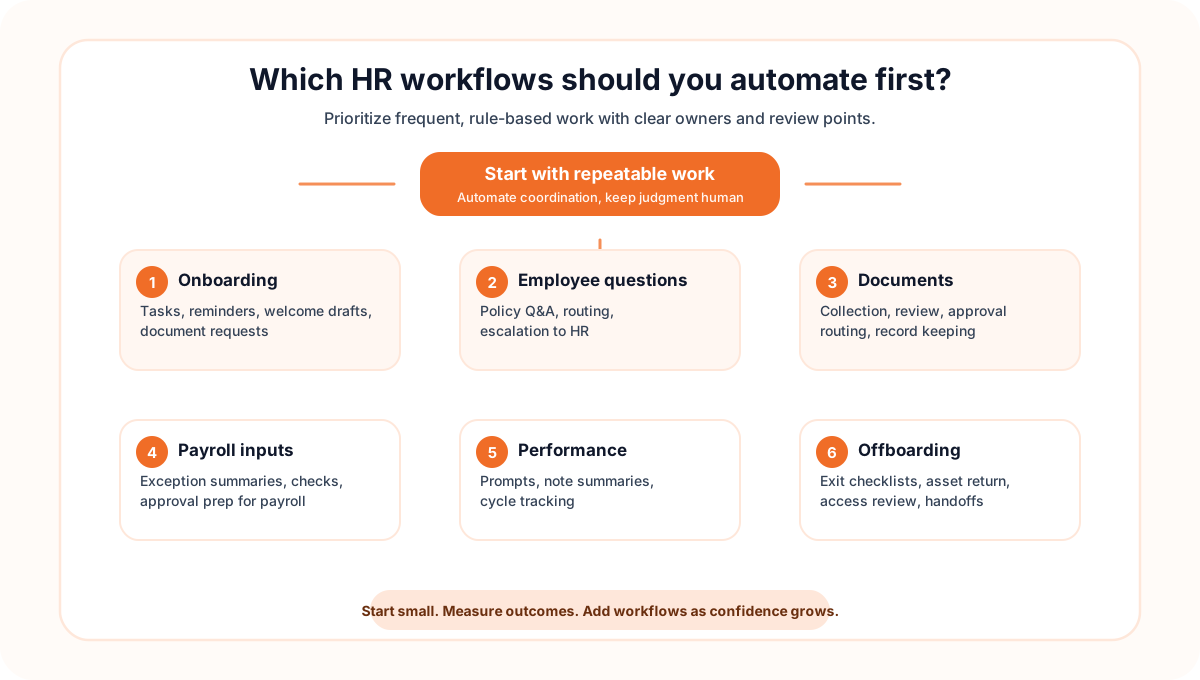
Here’s a quick look at where automation makes the most difference, and how.
Process | Automation Win | Typical Metric | Example Actions |
Onboarding | Faster and more consistent new-hire setup | Time to complete onboarding tasks | Trigger checklists, request documents, notify managers, draft welcome messages, and track pending steps |
Employee questions | Faster answers with fewer repeated tickets | Response time and ticket volume | Answer common policy questions, summarize relevant guidance, and escalate sensitive requests |
Document workflows | Cleaner routing and better record control | Document turnaround time | Collect forms, route approvals, remind owners, and maintain version history |
Payroll inputs | Fewer errors before payroll processing | Input error rate | Collect approved changes, summarize exceptions, and prepare review checklists for payroll teams |
Performance workflows | More consistent review cycles | Completion rate and manager follow-through | Send reminders, prepare feedback prompts, summarize notes, and track cycle progress |
Offboarding | Cleaner exits and fewer missed handoffs | Task completion rate | Trigger exit checklists, collect assets, notify stakeholders, and document closure steps |
Also read: How to Automate Employee Onboarding, How to Automate Employee Offboarding, and How to Automate HR Document Management
Automating these high-impact areas saves time, but the bigger benefit is reliability. HR work becomes easier to track, repeat, and improve.
The Real Benefits of HR Automation
HR automation creates measurable value when it reduces recurring work without weakening judgment, privacy, or employee trust. The strongest benefits usually show up in day-to-day operations:
-
Less administrative work: HR teams spend less time chasing updates, copying information, and rebuilding the same checklists.
-
Faster cycle times: Onboarding, document routing, approvals, and employee responses move faster because the next step is triggered automatically.
-
Fewer errors and missed steps: Standard workflows reduce the risk of forgotten approvals, incomplete documents, and manual re-entry mistakes.
-
Better employee experience: Employees get clearer updates and faster answers instead of waiting for manual follow-ups.
-
Cleaner data: Structured forms and consistent fields make reporting, planning, and analysis easier.
-
More consistent manager follow-through: Reminders and task owners make it easier for managers to complete their part of HR workflows.
-
Stronger privacy controls: Well-designed workflows can limit access, create audit trails, and reduce unnecessary data sharing.
-
Scalable operations: As headcount grows, HR work does not need to grow at the same manual pace.
These benefits make automation attractive, but HR is not a pure operations function. Some work should be supported by automation, not handed over to it completely.
Where to Draw the Line: What Should (and Shouldn’t) Be Automated
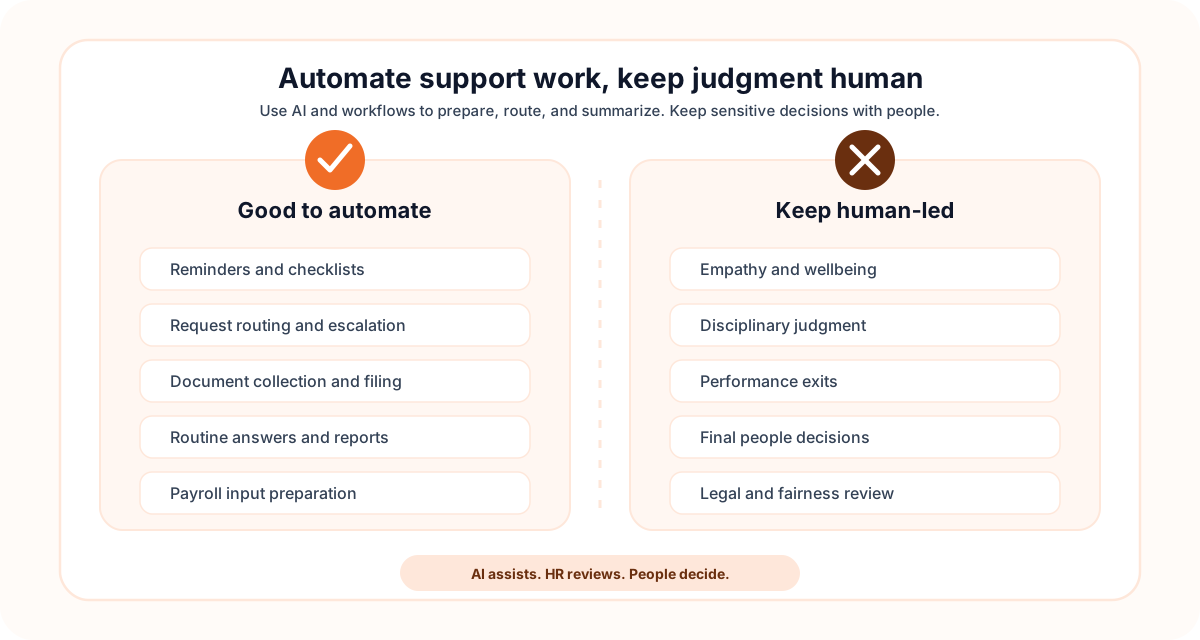
Not every HR interaction should be automated. Sensitive situations like bereavement, misconduct cases, performance exits, wellbeing concerns, and culture-building still require human judgment and empathy.
Automation can still support these workflows with documentation, scheduling, reminders, secure record-keeping, and preparation. But the conversation, interpretation, and final decision should stay with a responsible person.
Do vs Don’t (Quick Guide)
-
Do automate reminders, checklists, request routing, document collection, FAQ responses, reporting updates, and payroll input preparation.
-
Don’t fully automate empathy, difficult conversations, disciplinary judgment, performance exits, or final people decisions.
Responsible automation means finding the right balance between efficiency and judgment. Even with that mindset, rollout can be difficult if the team automates unclear processes too early.
Common HR Automation Challenges
HR automation offers clear efficiency gains, but implementation can fail when workflows, data, and ownership are not ready. Watch for these common issues:
-
Unclear process design: If the manual workflow is inconsistent, automation will make the inconsistency faster. Map the process before building the workflow.
-
Change resistance: Employees and managers may avoid new systems if the benefit is unclear. Use pilots, training, and visible quick wins.
-
Tool fragmentation: HR work often spans hiring, documents, payroll inputs, communication tools, and reporting systems. Decide what needs integration and what can remain a manual handoff.
-
Data quality problems: Incomplete, duplicated, or inconsistent data creates unreliable automation. Standardize fields and ownership before scaling.
-
Privacy and access risk: HR data should not be visible to everyone who can use a workflow. Define permissions, retention rules, and review steps.
-
Over-automation: Automating sensitive decisions can damage trust. Use automation to prepare and coordinate, not to replace judgment.
These challenges are manageable if rollout starts with a focused workflow, clear success metrics, and a review loop.
How to Roll Out HR Automation Successfully (Step-by-Step Guide)
Implementing HR automation successfully requires more than choosing software. It means designing clear workflows, assigning ownership, protecting employee data, and helping people adopt the new way of working.
-
Identify high-impact workflows: Start with repetitive, high-volume work such as onboarding tasks, document collection, employee questions, approvals, or payroll input preparation.
-
Define the workflow before choosing tools: Document inputs, owners, decisions, exceptions, and outputs. A clear workflow is easier to automate than a vague process.
-
Choose the right automation layer: Some tasks belong in an HR system, some in a workflow tool, and some can be supported by AI assistants or agents. Match the tool to the risk and complexity of the task.
-
Pilot with one workflow: Run a controlled pilot with clear KPIs such as completion time, error rate, response time, adoption, and employee satisfaction.
-
Train managers and employees: Explain what changes, what stays human-led, and where people should go for exceptions.
-
Add controls and review points: Use approvals, audit trails, access controls, and exception handling for sensitive workflows.
-
Improve in short cycles: Review usage, feedback, errors, and bottlenecks. Automation should evolve as the workflow changes.
Even with a good rollout, a few pitfalls can derail adoption.
Watch out for these common pitfalls:
-
Automating a broken process without redesigning it
-
Giving AI access to sensitive context without clear controls
-
Skipping manager training and change communication
-
Measuring only tool usage instead of business outcomes
A thoughtful rollout makes automation a durable operating improvement, not just a new tool rollout.
Where AI Fits in HR Automation
AI is most useful when it supports the work around HR decisions. It can help people move faster, understand context, and keep recurring workflows on track.
Useful AI-assisted HR automation examples include:
-
Policy Q&A: An assistant can summarize approved policy guidance and point employees to the right resource.
-
Onboarding coordination: An agent can prepare a checklist, draft reminders, summarize missing items, and keep owners updated.
-
Document support: AI can classify document requests, draft standard responses, and prepare review notes.
-
Manager prompts: AI can help managers draft feedback notes, prepare check-in questions, or summarize action items.
-
Reporting preparation: AI can summarize recurring HR metrics and flag unusual changes for review.
-
Payroll-adjacent coordination: AI can prepare input checklists and exception summaries, while payroll calculations and approvals stay in trusted systems.
Also read: Payroll Automation: What It Is, How It Works, and Where AI Helps
The important boundary is control. AI should not become the final decision-maker for sensitive employee outcomes. It should help prepare, explain, summarize, and coordinate work for humans to review.
How to Measure ROI and Success Metrics for HR Automation?
To understand whether HR automation is working, track outcomes that connect to time, quality, employee experience, and risk reduction. Tool adoption alone is not enough.
What to measure
Operational Efficiency KPIs
-
Admin hours saved per month
-
Onboarding task completion time
-
Employee request response time
-
Manager completion rates on workflows
-
Number of manual follow-ups avoided
Quality and Risk KPIs
-
Error rate before vs after automation
-
Rework or correction volume
-
Missed approval or missed task count
-
Escalation rate for sensitive cases
-
Employee satisfaction with HR support
**Simple ROI Formula
**ROI = (Annual Savings - Annual Cost) / Annual Cost
**Quick example **If automation saves 500 hours per year and reduces errors, estimate the value of saved time and avoided rework. Then compare that annual value with the cost of software, implementation, training, and maintenance.
The most useful ROI view combines hard savings with operational improvements. Faster response times, fewer missed steps, cleaner records, and better employee experience all matter.
How Craze Fits the New AI Workflow Layer
HR automation increasingly includes an AI layer around the systems teams already use. That layer helps people draft, compare, summarize, plan, and coordinate repeatable work.
Craze is a multi-model AI workspace for teams that want to work with different LLMs in one place, create AI agents, and run AI-assisted workflows. For HR-adjacent work, that can mean using AI to prepare onboarding plans, draft internal communications, summarize policy questions, or coordinate repeatable checklists.
Craze should not be treated as a replacement for HR systems of record, payroll engines, compliance tools, or human review. It fits best where teams need an AI workspace to support the thinking, drafting, and coordination around repeatable work.

Practical HR Automation Examples
Here are a few practical examples of HR automation that keep humans in control:
New hire onboarding
When an offer is accepted, the workflow can trigger a document checklist, send a welcome email draft, notify the manager, prepare first-week tasks, and remind owners about pending steps. HR reviews exceptions and handles sensitive conversations directly.
Employee policy questions
An employee asks about a policy. An AI assistant can summarize the relevant approved guidance, link to the source, and suggest whether the request should be escalated. HR keeps ownership of interpretation and exceptions.
Document collection
A workflow can request missing documents, remind employees, route files for review, and keep a completion log. AI can help classify requests or draft follow-up messages, but access controls should limit who can view sensitive files.
Offboarding coordination
An offboarding workflow can trigger return-of-property reminders, access review tasks, exit interview scheduling, and final documentation checks. Human review remains important for employee communication and final approvals.
Conclusion
HR automation works best when it removes repetitive coordination without removing human judgment. Start with clear, low-risk workflows, measure outcomes, protect employee data, and keep sensitive decisions human-led.
AI assistants and agents can now support the work around HR automation: drafting, summarizing, routing, reminding, and preparing checklists. Used carefully, they help HR teams spend less time on repetitive admin and more time on the people work that needs context and care.
If your team is exploring AI-assisted workflows, Craze gives you a multi-model workspace to work with different LLMs, create AI agents, and coordinate repeatable work from one place.
FAQs
What is HR automation?
HR automation is the use of software, workflows, and AI-assisted systems to handle repeatable HR tasks with less manual effort. It can support onboarding, employee questions, document routing, approvals, reporting, payroll inputs, and other recurring coordination work.
Which HR tasks should be automated first?
Start with high-volume, rule-based tasks that create delays or errors, such as onboarding checklists, document collection, employee FAQ responses, approval reminders, payroll input collection, and reporting updates.
Where can AI help with HR automation?
AI can help draft communications, summarize policies, answer routine questions, create checklists, classify requests, prepare reports, and coordinate repeatable workflows. Final decisions on sensitive employee matters should remain human-led.
Will HR automation replace HR teams?
No. Good HR automation removes repetitive administrative work so HR teams can spend more time on judgment-heavy work such as employee relations, workforce planning, manager coaching, and culture.
What should not be fully automated in HR?
Avoid fully automating sensitive conversations, disciplinary decisions, performance exits, wellbeing concerns, and any process where context, empathy, fairness, or legal review is required.
How do you measure HR automation ROI?
Track time saved, error reduction, cycle time improvements, employee response times, self-service adoption, rework reduction, and the cost of manual administration before and after automation.
How do AI agents fit into HR automation?
AI agents can help run structured HR-adjacent workflows such as preparing onboarding tasks, summarizing policy questions, routing requests, drafting reminders, and maintaining recurring checklists. They should work with clear instructions, approvals, and human oversight.
How do you choose HR automation tools?
Choose tools based on workflow fit, integration needs, privacy controls, auditability, ease of adoption, reporting quality, and how well the tool keeps humans in control of sensitive decisions.
More Articles
What Is an AI Agent? Types, Examples, and How They Work

Learn what AI agents are, how they work, the 5 main types, and how they differ from chatbots and AI assistants. Practical examples for non-technical teams.
Best AI Recruiting Tools in 2026: 18 Platforms Compared
Compare the 18 best AI recruiting tools and automation platforms for 2026. Features, pricing, and which tool fits your hiring team best.
Best HR Automation Software in 2026: Automation Platforms vs Dedicated Tools
Compare the best HR automation software for 2026, from general-purpose automation platforms to dedicated HR tools, and find the right fit for your team.


