
AI Agent Orchestration: What It Is and Why It Matters
AI agent orchestration coordinates multiple specialized agents to handle complex tasks no single agent can. Learn the patterns, building blocks, failure modes, and how to get started.

By: Deepit Patil
Co-Founder and CTO
Published
Updated
Edited by Craze Editorial Team · See our Editorial Process
A single AI agent can do a lot. Give it tools, a decent prompt, and access to your systems, and it will handle straightforward workflows surprisingly well. But there is a ceiling. Ask one agent to research a topic, write a report, check the facts, format the output, and file it in the right place, and you will start seeing shortcuts, missed steps, and confused reasoning. That is not a model problem. It is a coordination problem.
AI agent orchestration is how you get past that ceiling. Instead of one agent doing everything, you break the work into parts and assign each part to a specialized agent. One researches. One writes. One reviews. An orchestrator agent manages the handoffs and keeps the whole workflow on track.
It sounds clean on paper. In practice, orchestration adds real complexity, real cost, and real failure modes that you need to understand before committing. This article covers what orchestration actually means, when you need it, the core patterns, what can go wrong, and how to start without overbuilding.
TL;DR
- Orchestration coordinates specialists. AI agent orchestration assigns different parts of a complex task to specialized agents, with an orchestrator managing assignments and context.
- Don’t orchestrate by default. You need it when tasks span many tools, require different reasoning strategies per step, or benefit from a separate review agent. If a single agent handles the job reliably, skip it.
- Start with orchestrator-worker. It is the most common and debuggable pattern. Sequential pipelines, hierarchical delegation, and peer-to-peer setups are alternatives for specific situations.
- Failure modes are real. Context loss between agents, cost explosion from excessive communication, and debugging difficulty when errors chain across agents.
- Build incrementally. Start with a single agent. When it consistently fails at specific steps, split those steps into a specialist agent and connect them with an orchestrator.
What AI Agent Orchestration Actually Means
Orchestration is more specific than “multiple agents working together.” It is the structured coordination of specialized agents through a central management layer that breaks goals into subtasks, assigns those subtasks to the right agent, manages shared context, and reassembles results into a coherent output.
Think of it like a project manager running a product launch. The project manager does not write the copy, design the assets, or configure the campaign. Instead, they break the goal into tasks, assign each task to the right person, make sure everyone has the context they need, and pull it all together at the end. The project manager is the orchestrator. The specialists are the agents.
In a single-agent setup, one agent receives a goal and works through it step by step, calling tools along the way. In an orchestrated system, the orchestrator agent receives the goal, decomposes it, and delegates subtasks to agents that are purpose-built for each step. A researcher agent queries databases and APIs. A writer agent drafts content. A reviewer agent checks for accuracy. Each one has a narrower scope, which typically means better results on its specific job.
The key difference from simply running multiple agents in parallel is the coordination layer. Without orchestration, agents work in isolation. With it, they share context, respect dependencies, and produce a result that accounts for what every other agent has done.
Gartner reported a 1,445% surge in enterprise inquiries about multi-agent systems from Q1 2024 to Q2 2025. The interest is there. But interest and successful implementation are different things, which is why the next question matters more than the definition.
When You Need Orchestration (and When You Don’t)
Not every workflow needs multiple agents. Orchestration adds moving parts, and more moving parts mean more things that can break. Before you architect a multi-agent system, ask whether a single agent with the right tools can handle the job reliably.
Here are the signals that a single agent is hitting its limits:
The task spans more than three tools or systems. When an agent needs to query a CRM, pull data from a database, draft a message, send it through an API, and log the result, the context window fills up and the agent starts losing track of earlier steps. Splitting tool-heavy workflows across specialized agents keeps each one focused.
Different steps need different reasoning strategies. Research requires broad exploration. Writing requires structured generation. Code review requires pattern matching and rule enforcement. A single agent switching between these modes tends to do each one worse than a dedicated agent would.
Parallel processing would save meaningful time. If three research queries can run simultaneously instead of sequentially, separate agents handling each query and an orchestrator collecting results will finish faster.
Output quality improves with a separate review step. Having one agent generate content and a different agent review it catches errors that self-review misses. The reviewer has fresh context and no attachment to the draft.
On the other hand, if a single agent with good tools handles your workflow reliably and consistently, orchestration adds cost and complexity with no real upside. Gartner projects that more than 40% of agentic AI projects could be canceled by 2027 because of unclear value and rising costs. Many of those will be cases where teams orchestrated when they didn’t need to.
The honest rule: start with the simplest thing that works. Add agents only when the single-agent approach demonstrably fails.
How Orchestration Works: Core Patterns
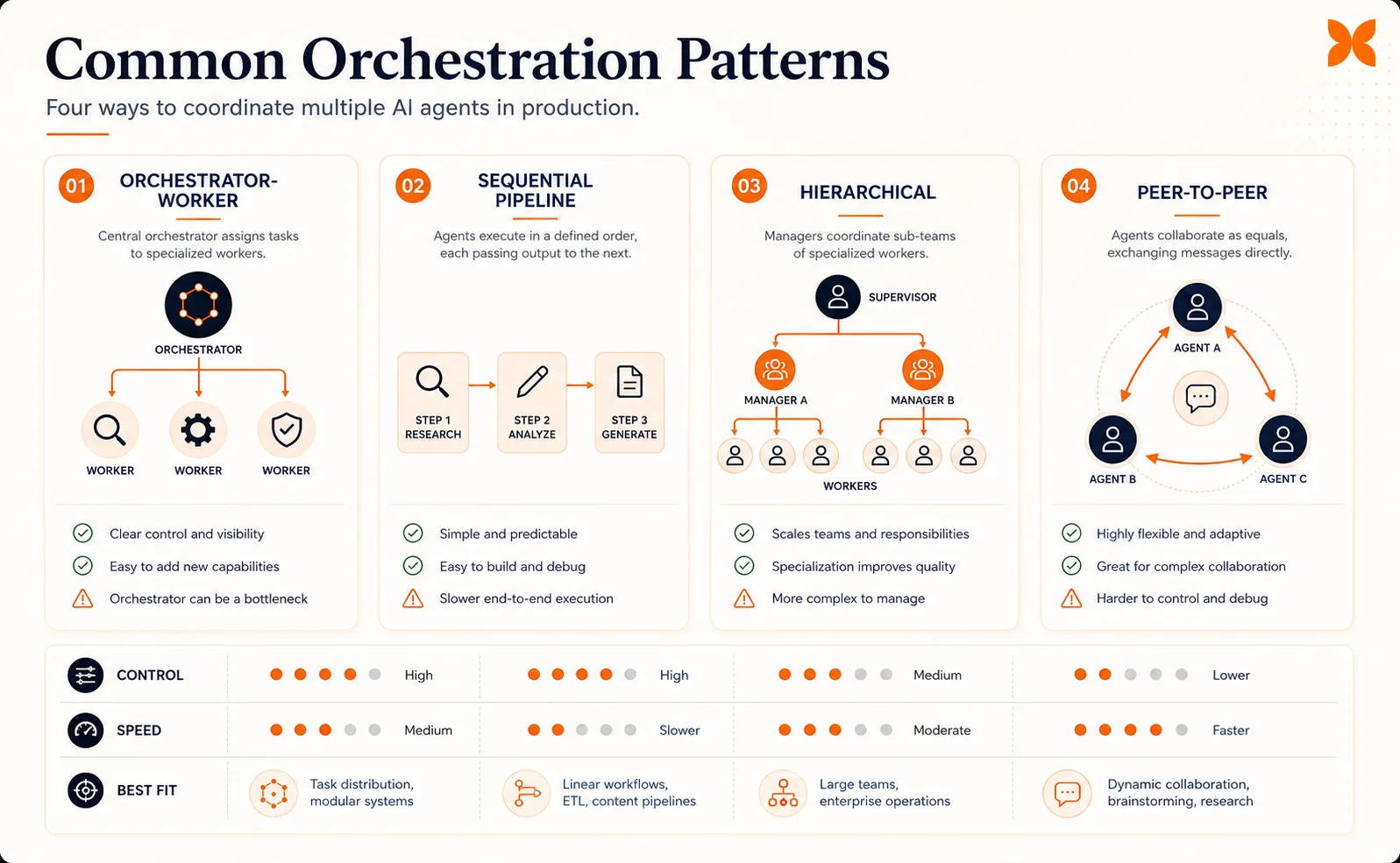
Once you’ve decided orchestration is necessary, the next choice is how to coordinate your agents. Four patterns cover the majority of production implementations, and each makes different tradeoffs between simplicity, flexibility, and debuggability.
Orchestrator-Worker
This is the most widely deployed pattern. A single orchestrator agent receives a goal, breaks it into subtasks, delegates each subtask to a worker agent, and aggregates the results. The orchestrator holds the plan, the workers execute.
It works well when subtasks are relatively independent and the orchestrator can define them upfront. A software development workflow might have the orchestrator break a feature request into a planning task, a coding task, and a testing task, then send each to the appropriate specialist.
The main tradeoff: the orchestrator is a single point of failure. If it misinterprets the goal or creates poor subtask definitions, every downstream agent inherits that mistake. For most teams, this pattern is the right starting point because it is the easiest to understand, monitor, and debug.
Sequential Pipeline
Agents process work in a fixed order, like an assembly line. Agent A does research and passes results to Agent B, which drafts content, which passes the draft to Agent C for review. Each agent’s output becomes the next agent’s input.
This pattern is strong when workflow stages have clear dependencies and the sequence rarely changes. Data processing pipelines (extract, transform, validate, load) fit naturally. The downside is rigidity: if you need to skip a step or reorder stages based on intermediate results, the pipeline does not adapt easily. Latency also accumulates because every stage must complete before the next one starts.
Hierarchical
A top-level orchestrator delegates to mid-level orchestrators, which delegate to worker agents. This creates a tree structure where complex goals decompose into sub-goals, which decompose further into tasks.
Hierarchical orchestration handles the most complex workflows, like a research project where one sub-team handles data collection, another handles analysis, and a third handles report generation. Each sub-team has its own coordinator. The cost is significant: more orchestrator layers mean more inter-agent communication, more shared context to maintain, and harder debugging when something goes wrong deep in the tree.
Peer-to-Peer
Agents communicate directly with each other without a central orchestrator. Each agent decides what to do based on messages from other agents. This is the least common pattern in production because it is the hardest to monitor and debug. When agents negotiate directly, it can be difficult to trace why a particular decision was made or where an error originated.
Microsoft’s research on multi-agent group chat recommends limiting peer-to-peer setups to three or fewer agents because larger groups tend to loop or fail to converge on a decision. Peer-to-peer works best for narrowly defined collaboration between two agents that need to iterate, like a writer-editor pair refining a document.
With the patterns in place, the next step is understanding the components that make any of them work.
The Building Blocks
Every orchestration pattern, regardless of which one you choose, relies on the same core components. Understanding the AI agent architecture behind each individual agent helps, but getting the coordination components right is more important than picking the “best” pattern.
The orchestrator agent is the central coordinator. It receives the high-level goal, decomposes it into subtasks, assigns each subtask to the right worker agent, tracks progress, handles failures, and assembles the final output.
In the orchestrator-worker pattern, this is a single agent. In hierarchical setups, there are multiple orchestrators at different levels. The orchestrator needs a clear understanding of what each worker agent can do, which usually means a registry or capability description for every available agent.
Shared memory and context keep agents aligned. Without shared state, each agent works in isolation and has no visibility into what other agents have done.
Shared memory can be as simple as a structured JSON document that the orchestrator updates after each agent completes its work, or as complex as a vector database that agents query for relevant context. The key requirement: every agent should be able to access the information it needs without receiving the entire conversation history, which would exhaust context windows quickly.
Tool integration is what connects agents to external systems. An agent that can only generate text is limited. An agent that can query APIs, read databases, send messages, and update records can take real action.
In orchestrated systems, different agents typically have access to different tools. A researcher agent might have web search and database access. A communication agent might have email and messaging APIs. The orchestrator needs to know which agent has which tools to route subtasks correctly.
Human oversight is the safety net. Most production orchestration systems include approval gates where a human reviews agent outputs before they go to the next stage or reach an end user. This might mean a human approves a drafted email before it’s sent, reviews a code change before it’s committed, or validates a data analysis before it informs a business decision.
The level of human involvement typically decreases as teams build confidence in their agents, but removing it entirely is rare in production systems today. Deloitte’s 2026 research found that only 21% of companies have a mature governance model for AI agents, which means most teams are still figuring out where humans need to stay in the loop.
These building blocks apply whether you are coordinating two agents or twenty. The difference is scale, and scale is where things get interesting.
Where Orchestration Delivers Real Results
Orchestration works best when the task is genuinely multi-step, each step benefits from specialization, and the workflow runs frequently enough to justify the setup cost. Here are four patterns where multi-agent AI consistently outperforms single-agent approaches.
Software development workflows break naturally into planning, coding, testing, and review. A planner agent decomposes a feature request into implementation steps. A coding agent writes the code. A testing agent generates and runs test cases. A review agent checks for style, security issues, and logic errors.
Each agent uses different tools and applies different evaluation criteria. The result is typically higher-quality code with fewer iterations than a single agent attempting all four roles.
Customer operations often require pulling data from multiple systems and taking action across channels. An orchestrated setup might have a routing agent that classifies incoming requests, a CRM agent that retrieves customer history, a billing agent that checks account status, and a communication agent that drafts and sends responses.
The orchestrator ensures the right information reaches the right agent in the right order. This is where the types of AI agents you deploy matter: each specialist agent needs to be built for its specific domain.
Research and analysis tasks benefit from separating search, synthesis, and verification. A search agent gathers sources from databases, APIs, and web search. A synthesis agent organizes findings into a structured analysis. A fact-checking agent verifies claims against primary sources. Running these as separate agents prevents the common failure where a single agent conflates searching and summarizing, producing plausible-sounding but poorly sourced analysis.
Content production follows a natural pipeline: research, outline, draft, edit, review. Each step benefits from a fresh agent that approaches the content without the biases of the previous step. The reviewer catches errors the drafter missed because it evaluates the output without having generated it.
In each case, the value of orchestration comes from specialization and separation of concerns, the same principles that make microservices work in software architecture. But just like microservices, the additional coordination comes with costs you need to account for.
What Can Go Wrong
Orchestration is not a free upgrade. It introduces failure modes that don’t exist in single-agent systems, and understanding them before you build is cheaper than discovering them in production.
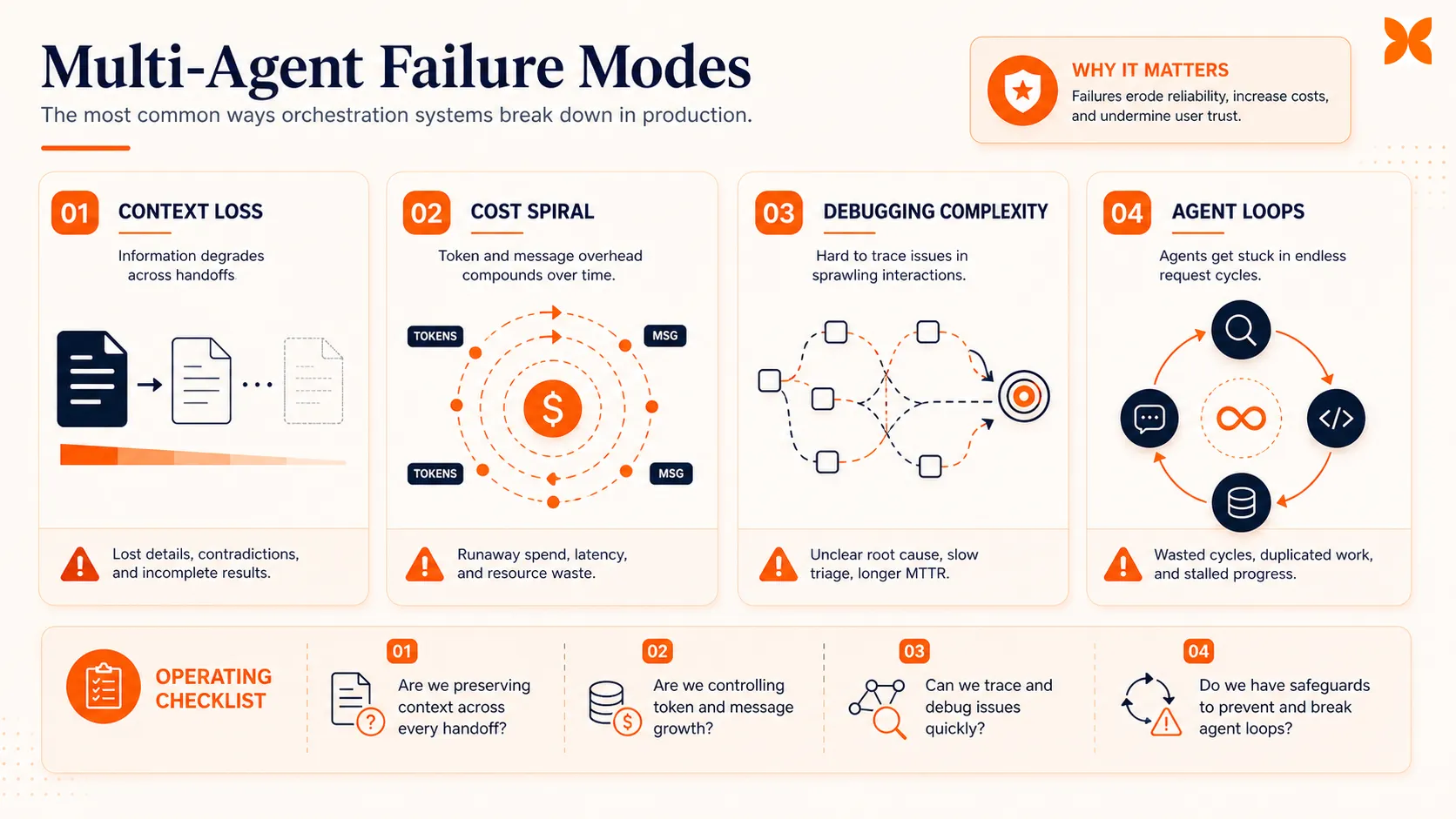
Context loss between agents is the most common issue. When the orchestrator summarizes task results before passing them to the next agent, information gets lost in compression. Agent B might need a detail that Agent A produced but the orchestrator didn’t include in the handoff.
This problem compounds across multiple handoffs. The MAST failure taxonomy, presented at NeurIPS 2025 and validated across 1,600+ execution traces , identifies context transfer failures as one of the three root categories of multi-agent breakdowns.
Cost explosion from inter-agent communication catches teams off guard. Every message between agents is a language model call. An orchestrator that sends detailed instructions to five worker agents and receives detailed responses from each, then summarizes and routes follow-up tasks, can burn through API budgets quickly. At moderate scale, production multi-agent platforms cost $3,200 to $13,000 per month to operate, and much of that goes to inter-agent communication overhead.
Debugging complexity increases non-linearly with the number of agents. When a single agent produces a bad output, you trace its reasoning in one conversation. When an orchestrated system produces a bad output, the error might have originated in Agent A, been passed through the orchestrator, transformed by Agent B, and surfaced in Agent C’s output.
Without proper tracing and logging, finding the root cause becomes a needle-in-a-haystack exercise. This is why observability (structured logging, distributed tracing) is not optional in multi-agent systems. You cannot debug what you cannot trace.
Hallucination propagation is uniquely dangerous in orchestrated systems. If Agent A produces a hallucinated fact, the orchestrator may pass it to Agent B as verified input. Agent B builds on it, and by the time the output reaches the end user, the hallucination has been reinforced by multiple agents and looks credible.
A single agent hallucinating is bad. Multiple agents building on each other’s hallucinations is worse.
Agent loops happen when agents trigger each other in cycles. Agent A asks Agent B for input, Agent B needs clarification from Agent A, and they cycle indefinitely. Without loop detection and hard limits on turns, this can exhaust API budgets in minutes.
McKinsey’s research found that fewer than 10% of organizations have successfully moved AI agents past the pilot stage. Many of the stalled projects hit these exact failure modes. The lesson: plan for failure before you build, not after.
Getting Started with Orchestration
If you’ve read this far and still think you need orchestration (not just want it), here is a practical path that avoids the most common pitfalls.
Step 1: Start with a single agent. Build one agent that handles your entire workflow end to end. Give it the tools it needs. Test it thoroughly. Document where it succeeds and where it consistently fails.
This gives you a baseline and concrete evidence of which steps actually need specialized agents. If you haven’t built an agent before, our guide on how to build an AI agent covers the fundamentals.
Step 2: Identify the failure points. Look for steps where the single agent consistently drops quality: it misses details during research, writes poorly structured code, or fails to catch its own errors in review. These are your candidates for specialization.
Step 3: Split one step at a time. Take the single worst-performing step and build a dedicated agent for it. Connect it to your original agent through a simple orchestrator.
Now you have a two-agent system: the orchestrator delegates one subtask to the specialist and handles the rest itself. Test this setup. Measure whether quality actually improves.
Step 4: Use the orchestrator-worker pattern. Don’t start with hierarchical or peer-to-peer setups. Orchestrator-worker is the easiest to build, monitor, and debug. One agent manages the plan. Specialist agents execute specific subtasks. Keep it flat until you have strong evidence that you need layers.
Step 5: Add observability from day one. Log every inter-agent message. Track latency per agent. Monitor token usage per interaction. Set hard limits on conversation turns to prevent loops. If you cannot trace an error from the final output back to the originating agent, your system is not ready for production.
For the orchestration infrastructure itself, agentic AI frameworks like LangGraph, CrewAI, and AutoGen provide coordination primitives so you don’t have to build handoff logic, shared memory, and agent registries from scratch. Pick one based on your stack and complexity needs.
Platforms like Craze also offer built-in support for agent workflows and automations, which can simplify the coordination layer if you’re not building from the ground up.
The Bottom Line
AI agent orchestration is a powerful pattern for complex, multi-step tasks that overwhelm a single agent. But it is not a default choice. It is an engineering decision with real tradeoffs in cost, complexity, and reliability.
The teams that succeed with orchestration are the ones that start simple, add agents only when they have evidence of single-agent failure, choose the simplest coordination pattern that solves their problem, and invest in observability before they invest in more agents.
If your workflow genuinely needs multiple specialized agents working in coordination, orchestration is the right approach. Just build it with your eyes open.
FAQs
What is AI agent orchestration?
AI agent orchestration is the coordinated management of multiple AI agents working together to complete complex tasks. An orchestrator agent breaks down goals into subtasks, assigns them to specialized agents (a researcher, a coder, a reviewer), manages shared context, and reassembles results. It is the difference between one agent trying to do everything and a team of agents each handling what they do best.
When do you need multi-agent orchestration instead of a single agent?
You need orchestration when a single agent cannot reliably handle the full task. Common signals: the task spans more than three tools or systems, requires different reasoning strategies for different steps, needs parallel processing for speed, or produces better results when a separate agent reviews the output. If a single agent with good tools handles the workflow reliably, orchestration adds complexity without benefit.
What are the main orchestration patterns?
The four common patterns are orchestrator-worker (a central agent delegates to specialists), sequential pipeline (agents pass work in order like an assembly line), hierarchical (multiple layers of orchestrators managing sub-teams), and peer-to-peer (agents negotiate directly without a central controller). Most production systems use orchestrator-worker because it is the simplest to debug and monitor.
What can go wrong with AI agent orchestration?
The most common failure modes are context loss between agents (each agent only sees part of the picture), cost explosion from excessive inter-agent communication, debugging difficulty when errors propagate across multiple agents, and latency buildup from sequential handoffs. Starting with the simplest orchestration pattern and adding complexity only when needed helps avoid these issues.
How do I get started with agent orchestration?
Start with a single agent that handles your workflow end to end. When it consistently fails at specific steps, split those steps into a specialized agent. Use the orchestrator-worker pattern first: one orchestrator agent delegates to one or two specialist agents. Frameworks like LangGraph, CrewAI, and AutoGen provide orchestration primitives so you do not have to build coordination logic from scratch.
More Articles
The 8 Best Lindy AI Alternatives in 2026 (Tested & Compared)

The 8 best Lindy AI alternatives for 2026, anchored to why people leave Lindy, with current pricing, third-party ratings, honest pros and cons, and the best pick for each reason to switch.
The 7 Best Make Alternatives in 2026 (Tested & Compared)
The 7 best Make.com alternatives for 2026, anchored to why people leave Make, with current pricing, third-party ratings, honest pros and cons, and the best pick for each reason to switch.
The 8 Best Zapier Alternatives in 2026 (Tested & Compared)
The 8 best Zapier alternatives for 2026, anchored to why people leave Zapier, with current pricing, third-party ratings, honest pros and cons, and the best pick for each reason to switch.


