
AI Agent vs Chatbot: How They Actually Differ
AI agents and chatbots are not the same thing. Learn the real differences in how they work, what they cost, and which one your team actually needs.

By: Deepit Patil
Co-Founder and CTO
Published
Updated
Edited by Craze Editorial Team · See our Editorial Process
If you’ve been shopping for AI tools recently, you’ve probably noticed something odd. Every vendor now claims their product is an “AI agent.” Last year, the same product was called a chatbot. The features haven’t changed. The marketing has.
This isn’t just branding noise. Gartner found that of the thousands of vendors claiming agentic capabilities, only about 130 actually qualify. The rest are chatbots with a fresh coat of paint. And mixing up the two can cost your team real money and months of wasted integration work.
The confusion matters because chatbots and AI agents solve fundamentally different problems. One answers questions. The other gets work done. Choosing wrong means you’ll either overpay for capability you don’t need or end up with a tool that can’t handle the job.
This guide breaks down the real differences between AI agents and chatbots, what each one actually costs, and a practical framework for deciding which your team needs right now.
TL;DR
- A chatbot responds. An AI agent acts. Chatbots generate text based on your input. Agents reason, plan, use tools, and complete tasks end to end.
- They exist on a spectrum, not in separate boxes. Most production systems use both, and the best approach is to layer agent capabilities on top of a chatbot foundation.
- Agent-washing is rampant. Only about 130 of thousands of AI vendors claiming agentic capabilities actually deliver them, according to Gartner.
- Cost gaps are significant. A chatbot runs under $50K to deploy. Agent systems start at $150K and climb past $400K, with agentic tasks consuming up to 1,000x more tokens.
- Start with chat, add agents where they matter. Deploy a chatbot first, measure where it fails, then add agent capabilities for high-value workflows.
What Chatbots and AI Agents Actually Do
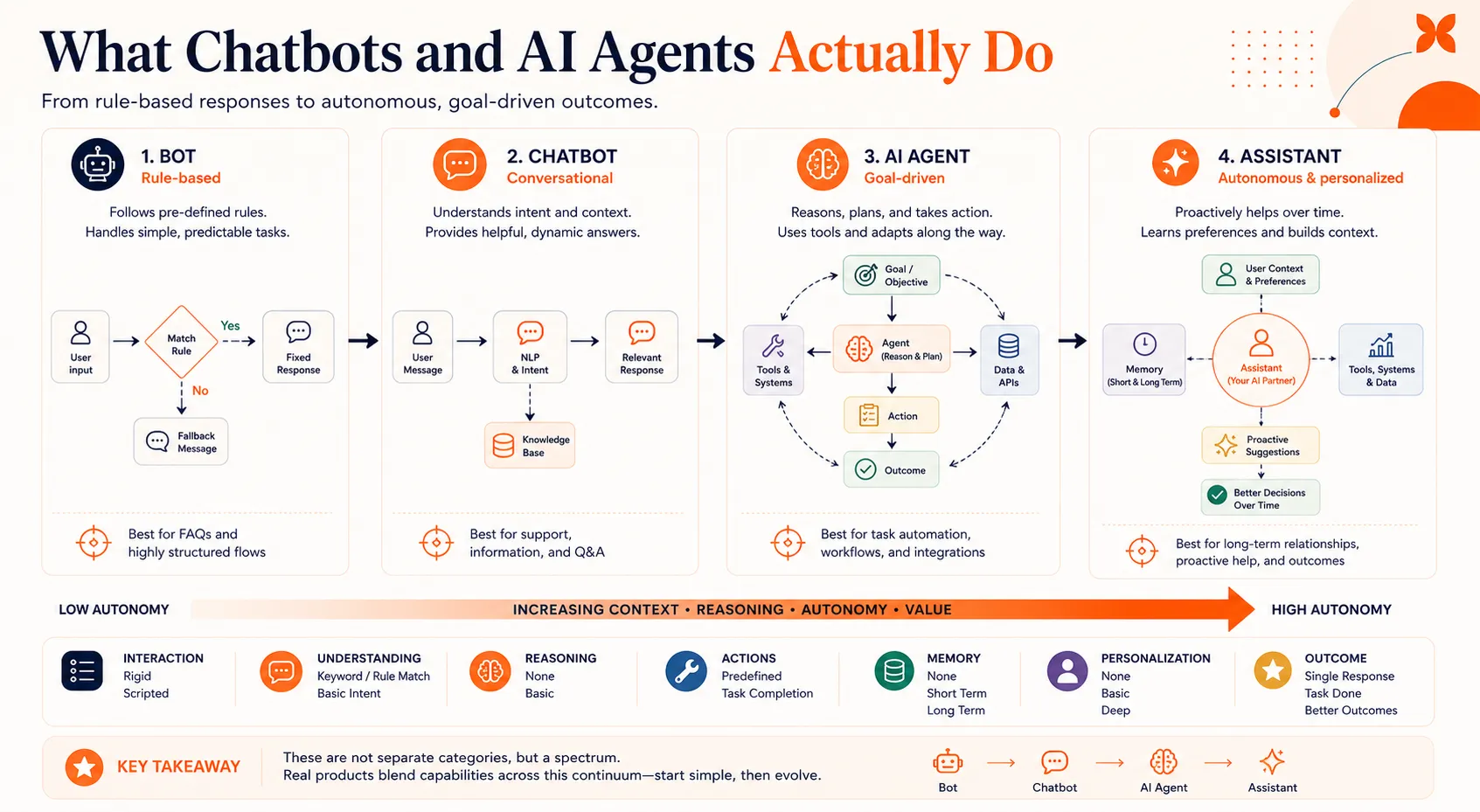
A chatbot is a conversational text responder. It works within defined boundaries, answering questions, routing requests, and surfacing information based on rules or a language model. Think of it as a really good FAQ page that can hold a conversation.
An AI agent is a system that reasons, plans, and takes action using external tools. It doesn’t just tell you what to do. It does it. An agent can check a database, call an API, send an email, and update a record, all as part of completing a single task.
Here’s the simplest way to think about it: a chatbot is one LLM call. An agent is an LLM calling tools in a loop until the job is done.
It helps to see where each fits on a broader scale. Bots follow rigid scripts with no intelligence. Chatbots add natural language understanding but stay within conversational boundaries. Agents add reasoning and tool use. Assistants combine agent capabilities with deep personalization and long-term memory.
Most real products sit somewhere on that spectrum rather than cleanly in one box. That’s why the marketing gets confusing, and why the differences below matter more than the labels.
Five Differences That Actually Matter
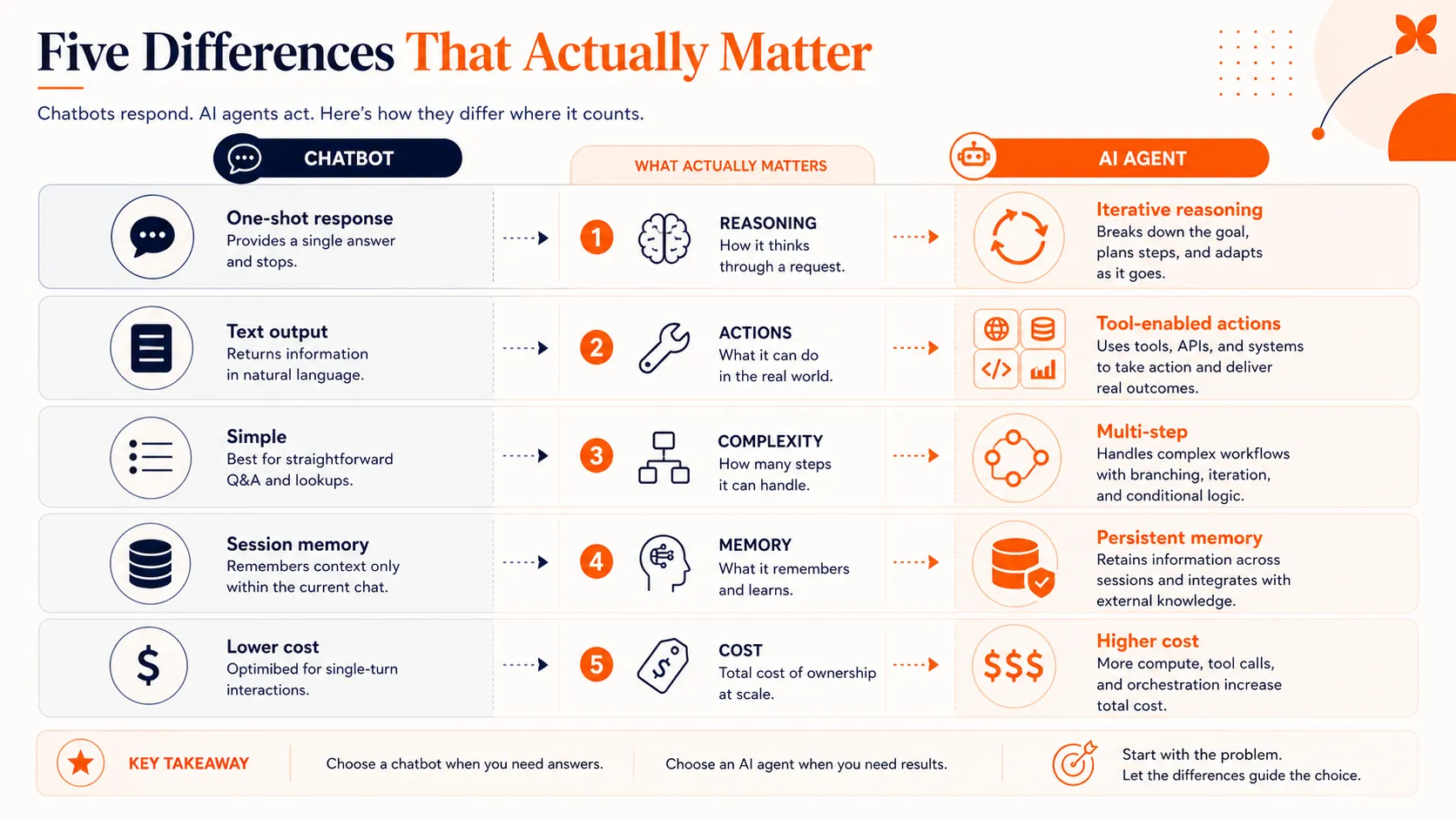
The feature lists on vendor websites won’t help you tell these apart. What matters is how each system behaves when it hits a real problem. Here are five differences that show up in production.
How They Reason
Chatbots process your input and produce a response. The sophisticated ones use large language models, but the pattern is the same: input goes in, output comes out. If your request doesn’t match what the chatbot expects, it gives a generic fallback or asks you to rephrase.
Agents reason through problems using a loop. The most common framework is ReAct (from Yao et al., 2022), where the system perceives a situation, reasons about it, plans a sequence of steps, acts on one step, observes the result, and then decides what to do next. This cycle repeats until the task is complete.
The practical difference shows up when something goes wrong. A chatbot that encounters an unexpected input stalls or deflects. An agent that hits an error can re-plan, try an alternative approach, or ask a clarifying question before continuing. That recovery ability is what separates a tool that handles the happy path from one that handles the real world.
What They Can Do
Chatbots produce text. That’s their output. They can generate helpful, well-written, contextually appropriate text, but the conversation is the entire interaction.
Agents take actions. They connect to APIs, query databases, send emails, update records, trigger workflows, and move data between systems. The text they generate is a byproduct of getting work done, not the end goal.
Here’s a concrete example. A customer wants to reschedule a delivery. A chatbot tells them: “You can reschedule by calling this number or visiting this page.” An agent checks the delivery system, finds available slots, reschedules the order, sends a confirmation email, and tells the customer it’s done. Same request, very different outcome.
This action capability is also what drives differences in agent architecture . Agents need tool integrations, permission systems, and error handling that chatbots simply don’t require.
How They Handle Complexity
Chatbots work best for single-turn interactions or short, linear conversations. “What are your hours?” “How do I reset my password?” “What’s the return policy?” These are chatbot territory, and they handle them well.
Multi-step problems that span multiple systems are where chatbots break down. A Gartner survey of over 5,700 customers found that only 14% of customer service issues are fully resolved through self-service, even though 73% of customers attempt it. The gap between intent and resolution is where frustration builds and abandonment spikes.
Agents are built for exactly these multi-step, cross-system tasks. Need to process a refund that involves checking order history, verifying a return, updating inventory, issuing a credit, and sending a confirmation? That’s a sequence an agent can manage end to end. There are many real-world examples of agents handling these kinds of workflows in production today.
What They Remember
Most chatbots have session memory. They remember what you said earlier in the current conversation, but once the session ends, that context disappears. Your next interaction starts from scratch.
Agents use persistent memory and retrieval-augmented storage. They can recall your preferences, past interactions, and relevant history from previous sessions. Some agent architectures maintain structured memory stores that update over time, so the system actually gets better at helping you the more you use it.
This distinction matters more than it sounds. Memory is what enables an agent to say “Last time you had this issue, we resolved it by adjusting your notification settings. Want me to check those again?” instead of asking you to explain the problem from the beginning every time.
What They Cost
Cost is often the deciding factor when you’re making a real buying decision, so it’s worth getting specific.
A simple chatbot deployment typically costs under $50K, including setup, training data, and basic integrations. Monthly operations run on the lower end of your support budget, and token consumption is predictable.
Agent systems are a different order of magnitude. Initial deployment ranges from $150K to $400K or more, depending on the number of tool integrations and compliance requirements. Monthly operational costs run between $3,200 and $13,000. Research from the Stanford Digital Economy Lab shows that agentic tasks can consume up to 1,000x more tokens than simple chatbot interactions, because agents make multiple LLM calls per task as they reason through their tool-use loops.
Where does that money go? Roughly 40-60% of agent deployment costs go to integrations and compliance, not the AI itself. Connecting to your CRM, ERP, ticketing system, and communication tools, while maintaining security and audit trails, is the expensive part.
That said, agents can deliver outsized returns. McKinsey documented cases where AI-enabled customer service achieved a 40-50% reduction in service interactions and over 20% lower cost-to-serve. The ROI is there, but only when you’re solving a problem that actually needs agentic capabilities.
The Agent-Washing Problem
Now that “AI agent” has become the hottest term in enterprise software, every vendor wants the label. This has created a real problem for buyers.
Agent-washing is when companies rebrand existing chatbot or automation products as “agents” without adding the core capabilities that define agentic AI. It’s the same dynamic that turned every database into a “data lake” and every update into a “digital transformation.” Gartner estimates that 40%+ of agentic AI projects will be canceled by 2027, largely because organizations bought agent-washed products that couldn’t deliver on their promises.
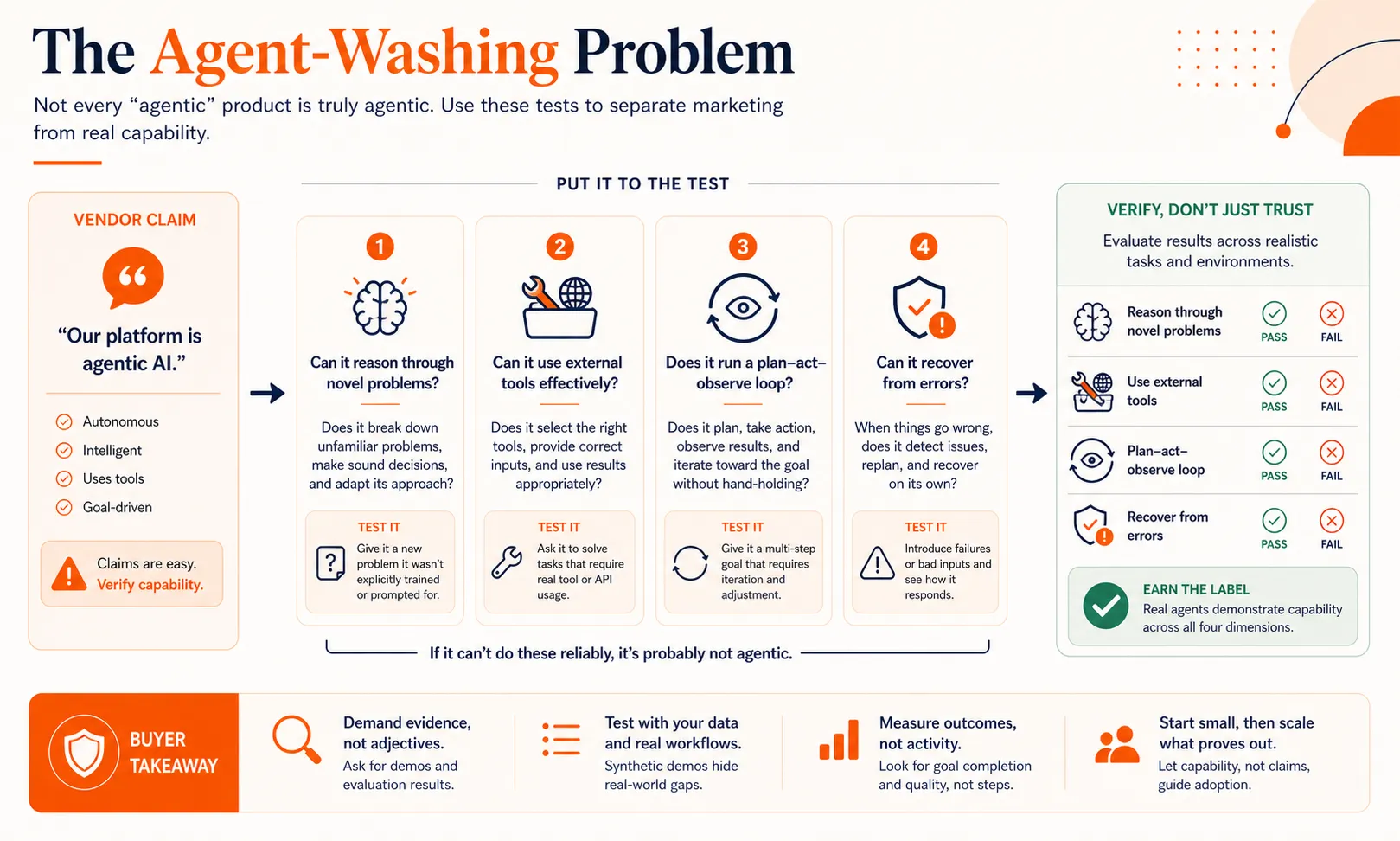
So how do you spot it? Ask four questions about any product claiming to be an AI agent:
- Can it reason through novel problems it hasn’t seen before, or does it only handle pre-programmed scenarios?
- Does it use external tools (APIs, databases, services) to take real actions, or does it only generate text responses?
- Does it have a reasoning loop that plans, acts, observes, and adapts, or does it produce one-shot answers?
- Can it recover from errors mid-task and try alternative approaches, or does it fail and escalate on any unexpected input?
If the answer to most of these is no, you’re looking at a chatbot with better marketing. That’s not necessarily a bad product. It just means you should pay chatbot prices and set chatbot expectations.
Understanding the different types of AI agents can also help you evaluate vendor claims more critically. Not every agent needs every capability, but it should have the core reasoning loop.
How to Decide What Your Team Needs
Forget the labels for a moment. The decision comes down to three factors: how complex are the tasks, do they require taking action in other systems, and how many systems are involved?
Here’s a simple formula: Complexity x Action Required x Systems Involved = Solution Type.
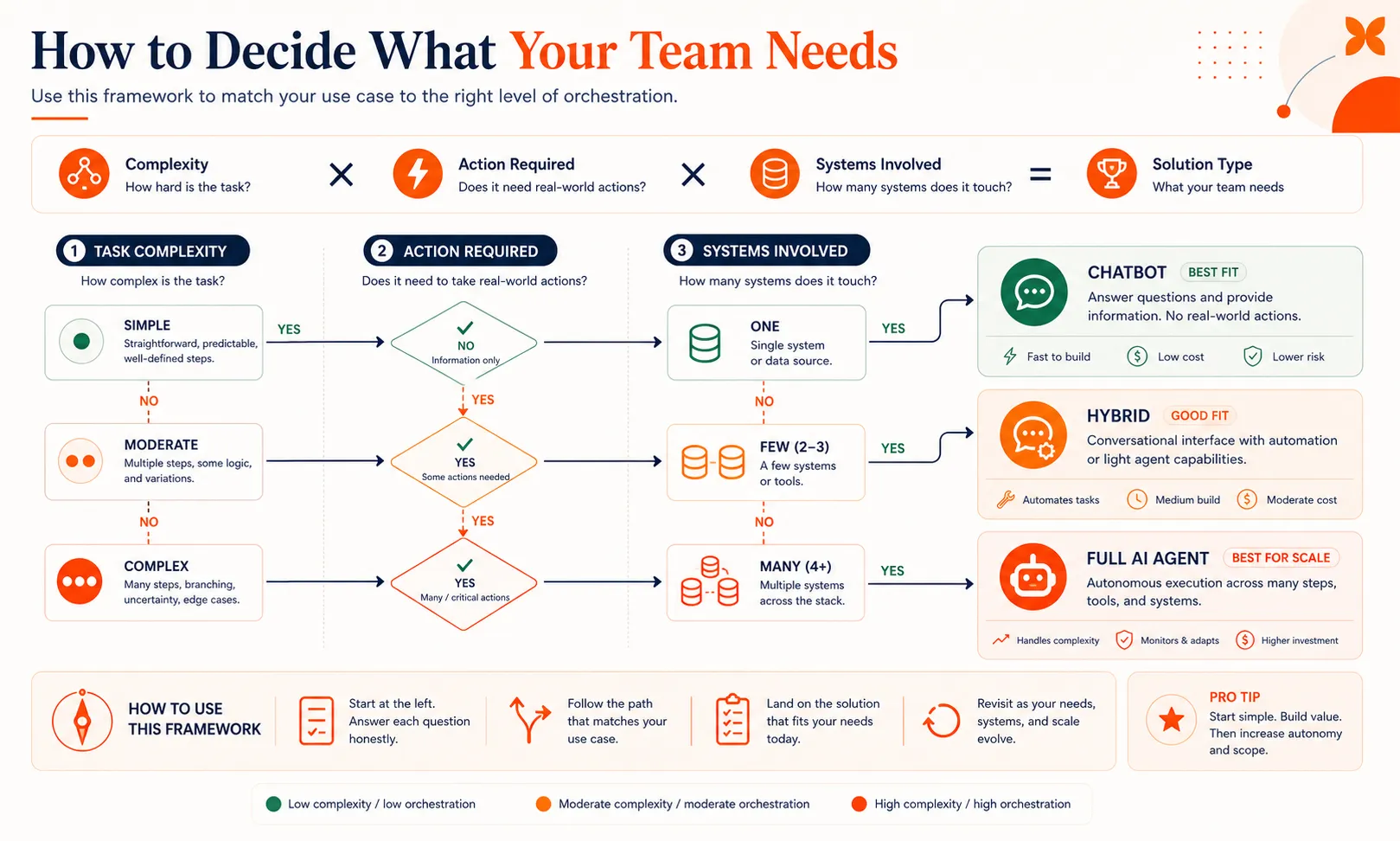
- Low complexity, no actions, one system: a chatbot handles this perfectly. FAQ responses, information lookup, basic routing.
- Medium complexity, some actions, two to three systems: a chatbot with some automation can work, or a lightweight agent.
- High complexity, multiple actions, three or more systems: you need agent capabilities.
For most teams, the right answer is a hybrid approach. A chatbot handles the 60-70% of interactions that are straightforward. An agent layer takes over for tasks that require action across systems. Humans stay in the loop for edge cases and high-stakes decisions.
Here’s a realistic timeline. A chatbot can be deployed in two to three weeks with good training data. Adding an agent layer on top takes another four to six weeks, primarily because of the integration and testing work. You don’t have to build both at once.
Start with the chatbot. Measure where it fails. The patterns in those failures tell you exactly where agent capabilities will deliver the most value. Our guide to building an AI agent walks through the technical steps for adding that layer when you’re ready.
The biggest mistake teams make is buying an agent platform for chatbot-level problems. You end up paying 3-8x more for capabilities you won’t use for months. The second biggest mistake is sticking with a chatbot when your users clearly need actions taken on their behalf, and watching abandonment rates climb.
Start With Chat, Add Agents Where They Matter
Chatbots and AI agents aren’t competing categories. They’re points on a spectrum, and the best production systems use both. Start with a chatbot to handle the volume, identify the workflows where users need real actions taken, and add agent capabilities there first.
Craze lets you start with chat and layer in agents and workflows as your needs grow, so you’re not locked into a decision you’ll outgrow in six months.
FAQs
Is ChatGPT an AI agent or a chatbot?
It is both, depending on how you use it. In its default mode, ChatGPT functions as a chatbot: you ask a question, it responds with text. When you enable features like web browsing, code execution, or plugins, it starts behaving more like an agent because it is using tools and reasoning through multi-step tasks. The line is not clean, and that is actually a good illustration of why this is a spectrum rather than a binary choice.
Can a chatbot become an AI agent?
Yes. A chatbot becomes more agentic when you add three things: tool access (the ability to call APIs, query databases, or trigger workflows), a reasoning loop (so it can plan, act, observe results, and adapt), and persistent memory (so it learns from past interactions). Many production systems follow exactly this upgrade path, starting as chatbots and gaining agent capabilities over time.
Are AI agents replacing chatbots?
No. Agents and chatbots serve different needs, and the trend in production systems is hybrid layering, not replacement. Chatbots remain the most cost-effective solution for high-volume, straightforward interactions. Agents handle the complex, multi-step tasks that chatbots cannot. Gartner projects that 33% of enterprise software will include agentic AI by 2028, but that means the other 67% will still rely on simpler conversational interfaces.
How much more do AI agents cost than chatbots?
A straightforward chatbot deployment typically costs under $50K, while agent systems range from $150K to over $400K for initial setup. Monthly operations for agents run $3,200 to $13,000, and agentic tasks can consume up to 1,000x more tokens than chatbot interactions. The majority of the cost gap comes from integrations and compliance requirements, not the AI models themselves.
What is agent-washing?
Agent-washing is when vendors rebrand existing chatbot or automation products as AI agents without adding true agentic capabilities like reasoning loops, tool use, and error recovery. Gartner found that only about 130 of the thousands of vendors claiming agentic features actually deliver them. To avoid agent-washed products, test whether the system can reason through novel problems, use external tools, and recover from mid-task errors.
More Articles
The 8 Best Lindy AI Alternatives in 2026 (Tested & Compared)

The 8 best Lindy AI alternatives for 2026, anchored to why people leave Lindy, with current pricing, third-party ratings, honest pros and cons, and the best pick for each reason to switch.
The 7 Best Make Alternatives in 2026 (Tested & Compared)
The 7 best Make.com alternatives for 2026, anchored to why people leave Make, with current pricing, third-party ratings, honest pros and cons, and the best pick for each reason to switch.
The 8 Best Zapier Alternatives in 2026 (Tested & Compared)
The 8 best Zapier alternatives for 2026, anchored to why people leave Zapier, with current pricing, third-party ratings, honest pros and cons, and the best pick for each reason to switch.


