
How to Use AI in Recruiting: A Step-by-Step Guide
A practical, stage-by-stage playbook for using AI across the recruiting workflow, with specific prompts, real practitioner examples, and honest notes on what works and what does not.

By: Kabir Nagral
Co-Founder and CEO
Published
Updated
Edited by Craze Editorial Team · See our Editorial Process
You know AI could make your recruiting faster. You have heard the stats, seen the product demos, maybe even tried ChatGPT for a job description or two. But when it comes to actually weaving AI into your daily workflow across sourcing, screening, outreach, and scheduling, most recruiters hit the same wall: where exactly do I start, and what actually works?
It is a fair question. LinkedIn’s 2025 Future of Recruiting report found that 37% of organizations are now actively integrating generative AI into recruiting, up from 27% the year before, and teams using AI report significant time savings on routine tasks. But saving time only matters if you know where to apply AI. Many teams are still experimenting with scattered tools while their inbox fills with 250 more applications.
This guide walks through every major recruiting stage, from writing the job description to scheduling the interview, and shows exactly how AI fits in. Not as a concept, but as a workflow you can try today. Each section includes specific prompts, real examples from practitioners, and honest notes on what works and what does not.
TL;DR
- AI delivers the biggest recruiting gains when you apply it to specific workflow stages (sourcing, outreach, scheduling) rather than flipping a single “AI recruiting” switch.
- Start with one stage where your team burns the most manual time. For most teams, that is sourcing or interview scheduling.
- This guide includes specific prompts and workflow examples for each stage so you can try things immediately with free tools.
- Not everything works equally well. AI resume screening and AI phone screens have real limitations in 2026, and the guide covers those honestly.
- The advice spans free tools (ChatGPT, Claude, Perplexity) and dedicated platforms, so it is useful whether your AI budget is zero or six figures.
Build the Job Foundation with AI
Before any candidate enters the picture, AI can sharpen the two tasks that kick off every hire: the job requisition and the job description.
Create Structured Job Requisitions
The intake meeting ends. You have a page of rough notes, a vague wish list from the hiring manager, and a Slack message that says “we need someone ASAP.” Turning that into a clean, structured requisition used to take 30 to 45 minutes of formatting and follow-up. AI cuts that to minutes.
How recruiters are doing it now:
-
Structured intake prompts. Paste your call notes or hiring manager email into ChatGPT or Claude with a prompt like: “Convert these hiring manager notes into a structured job requisition. Include role title, department, reporting line, key responsibilities (5 max), must-have qualifications, nice-to-have qualifications, salary range if mentioned, and start date.” The output gives you a clean starting point that needs human editing for context, not from-scratch formatting.
-
Automated intake workflows. Diane Rocher, a recruiting operations specialist, built 10+ recruitment AI workflows in under a month using Zapier. When a new hiring request arrives via Google Form, automated workflows store the job details, send approval emails to the right departments, alert the Slack hiring channel, and trigger intake preparation, all without manual intervention.
-
Market research at intake. Recruiter Shiv Brodie (featured in Metaview’s “How I AI” series) uses Perplexity instead of ChatGPT for company intelligence and market research during intake. Perplexity pulls real-time salary data, talent availability signals, and competitor hiring patterns, which helps set realistic expectations with hiring managers before the req is even approved.
Write Better Job Descriptions in Minutes
Job description writing is one of the highest-adoption, lowest-risk AI applications in recruiting. According to BCG’s 2025 report on AI in recruitment, 70% of companies using AI in HR use it for content creation, including job descriptions.
A ChatGPT prompt that actually works:
Act as a senior recruiter at a [industry] company with [X] employees. Write a 300 to 400 word job description for a [role title]. The role reports to [manager title] and sits in the [department] team. Emphasize impact and growth opportunity. Avoid clichés like “fast-paced environment,” “rockstar,” and “wear many hats.” Separate must-have from nice-to-have qualifications. Use a conversational, professional tone.
This prompt works because it follows the five elements that make AI prompts effective for recruiting: role definition (senior recruiter), specific context (industry, company size, department), clear output format (word count, sections), constraints (what to avoid), and tone direction.
Then run a bias audit: After generating the JD, paste it back with this follow-up: “Review this job description for gendered language, exclusionary requirements, unnecessary degree requirements, and barriers that might discourage qualified candidates from underrepresented groups. Suggest specific alternatives.”
Tools like Textio do this automatically at scale, but the ChatGPT two-step (draft, then audit) costs nothing and catches the most common issues.
The honest limitation: AI-written job descriptions tend to sound the same across companies. The output gets you 80% of the way there, but a recruiter who knows the team culture, the real day-to-day, and what makes the role genuinely interesting needs to edit the last 20%. Skip that step and every JD reads like it came from the same template.
Source Candidates with AI
Sourcing is where recruiters report the most transformative AI impact. Nearly half of tech recruiters spend at least 30 hours a week on sourcing alone, according to Dice. AI is changing that from manual Boolean grinding to natural-language discovery.
Move Beyond Boolean: Natural Language Sourcing
The shift is fundamental. Instead of constructing complex Boolean strings and running them across multiple platforms, you describe the candidate you want in plain English and let AI find them.
A practical sourcing workflow:
- Define the ideal candidate profile. Feed your job description into ChatGPT or Claude and ask it to extract a structured profile: title variations, core skills, target companies, experience range, and location preferences.
- Run AI-powered searches. Use a sourcing platform with natural language search. Describe what you need (“Senior backend engineer with distributed systems experience, 5+ years, currently at a Series B or later startup, open to remote”) and let the AI scan databases, professional networks, and public profiles.
- Review and shortlist. AI scores and ranks candidates against your profile. Review the top matches and shortlist the strongest ones for outreach.
- Enrich profiles. Pull verified contact information (email, phone) from data providers for your shortlisted candidates.
- Draft personalized outreach. AI generates tailored messages based on each candidate’s background.
The impact is real: recruiters using AI sourcing agents report handling 6 to 8 roles per month compared to 3 with manual search filters alone.
Teams that want to move faster are building AI-assisted sourcing workflows using multi-model AI workspaces. In Craze, for example, you can use different LLMs to research target companies, generate candidate profiles, draft natural-language search queries, and compare results across models, all in one workspace instead of switching between ChatGPT, LinkedIn, and a spreadsheet.
Generate Boolean Strings with ChatGPT
For recruiters who still work in LinkedIn Recruiter or job board search bars, AI makes Boolean string construction a 30-second task instead of a 15-minute one.
Try this prompt:
Act as a tech recruiter specializing in [industry]. Generate three variations of a Boolean search string for LinkedIn Recruiter to find a [role title] in [location]. The ideal candidate must have experience with [skill 1], [skill 2], and [skill 3]. They should have worked at a [company type]. Exclude candidates from [exclude criteria]. Provide one short string and two comprehensive ones.
This is one of the quickest wins in AI recruiting. The prompt takes seconds to write, the output is immediately usable, and it often surfaces search combinations a recruiter would not have thought of on their own. Recruiters who want to go deeper into AI-powered candidate sourcing workflows or compare dedicated sourcing tools can build on these fundamentals.
Screen and Shortlist Smarter (Without Over-Automating)
Resume screening is where AI recruiting gets complicated. It is one of the most widely adopted AI applications (a majority of companies using AI in hiring deploy it for resume screening, according to multiple 2024-2025 surveys), but it is also one of the most problematic.
What AI Resume Screening Actually Does
At its core, AI screening tools:
- Extract skills and qualifications from resumes and match them against job requirements
- Score candidates on a scale (typically 1 to 10) based on how well they fit the role
- Flag potential issues like unexplained employment gaps or short tenures
- Categorize applications into tiers (shortlisted, pending review, not a match)
Some teams build custom workflows for this. The n8n automation community has open-source templates where GPT-4 agents parse CVs, score candidates, detect red flags, extract soft skills, and auto-sort resumes into folders, processing 50 to 100+ candidates per week.
The AI vs. AI Problem
Here is what most “AI in recruiting” guides will not tell you: AI resume screening is in an arms race with AI resume writing. According to a Career Group Companies survey covered by CNBC, roughly 65% of job candidates now use AI at some point in their application process, with resume writing being a top use case. When AI evaluates AI-written content, the result is pattern recognition against noise.
Practitioners on Reddit are blunt about it. Multiple recruiters on r/recruiting report that AI resume screening “does not screen resumes well” for anything beyond high-volume, standardized roles. It works for customer service or warehouse positions where requirements are clear-cut. It struggles for nuanced roles where strategic thinking, cultural fit, or cross-functional experience matters.
A Balanced Approach
The practical advice from recruiters who use AI screening successfully:
- Use AI to filter out, not filter in. Set AI to remove clear mismatches (wrong location, missing critical certification, wildly insufficient experience) rather than to identify top candidates. The false-negative cost of missing a good person is higher than the false-positive cost of reviewing one extra resume.
- Treat AI scores as a sorting mechanism, not a decision. Use the 1-to-10 score to prioritize your review order, not to auto-reject anyone below a threshold.
- Combine with sourcing. If your sourcing tool surfaces AI-ranked candidates, you can effectively merge sourcing and initial screening into one step. Instead of screening 300 inbound applications, you source 30 strong-fit candidates and screen from that curated pool.
Personalize Candidate Outreach with AI
Getting candidates to respond is one of the most frustrating parts of recruiting. Generic outreach gets ignored. AI-personalized outreach gets replies.
Why Generic Outreach Is Dead
The data is clear:
- Multi-channel outreach (email plus LinkedIn plus SMS) generates 3 to 4x more replies than single-channel approaches, with combined engagement rates around 67% compared to 41% for email only.
- AI-personalized sequences that reference specific candidate projects and skills consistently outperform generic templates. Ashby’s analysis of over 500,000 email sequences found reply rates jumped 30 to 40% year over year as teams adopted personalization.
- Around 42% of candidate replies come from follow-up messages, not the initial email.
The key insight: true personalization means referencing a candidate’s specific projects, skills, career trajectory, or published work. Inserting a first name and company is not personalization. It is mail merge.
Build Multi-Step Outreach Sequences
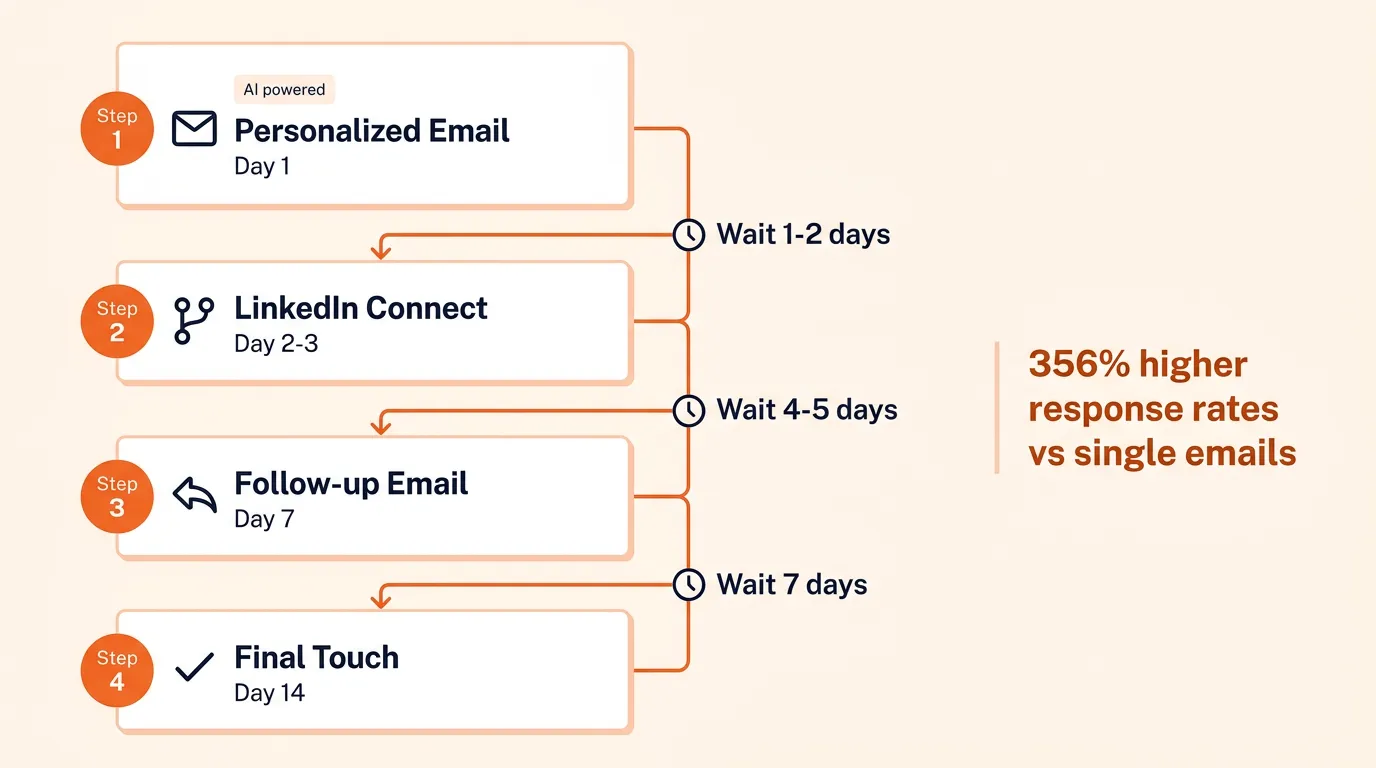
The highest-performing outreach follows a multi-step, multi-channel structure:
- Email 1 (Day 1): Personalized introduction referencing something specific about the candidate’s background. Keep it under 150 words with a clear call to action.
- LinkedIn connection request (Day 2-3): Short, personal note. Under 80 words.
- Email 2 (Day 7): Follow-up with an additional value proposition or detail about the role. Same thread as Email 1.
- Email 3 (Day 14): Final touch with a soft close.
Three-touchpoint sequences produce 356% higher response rates than single emails. Longer sequences of six to seven emails can achieve up to 450% higher rates.
An outreach prompt you can use right now:
Write a recruiting outreach email for a [role] at [company]. The candidate has [X years] experience at [current company] working on [specific project or skill]. Keep it under 150 words. Tone: professional but conversational. Mention [one specific thing about the candidate’s background]. Include a clear next step. Do not use phrases like “exciting opportunity” or “I came across your profile.”
Automate Without Losing the Human Touch
Setting up outreach sequences manually (drafting each email, scheduling sends, tracking responses) eats hours. AI outreach platforms automate the mechanics while letting you control the quality.
Dedicated outreach platforms (Lemlist, Instantly, Woodpecker) automate the sequence mechanics: scheduling, follow-up triggers, daily send limits, and response tracking. The better ones include a manual-approval mode that lets you review each AI-drafted email before it reaches a candidate, so nothing robotic goes out under your name. If you prefer to consolidate tools, a multi-model AI workspace like Craze lets you draft and iterate outreach copy across different LLMs, test tone variations, and build reusable prompt templates for your recruiting sequences.
Automate Interview Scheduling
If there is one area where AI delivers immediate, uncontroversial value, it is interview scheduling. Every recruiter knows the pain: coordinating calendars across three interviewers, two time zones, and a candidate who can only meet Tuesday or Thursday afternoons.
Why Scheduling Is the Easiest Win
Practitioners on Reddit consistently cite scheduling as the simplest AI investment. One recruiter put it plainly: the real bottleneck is “30 minutes per panel interview spent copy-pasting invites and rechecking time zones.”
The numbers back it up:
- Recruiters using AI scheduling tools report being able to schedule 2.5x more interviews per week.
- Teams using AI scheduling consistently see significant reductions in time-to-first-interview, mostly from eliminating the back-and-forth emails that stall the process.
- AI-powered reminders cut no-show rates by up to 50%.
Set Up AI-Powered Scheduling
The general workflow across AI scheduling tools:
- Connect calendars. Sync Google Calendar, Outlook, or other calendar providers so the tool sees real-time availability.
- Configure availability rules. Set interview windows, buffer times between meetings, and maximum interviews per day per interviewer.
- Send self-scheduling links. Candidates pick from available slots that work for all required interviewers. No back-and-forth emails.
- Automate reminders. The tool sends confirmation and reminder emails (or SMS) to both candidates and interviewers.
- Handle rescheduling. When conflicts arise, the tool finds the next available slot and updates everyone automatically.
The “one platform” advantage matters here. When sourcing, outreach, and scheduling live in the same system, candidate data flows without manual re-entry. Look for tools that keep these steps connected so you are not toggling between four different apps to move a candidate from outreach to interview.
Use AI for Interview Prep and Assessment
AI is changing how recruiters prepare for and conduct interviews, but this is the stage where the line between helpful and harmful gets thin.
Generate Interview Questions and Scorecards
This is one of the safest, highest-value AI applications in recruiting. Instead of scrambling to write questions 10 minutes before an interview, use AI to generate a structured question set days in advance.
A prompt that produces usable interview prep:
Generate 10 structured interview questions for a [role title] with [X years] experience. Include 3 behavioral questions using the STAR format, 3 technical questions relevant to [key skills], 2 situational questions, and 2 culture-fit questions. For each question, provide: the competency being assessed, what a strong answer includes, and red flags to watch for.
The output gives interviewers a consistent, competency-mapped framework. AI-generated scorecards (ask for a 1 to 5 grading rubric for each question) help eliminate gut-feel hiring and ensure every interviewer evaluates the same criteria.
Free tools like Junia.ai and InterviewFlowAI offer dedicated interview question generators with built-in scoring rubrics, if you want something more structured than a ChatGPT prompt.
Record, Transcribe, and Summarize Interviews
This is another high-ROI, low-controversy application. Tools like Metaview transcribe interviews and generate structured notes within 2 to 5 minutes, with 90 to 95% transcription accuracy. They also track interviewer patterns like talk-to-listen ratios and question consistency, saving recruiters 3 to 5 hours per week.
The reason this works without backlash: AI helps the interviewer be better, not replace them. The candidate still has a human conversation. The notes are just more accurate and faster.
What to Be Careful With
Not all AI interview tools are equal, and some are actively hurting the candidate experience.
- AI phone screening has been widely criticized by recruiters. Multiple practitioners on r/recruiting describe AI phone screens as having “bombed” and being “a huge waste of money.” Candidates report them as impersonal and frustrating.
- Video interview emotion analysis (scoring candidates based on facial expressions, tone, or word choice) is biased and unreliable. Brookings research found significant gender and racial discrimination in these systems.
- Candidate sentiment is clear: Pew Research found that 66% of U.S. adults would not want to apply for a job if AI were used to make hiring decisions.
The practical takeaway: use AI to help interviewers prepare and take better notes. Do not use it to replace the human interview.
Where AI Falls Short (and Where to Keep the Human Touch)
Honesty about AI’s limitations is not pessimism. It is how you avoid wasting time and money on tools that do not deliver.
The abandonment numbers are sobering. According to Gartner’s Q1 2025 data, roughly 42% of companies abandoned most of their AI projects in 2025, up from 17% the prior year. Meanwhile, 88% of HR leaders report no significant business value from their AI tools, often because they lack a credible AI recruiting ROI measurement framework.
The signal quality problem is growing. As covered in the screening section, the arms race between AI-written applications and AI screening tools means that over-reliance on automated filtering can actually lengthen your pipeline instead of shortening it.
Bias is a real risk, not a theoretical one. Amazon famously scrapped its internal AI recruiting model after it showed bias against women. Brookings research documented gender and racial discrimination in resume screening systems. Enforcement is active: NYC Local Law 144 requires bias audits for automated employment decision tools, and Illinois requires candidate consent for AI video analysis.
Candidate experience is at stake. BCG found that 52% of candidates would decline an otherwise attractive offer if they had a bad experience with AI during the hiring process. Your employer brand is on the line.
What to do about it:
- Always keep a human making the final hiring decision. AI filters, scores, and recommends. People decide.
- Audit AI tools for bias regularly. If your vendor cannot explain how their model works and what data it was trained on, that is a red flag.
- Be transparent with candidates. Tell them when AI is involved and what it is doing. Most candidates are fine with AI scheduling; many are not fine with AI making screening decisions without human review.
- Measure whether AI is actually helping. Track time-to-fill, quality-of-hire, and candidate satisfaction before and after AI adoption. If the numbers do not improve, the tool is not working. Teams that also need recruitment process automation beyond AI (RPA, workflow engines, integration platforms) should evaluate those tools alongside their AI stack, not in isolation.
How to Get Started: A Practical Framework
If the sections above feel like a lot, here is the simple version.
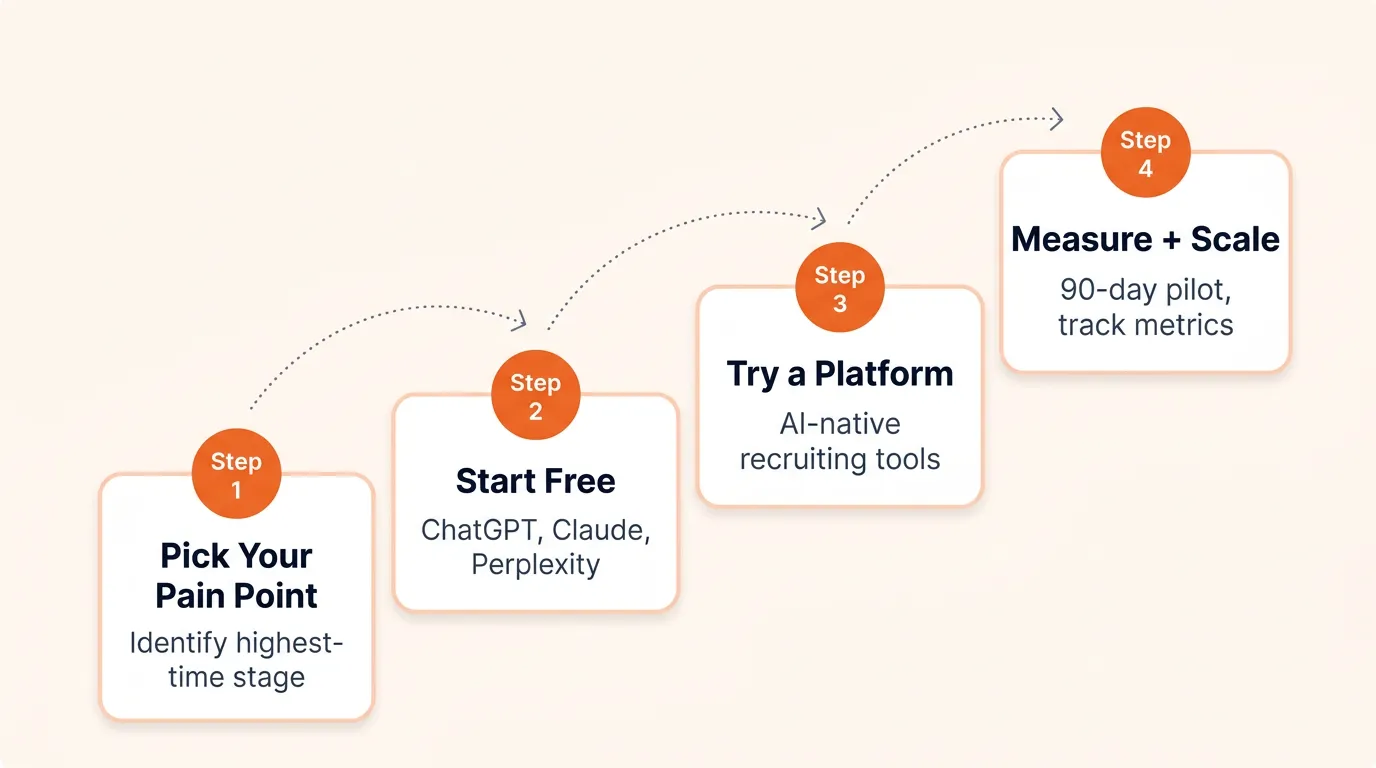
Pick Your Highest-Pain Stage
Where does your team spend the most manual time?
- Drowning in sourcing? Start there. Natural language AI sourcing delivers the fastest visible impact.
- Scheduling chaos? AI scheduling is the lowest-risk, highest-ROI starting point.
- Low response rates? AI-personalized outreach sequences can double your reply rate.
- Buried in applications? AI screening helps manage volume (with human oversight on final decisions).
Start with Free Tools
You do not need an enterprise platform to begin. These tools cost nothing:
- ChatGPT or Claude: Write job descriptions, generate Boolean strings, draft outreach messages, create interview questions and scorecards.
- Perplexity: Research companies, map talent markets, pull salary benchmarks during intake.
- Free generators: Junia.ai for interview questions, WritingTools.ai for job descriptions.
Spend a week using free AI tools for your daily tasks. You will quickly see which stage benefits most and whether a dedicated platform is worth evaluating.
Try a Dedicated Platform
When free tools hit their limits (no automation, no ATS integration, no candidate tracking), evaluate a recruiting platform with built-in AI. Our guide to the best AI recruiting tools compares 15 platforms across features, pricing, and team fit.
If you want a single workspace for the AI side of recruiting, Craze is a multi-model AI workspace where you can chat with different LLMs, build AI agents for repeatable recruiting tasks (candidate research, outreach drafting, interview prep), and automate workflows across models. It is free to start and useful whether your recruiting AI budget is zero or six figures.
Measure Before You Scale
Run a 90-day pilot on one stage. Track these metrics:
- Time-to-fill for roles where AI is involved vs. your baseline
- Response rates on AI-personalized outreach vs. your previous rates
- Candidate satisfaction (a quick post-process survey works)
- Recruiter time saved per week on the targeted task
Expand only when the data shows real improvement. The recruiters getting the most from AI are not the ones with the biggest budgets. They are the ones who picked one stage, tested it, measured the results, and expanded from there.
Conclusion
AI in recruiting is not about replacing recruiters. It is about reclaiming the hours lost to manual sourcing, templated outreach, and calendar coordination so you can focus on what actually fills roles: relationships, judgment, and strategy.
The technology works well at specific stages today. Job descriptions, candidate sourcing, outreach sequences, interview scheduling, and interview prep all have proven AI workflows that deliver measurable time savings. Screening and automated assessments still have real limitations that require honest evaluation.
Start with one stage, try it with free tools, measure the results, and scale what works. The recruiters getting the most from AI are not waiting for a perfect tool. They are building practical workflows, keeping the candidate experience front and center, and treating AI as what it is: a powerful addition to the recruiting toolkit, not a replacement for the people who use it.
FAQs
How can AI be used for recruiting?
AI fits into nearly every recruiting stage. It writes and optimizes job descriptions, sources passive candidates using natural language search, screens resumes against job requirements, personalizes outreach at scale, automates interview scheduling across time zones, generates structured interview questions with scorecards, and transcribes interviews into actionable notes. The highest-impact applications today are sourcing, outreach sequences, and scheduling, where AI consistently saves recruiters several hours per week.
Which AI tool is best for recruitment?
It depends on your biggest bottleneck and budget. For job descriptions and interview prep, free tools like ChatGPT or Claude work well. For sourcing, outreach, and scheduling, dedicated AI recruiting platforms like Gem, Ashby, and HireVue serve teams of different sizes. Multi-model AI workspaces like Craze let you combine different LLMs and build custom recruiting agents for tasks like candidate research, outreach drafting, and interview prep. Start with one pain point and choose the tool that solves it, rather than buying an all-in-one platform before you know what you need.
How do I get started with AI in recruiting?
Pick the recruiting stage where your team loses the most time. For most teams, that is sourcing or scheduling. Start with a free tool like ChatGPT to draft job descriptions or outreach messages, then try a dedicated platform when you need automation and ATS integration. Run a 90-day pilot on one stage, track time-to-fill and response rates, and expand only when the data shows improvement.
What is the 30% rule in AI recruiting?
The 30% rule is a general industry guideline suggesting that AI should influence no more than roughly 30% of a hiring decision, with the remaining 70% coming from human judgment. It is not a regulation or legal requirement. The principle behind it is that AI works best as a filtering and efficiency tool, while relationship assessment, cultural fit, and final hiring decisions benefit from human evaluation.
More Articles
The 8 Best Lindy AI Alternatives in 2026 (Tested & Compared)

The 8 best Lindy AI alternatives for 2026, anchored to why people leave Lindy, with current pricing, third-party ratings, honest pros and cons, and the best pick for each reason to switch.
The 7 Best Make Alternatives in 2026 (Tested & Compared)
The 7 best Make.com alternatives for 2026, anchored to why people leave Make, with current pricing, third-party ratings, honest pros and cons, and the best pick for each reason to switch.
The 8 Best Zapier Alternatives in 2026 (Tested & Compared)
The 8 best Zapier alternatives for 2026, anchored to why people leave Zapier, with current pricing, third-party ratings, honest pros and cons, and the best pick for each reason to switch.


