AI Agent vs AI Workflow: Start Simple, Scale Smart
AI agents decide their own steps. Workflows follow a fixed path. Learn key differences, workflow patterns, cost tradeoffs, and when to combine both.

By: Deepit Patil
Co-Founder and CTO
Published
Updated
Edited by Craze Editorial Team · See our Editorial Process
Every team building with AI hits the same fork in the road: do you need an AI agent or an AI workflow?
The two terms get tossed around interchangeably, but they solve different problems at different costs. Pick a workflow when you needed an agent, and you’ll hit a ceiling the moment tasks stop being predictable. Pick an agent when a workflow would have done the job, and you’re paying five to twenty times more per task for flexibility you never use. Most failed AI projects don’t fail because of bad models. They fail because the team chose the wrong level of automation.
This guide breaks down how AI workflows and AI agents actually work, when to use each one, and how to pick the right level of automation without overspending or overbuilding.
TL;DR
- Workflows follow your steps. Agents decide their own. AI workflows execute a predefined path you design. AI agents receive a goal and figure out how to get there. Choose based on how predictable your task is.
- Workflows win on cost, speed, and reliability. For repeatable tasks, workflows are faster and cheaper. Agents handle open-ended problems but cost 5 to 20x more per task.
- Four workflow patterns cover most needs. Prompt chaining, routing, parallelization, and orchestrator-workers solve most automation use cases without full agent autonomy.
- Start simple, then scale up. Most teams should begin with workflows and add agent capabilities only where the workflow breaks down. This hybrid approach is called an agentic workflow.
- Craze lets you build both in one platform, choosing the right AI model for each step. Free to use.
What Is an AI Workflow?
An AI workflow is a structured sequence of AI-powered steps where you control what happens at each stage. You define the path. You set the order. The LLM handles individual tasks within that pipeline, but it doesn’t decide what comes next.
Think of it like following a recipe. Every time you make the dish, the steps are the same. The AI might handle individual steps (summarize this, classify that, translate this), but you decide the sequence and the ingredients.
Key characteristics that define AI workflows:
- Predefined paths: every step is mapped out before execution begins
- Deterministic execution: the same input produces the same sequence of actions
- Explicit control flow: you (or your code) decide what happens when
- High predictability: outputs are consistent, auditable, and easy to debug
Workflows shine when the task is repeatable, the process is stable, auditability matters, or you’re running cost-sensitive operations at high volume. If your team processes 500 support tickets a day using the same classification and routing logic, a workflow handles that reliably without burning through your LLM budget.
The real power of AI workflows becomes clear when you understand the patterns available to you.
Common AI Workflow Patterns
Anthropic’s research on building effective agents identified five common workflow patterns. Here are the four that cover most use cases.
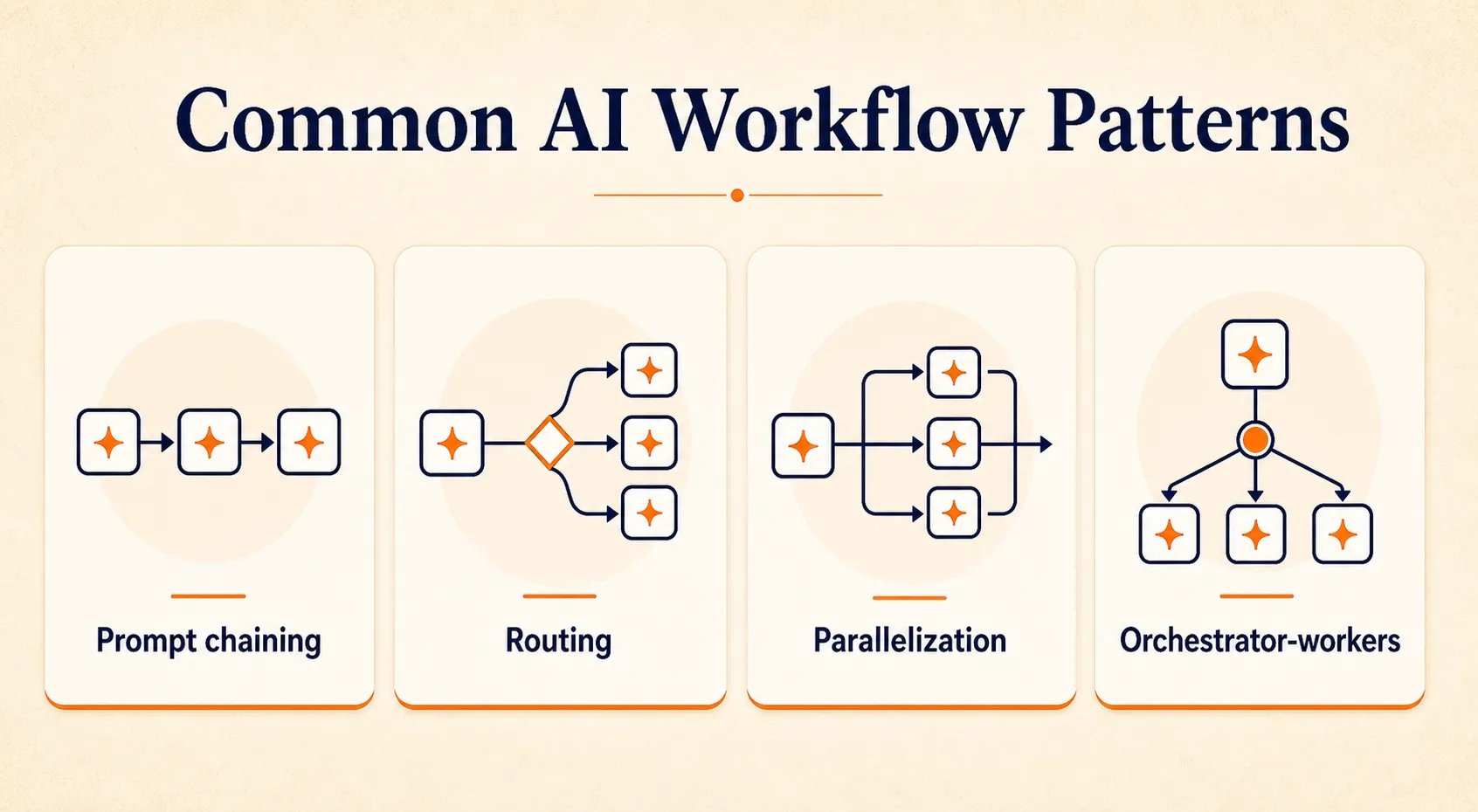
Prompt Chaining
Break a complex task into sequential LLM calls, where each step’s output feeds into the next.
Example: A customer support pipeline that classifies an incoming ticket, checks the knowledge base for a matching solution, drafts a response, and translates it into the customer’s language. Four steps, one after another, each building on the last.
Best for: multi-stage content processing, document generation with quality gates, and sequential data transformation.
Routing
Classify an input and direct it to a specialized handler.
Example: An incoming customer message gets analyzed: is it a billing question, a technical issue, a feature request, or a complaint? Based on the classification, the system routes it to the right response template and tone.
Best for: customer support triage, multi-domain question answering, and request prioritization.
Parallelization
Run multiple independent LLM operations simultaneously on the same input.
Example: Take a blog draft and simultaneously fact-check claims, check brand voice compliance, score readability, and flag sensitive content. Four checks running at once instead of sequentially.
Best for: content moderation, multi-criteria evaluation, and concurrent quality checks.
Orchestrator-Workers
A central LLM dynamically breaks a task into subtasks and delegates them to specialized workers.
Example: A quarterly report needs writing. The orchestrator breaks it into sections, assigns each to a specialist model, then collects and merges the outputs into a cohesive document.
Best for: complex document generation, multi-step research, and parallel processing that requires final synthesis.
These patterns handle most automation needs well. But some tasks resist being mapped to fixed steps. That’s where AI agents come in.
What Is an AI Agent?
An AI agent is an autonomous system that receives a goal, decides which tools to use, takes action, evaluates the result, and iterates until the job is done. Instead of following your instructions step by step, the agent figures out its own path.
If a workflow is like following a recipe, an agent is like hiring a professional chef. You say “make dinner for four, one guest is vegetarian.” The chef figures out the menu, checks the fridge, shops for what’s missing, adjusts timing, and serves the meal. You gave the goal; they handled the rest.
Agents shine when the task is open-ended, when you can’t predict the number of steps upfront, when the situation requires adaptive reasoning, or when the work spans multiple tools and systems. Research projects, complex troubleshooting, and personalized content creation are all territory where agents add real value.
But that autonomy comes with tradeoffs. Agents run slower, cost more per task, and are harder to debug. Understanding what makes them tick helps you decide when those tradeoffs are worth it.
Core Components of an AI Agent
Four components work together to give an agent its capabilities.
Reasoning Engine
The LLM at the center processes inputs, plans actions, and decides what to do next. Most agents use some version of the ReAct pattern: the agent thinks about the situation (Thought), takes an action like calling a tool (Action), observes the result (Observation), then decides the next step. This loop repeats until the task is complete.
Tool Access
Agents can connect to external systems: web search, databases, APIs, file systems, calculators, and more. The key difference from workflows is that the agent autonomously selects which tools to use based on the task. A research agent might search the web, read a PDF, query a database, and write to a spreadsheet, all without being told which tools to use or when.
Memory
Short-term memory holds the conversation and task history within a single run. Long-term memory retains knowledge across interactions for continuity. Without memory, agents forget what they’ve already tried and end up repeating themselves or going in circles.
Autonomy
This is the big one. The agent decides when a task is done, not the developer, and it runs without predefined control flow. This is what makes agents powerful for complex problems, and it’s also what makes them harder to predict and debug.
Now that you know how each approach works under the hood, here’s how they compare side by side.
AI Agent vs AI Workflow: Key Differences
| Dimension | AI Workflow | AI Agent |
|---|---|---|
| Control flow | Predefined, explicit | Dynamic, autonomous |
| Decision-making | Hard-coded logic | LLM-driven reasoning |
| Tool usage | Orchestrated by your code | Self-selected by the agent |
| Flexibility | Fixed paths, repeatable | Adapts to new situations |
| Speed | Fast (deterministic path) | Slower (reasoning loops) |
| Cost per task | Lower (fewer LLM calls) | Higher (multiple reasoning cycles) |
| Reliability | High, predictable outputs | Variable, depends on reasoning quality |
| Debugging | Easy: trace each step | Hard: opaque decision chain |
| Best for | Repeatable, well-defined tasks | Open-ended, complex tasks |
These aren’t binary categories. Real production systems exist on a spectrum between fully deterministic workflows and fully autonomous agents. The most effective systems combine both, and the best teams match their approach to the specific demands of each task.
The table clarifies the differences. But knowing which approach to use for your specific task takes a few more questions.
When to Use an AI Workflow vs an AI Agent
Use Cases Where AI Workflows Win
Customer Support Triage
Classify incoming tickets, route them to the right team, and draft an initial response. Same steps every time, high volume, and auditability matters. A prompt chaining workflow handles this faster and cheaper than an agent ever could.
Content Production Pipeline
Generate a draft, check brand voice, fact-check, and format for publishing. Sequential quality gates that you want to control. If one check fails, the whole pipeline pauses, and you know exactly where it stopped.
Data Processing and Extraction
Pull information from invoices, validate it against existing records, flag exceptions, and route for approval. Rule-based with LLM-powered extraction at specific steps. Predictable, auditable, and scalable to thousands of documents a day.
Employee Onboarding Automation
Send a welcome email, assign training modules, schedule a check-in, and update the HR system. Every new hire follows the same path. Compliance-sensitive steps stay exactly where you put them.
Use Cases Where AI Agents Win
Open-Ended Research
“Research this company’s competitive landscape and produce a briefing.” The agent decides what to search, which sources to read, what to include, and when the brief is thorough enough to deliver. You couldn’t map those steps in advance because they depend on what the agent finds along the way.
Complex Customer Interactions
A customer asks a question that spans billing, technical troubleshooting, and account history. The agent investigates across multiple systems, synthesizes the findings, and responds with a complete answer. No single predefined path covers the range of possible questions.
Personalized Outreach at Scale
“Draft a personalized email to each of these 50 prospects based on their LinkedIn profiles and recent company news.” Each email requires different research, different angles, and different messaging. An agent adapts its approach for every prospect.
Coding and Debugging
“Fix this bug.” The agent reads the codebase, identifies the issue, searches documentation, writes the fix, and runs tests. The number of steps varies every time depending on the problem.
How to Decide: A Practical Checklist
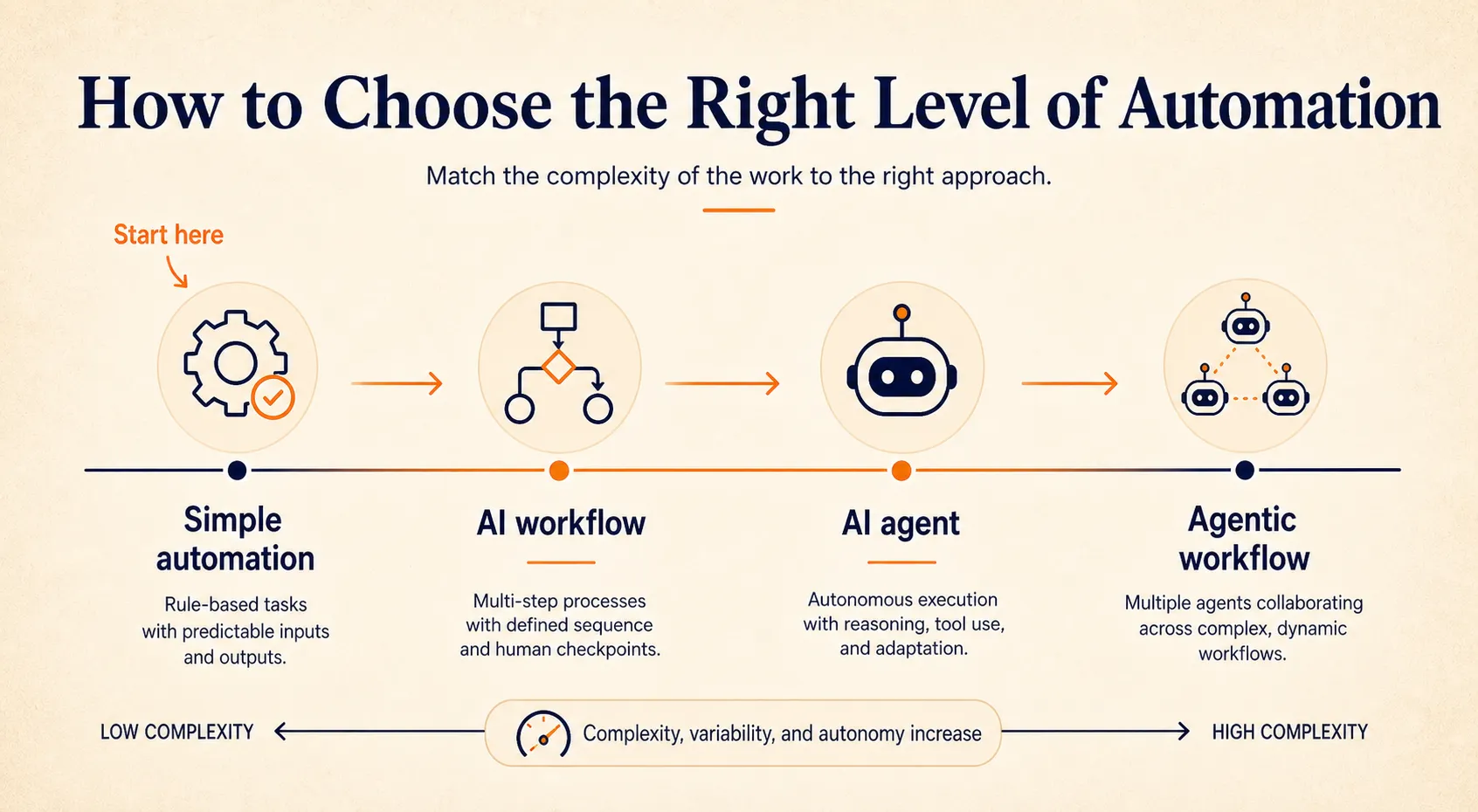
Anthropic’s team, after working with dozens of companies building agents, arrived at a clear recommendation: start with the simplest solution that works, and add complexity only when needed. That maps to a spectrum:
Simple automation → AI workflow → AI agent → Agentic workflow
Before you build, run through these five questions:
- Can you list every step before starting? If yes, a workflow is enough. If the steps depend on what the AI discovers along the way, you need an agent.
- Does the task need the AI to choose its own tools? If the AI must decide what to search, which API to call, or which system to check, that’s agent territory.
- Is auditability or compliance critical? Workflows give you a clear trace of every step. Agents make decisions that are harder to audit. If compliance matters, lean toward a workflow or an agentic workflow with human checkpoints.
- Is the task cost-sensitive or high-volume? Agents involve multiple LLM calls per task (think, act, observe, repeat). That can run 5 to 20 times more expensive per task than a single-pass workflow.
- Does the task span multiple systems and need human approval gates? This is the sweet spot for agentic workflows: workflow structure with agent intelligence at the decision points.
Platforms like Craze let you start with a workflow and add agent capabilities as your needs grow, so you don’t have to choose one approach permanently.
Most tasks don’t need an autonomous agent. But the ones that do can’t be forced into a rigid workflow. The next step for many teams is combining both.
Agentic Workflows: The Best of Both
An agentic workflow uses a structured pipeline for routine operations and embeds AI agents at specific decision points where dynamic reasoning is needed. The workflow provides the skeleton (sequence, checkpoints, human approvals, error handling). Agents provide intelligence at the nodes where fixed rules aren’t enough.
Here’s what this looks like in practice with a claims processing pipeline:
- Receive and extract (workflow step): Claim comes in. The system extracts data from submitted documents using a structured extraction template.
- Investigate (agent step): An AI agent researches the claim details, searches internal records for matching cases, cross-references policy terms, and assesses complexity. The number of steps varies by claim.
- Route for review (workflow step): If the claim exceeds a dollar threshold or the agent flags high complexity, it routes to a human reviewer with the agent’s findings attached.
- Draft resolution (agent step): Based on the investigation and policy guidelines, an agent drafts a resolution recommendation. It adapts its reasoning based on claim type, precedent, and coverage terms.
- Close and log (workflow step): The system logs the decision, sends a notification to the claimant, and closes the case.
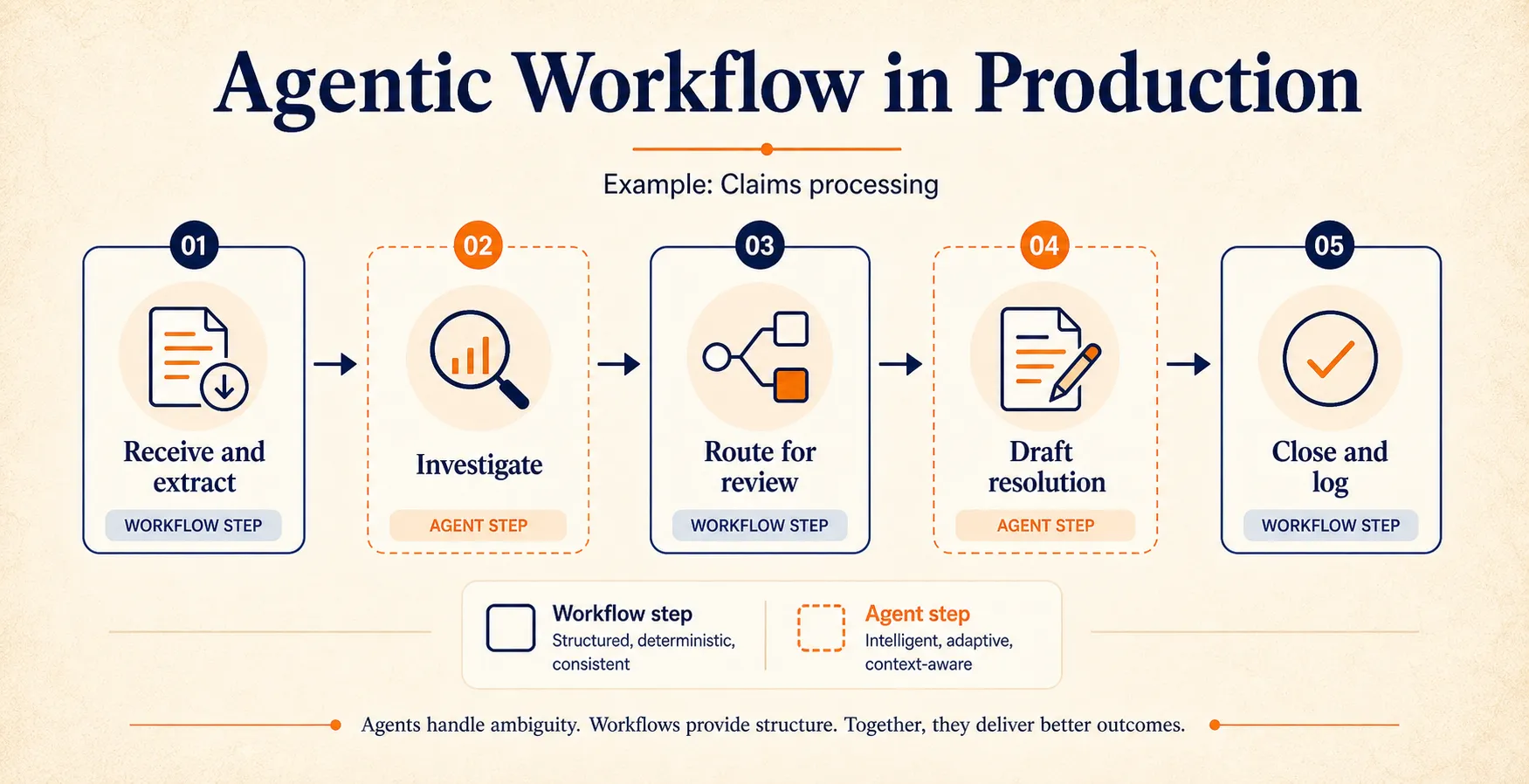
This pattern is gaining traction for good reasons. You get governance (a clear audit trail at every workflow step), reliability (structured checkpoints catch errors early), flexibility (agents handle the parts that resist fixed rules), and cost efficiency (you’re only paying for agent reasoning where it adds value).
This is how most production AI systems actually work today. The agents making headlines aren’t running free. They’re embedded inside structured pipelines, handling the decision points that matter most while workflows keep everything else predictable and auditable.
If you want to understand how AI agents differ from agentic AI as a broader concept, we break down that distinction separately.
Knowing the right pattern is half the job. The other half is avoiding the mistakes that derail teams who have the right idea but the wrong execution.
Common Mistakes When Choosing Between Agents and Workflows
Calling Everything an “Agent”
Many products marketed as “AI agents” are actually workflows with an LLM step. The distinction matters more than you might think: true agents carry higher cost, latency, and debugging overhead. If a system follows the same sequence every time, it’s a workflow, regardless of what the marketing says.
A quick test: does the system decide its own steps, or does it follow a fixed path? If every run looks the same, you’ve got a workflow wearing an agent’s name tag.
Starting Too Complex
Agent loops involve multiple LLM calls per task. The reasoning cycle (think, select a tool, execute, observe the result, repeat) can run five to twenty times per task. For high-volume operations like processing 1,000 support tickets a day, that cost multiplier adds up fast.
A useful rule of thumb: if the task looks the same every time, a workflow will be both faster and cheaper. You can always upgrade to an agent later if the workflow starts breaking down on edge cases.
Skipping Governance
Agent decision-making is opaque. When an agent chooses its own path, tracing why it made a specific decision can be difficult. In regulated industries or high-stakes processes, that’s a problem.
This is exactly why agentic workflows are gaining traction in enterprise settings. You get the structured audit trail of a workflow at every checkpoint, with agent intelligence only at the nodes where you need adaptive reasoning. Teams that skip governance end up with agents they can’t audit, can’t explain to stakeholders, and eventually can’t justify keeping in production.
All three mistakes point to the same underlying principle: match the complexity of your solution to the complexity of your task.
Start Simple, Scale Smart
The choice between an AI agent and an AI workflow isn’t really a choice between two competing tools. It’s a question of complexity: how much does your task actually need?
Start with workflows for the structured, repeatable work. Reach for agents when the task genuinely needs adaptive reasoning and autonomous tool use. If you want to go deeper, our guide on how to build an AI agent walks through the process step by step.
Combine both into agentic workflows when you need structure and flexibility in the same pipeline. The simplest approach that solves your problem is almost always the right one.
If you’re ready to try both approaches in one place, Craze lets you chat, build agents, run workflows, and schedule automations with any AI model. It’s free to use.
FAQs
What is the main difference between an AI agent and an AI workflow?
An AI workflow follows predefined steps you design in advance. An AI agent receives a goal and decides its own steps, tools, and approach dynamically. The core difference is who controls the execution: you or the LLM. Workflows give you predictability and lower costs. Agents give you flexibility for tasks where the steps can't be mapped out ahead of time.
When should I use an AI agent instead of a workflow?
Use an agent when you can't predict the steps a task requires before starting, or when the task needs adaptive reasoning (like open-ended research or complex troubleshooting). Use a workflow when the task is repeatable, cost-sensitive, or requires auditability. For most teams, the best approach is to start with a workflow and add agent capabilities only at the specific steps where the workflow breaks down.
What is an agentic workflow?
An agentic workflow combines the structure of a predefined pipeline with agent-level intelligence at key decision points. It uses workflow steps for routine operations (data extraction, routing, logging) and embeds AI agents where dynamic reasoning is needed (investigation, drafting, adaptive responses). This hybrid pattern gives you both the reliability of workflows and the flexibility of agents.
Are AI agents more expensive than workflows?
Generally, yes. Agents run multiple LLM reasoning cycles per task (think, act, observe, repeat), which means more API calls and higher latency. A task that takes one LLM call in a workflow might take five to fifteen calls in an agent loop. For high-volume, repeatable tasks, workflows are significantly more cost-effective. Reserve agents for tasks where the added cost buys you meaningfully better outcomes.
Can you combine AI agents and workflows?
Yes, and most production systems do. The typical pattern is to use a workflow for the overall pipeline structure and insert agents at specific steps where dynamic decision-making is needed. For example, a workflow might classify and route a support ticket (fixed steps), then hand off to an agent that researches the issue and drafts a personalized response (dynamic steps).
What are the main AI workflow patterns?
The four most common patterns are prompt chaining (sequential LLM steps where each output feeds the next), routing (classify an input and direct it to a specialized handler), parallelization (run multiple checks simultaneously on the same input), and orchestrator-workers (a central LLM breaks a task into subtasks and delegates them to specialists). Anthropic's research identifies a fifth pattern, evaluator-optimizer, where one LLM generates output and another evaluates it in a loop until quality meets a threshold.
More Articles
The 8 Best Lindy AI Alternatives in 2026 (Tested & Compared)

The 8 best Lindy AI alternatives for 2026, anchored to why people leave Lindy, with current pricing, third-party ratings, honest pros and cons, and the best pick for each reason to switch.
The 7 Best Make Alternatives in 2026 (Tested & Compared)
The 7 best Make.com alternatives for 2026, anchored to why people leave Make, with current pricing, third-party ratings, honest pros and cons, and the best pick for each reason to switch.
The 8 Best Zapier Alternatives in 2026 (Tested & Compared)
The 8 best Zapier alternatives for 2026, anchored to why people leave Zapier, with current pricing, third-party ratings, honest pros and cons, and the best pick for each reason to switch.