
AI Agent Team: What It Is, How It Works, and How to Build One
Learn what an AI agent team is, how multiple AI agents collaborate using coordination patterns, and how to build your first agent team step by step using no-code tools and platforms available today.

By: Deepit Patil
Co-Founder and CTO
Published
Updated
Edited by Craze Editorial Team · See our Editorial Process
You ask ChatGPT to research competitors, summarize findings, draft a report, and format it for your team. It works, sort of. But you’re babysitting every step, copying outputs between prompts, and losing context along the way. By the time the report is done, you’ve spent more time managing the AI than doing the actual thinking.
Now imagine a different setup: you describe the project once, and a team of AI agents handles the rest. One agent researches, another analyzes, a third writes the report, and a coordinator routes the work between them. You review the final output, not every intermediate step.
That’s what an AI agent team does. And in 2026, you don’t need to be a developer to build one. Gartner predicts 40% of enterprise applications will embed task-specific AI agents by end of this year. Multi-agent systems, where specialized agents collaborate under coordination, are the next phase of how teams use AI at work.
This guide covers what AI agent teams are, how they work, and how to build your first one using tools available today.
TL;DR
- What it is: An AI agent team is a group of specialized AI agents that work together on complex tasks, each handling a defined role and coordinated by a manager agent or workflow.
- How it works: A coordinator breaks tasks into steps, routes them to specialist agents (researcher, writer, analyst), and assembles the final output, all without you managing every handoff.
- Who it’s for: Any knowledge worker, founder, or team lead who wants to automate multi-step workflows without managing every prompt manually.
- How to build one: Start with 2 agents in a simple chain, pick a no-code platform (Craze, Taskade, Lindy, or similar), validate with real tasks, then scale gradually.
- Key reality check: Over 80% of AI projects fail to deliver business value, according to RAND Corporation data. Clear roles and simple coordination matter more than the number of agents you run.
What Is an AI Agent Team?
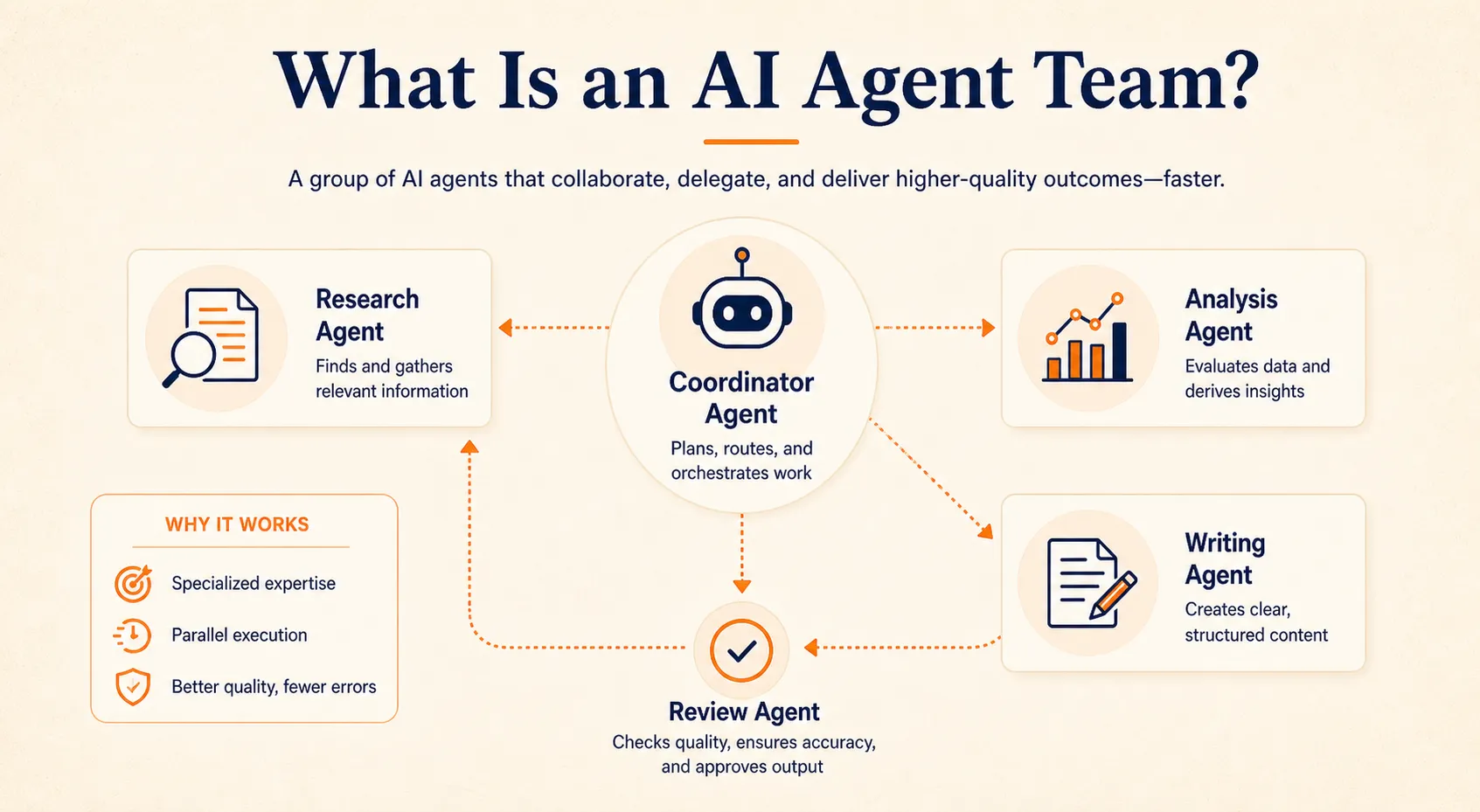
An AI agent team is a group of AI agents , each with a specific role, that collaborate to handle tasks too complex or multi-step for a single agent to manage well.
Think of it like a human team. A project manager coordinates the work, a researcher gathers information, a writer turns findings into a deliverable, and a reviewer checks quality before anything goes out. An AI agent team mirrors that same structure, but with specialized AI agents filling each role.
The key difference from using a single AI chatbot is focus. Instead of one generalist trying to handle everything (and often losing quality along the way), each agent concentrates on one job and passes its output to the next. A research agent gathers data, a drafting agent writes, a review agent checks accuracy, and a coordinator routes the work between them.
This isn’t theoretical. In May 2026, Nature published research on two multi-agent systems, Robin and Co-Scientist, that automate scientific discovery by having specialized agents generate hypotheses, design experiments, and analyze results collaboratively.
For most teams, though, the practical version is simpler: a few agents handling a repeatable workflow like content production, lead research, or weekly reporting, so you can focus on the decisions that actually need a human. Understanding the concept is one thing; here’s how the pieces actually work together.
How AI Agent Teams Work
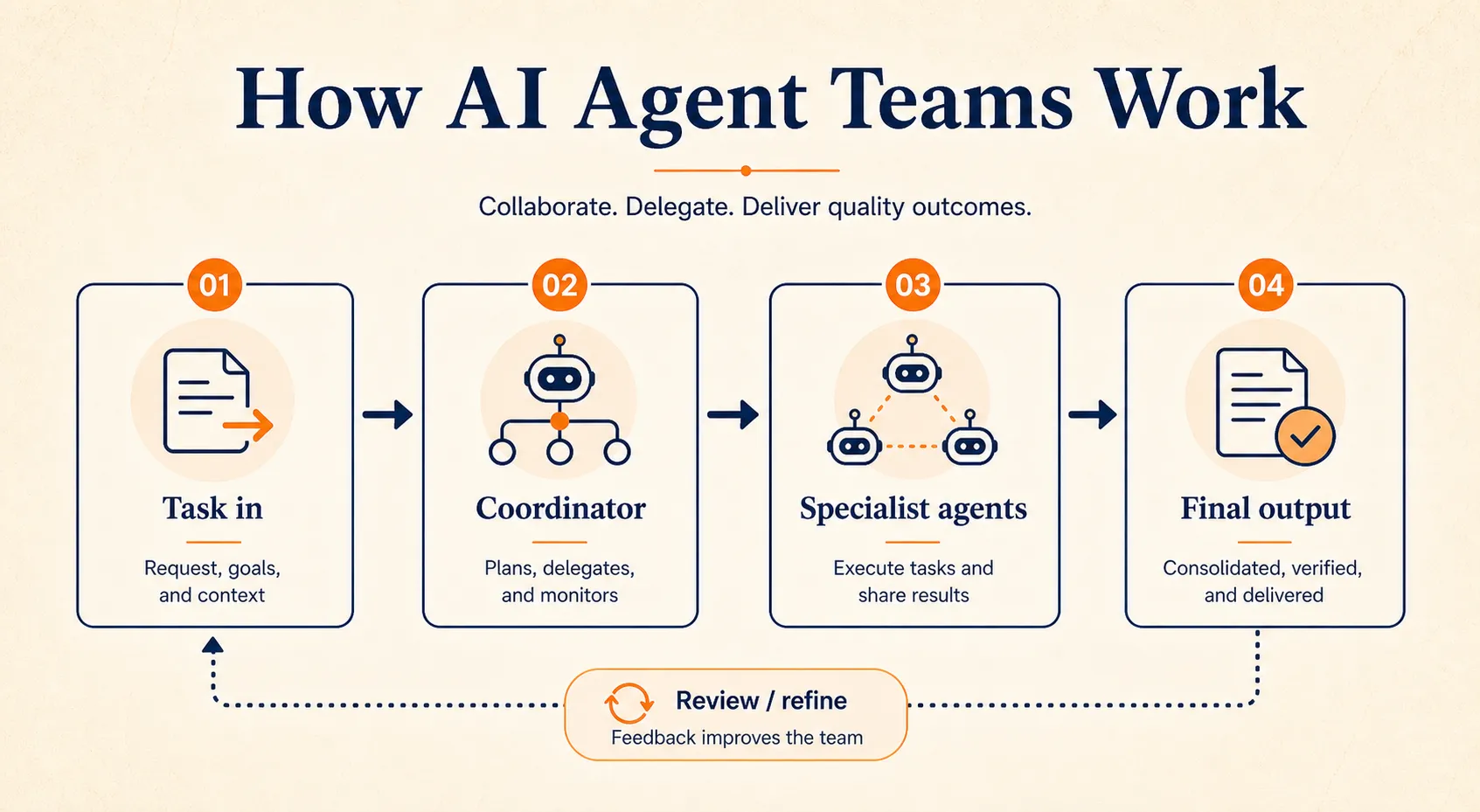
Three core mechanics make agent teams function: role specialization, coordination patterns, and handoffs.
Roles and Specialization
Each agent in a team has one clear job. You define what tools it can access, what instructions it follows, and what output it produces. Think of it as writing a job description for an AI team member.
Common roles include a research agent that pulls data from specific sources, an analysis agent that identifies patterns or compares options, a writing agent that produces drafts or summaries, and a review agent that checks outputs against quality criteria. The specifics depend on your workflow, but the principle stays the same: narrow roles produce better results than asking one agent to do everything.
Coordination Patterns
How work flows between agents is the structural backbone of any agent team. Three patterns cover the vast majority of use cases, and you don’t need technical knowledge to understand them.
Chain (sequential)
Agent A finishes its task, hands the output to Agent B, then Agent B passes to Agent C. Like an assembly line. This works best for linear workflows where each step depends on the previous one, such as research, then draft, then review.
Fan-out (parallel)
Multiple agents work on different parts of the same project at the same time, and then results merge. Like splitting a research project across team members. This is useful when tasks can be divided independently, such as analyzing five competitors simultaneously.
Manager-worker (hierarchical)
A coordinator agent receives the overall task, breaks it into subtasks, assigns them to specialist agents, reviews outputs, and decides next steps. Like a team lead delegating to specialists. This pattern handles complex projects where routing and judgment calls are involved.
Most real-world agent teams start with a simple chain and only add complexity when they genuinely need it.
Communication and Handoffs
When agents pass work to each other, the output of one agent becomes the input for the next. Good platforms handle this automatically. You define the workflow, set the order, and the platform manages the data transfer between steps.
When you’re choosing a platform, pay attention to how it handles handoffs. Can agents share context? Can you inspect intermediate outputs? These details matter more than the number of agents you can technically run.
The mechanics are straightforward once you see them in action. The harder part is designing the right team for your specific workflow.
How to Build Your First AI Agent Team
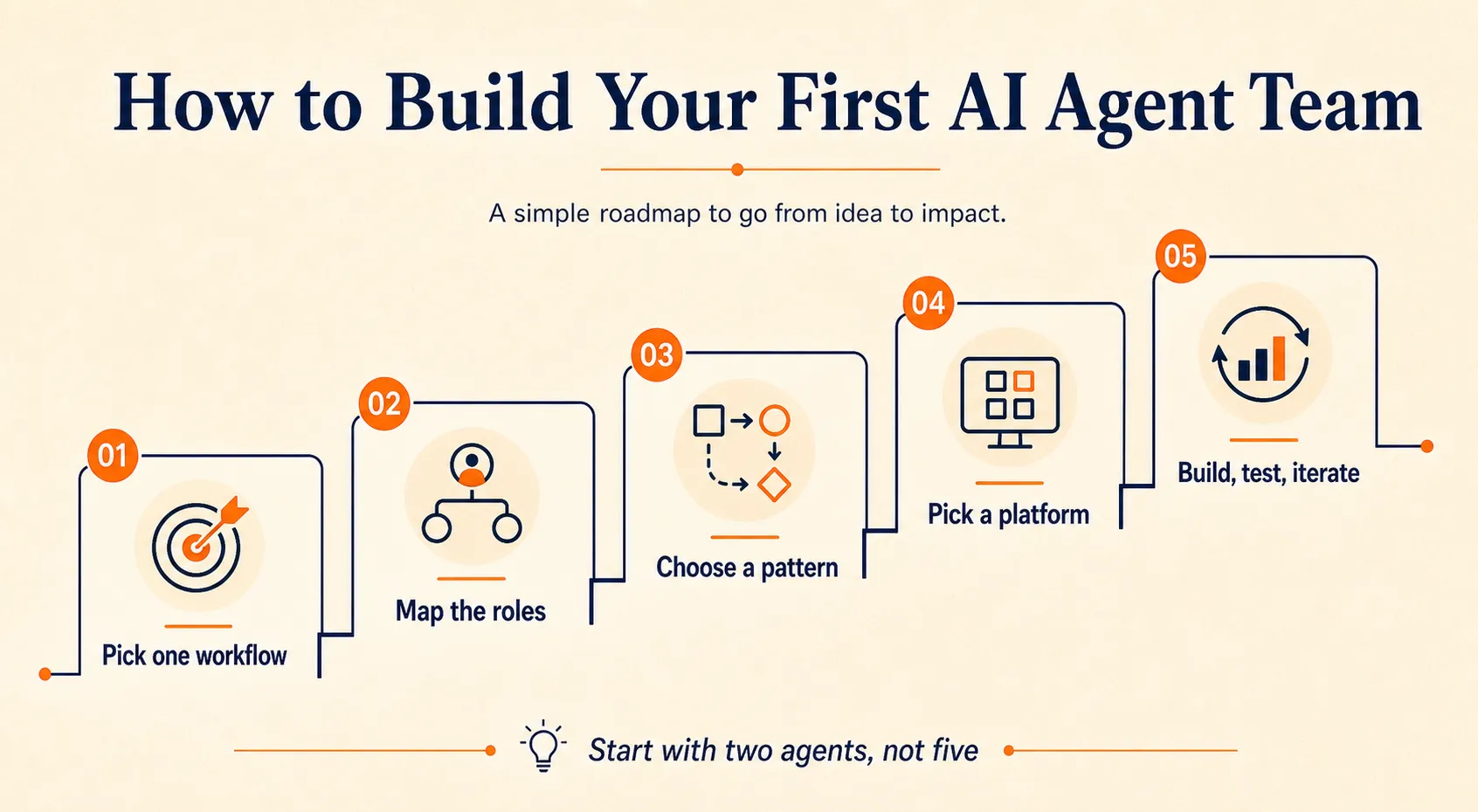
Building an agent team is less about technology and more about design. These five steps work whether you’re using a no-code platform or a more technical framework.
Step 1: Pick One Workflow That Costs Your Team Time
Look for tasks that are repetitive, multi-step, and currently require you to move information between different tools or prompts manually. Good candidates include:
- Content production pipelines
- Competitive research
- Lead qualification and enrichment
- Customer feedback analysis
- Weekly status or performance reports
- Data collection and formatting
A useful rule of thumb: if you’re copy-pasting between AI tools or applications more than twice in a workflow, that’s a strong signal the process is ready for an agent team.
Don’t try to automate your most complex process first. Pick something where the steps are clear and the stakes are manageable while you learn.
Step 2: Map the Roles
Break your chosen workflow into discrete steps. Each step becomes a potential agent role.
For example, a weekly competitor analysis workflow might need three agents: a Research Agent that gathers news, pricing changes, and product updates from defined sources; an Analysis Agent that compares this week’s findings against last week’s baseline and identifies meaningful changes; and a Report Agent that formats the analysis into a summary your team can scan in five minutes.
Keep roles narrow. An agent that tries to research, analyze, and write is just a chatbot with extra steps. The power of a team comes from specialization.
Step 3: Choose Your Coordination Pattern
For your first agent team, start with a chain. Agent A finishes, passes output to Agent B, then Agent B passes to Agent C. It’s the simplest pattern to build, test, and debug.
A quick decision guide:
- Linear workflow where each step depends on the previous one? Use a chain.
- Independent subtasks that can run at the same time? Use fan-out.
- Tasks that require routing decisions or quality judgment between steps? Use a manager-worker.
You can always restructure later. Most successful teams started with a simple chain and added complexity only when they hit a clear limitation.
Step 4: Pick a Platform
You have three categories of tools to choose from, depending on your technical comfort level.
No-code platforms
These are the best starting point if you want to build an agent team without touching code. Taskade has an AI Teams feature that lets you create a group of agents from a single prompt, assign each one a role, and have them work concurrently while a manager coordinates.
Craze takes a similar approach for teams managing multiple specialized agents across departments. Lindy supports agents that trigger other agents and share tasks, making it useful for chain and fan-out patterns. Relevance AI and Zapier also offer multi-agent workflow capabilities.
Low-code builders
These are the middle ground when no-code platforms feel limiting but you don’t want to write a full application. n8n with its AI agent nodes lets you build multi-step agent workflows visually while adding custom logic, API calls, and database connections at any step. Make offers AI modules that slot into its visual builder for similar flexibility. If your agent team needs to pull from internal databases, push to CRMs, or apply conditional routing that pure no-code tools can’t handle, this tier is where you’ll likely land.
Developer frameworks
These give full control but require programming skills. CrewAI is built specifically for role-based agent teams with manager and worker agents. LangGraph handles production-grade systems that need precise state management and complex routing.
OpenAI’s Agents SDK and Google’s ADK offer native support from their respective model providers. These frameworks are worth exploring if your team has developers and your workflow demands custom coordination logic that visual builders can’t express, and our guide to AI agent builders compares platforms across all three categories.
Step 5: Build, Test, and Iterate
Start with two agents, not five. Build the simplest version of your workflow, run it on real data, and check the outputs carefully.
Run the workflow three to five times and review every intermediate output, not just the final result. You’re looking for whether the handoff between agents preserved the right context, whether each agent stayed within its defined role, and whether the final output is actually useful.
The most common first-build mistake is making agents too broad. If outputs are inconsistent or unfocused, split the agent into two narrower specialists. One agent that “researches and analyzes” almost always works better as a separate research agent and a separate analysis agent.
A grounding principle worth remembering: most problems don’t need multi-agent systems at all. Validate that your workflow genuinely benefits from a team before over-engineering it. If you haven’t built your first single agent yet, our guide on how to build an AI agent covers the foundations you’ll need before creating a team.
Once your first chain is running reliably, the next challenge is keeping it that way.
Managing Your Agent Team
Building the team is the first challenge. Keeping it running well is the second, and it’s where most teams stumble.
Human-in-the-Loop Checkpoints
“Keep a human in the loop” is advice you’ll hear everywhere, but rarely with specifics. Here’s what it looks like in practice: identify the points in your workflow where an error would be costly. Customer-facing content, financial data, strategic recommendations, and anything involving external communication should have a human gate.
At those points, the agent pauses and sends you the output for review. You approve, edit, or send it back. Everything else can run autonomously. The goal isn’t to review every step; it’s to review the steps that matter.
Monitoring Performance
Check agent outputs regularly, especially during the first two to four weeks. Look for:
- Consistency of output quality across runs
- Whether agents are drifting outside their defined role
- Accuracy of any factual claims or data pulled from external sources
- How long each run takes versus the value it produces
Most platforms provide basic run logs and output history. Use them. An agent team you don’t monitor is an agent team you can’t trust.
Managing Costs
Each agent call uses tokens, and a multi-agent team running daily can accumulate meaningful API costs. Two practical rules keep this manageable.
First, use cheaper, faster models for simple tasks. Sorting, formatting, extracting structured data, and basic summarization don’t need a frontier model. Save your more capable models (Claude Opus 4.7, GPT-5.5, Gemini 3.1 Pro) for agents that handle complex reasoning, analysis, or writing.
Second, monitor token usage weekly. Most platforms show cost-per-run or tokens-per-agent. If one agent is consuming a disproportionate share, its instructions might be too broad or its context window too bloated. Tighten the prompt or split the role.
Iterating on Roles
Agent teams evolve. An agent that worked fine in week one might need refinement by week four as you learn what it handles well and where it struggles.
If one agent consistently produces weak output, refine its instructions or narrow its scope. If two agents overlap in what they do, merge them. If a single agent is handling two clearly different types of work, split it. Treat agent roles like job descriptions: they need periodic review and updating, not a one-time setup.
Over 40% of agentic AI projects are at risk of failure by 2027, according to Gartner, and poor coordination and monitoring are among the primary reasons. The teams that succeed treat agent management as an ongoing practice, not a launch-day task.
How you manage your team matters, but so does knowing whether you need one in the first place.
When You Need an Agent Team (and When You Don’t)
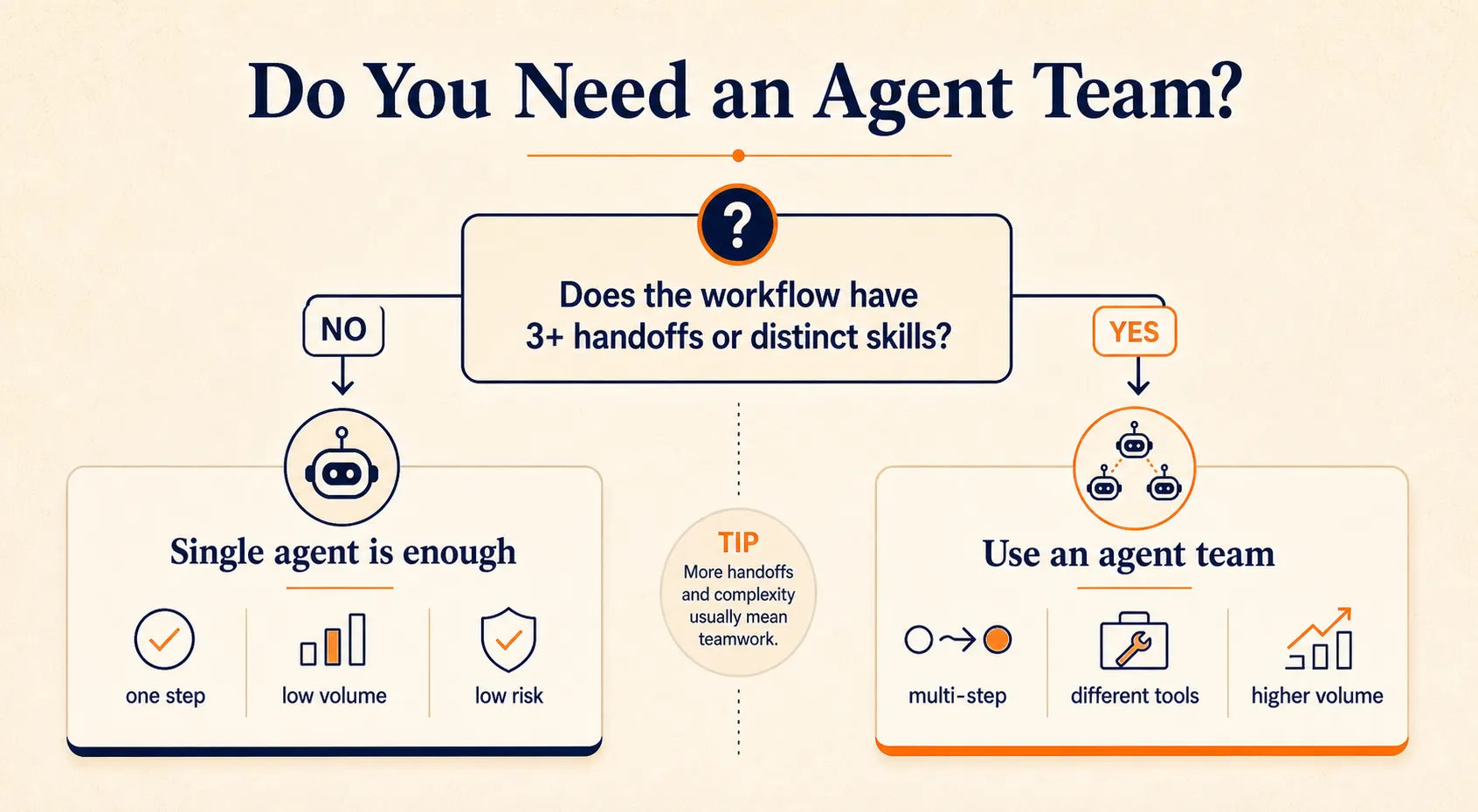
Not every AI workflow needs multiple agents. Using a team when a single agent would suffice adds complexity, cost, and failure points without real benefit. Here’s a simple way to decide.
You likely need an agent team when:
- Your workflow has three or more distinct steps with handoffs between them
- You’re already using AI for individual steps but manually connecting the outputs
- Volume makes single-agent prompting unsustainable (processing 100 leads per day, analyzing 50 feedback responses per week)
- Different steps require genuinely different skills or tools (research versus writing versus data analysis)
A single agent is probably enough when:
- The task is essentially one step (summarize, draft, translate, classify)
- The output is directly usable without further processing
- Volume is low enough that manual prompting works fine
- Errors in the output carry low stakes
The honest answer for most teams in 2026: start with a single well-built agent for your most important use case. Once that’s reliable and you see the workflow it fits into, you’ll know exactly where a second agent would help. That organic progression, one agent at a time, produces better teams than designing a five-agent system on a whiteboard.
Start with Two
The shift from “AI as a tool I open” to “AI as a team that works alongside me” is real, and it’s happening faster than most people expected. By 2027, Gartner predicts one-third of agentic AI implementations will combine agents with different skills for complex workflows.
But you don’t need to wait for that future to arrive. The tools exist today: no-code platforms like Taskade and Craze for creating agent teams without writing code, low-code builders like n8n when you need custom logic, and developer frameworks like CrewAI when you want full control.
The teams that succeed with AI agent teams don’t start with the most agents. They start with the clearest roles. Pick one workflow that costs your team time every week, map the roles, and build your first two-agent chain. You can always add a third.
FAQs
What is an AI agent in Teams?
AI agent in Teams can refer to two different things. In the Microsoft Teams context, it means AI-powered assistants built into the Teams platform (like Copilot agents for meetings, tasks, and workflows). More broadly, an AI agent team is a group of specialized AI agents working together to complete complex tasks. This article covers the second meaning. For Microsoft Teams-specific AI features, check Microsoft's documentation.
How many AI agents do I need for a team?
Start with two. Most successful agent teams begin with a simple pair: one agent that gathers or processes information, and one that acts on it or produces a deliverable. Scale only when you've validated the first chain works reliably on real data. The stories you see online about 9-agent or 45-agent setups are advanced configurations built over months, not starting points.
Do I need to know how to code to build an AI agent team?
No. No-code platforms like Craze, Taskade, Relevance AI, and Lindy let you define agent teams, assign roles, and run coordinated workflows through visual interfaces. Developer frameworks like CrewAI, LangGraph, and OpenAI Agents SDK exist for technical users who want full control over agent coordination, but they're not required to get started.
How much does it cost to run an AI agent team?
Costs depend on how many agents you run, how often they execute, and which AI models they use. Practical ways to manage costs: use cheaper models for simple tasks (sorting, formatting, extraction) and reserve expensive frontier models for complex reasoning. Monitor token usage weekly. Many platforms offer free tiers or credits to start, and moderate-scale agent teams typically run between $50 and $200 per month in API costs.
What is the difference between an AI agent and an AI agent team?
A single AI agent handles one task autonomously: it receives input, reasons about what to do, takes action, and delivers output. An AI agent team is multiple agents with different specializations working together, coordinated by a manager agent or automated workflow. The team approach is better for complex, multi-step processes where different steps require different capabilities.
More Articles
The 8 Best Lindy AI Alternatives in 2026 (Tested & Compared)

The 8 best Lindy AI alternatives for 2026, anchored to why people leave Lindy, with current pricing, third-party ratings, honest pros and cons, and the best pick for each reason to switch.
The 7 Best Make Alternatives in 2026 (Tested & Compared)
The 7 best Make.com alternatives for 2026, anchored to why people leave Make, with current pricing, third-party ratings, honest pros and cons, and the best pick for each reason to switch.
The 8 Best Zapier Alternatives in 2026 (Tested & Compared)
The 8 best Zapier alternatives for 2026, anchored to why people leave Zapier, with current pricing, third-party ratings, honest pros and cons, and the best pick for each reason to switch.


