Anatomy of an AI Agent: What Every Component Does and How They Work Together
Learn the six core components of an AI agent and how they interact in the execution loop. Includes stats, examples, and a failure diagnostic framework.

By: Deepit Patil
Co-Founder and CTO
Published
Updated
Edited by Craze Editorial Team · See our Editorial Process
An AI agent that monitors your inbox, pulls context from past conversations, checks your calendar, and drafts a reply is not making one clever API call. It’s six components working together in a loop: interpreting your request, recalling what it knows, deciding which tools to use, executing them, and checking whether the result makes sense before delivering it.
That matters because agents are no longer experimental. Gartner predicts 40% of enterprise apps will embed task-specific AI agents by end of 2026, up from less than 5% in 2025. Whether you’re building agents, evaluating platforms, or trying to understand why one agent works and another doesn’t, understanding the anatomy gives you a shared language and a diagnostic framework.
This article breaks down what’s inside an AI agent, component by component, and shows how the pieces interact in the execution loop that makes agents actually useful.
TL;DR
- Six components, one system. An AI agent runs on a reasoning engine, perception layer, memory, tools, planning module, and governance layer working together.
- The LLM is the brain, not the whole body. The reasoning engine can’t work alone. It needs memory for context, tools for action, and planning for multi-step execution.
- Agents run in a continuous loop. Perceive input, reason about the goal, plan the steps, act using tools, observe results, reflect, and repeat until the job is done.
- Governance is the most neglected component. Only 11% of organizations have agent governance frameworks despite widespread deployment.
- Build agents with any model. Craze is an AI platform where you can chat, build agents, run workflows, and schedule automations. Free to use.
What Makes an AI Agent Different from a Chatbot
Before breaking down the anatomy, it helps to clarify what qualifies as an AI agent in the first place. The term gets used loosely, so here’s the practical distinction.
A chatbot reacts to individual messages. You ask a question, it returns an answer using scripts or pattern matching. It doesn’t remember what you asked yesterday, and it can’t go check your CRM or send a follow-up email on its own.
An AI assistant or copilot uses AI to help you do tasks, but it waits for your direction at each step. It might draft a refund email for you, but you still decide when to send it and where.
An AI agent pursues goals across multiple steps, uses external tools, and makes decisions on its own. It processes a return, checks the order database, calculates the refund, issues it, and sends the confirmation without you touching anything. The key difference is the loop: agents observe, decide, act, and evaluate, repeatedly, until the goal is met.
That loop is what the rest of this article is about: the six components that make it work and how they fit together.
The Six Core Components of an AI Agent
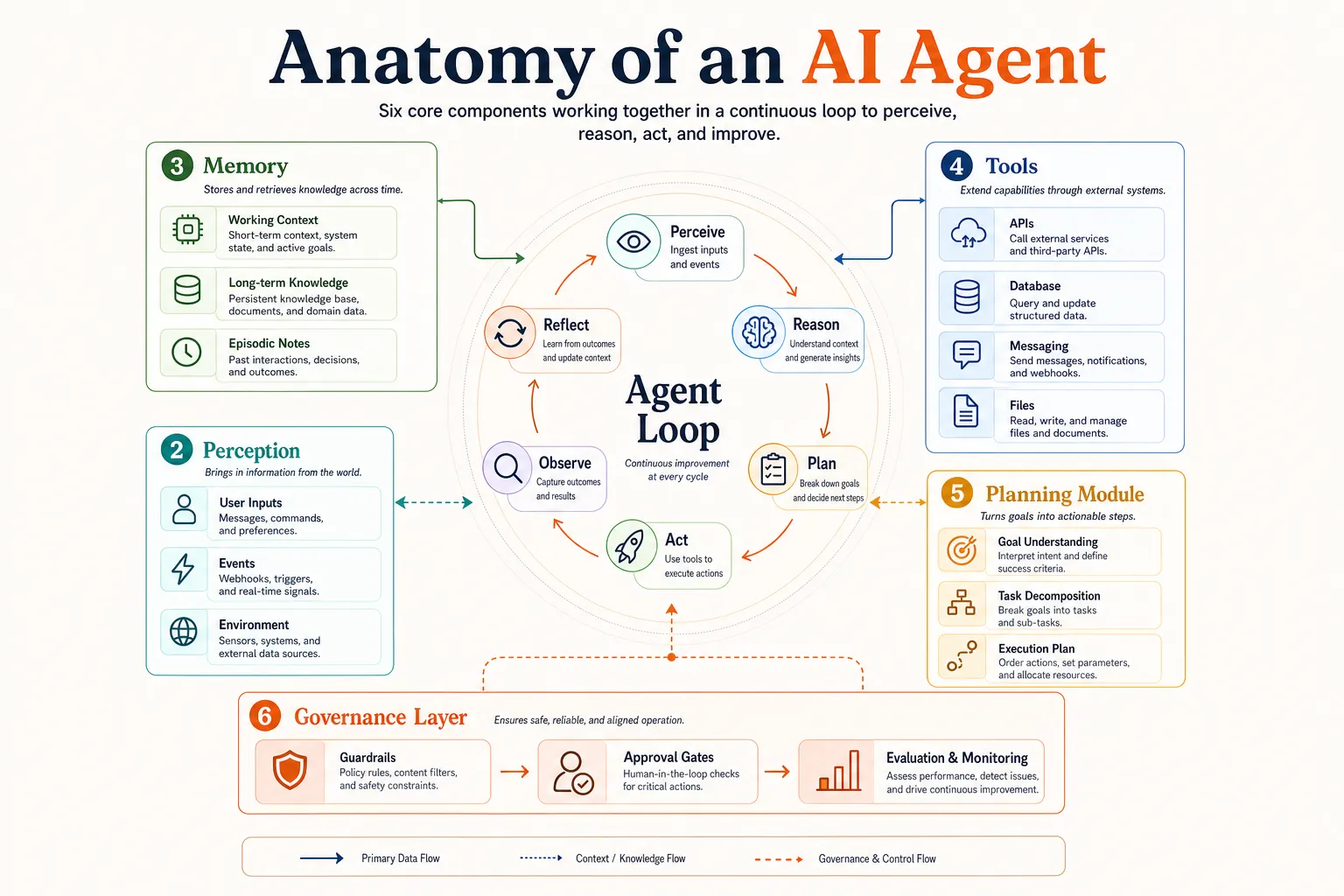
Think of an AI agent as a system with six interconnected parts. The reasoning engine is the brain, perception is the senses, memory is the knowledge, and tools are the hands. The planning module is the strategy, and the governance layer is the rules.
None of these works in isolation. The reasoning engine decides what to do, but it needs memory to understand context, tools to take action, and planning to sequence multi-step tasks. Governance keeps the whole system safe and aligned with what you actually want.
Here’s what each component does and why it matters.
1. The Reasoning Engine
At the core of every AI agent sits a foundation model, typically a large language model (LLM) like Claude, GPT, Gemini, or an open-source alternative like Llama. This is the component that “thinks.”
The reasoning engine handles three critical jobs. First, it interprets user input: understanding what you’re asking for and what the context requires. Second, it generates reasoning traces, often called chain-of-thought, where it works through a problem step by step before deciding on an action. Third, it handles task decomposition, breaking a broad goal (“reschedule all my meetings this week”) into smaller, executable subtasks (“check calendar,” “identify meetings,” “send reschedule requests”).
One important architectural decision: model selection isn’t one-size-fits-all. Production agents increasingly use different models for different subtasks. A fast, lightweight model can handle simple classification or routing, while a more powerful model tackles complex reasoning or content generation. This model-agnostic approach is becoming the norm rather than the exception, because it balances speed, cost, and accuracy across the entire workflow.
The reasoning engine is essential, but it’s only one piece. Without the other five components, it’s just an LLM responding to prompts, not an agent pursuing goals.
2. Perception
Perception is how the agent takes in information about its environment. It translates raw input into something the reasoning engine can act on.
For most business agents, perception means processing:
- Text inputs: user messages, support tickets, documents, form submissions
- Structured data: API responses, database query results, spreadsheet rows
- Triggered events: scheduled runs, webhooks, system alerts
- Multimodal inputs: images, audio files, PDFs (when the agent supports them)
The perception layer does more than just receive data. It parses, filters, and structures it. When an agent reads an API response from your project management tool, the perception layer extracts the relevant fields (task name, assignee, due date, status) so the reasoning engine can work with clean, actionable information rather than raw JSON.
Not every agent needs multimodal perception. Many effective agents operate purely on text and structured data. The key is matching the perception layer to the agent’s actual use case.
3. Memory
Without memory, every agent interaction starts from scratch. Memory is what lets an agent maintain context within a task, recall what happened in past sessions, and access domain knowledge that wasn’t in its original training data.
There are four types of memory that matter in practice:
Short-Term (Working) Memory
This is the current task context: the conversation so far, intermediate tool outputs, errors encountered, and the current step in the plan. It typically lives in the LLM’s context window. It’s fast and simple, but limited by how much the context window can hold.
Long-Term Memory
Long-term memory stores knowledge across sessions. User preferences, past actions, project details, and accumulated context go here. Most production agents implement this through vector databases (like Pinecone or Chroma) or knowledge graphs that store and retrieve information by semantic similarity rather than exact keyword match. This is where retrieval-augmented generation (RAG) comes in: when the agent needs information, it pulls the most relevant chunks from long-term memory into its working context, reducing hallucinations and keeping responses grounded.
Episodic Memory
Episodic memory records what the agent has done before: structured summaries of past runs rather than raw data. “Last time the user asked about Q3 budgets, I pulled data from the finance dashboard and the user asked me to format it as a table.” This is how agents get better over time.
Semantic Memory
Semantic memory holds domain facts, business rules, and reference knowledge: your company’s refund policy, product catalog, compliance requirements, or standard operating procedures.
In practice, production agents combine all four. Working memory handles the current session, a vector store manages long-term retrieval, and a structured knowledge base provides domain facts. The result is an agent that feels context-aware rather than amnesiac.
4. Tools
Tools are what separate agents from chatbots. An LLM on its own can only generate text. Tools connect that text-generation capability to real-world action: reading files, querying databases, calling APIs, sending messages, and executing code.
Common tool categories include:
- Read tools: web search, database queries, file access, API calls that retrieve information. These are safe, read-only operations.
- Write tools: creating records, updating databases, sending emails, modifying files. These change state and typically need guardrails.
- Communication tools: sending Slack messages, emails, SMS, or push notifications.
- Compute tools: running calculations, executing code, transforming data.
The agent’s reasoning engine decides when and which tool to call based on the current task. If you ask an agent to “check whether our Q2 revenue target is on track,” it might use a read tool to query your analytics dashboard, a compute tool to compare actual vs. projected numbers, and a communication tool to send you the summary.
A standard called MCP (Model Context Protocol), originally developed by Anthropic, is emerging as the default way to connect agents to tools. Instead of building custom integrations for every tool, MCP provides a standardized interface. Most major agent frameworks now support it natively, which means you can connect an agent to your CRM, email, calendar, or database using a shared protocol rather than writing bespoke code for each one.
One practical rule: start with read-only tools and add write tools only after the agent’s decision-making is reliable. A miscalibrated agent that reads the wrong data is annoying. One that sends the wrong email is a problem.
5. The Planning Module
Planning is how an agent turns a high-level goal into a sequence of executable steps. Without planning, an agent can only handle single-shot tasks. With planning, it can run multi-step workflows that take minutes or hours to complete.
Two primary planning patterns dominate production agent design:
ReAct (Reason + Act)
This is the most common pattern. The agent alternates between reasoning steps (“I need to check the user’s order status before I can process the return”) and action steps (calling the order lookup tool). Each reasoning step produces a thought, each action step produces an observation, and the agent uses that observation to inform its next thought. ReAct works well for dynamic tasks where the next step depends on what the previous one returned.
Plan-and-Execute
This pattern separates planning from execution. A planner first generates the complete sequence of steps, and a separate executor works through each one. It’s more reliable for complex tasks with five or more sequential steps, because the full plan can be reviewed (by a human or another agent) before execution begins. The tradeoff is less flexibility: if an early step returns unexpected results, the plan may need revision.
For more complex scenarios, hierarchical planning comes into play. Higher-level agents decompose a large task and delegate subtasks to specialized agents. An orchestrator agent might break “prepare the quarterly business review” into subtasks for a data-analysis agent, a slide-creation agent, and an email-drafting agent.
Each sub-agent runs independently and reports results back to the orchestrator, which coordinates the final output. This is the foundation of multi-agent systems , where a team of specialized agents collaborates under an orchestrator rather than one generalist agent trying to do everything.
Many simple agents don’t need explicit planning at all. A single-tool agent that answers questions from a knowledge base handles its loop naturally through ReAct. Planning becomes critical when you need multi-step workflows, parallel subtasks, or coordination across multiple agents.
6. The Governance Layer
Governance is the component that keeps agents safe, aligned, and trustworthy. It’s also the most neglected. Only 11% of organizations have implemented governance frameworks for their AI agents, despite widespread deployment. And over 40% of agentic AI projects are at risk of cancellation by 2027, partly because governance gaps erode trust faster than capabilities build it.
The governance layer covers four areas:
Guardrails
These are rules that constrain agent behavior. “Never send money without human approval.” “Never access files outside the project folder.” “Never share customer data with external APIs.” Guardrails define what the agent is not allowed to do, regardless of what the reasoning engine decides.
Human-in-the-Loop Triggers
These define when the agent should stop and ask a human to review or approve. Not every action needs oversight, but high-risk or irreversible actions (deleting data, sending external communications, making purchases) should have escalation points. The best implementations use confidence-based routing: the agent handles routine decisions autonomously and escalates uncertain or high-stakes ones.
Evaluation and Feedback
This area assesses whether the agent did a good job. It includes self-evaluation (did the agent meet the stated goal?), human feedback (corrections, ratings, approval signals), and automated quality checks (accuracy scoring, latency monitoring, cost tracking). The feedback loop is what allows agents to improve over time rather than repeating the same mistakes.
Compliance
Compliance ensures the agent meets regulatory and organizational requirements. For agents handling customer data, financial transactions, or health information, compliance isn’t optional. It defines what data the agent can access, how long it can retain it, and what audit trails it must produce.
Governance isn’t a feature you bolt on after launch. It’s a component you design alongside the reasoning engine, memory, and tools from day one. And understanding how it fits into the broader architecture is what makes the execution loop work safely.
How the Components Work Together: The Agent Execution Loop
Listing six components is useful for understanding, but agents don’t run as a checklist. They run as a loop. The execution loop is the dynamic process where all six components interact continuously until the goal is met.
Here’s the loop in action, using a concrete example: an agent that monitors a team’s project board, identifies overdue tasks, and sends status updates.
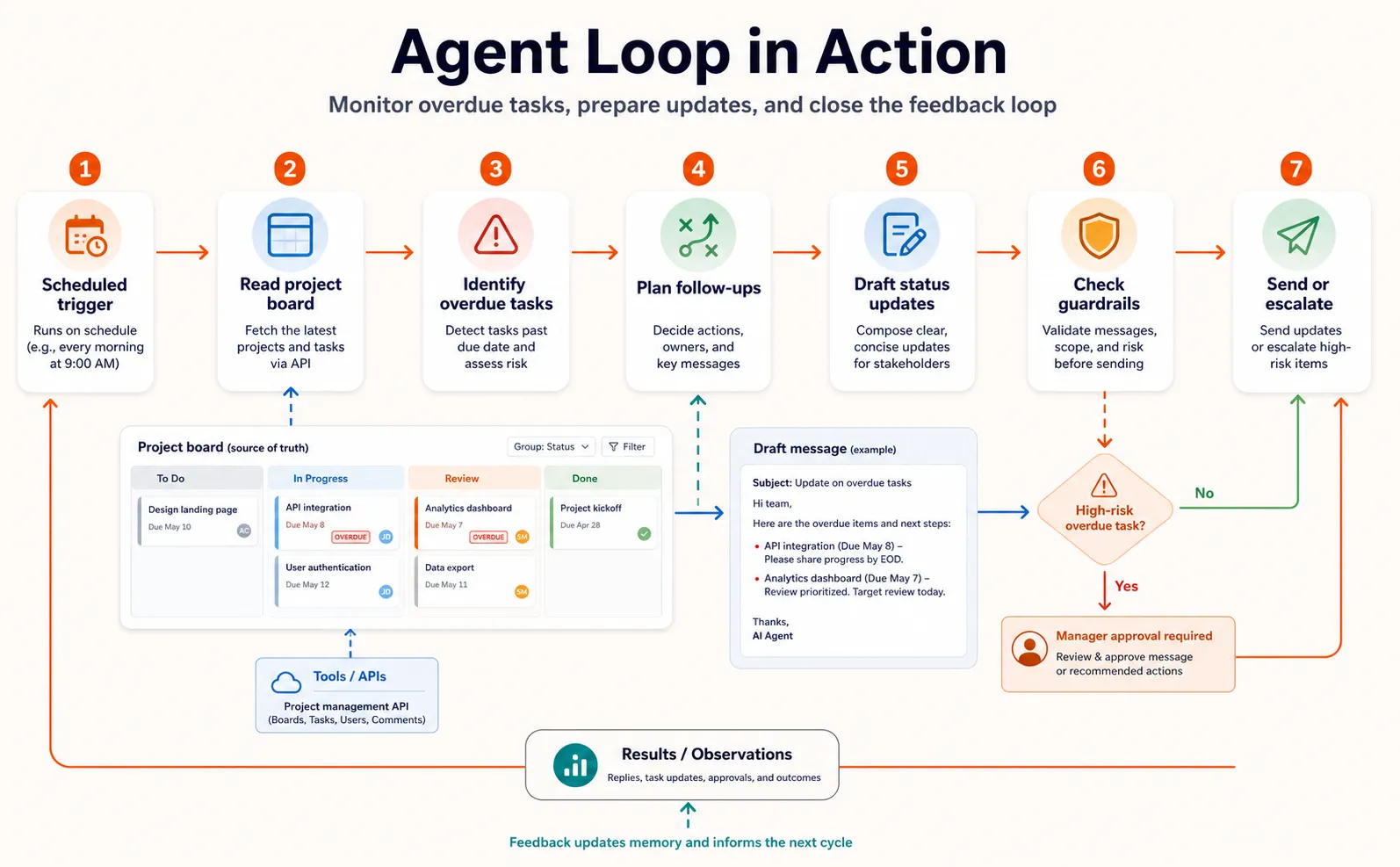
- Perceive. The agent receives a trigger (a scheduled daily run). The perception layer connects to the project management API and retrieves current task data, including names, assignees, due dates, and statuses.
- Reason. The reasoning engine interprets the data. It identifies three tasks that are overdue by more than two days and two that are due today.
- Plan. The planning module sequences the next steps: look up each overdue task’s last activity, draft a status update message for each assignee, and check the messages against communication guidelines.
- Act. The agent uses read tools to fetch activity logs for each overdue task, then uses the reasoning engine to draft personalized messages (“Hey Sarah, your task ‘Finalize Q2 deck’ is two days past due. The last update was Thursday. Need help or a new deadline?”).
- Observe. The agent checks the drafted messages against its memory for prior communication patterns with each team member and adjusts the tone where needed.
- Reflect. The agent evaluates: are all overdue tasks accounted for? Are the messages clear and accurate? If it finds a gap (say, one task has no assignee), it loops back to step 2 to handle the edge case.
- Align. The governance layer checks the messages against guardrails (no sensitive project details in messages to external stakeholders, escalate if a task is more than a week overdue) and applies human-in-the-loop triggers if needed (the agent flags the week-overdue task for a manager to review before sending).
This loop repeats until every overdue task has been addressed. The governance layer runs throughout, not just at the end.
The practical value of understanding this loop is that it turns agent behavior from a black box into something you can observe, debug, and improve step by step.
Why Agent Anatomy Matters
The market context makes understanding agent anatomy more than an academic exercise.
According to G2’s enterprise survey, 57% of companies already have AI agents in production, with another 22% in pilot programs. Datadog’s State of AI Engineering report shows agentic framework adoption nearly doubled year over year, rising from 9% to 18% of organizations between early 2025 and early 2026. And McKinsey reports that 23% of organizations are scaling agentic AI, with another 39% actively experimenting.
This adoption wave means more teams are evaluating agent platforms, debugging agent workflows, and deciding how much autonomy to give their agents. Understanding the anatomy helps in four practical ways:
- Evaluate agent tools more critically. When a platform claims it offers “AI agents,” you can ask which of the six components it actually provides. Does it have real memory, or just a conversation history? Does it support tool integration via MCP, or only pre-built connectors? Is there a governance layer, or are guardrails your problem?
- Debug agent failures by tracing them to components. If an agent gives wrong answers, it’s usually a memory problem. If it calls the wrong tool, the tool descriptions need work. If it loops endlessly, planning needs a stopping condition. If it does something unsafe, governance is missing.
- Design governance from day one. The 11% governance stat is a wake-up call. Building guardrails, escalation triggers, and evaluation into the architecture from the start is vastly easier than retrofitting them after deployment.
- Avoid the project cancellation trap. With over 40% of agentic AI projects at risk of cancellation by 2027, the teams that succeed are the ones building on solid architectural foundations rather than rushing to production without understanding what’s inside their agents.
Platforms like Craze let you build agents using any AI model, connect tools, and schedule automations, so you can focus on getting the architecture right rather than wrestling with infrastructure.
But knowing the components also gives you a framework for when things go wrong.
When Components Break: Diagnosing Agent Failures
One of the most practical benefits of understanding agent anatomy is being able to pinpoint where things go wrong. Here’s a quick diagnostic framework.
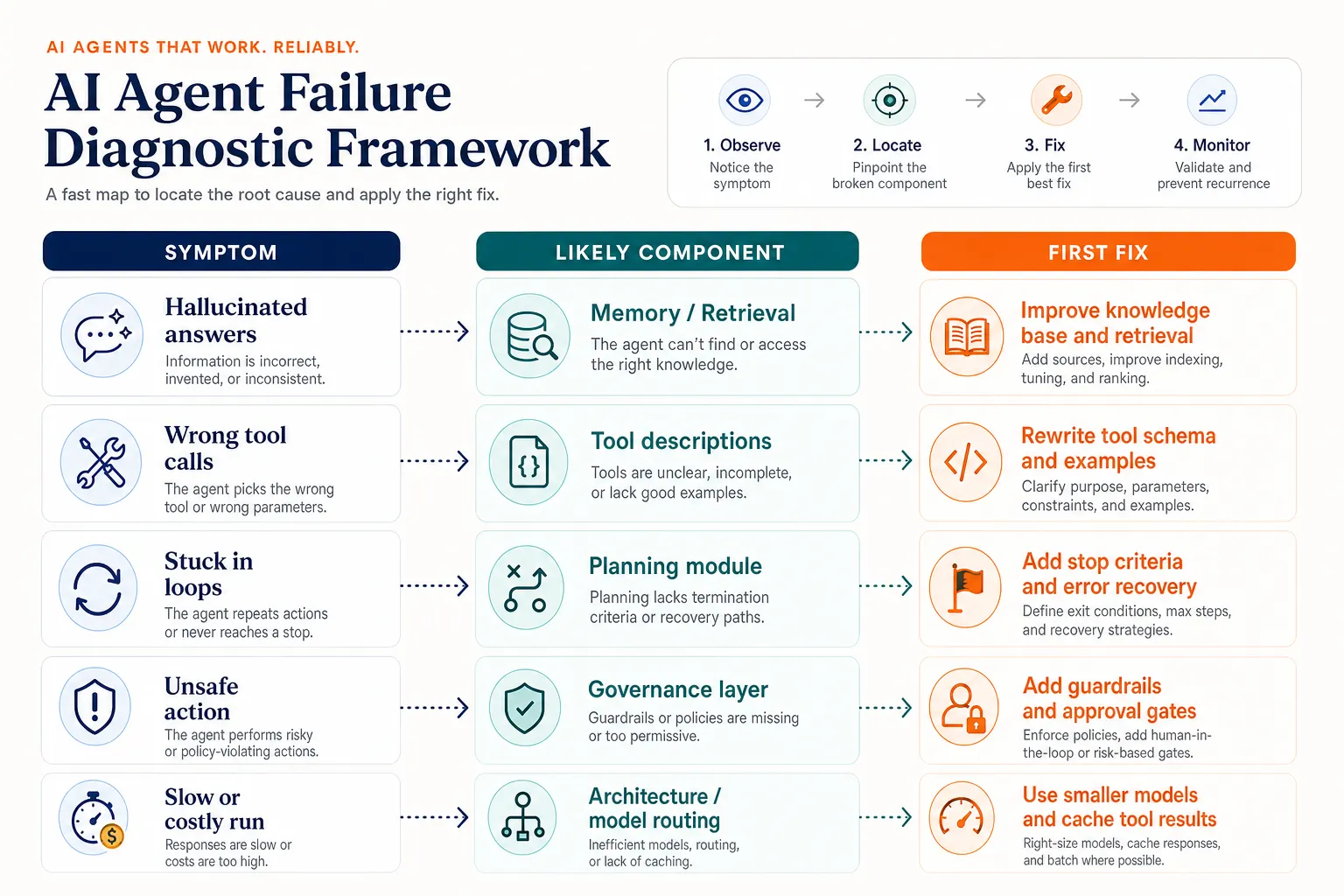
Wrong or Hallucinated Answers
This is usually a memory problem. The agent either lacks the relevant context (long-term memory is missing or poorly structured) or its retrieval is pulling irrelevant information. Check whether the knowledge base covers the topic, whether the RAG retrieval is returning useful chunks, and whether the context window is overflowing with noise.
Wrong Tool Calls or Skipped Tool Use
This is a tool description problem. The reasoning engine chooses tools based on their descriptions. If a description is vague (“handles data operations”), the agent can’t reliably decide when to use it. Make descriptions specific (“retrieves order details by order ID from the fulfillment database”).
Stuck in Loops or Never Finishes
This is a planning problem. The agent either lacks a clear stopping condition (“keep going until all tasks are done” without defining “done”) or it’s hitting errors it doesn’t know how to recover from. Add explicit success criteria and error-handling logic to the planning layer.
Unsafe or Off-Policy Actions
This is a governance gap. The agent either lacks guardrails for the specific action, has no human-in-the-loop trigger for high-risk operations, or the escalation thresholds are set too loosely. Review the guardrail rules and tighten escalation triggers.
Slow or Expensive Runs
This is an architecture issue. The agent might be using an oversized model for simple tasks, making too many unnecessary tool calls, or planning inefficiently. Consider using a smaller model for routine steps, caching frequent tool results, and streamlining the planning sequence.
Being able to map symptoms to components turns vague complaints (“the agent isn’t working right”) into targeted fixes.
Final Thoughts
An AI agent isn’t just an LLM with a fancy interface. It’s a system of six components: reasoning, perception, memory, tools, planning, and governance, all working together in a continuous execution loop. Understanding that anatomy gives you a mental model for building agents that work, evaluating platforms that claim to offer them, and diagnosing the specific component when something goes wrong.
The market is moving fast. Agents are already in production at the majority of companies, and adoption is accelerating. The organizations that will get the most value are the ones that understand what’s inside their agents, not just what those agents promise to do.
Now that you understand the anatomy, you’re ready to build. Start with the step-by-step guide to building an AI agent , or explore real examples of agents delivering business results .
FAQs
What are the core components of an AI agent?
An AI agent has six core components: the reasoning engine (an LLM that interprets input and makes decisions), perception (how the agent takes in data), memory (short-term context and long-term knowledge), tools (APIs and external systems the agent can use), a planning module (how it breaks goals into steps), and a governance layer (guardrails, human-in-the-loop triggers, and evaluation). These components work together in a continuous execution loop.
What is the difference between an AI agent and a chatbot?
A chatbot reacts to individual messages using scripts or pattern matching. An AI agent pursues goals across multiple steps, uses external tools, and makes decisions autonomously. The core difference is the execution loop: agents observe their environment, reason about what to do, take action, evaluate the result, and repeat until the goal is met. Chatbots don't have this loop.
What role does memory play in AI agents?
Memory lets agents maintain context rather than starting fresh with every interaction. Short-term memory holds the current task context (conversation history, tool outputs). Long-term memory stores knowledge across sessions (user preferences, past actions, domain facts) using vector databases or knowledge graphs. RAG (retrieval-augmented generation) pulls relevant long-term knowledge into the agent's working context, reducing hallucinations and keeping responses accurate.
How do AI agents use tools?
Tools connect the agent's reasoning capability to external systems. When the reasoning engine determines it needs to take action (query a database, send an email, run a calculation), it calls the appropriate tool with specific parameters and processes the result. MCP (Model Context Protocol) is becoming the standard way to connect agents to tools, providing a shared interface instead of custom integrations for each system.
What are guardrails in AI agent systems?
Guardrails are rules that constrain agent behavior to keep it safe and aligned. They define what the agent can't do (e.g., send money without approval), when it must escalate to a human, and how its outputs are evaluated for quality. Despite their importance, only 11% of organizations have governance frameworks for their agents. Building guardrails from day one is far easier than adding them after deployment.
What is the execution loop of an AI agent?
The execution loop is the cycle agents follow to accomplish goals: perceive input, reason about the goal, plan the steps, act using tools, observe results, reflect on whether the goal was met, and check against governance rules. If the goal isn't met, the agent loops back and tries again. This continuous loop is what makes agents autonomous rather than reactive, and it's where all six components interact dynamically.
More Articles
The 8 Best Lindy AI Alternatives in 2026 (Tested & Compared)

The 8 best Lindy AI alternatives for 2026, anchored to why people leave Lindy, with current pricing, third-party ratings, honest pros and cons, and the best pick for each reason to switch.
The 7 Best Make Alternatives in 2026 (Tested & Compared)
The 7 best Make.com alternatives for 2026, anchored to why people leave Make, with current pricing, third-party ratings, honest pros and cons, and the best pick for each reason to switch.
The 8 Best Zapier Alternatives in 2026 (Tested & Compared)
The 8 best Zapier alternatives for 2026, anchored to why people leave Zapier, with current pricing, third-party ratings, honest pros and cons, and the best pick for each reason to switch.