
AI Agentic Workflows: What They Are, Design Patterns, and How to Build Them
Learn what AI agentic workflows are, the four core design patterns, real use cases, and how to build them step by step.

By: Deepit Patil
Co-Founder and CTO
Published
Updated
Edited by Craze Editorial Team · See our Editorial Process
Most teams using AI are leaving performance on the table. They send a prompt, get a response, and move on. But the organizations seeing real results are doing something different: they’re building workflows where AI agents reason, act, check their work, and iterate, just like a human would.
These are agentic workflows, and they’re the difference between AI that answers questions and AI that completes tasks. This guide explains what agentic workflows are, breaks down the four core design patterns, walks through real use cases, and shows you how to build them step by step.
TL;DR
- Agentic workflows are iterative AI processes where agents reason, act, observe results, and refine their approach across multiple steps instead of generating a single response.
- Four design patterns cover most use cases: reflection (self-critique), tool use (external systems), planning (multi-step decomposition), and multi-agent collaboration (specialized teams).
- Workflow design often matters more than model choice. GPT-3.5 with an agentic workflow scored 95% on HumanEval, compared to 48% without one.
- Start simple. Begin with reflection, add tool use when you need external data, then planning for complex tasks. Multi-agent is the last pattern to add.
- Most implementation effort isn’t the AI. About 80% of the work goes to data engineering, governance, and workflow integration.
What Are AI Agentic Workflows?
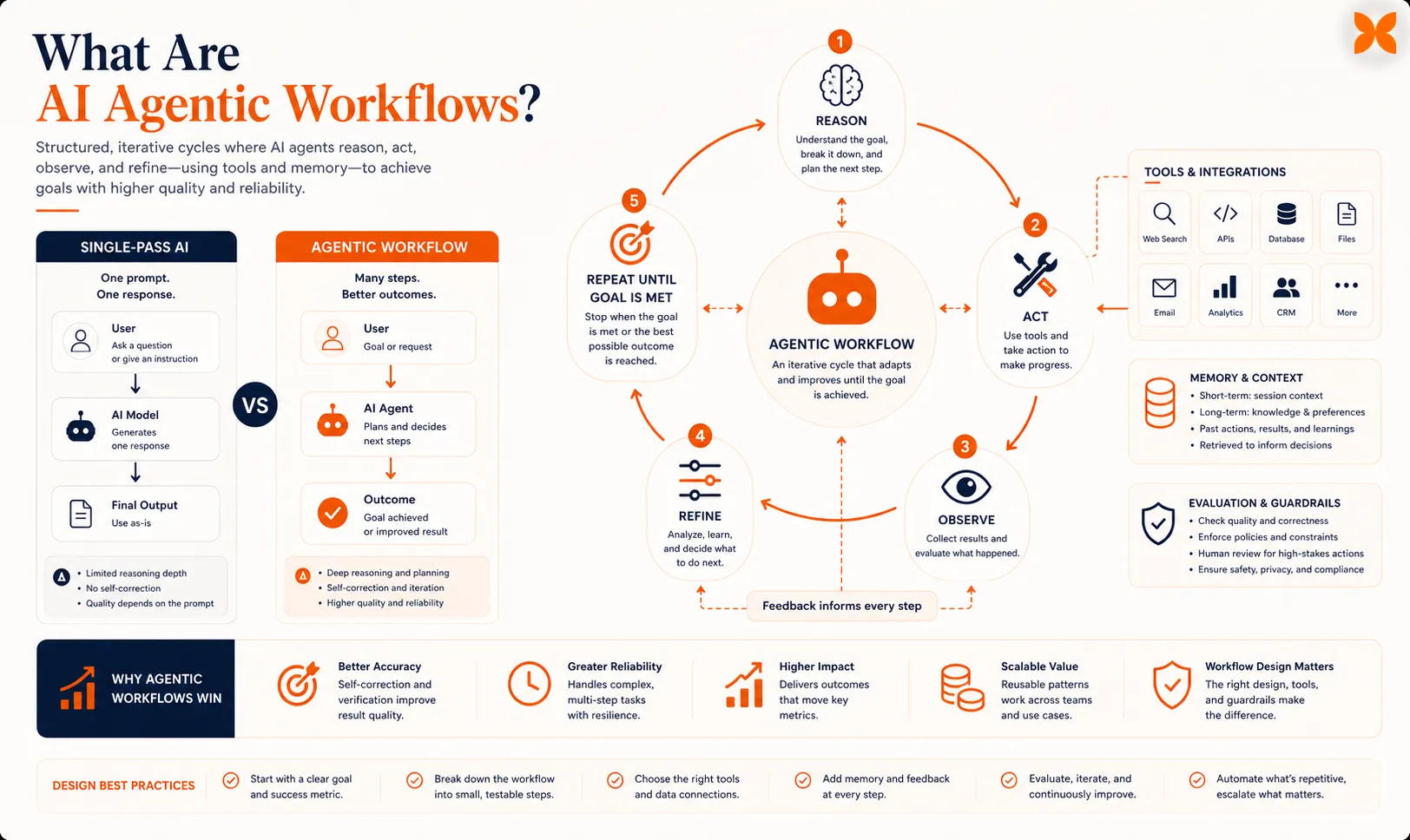
An AI agentic workflow is an iterative process where an AI agent reasons through a problem, takes action, observes the result, and refines its approach across multiple steps. Instead of generating one answer in a single pass, the agent works through cycles of thinking, doing, and improving.
Think of how you’d actually write a report. You don’t type it perfectly in one shot. You draft, review, check your sources, revise sections, maybe ask a colleague to look it over, then polish the final version. Agentic workflows bring this same iterative approach to AI.
The term “agentic” is key here. It means the AI has agency, the ability to make decisions about what to do next based on what it’s already learned. A standard AI prompt gives you a single response. An agentic workflow gives you a process that loops, adapts, and improves until the task is done.
This distinction matters more than most people realize. In coding benchmarks, GPT-3.5 with an agentic workflow scored 95% on HumanEval, compared to just 48% without one. The workflow design often matters more than the model itself.
How Agentic Workflows Differ from Traditional AI
Traditional AI interactions follow a request-response pattern. You send a prompt, get back an answer, and that’s it. The model has no memory of what just happened, no ability to check its own work, and no access to external tools.
Agentic workflows add three critical capabilities. First, the agent can evaluate its own output and decide whether it meets the goal. Second, it can use tools like search engines, APIs, databases, and code interpreters to gather information or take action. Third, it can plan multi-step approaches and adjust the plan as it learns more.
This changes what AI can reliably do. Single-pass AI works fine for quick questions and simple text generation. But for anything that requires research, verification, multi-step reasoning, or interacting with external systems, agentic workflows are how you get consistent, high-quality results.
Why Agentic Workflows Outperform Single-Pass AI
The performance gap comes down to iteration and feedback. When an agent can review its work, it catches mistakes a single pass would miss. When it can use tools, it grounds its responses in real data instead of relying only on training knowledge.
Andrew Ng, who popularized the four core design patterns, frames it clearly: instead of having an LLM generate its final output directly, an agentic workflow prompts the LLM multiple times, giving it opportunities to build step by step to higher-quality output.
The business impact backs this up. 66% of organizations using AI agents report measurable productivity gains. Gartner predicts that by the end of 2026, 40% of enterprise applications will include task-specific AI agents, up from less than 5% in 2025.
Those gains come down to how these workflows are structured, which starts with the four patterns at the core of every agentic system.
Quick check
In coding benchmarks, how did GPT-3.5 perform on HumanEval WITH an agentic workflow compared to WITHOUT one?
The Four Core Agentic Workflow Design Patterns
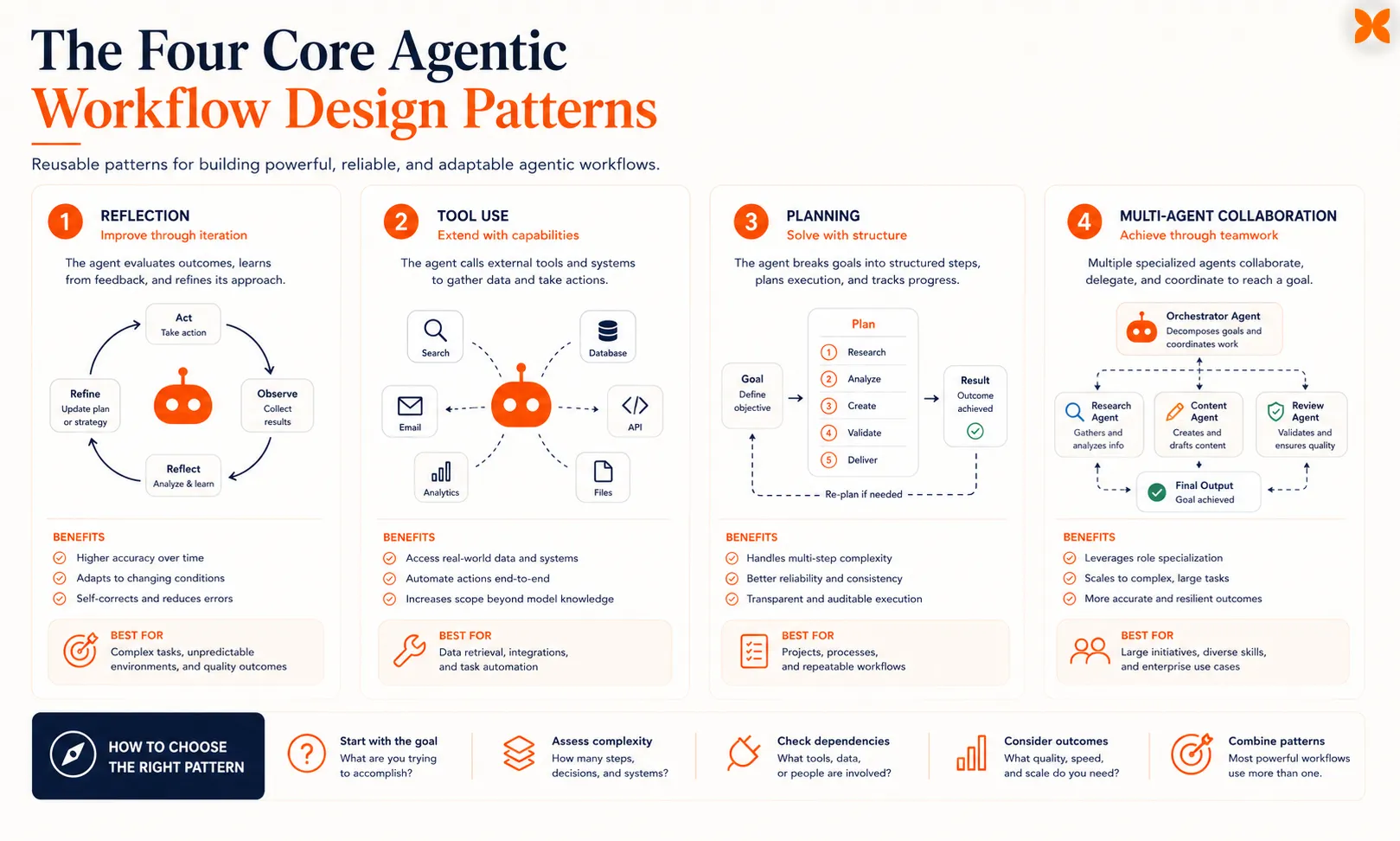
Every agentic workflow uses one or more of four design patterns: reflection, tool use, planning, and multi-agent collaboration. Understanding these patterns is the foundation for building effective AI workflows, and it helps to be familiar with how AI agents work at a basic level before diving into the specifics.
Reflection: Self-Critique and Iterative Improvement
Reflection is the simplest and often most impactful pattern. The agent generates an output, then evaluates that output against defined criteria, identifies problems, and produces an improved version. This loop can repeat multiple times.
Here’s what a reflection workflow looks like in practice:
- Generate: The agent writes a first draft, whether that’s code, text, analysis, or whatever the task requires.
- Critique: The same or a separate agent reviews the output for errors, gaps, or quality issues.
- Revise: The agent incorporates the feedback and produces an improved version.
- Repeat: Steps 2 and 3 continue until quality criteria are met or a loop limit is reached.
A concrete example: you ask an agent to write a Python function for data validation. In the first pass, it produces working code. The reflection step catches that it doesn’t handle edge cases like empty inputs or malformed dates, and the revision adds those checks.
Another reflection pass notices the error messages aren’t descriptive enough, and the final output is significantly better than the first attempt. Reflection works because it mirrors how humans naturally improve their work, and it’s the easiest pattern to implement since you just need to add a review prompt after the initial generation.
Tool Use: Connecting Agents to External Systems
Tool use gives agents access to the real world. Instead of relying solely on what the model learned during training, agents can search the web, query databases, run code, call APIs, and interact with applications.
Common tools in agentic workflows include:
- Web search for current information and fact-checking
- Code interpreters for running calculations and data analysis
- API connectors for reading and writing to business systems
- Database queries for retrieving structured data
- File operations for reading documents and writing outputs
The tool use pattern follows a cycle: the agent decides which tool to use, formats the request, executes it, interprets the results, and decides what to do next. This decision-making is what separates tool use in agentic workflows from simple API calls in traditional automation, and it’s closely tied to the agent architecture powering the loop.
Planning: Breaking Complex Goals into Steps
Planning enables agents to tackle goals that require multiple steps, dependencies, and conditional logic. Instead of trying to solve everything at once, the agent creates a structured plan, then executes it step by step.
A planning workflow typically follows this sequence:
- Understand the goal: Parse what needs to be accomplished.
- Decompose: Break the goal into smaller, manageable subtasks.
- Sequence: Determine the right order, accounting for dependencies.
- Execute: Work through each subtask.
- Evaluate and adjust: After each step, check progress and update the plan if needed.
For example, if you ask an agent to analyze your Q4 sales data and identify growth opportunities, a planning agent would break this into: retrieve the sales data, clean and aggregate it, compare against previous quarters, identify growth patterns, rank opportunities by potential impact, and generate a summary with recommendations.
The key difference from simple task lists is adaptability. If the agent discovers during analysis that a particular product category had unusual returns, it can adjust its plan to investigate that anomaly.
Multi-Agent Collaboration: Specialized Teams of Agents
Multi-agent collaboration structures a workflow as a team of specialized agents, each responsible for specific tasks, coordinated by an orchestrator. This mirrors how human teams work, where specialists handle what they’re best at.
A typical multi-agent setup includes:
- Orchestrator agent: Manages the overall workflow, delegates tasks, and assembles results
- Researcher agent: Gathers and synthesizes information
- Analyst agent: Processes data and generates insights
- Writer agent: Produces polished output
- Reviewer agent: Checks quality and flags issues
Multi-agent workflows shine for complex tasks that benefit from different perspectives or specialized skills. They also enable debate patterns where agents challenge each other’s conclusions, a capability that depends heavily on how you handle agent orchestration .
These four patterns cover what agentic workflows can do, but knowing when to use them versus traditional automation matters just as much.
Agentic Workflows vs Traditional Automation
Understanding the distinction helps you pick the right approach for each task. Not everything needs an agentic workflow, and traditional automation is still the better choice for many processes.
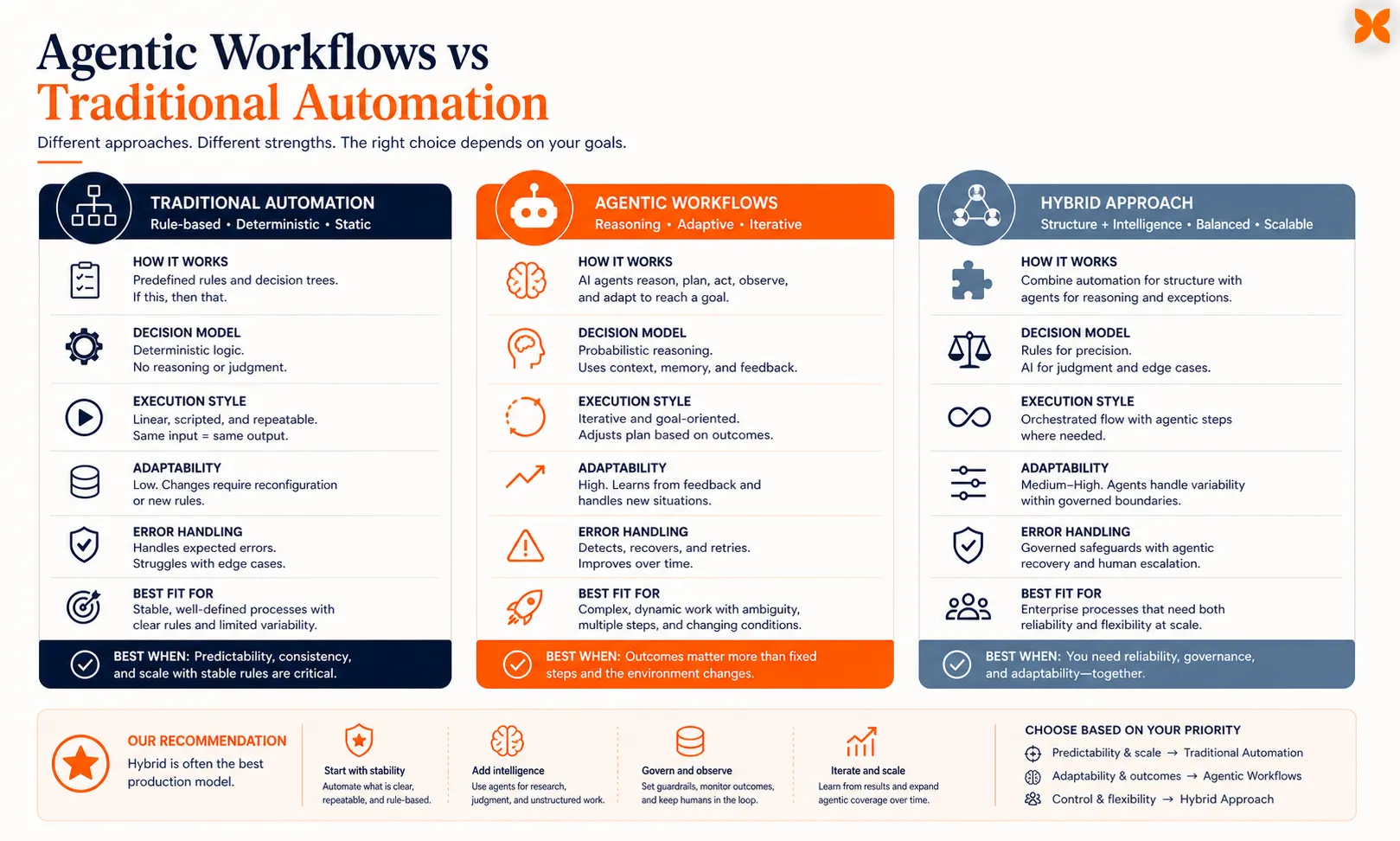
Traditional automation (RPA, scripted workflows, rule-based systems) follows predefined paths. If X happens, do Y. These are deterministic, predictable, and fast. They work well for structured, repetitive tasks with clear rules, like moving data between systems, sending notifications, or applying standard transformations.
Agentic workflows handle ambiguity, make judgment calls, and adapt to unexpected inputs. They work well for tasks that previously required human reasoning, like analyzing unstructured documents, making recommendations based on incomplete data, or handling customer requests that don’t fit neat categories.
The practical difference: traditional automation breaks when it encounters something outside its rules. An agentic workflow can reason about the unexpected situation and figure out a path forward.
Here’s when to use each approach:
- Traditional automation: Structured data, clear rules, high volume, needs to be deterministic
- Agentic workflows: Unstructured inputs, requires judgment, complex reasoning, benefits from iteration
- Hybrid (often the best approach): Traditional automation for the structured parts, agentic workflows for the parts that need reasoning
Most real-world implementations end up as hybrids. The structured, predictable steps run as traditional automation for speed and cost efficiency, and the steps that require interpretation, analysis, or judgment use agentic patterns. That hybrid model is what most production deployments look like, and the use cases already delivering results show exactly how the patterns combine.
Quick check
What is the key difference between traditional automation and agentic workflows when encountering unexpected inputs?
Real-World Agentic Workflow Use Cases
These aren’t hypothetical scenarios. They’re the patterns organizations are implementing today, drawn from a wider set of AI agent use cases across industries.
Software Development and Code Review
An agentic coding workflow uses all four patterns together. The planning agent breaks a feature request into implementation steps. The coding agent writes the code, using tool access to check documentation and run tests.
The reflection agent reviews the code for bugs, security issues, and style violations. If issues are found, the coding agent revises and the cycle repeats. This iterative approach catches bugs, handles edge cases, and produces cleaner code than a single generation pass.
Customer Support Triage and Resolution
An agentic customer support workflow classifies incoming tickets, pulls relevant customer data and knowledge base articles, drafts responses, and routes complex issues to human agents. The key agentic element: the workflow evaluates its own confidence level and escalates when it’s unsure, rather than guessing.
Content Research and Creation
A multi-agent content workflow assigns research, outlining, writing, and editing to different specialized agents. The researcher gathers and verifies information using web search and document retrieval. The writer produces the draft.
The editor checks accuracy, tone, and completeness. Each handoff includes context that keeps the workflow coherent across all stages.
Data Analysis and Reporting
An agentic analysis workflow receives a question like “What drove the revenue change last quarter?” and plans its investigation. It queries databases, runs statistical analysis using code interpretation, identifies the key factors, generates visualizations, and produces a narrative explanation. If initial analysis raises new questions, the agent can pursue those leads automatically.
These use cases share a common thread: the value comes from combining patterns and iterating until the result is right. Building your own starts with a few key decisions.
How to Build an AI Agentic Workflow
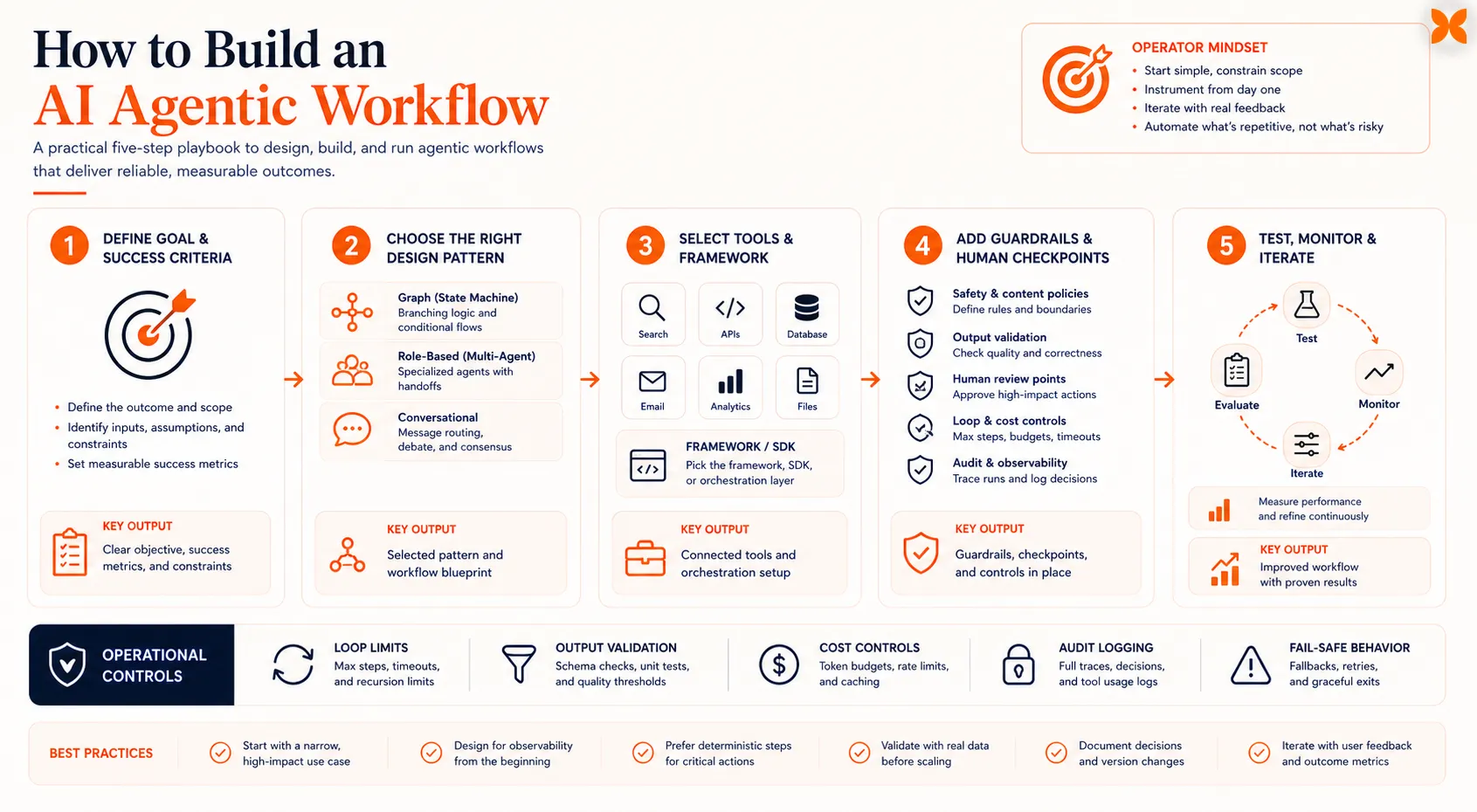
Building an effective agentic workflow is more about design thinking than coding. The frameworks and tools matter, but the decisions you make about workflow structure determine whether the result is useful or just expensive, even more than the initial agent setup itself.
Define the Goal and Success Criteria
Start with a specific, measurable outcome. “Automate customer support” is too vague. “Accurately classify and respond to tier-1 support tickets with a 90% resolution rate and less than 2-minute response time” gives you something to build toward and measure against.
Common mistake here: skipping this step entirely. Teams that don’t define clear success criteria end up with agents that demo well but don’t deliver real value.
Choose the Right Design Pattern
Match the pattern to the task:
- Reflection works best when output quality matters and you can define clear evaluation criteria. Use it for code generation, writing, analysis, and any task where iterative improvement helps.
- Tool use is essential when the task requires external data or actions. Use it for research, data retrieval, system integration, and fact-checking.
- Planning fits tasks with multiple steps and dependencies. Use it for complex analysis, project management, and multi-stage processes.
- Multi-agent makes sense for tasks that benefit from specialized roles or different perspectives. Use it for complex projects that span research, analysis, and creation.
Most production workflows combine multiple patterns. A typical setup might use planning to structure the work, tool use to gather data, reflection to verify quality, and multi-agent collaboration for complex tasks.
Select Your Tools and Framework
Several agentic AI frameworks support building these workflows. Your choice depends on your technical requirements, existing stack, and the complexity of your workflows.
Key considerations when choosing:
- How much control do you need over the workflow logic?
- What tools and integrations does the framework support?
- How does it handle errors and retries?
- What monitoring and debugging capabilities does it offer?
For teams that want to build agentic workflows without managing infrastructure, Craze is an AI platform that lets you design multi-step workflows with built-in tool connections across any AI model, and it’s free to use.
Add Guardrails and Human Checkpoints
Every production agentic workflow needs guardrails. These include:
- Loop limits: Cap the number of iterations to prevent infinite loops and runaway costs
- Output validation: Check outputs against format, length, and content rules before they’re used
- Confidence thresholds: Route low-confidence outputs to human review
- Cost controls: Set spending limits per workflow run
- Audit logging: Record every step for debugging and compliance
Human-in-the-loop checkpoints are especially important for high-stakes workflows. Let the agent handle the heavy lifting, but keep humans in the loop for approvals, edge cases, and quality spot-checks.
Test, Monitor, and Iterate
Agentic workflows need ongoing attention. Start with a narrow use case, measure performance against your success criteria, and expand gradually.
Monitor for these signals:
- Quality drift: Output quality changing over time
- Cost efficiency: Cost per successful outcome
- Edge cases: Inputs that cause unexpected behavior
- Latency: Response times staying within acceptable bounds
The 80/20 rule applies here. According to McKinsey, about 80% of the work in implementing agentic AI goes to data engineering, governance, and workflow integration. The AI model is the smaller part of the equation. That 80/20 split also explains why certain mistakes keep showing up across implementations.
Quick check
According to McKinsey, what percentage of the work in implementing agentic AI goes to data engineering, governance, and workflow integration?
Common Mistakes When Building Agentic Workflows
After reviewing what works and what doesn’t across real implementations, these are the patterns that consistently cause problems:
-
Using LLMs where simple code would work. Not every step in a workflow needs a language model. If a task follows fixed rules, handle it with regular code. Save LLM calls for the parts that genuinely need reasoning.
-
Stuffing too much context into prompts. More context doesn’t automatically mean better performance. Agents work better with focused, relevant context than with everything you can fit into the prompt window.
-
Skipping error handling. Agents will fail, tools return errors, APIs time out, and models hallucinate. Design for failure from the start with retries, fallbacks, and graceful degradation.
-
Building complex multi-agent systems prematurely. A single agent with a reflection loop often outperforms a complex multi-agent setup for many tasks, and it’s far easier to debug and maintain.
-
Not setting loop limits. Without caps on iterations, an agent can burn through your API budget trying to fix an unfixable problem. Always set maximum retry counts and total token budgets.
-
Ignoring latency. Agentic workflows are inherently slower than single-pass generation because they involve multiple steps. For time-sensitive applications, design for acceptable latency from the start and parallelize where possible.
The common thread across all these mistakes is complexity creep. Start with the simplest workflow that solves your problem, prove it works, then add sophistication only when you have evidence it’s needed.
Final Thoughts
Agentic workflows turn AI from a question-answering tool into something that can actually complete work. The four design patterns (reflection, tool use, planning, and multi-agent collaboration) give you a toolkit for structuring that work, and combining them is where the real power shows up.
The best place to start is small. Pick one repetitive task that currently requires human judgment, build a reflection loop around it, and measure whether the output quality holds up. Once that works, layer in tool use for external data, planning for multi-step complexity, and multi-agent collaboration when you genuinely need specialized roles. Every production team that’s gotten real value from agentic workflows followed this same incremental path.
FAQs
What is the difference between agentic AI and agentic workflows?
Agentic AI refers to AI systems that can act autonomously, make decisions, and pursue goals. Agentic workflows are the specific processes and patterns those systems use to accomplish tasks. Think of agentic AI as the capability and agentic workflows as the method.
Do I need to code to build agentic workflows?
Not necessarily. While custom workflows often involve code, several platforms and AI agent builders offer visual workflow designers that let you create agentic processes without writing code. The key is understanding the design patterns, regardless of how you implement them.
How much do agentic workflows cost to run?
Costs vary widely based on the model used, number of iterations, and tool calls involved. A simple reflection workflow might cost a few cents per run. A complex multi-agent workflow with many tool calls could cost several dollars. The most important cost control is setting loop limits and being intentional about when you use LLM calls versus deterministic code.
What is the difference between an agentic workflow and a chatbot?
A chatbot responds to individual messages in a conversation. An agentic workflow autonomously executes multi-step processes, uses tools, evaluates its own work, and iterates toward a goal. A chatbot answers your question. An agentic workflow completes your task.
Which agentic workflow pattern should I start with?
Start with reflection. It's the simplest to implement, works with any LLM, and delivers immediate quality improvements. Once you're comfortable with reflection, add tool use for external data access, then planning for multi-step tasks. Multi-agent collaboration is usually the last pattern to add.
More Articles
The 8 Best Lindy AI Alternatives in 2026 (Tested & Compared)

The 8 best Lindy AI alternatives for 2026, anchored to why people leave Lindy, with current pricing, third-party ratings, honest pros and cons, and the best pick for each reason to switch.
The 7 Best Make Alternatives in 2026 (Tested & Compared)
The 7 best Make.com alternatives for 2026, anchored to why people leave Make, with current pricing, third-party ratings, honest pros and cons, and the best pick for each reason to switch.
The 8 Best Zapier Alternatives in 2026 (Tested & Compared)
The 8 best Zapier alternatives for 2026, anchored to why people leave Zapier, with current pricing, third-party ratings, honest pros and cons, and the best pick for each reason to switch.


