
How to Build an AI Customer Support Agent That Actually Helps
A practical guide to building an AI agent for customer support. Covers scoping your first project, knowledge base setup, escalation design, and quality metrics that go beyond deflection rate.

By: Roshan Mhatre
Core Engineering
Published
Updated
Edited by Craze Editorial Team · See our Editorial Process
91% of customer service leaders say they’re under pressure to bring AI into their support operations. The tools are ready. The business case is clear. But here’s the part that doesn’t make the pitch deck: a poorly built AI support agent is worse than no AI support agent at all. It gives wrong answers with confidence, traps customers in loops, and quietly tanks your satisfaction scores while your dashboard shows “80% deflection.”
This guide walks through the practical side of building an AI agent for customer support, from figuring out what to automate first, to designing escalation that doesn’t leave customers frustrated, to measuring whether your agent is genuinely helping or just hiding problems.
TL;DR
- It’s not a chatbot, it’s an agent. An AI customer support agent uses NLP, a knowledge base, and tool integrations to handle inquiries end-to-end. It understands intent instead of matching keywords, and operates on a spectrum from suggesting responses to resolving tickets autonomously.
- Audit before you automate. Pull 90 days of tickets, categorize by volume and complexity, and automate the highest-volume, lowest-complexity category first. Password resets and order status are common starting points. Billing disputes are not.
- Your knowledge base makes or breaks the agent. The quality of your documentation directly determines the quality of your agent’s answers. Clean it up, organize it, and remove anything stale before you connect a single tool.
- Escalation is half the product. Design your human handoff paths with the same care as the automation. Three triggers: low confidence, excluded topics, and customer request. Always pass full conversation context. Always let customers reach a human.
- Deflection rate lies to you. Track resolution rate, CSAT on AI-handled conversations, escalation trends, and repeat contact rate within 48 hours instead. A deflected ticket might just mean the customer gave up.
What an AI Customer Support Agent Actually Does
An AI customer support agent is an AI system that handles customer inquiries using natural language processing, a knowledge base of your company’s information, and integrations with your business tools. Unlike a traditional chatbot that follows scripted decision trees, an AI agent understands intent, pulls relevant information, and takes action.
These agents operate on a spectrum of autonomy. Understanding the different types of AI agents helps you pick the right starting point:
- Assistive agents surface relevant knowledge base articles and suggest responses for your human agents to use. The human stays in control of every reply.
- Copilot agents draft complete responses for human review and approval. Your team edits and sends, but the heavy lifting is done.
- Autonomous agents resolve tickets end-to-end without human involvement, escalating only when they hit their confidence limits or encounter topics they’re not built to handle.
Most teams start with assistive or copilot mode and expand toward autonomy as they build confidence in the agent’s accuracy.
The distinction from chatbots matters here. A rule-based chatbot can only handle the exact scenarios you’ve programmed. An AI agent can handle variations, follow-up questions, and new phrasings of the same problem because it understands language rather than matching keywords. The practical differences between AI agents and chatbots go deeper than that summary if you’re weighing the two approaches.
Voice is part of this picture too. AI voice agents handle phone support using the same underlying capabilities, converting speech to text, processing the query, and responding with synthesized speech. The scoping and quality principles in this guide apply to voice and chat equally.
Once you have a clear picture of what these agents can do, the next question is where to start.
How to Scope Your First AI Support Agent
The biggest mistake teams make is trying to automate everything at once. A support agent that “handles all inquiries” handles none of them well. The path to a useful AI support agent starts with a focused scope.
Run a Ticket Audit
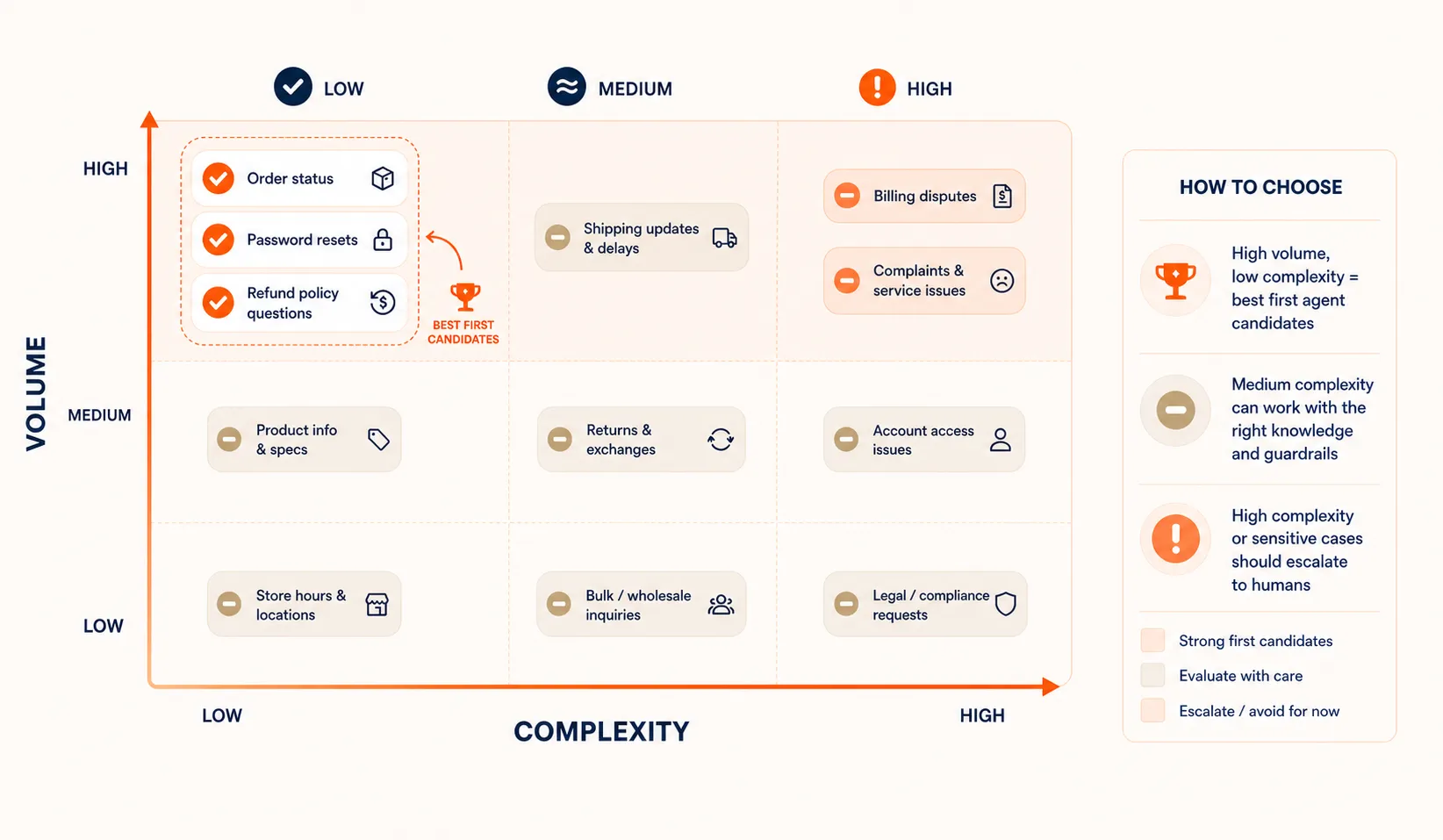
Pull your last 90 days of support tickets and categorize them by type and frequency. You’re looking for patterns: which categories make up the bulk of your volume, and which have clear, repeatable resolution paths.
A basic categorization might look like this:
| Category | Volume % | Complexity | Good First Candidate? |
|---|---|---|---|
| Order status / tracking | 25% | Low | Yes |
| Password resets / account access | 15% | Low | Yes |
| Return and refund policy questions | 12% | Low-Medium | Yes |
| Product feature questions | 10% | Medium | Maybe (depends on docs) |
| Billing disputes | 8% | High | No |
| Complaints / escalations | 5% | High | No |
Pick the Right Starting Point
Your best first candidate is high volume, low complexity, and has a clear resolution path. Password resets, order tracking, and basic policy questions are common starting points because the answers are factual, the resolution is binary (either the info is right or it isn’t), and the stakes of a wrong answer are low.
Avoid starting with anything that requires empathy, judgment calls, or access to sensitive billing information. Complaints and billing disputes are poor first candidates because the cost of getting them wrong is high and the conversations are emotionally charged. Customer support is one of many AI agent use cases , but the scoping discipline is universal: narrow first, expand later.
Gartner predicts that agentic AI will resolve 80% of common customer service issues without human intervention by 2029. But the key word is “common.” That prediction assumes proper scoping, not blanket automation.
Starting narrow also helps you build internal confidence. When your team sees the agent handling order status inquiries accurately for a month, they’ll trust expanding its scope. If you launch with everything and the agent fumbles a billing dispute on day one, you’ll spend months rebuilding trust.
Quick check
Which type of support ticket makes the WORST first candidate for AI automation?
With your scope defined, the next step is building the agent itself.
Building the Agent: Knowledge Base, Tools, and Instructions
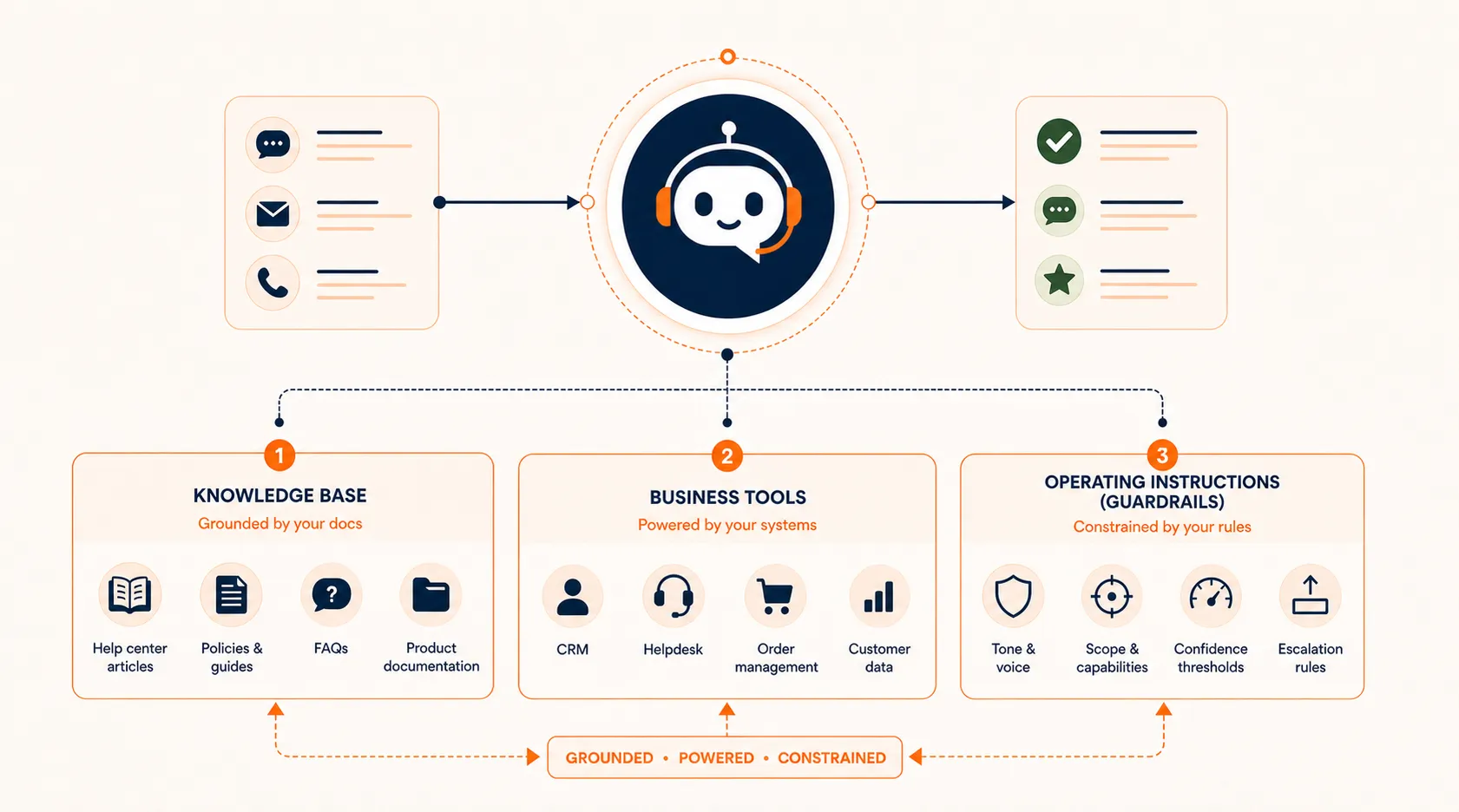
Once you’ve picked your first ticket category, the build has three layers: what the agent knows, what it can access, and how it behaves. If you want a deeper look at the general process, our guide to building an AI agent covers the full range of build paths. Here, we’ll focus on what’s specific to customer support.
Your Knowledge Base Is the Foundation
Your knowledge base is the single most important input to your AI support agent. The agent retrieves relevant documents to ground its responses (an approach called retrieval-augmented generation, or RAG), which means the quality of its answers depends directly on the quality of your documentation.
What to include in your knowledge base:
- FAQs covering the ticket category you’re automating
- Product documentation relevant to common questions
- Troubleshooting guides with step-by-step resolution paths
- Policy documents for returns, refunds, shipping, and account terms
The common mistake is dumping your entire help center into the agent’s knowledge base without cleaning it up. Outdated articles, conflicting information, and poorly written docs lead to hallucinated or incorrect responses. Treat your knowledge base like a product: organize it, update it, and remove anything stale before you connect the agent.
Connect Your Business Tools
A support agent that can only answer questions from docs is useful but limited. The real value comes when the agent can look things up and take action. Common integrations include:
- CRM or helpdesk (look up customer history, update ticket status)
- Order management (check order status, tracking info)
- Billing system (read-only access to invoice history)
- Product database (check feature availability, compatibility)
Set clear permission boundaries. Your agent should be able to read order status but probably shouldn’t process refunds autonomously in its first version. Expand write permissions gradually as you verify accuracy. The architecture behind AI agents explains how tool connections, memory, and decision logic fit together.
Define Instructions, Tone, and Constraints
Your agent needs explicit instructions covering:
- Tone and personality: Should it be formal or conversational? Match your brand’s existing support voice.
- Scope constraints: What topics it can handle and what it should escalate immediately.
- Response format: How long answers should be, whether to use bullet points, when to ask clarifying questions.
- Confidence thresholds: When to attempt a response versus admitting uncertainty and escalating.
Think of these instructions as the agent’s training manual. The more specific you are, the more consistent the agent’s behavior will be.
With the agent built, the next critical piece is what happens when it can’t help.
Designing Escalation That Does Not Frustrate Customers
Here’s where most AI support implementations fall short. Teams spend weeks building the automation and fifteen minutes thinking about what happens when the automation can’t help. Escalation design deserves as much attention as the automation itself.
Three Escalation Triggers
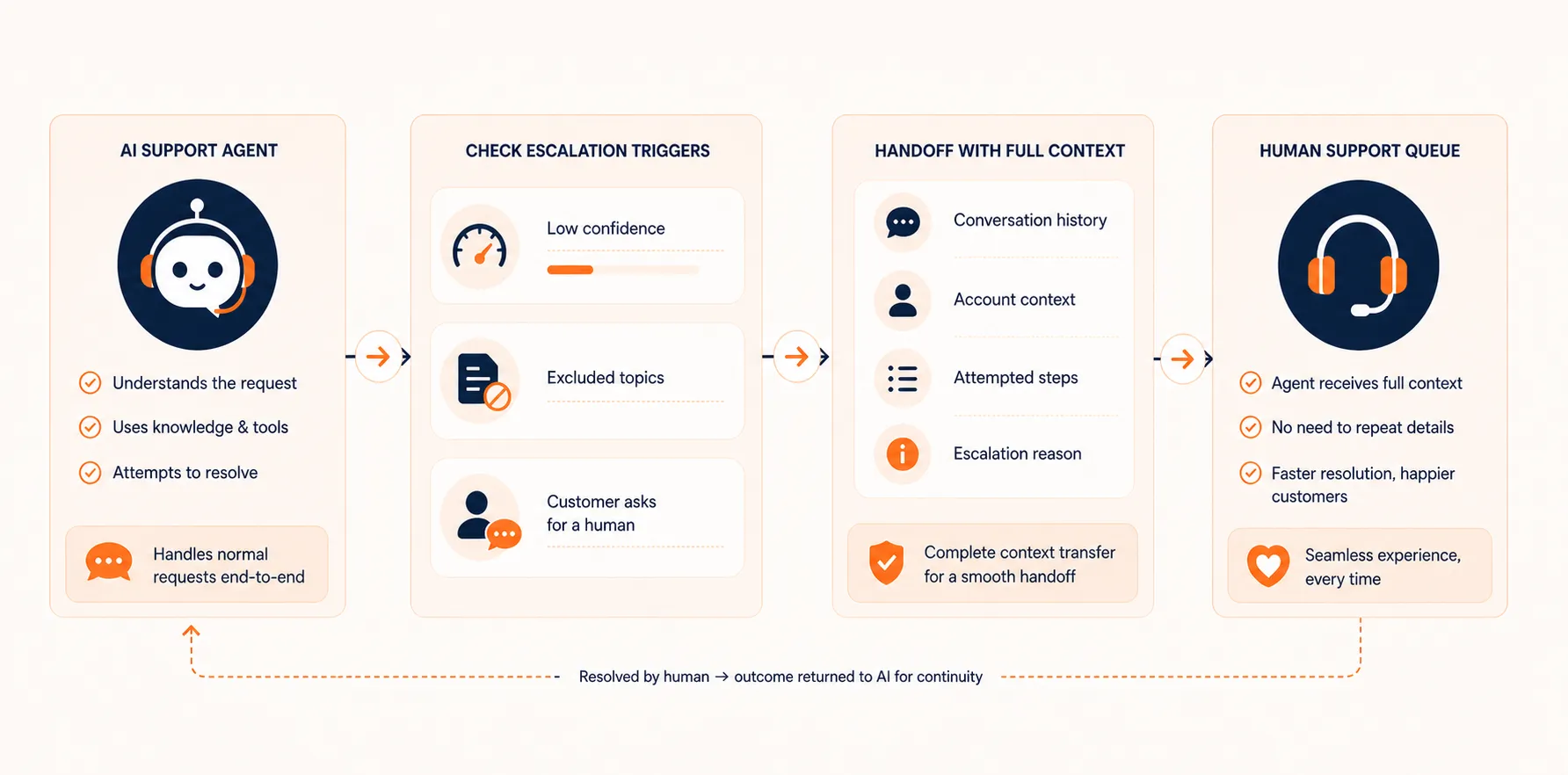
Build your escalation logic around three triggers:
-
Confidence threshold: The agent isn’t confident it has the right answer. Rather than guessing, it transfers to a human. Set this threshold conservatively at first and adjust based on transcript review.
-
Topic exclusion: Certain topics should always go to humans regardless of agent confidence. Billing disputes, complaints, legal questions, and anything involving sensitive personal data belong in this category.
-
Customer request: If a customer asks to speak to a human, honor it immediately. No “Let me try to help you first” loops. No “Are you sure?” confirmations. Just a clean transfer.
Make Handoffs Work
The worst escalation experience is when a customer explains their problem to the AI agent for five minutes, gets transferred, and then has to repeat everything to the human agent. Your escalation should pass the full conversation history, the customer’s account context, and a summary of what the agent attempted.
A good handoff gives the human agent:
- The customer’s name and account details
- The full conversation transcript
- What the AI agent identified as the issue
- What resolution steps were attempted
- Why the escalation was triggered
Designing these handoffs well is a form of AI agent orchestration , where you’re coordinating the transition between AI and human workflows.
Anti-patterns to Avoid
- No human option: The agent keeps trying to help with no way for the customer to reach a person. This is the single fastest way to destroy customer trust.
- Cold transfers: Sending the customer to a human with zero context, forcing them to start over.
- Escalation loops: The agent transfers to a queue that routes back to the agent. Test your escalation paths end to end.
- Hidden exit: The “talk to a human” option exists but is buried three menus deep or requires a specific phrase.
Quick check
A customer asks to speak to a human agent. What should the AI agent do?
Getting escalation right sets the stage for honest measurement of your agent’s performance.
Measuring Success Beyond Deflection Rate
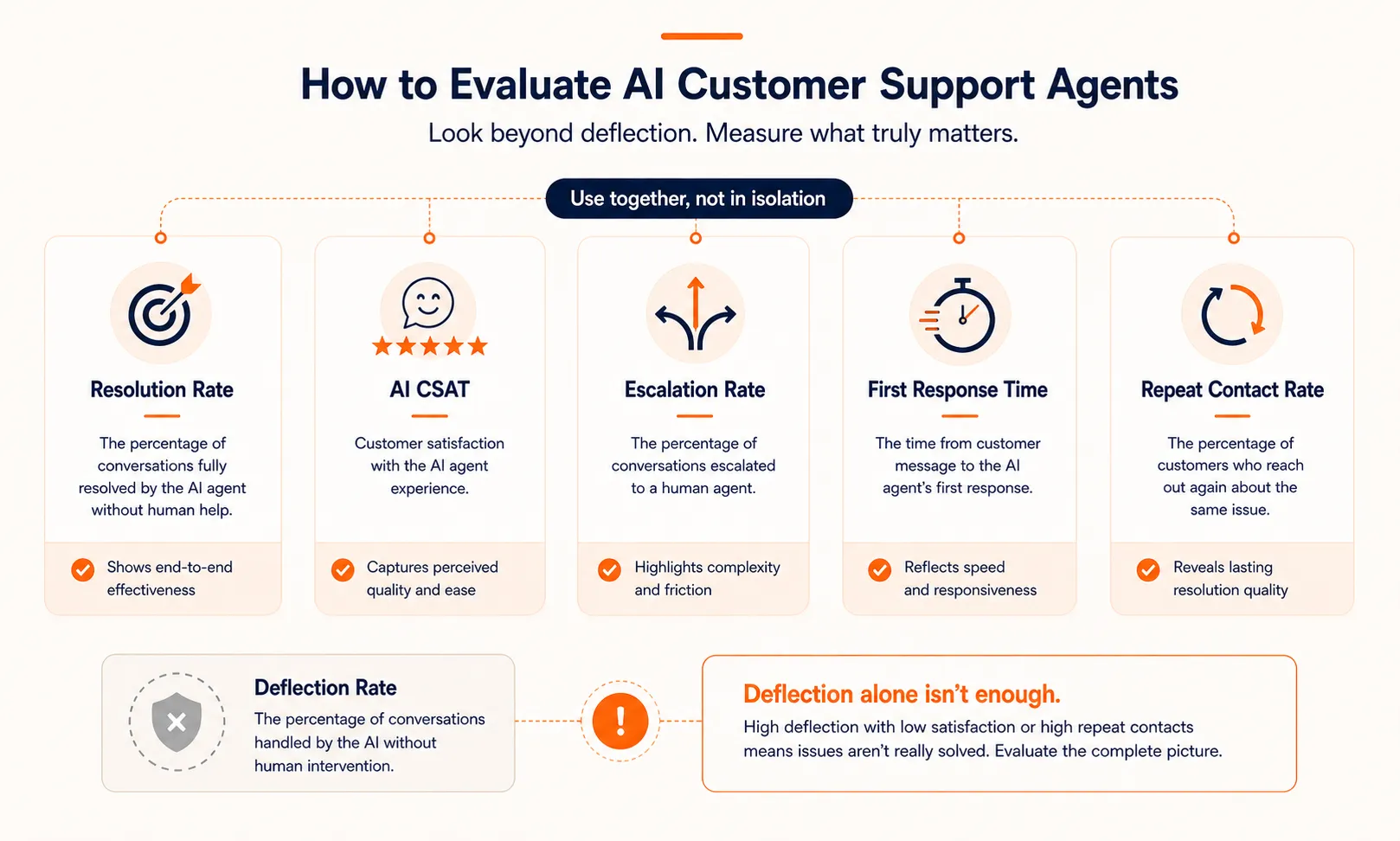
Deflection rate is the metric everyone talks about, and it’s the one most likely to mislead you. You can deflect 80% of tickets and still have unhappy customers if the agent is giving wrong answers that people give up on rather than escalating.
A Better Metrics Framework
Track these metrics together, not in isolation:
- Resolution rate: What percentage of AI-handled conversations actually resolved the customer’s problem? This is different from deflection. A deflected ticket might just mean the customer gave up.
- CSAT on AI conversations: Survey customers after AI-handled interactions specifically. Compare this to your human agent CSAT baseline.
- Escalation rate: What percentage of conversations get escalated? Track the trend over time. A rising escalation rate might mean your knowledge base has gaps.
- First response time: How much faster are customers getting initial responses? This is usually where the biggest improvement shows up.
- Repeat contact rate: Are customers coming back with the same issue within 48 hours? High repeat contacts suggest the agent is giving answers that don’t actually solve the problem.
AI-enabled self-service can reduce incident volume by 40-50% and cut cost-to-serve by over 20%, according to McKinsey. But those numbers only hold when you’re measuring resolution, not just deflection.
Build a Review Habit
During your first month, review AI conversation transcripts daily. You’re looking for:
- Incorrect answers the agent delivered with confidence
- Escalations that could have been avoided with better docs
- Customer frustration signals (short responses, repeated questions, abandonment)
- Edge cases your instructions didn’t cover
After the first month, shift to weekly reviews. Flag recurring issues and update your knowledge base and instructions accordingly. This review loop is what separates agents that improve over time from agents that quietly degrade.
Quick check
Why is deflection rate a misleading metric for AI support agent success?
With a measurement system in place, you’re ready to scale beyond the pilot.
Piloting and Scaling Without Breaking Things
Don’t flip the switch from zero to full automation overnight. A controlled rollout protects your customer experience while you verify the agent works in production.
Start Small
Route 10-20% of incoming tickets in your chosen category to the AI agent. Keep full human coverage running in parallel. This gives you a direct comparison: AI-handled tickets versus human-handled tickets in the same category, same time period.
Know When to Expand
Move to a higher traffic percentage when you see:
- CSAT on AI conversations within 5 points of your human baseline
- Escalation rate below 25% and stable or declining
- Repeat contact rate not increasing
- Positive feedback from your human agents who handle escalations
Adding New Categories
Once your first category is stable, repeat the scoping process for the next one. Don’t rush to add multiple categories simultaneously. Each new category needs its own knowledge base review, instruction tuning, and monitoring period.
Compliance Considerations
If your support involves customer data, address data privacy early:
- Where conversation data is stored and for how long
- Whether your AI provider processes data in compliant regions (relevant for GDPR, CCPA)
- How you handle requests to delete conversation history
- Whether customers are informed they’re interacting with an AI agent (required in some jurisdictions)
Build these into your implementation plan from the start, not as an afterthought.
If you’re looking for a platform to build, test, and iterate on AI agents for support workflows, Craze is designed for exactly that kind of work. For a broader look at the tools available, our comparison of AI agent builders covers the main options across no-code, framework, and custom paths.
Where to Go From Here
Building an AI customer support agent is less about the technology and more about the preparation. The teams that succeed start with a narrow scope, invest in their knowledge base, design escalation with the same care as automation, and measure what actually matters to customers.
The trajectory is clear: AI will handle a growing share of customer support interactions over the next few years. But the teams that benefit most won’t be the ones who automated fastest. They’ll be the ones who automated carefully, measured honestly, and kept the customer’s experience at the center of every decision.
FAQs
What is an AI agent for customer support?
An AI customer support agent is an AI system that handles customer inquiries using natural language processing, a knowledge base, and integrations with business tools like your CRM or helpdesk. Unlike rule-based chatbots that follow scripted flows, AI agents understand intent and can handle variations in how customers phrase their questions. They range from assistive (suggesting responses for human agents) to fully autonomous (resolving tickets without human involvement).
What AI agent provides the best customer service?
There is no single best option because it depends on your tech stack, ticket volume, team size, and budget. No-code platforms work well for most small-to-mid-market teams getting started. Look for a platform that supports knowledge base integration, tool connections, clear escalation rules, and conversation monitoring. Craze is a free AI platform that lets you build, test, and refine support agents without writing code.
How much does an AI customer support agent cost?
Costs range widely. Free-tier no-code tools let you build a basic support agent at no upfront cost. Mid-range implementations with custom integrations run $5K to $30K in setup costs. Enterprise deployments can exceed $100K. Beyond setup, expect ongoing costs for API usage (typically $50 to $200 per month for moderate volume) and the time investment of maintaining your knowledge base and reviewing conversations.
Can an AI agent fully replace human support?
Not for everything. AI agents handle factual, repetitive, well-documented inquiries well: order status, password resets, policy questions, basic troubleshooting. They struggle with emotionally charged conversations, complex billing disputes, and situations requiring creative problem-solving or empathy. The most effective approach combines AI for volume and speed with humans for complexity and care.
How do you measure if an AI support agent is working?
Track five metrics together: resolution rate (problems actually solved, not just deflected), CSAT specifically on AI-handled conversations, escalation rate and trend, first response time improvement, and repeat contact rate within 48 hours. Deflection rate alone is unreliable because it counts customers who gave up as resolved. Review conversation transcripts regularly to catch issues your metrics might miss.
More Articles
The 8 Best Lindy AI Alternatives in 2026 (Tested & Compared)

The 8 best Lindy AI alternatives for 2026, anchored to why people leave Lindy, with current pricing, third-party ratings, honest pros and cons, and the best pick for each reason to switch.
The 7 Best Make Alternatives in 2026 (Tested & Compared)
The 7 best Make.com alternatives for 2026, anchored to why people leave Make, with current pricing, third-party ratings, honest pros and cons, and the best pick for each reason to switch.
The 8 Best Zapier Alternatives in 2026 (Tested & Compared)
The 8 best Zapier alternatives for 2026, anchored to why people leave Zapier, with current pricing, third-party ratings, honest pros and cons, and the best pick for each reason to switch.


