
How to Build an AI Agent for Sales: A Practical Guide
Learn how to build an AI agent for sales step by step. Covers scoping, tool selection, workflow design, testing, and three ready-to-copy sales agent workflows.

By: Deepit Patil
Co-Founder and CTO
Published
Updated
Edited by Craze Editorial Team · See our Editorial Process
Sales teams spend a surprising amount of time on work that isn’t selling. Research, data entry, follow-up emails, lead scoring, CRM updates. According to Salesforce’s State of Sales report, 87% of sales organizations already use some form of AI for these tasks. But most of that usage is still one-off prompts and basic automations, not agents that run full workflows on their own.
An AI sales agent is different. It connects to your tools, follows your rules, makes decisions based on your criteria, and handles entire workflows from trigger to output. This guide walks through how to build one, step by step, for your sales team or your clients.
TL;DR
- An AI sales agent runs complete workflows, not just single tasks, by connecting to your CRM, email, and data sources to handle entire processes from trigger to output.
- Start by automating one specific sales workflow, not your entire pipeline. Lead qualification is the most common and safest starting point.
- Match your tool choice to your team’s technical skill: no-code platforms for speed, frameworks like CrewAI for multi-agent setups, full code for maximum control.
- Always include human review gates for customer-facing actions like email outreach and pricing conversations.
- Test with historical data before going live, then iterate weekly based on real results. Start with 10-20% of live leads and scale up.
What an AI Sales Agent Actually Does
An AI agent is software that takes a goal, breaks it into steps, uses tools to complete those steps, and makes decisions along the way. In sales, that means a system connected to your CRM, your email platform, your enrichment tools, and your calendar, executing tasks that follow a defined workflow.
This is different from a chatbot that answers questions in a conversation window. It is also different from a Zapier automation that moves data between two apps when a trigger fires. A sales agent sits between those two: it can reason about what to do next, pull information from multiple sources, and take different actions depending on what it finds.
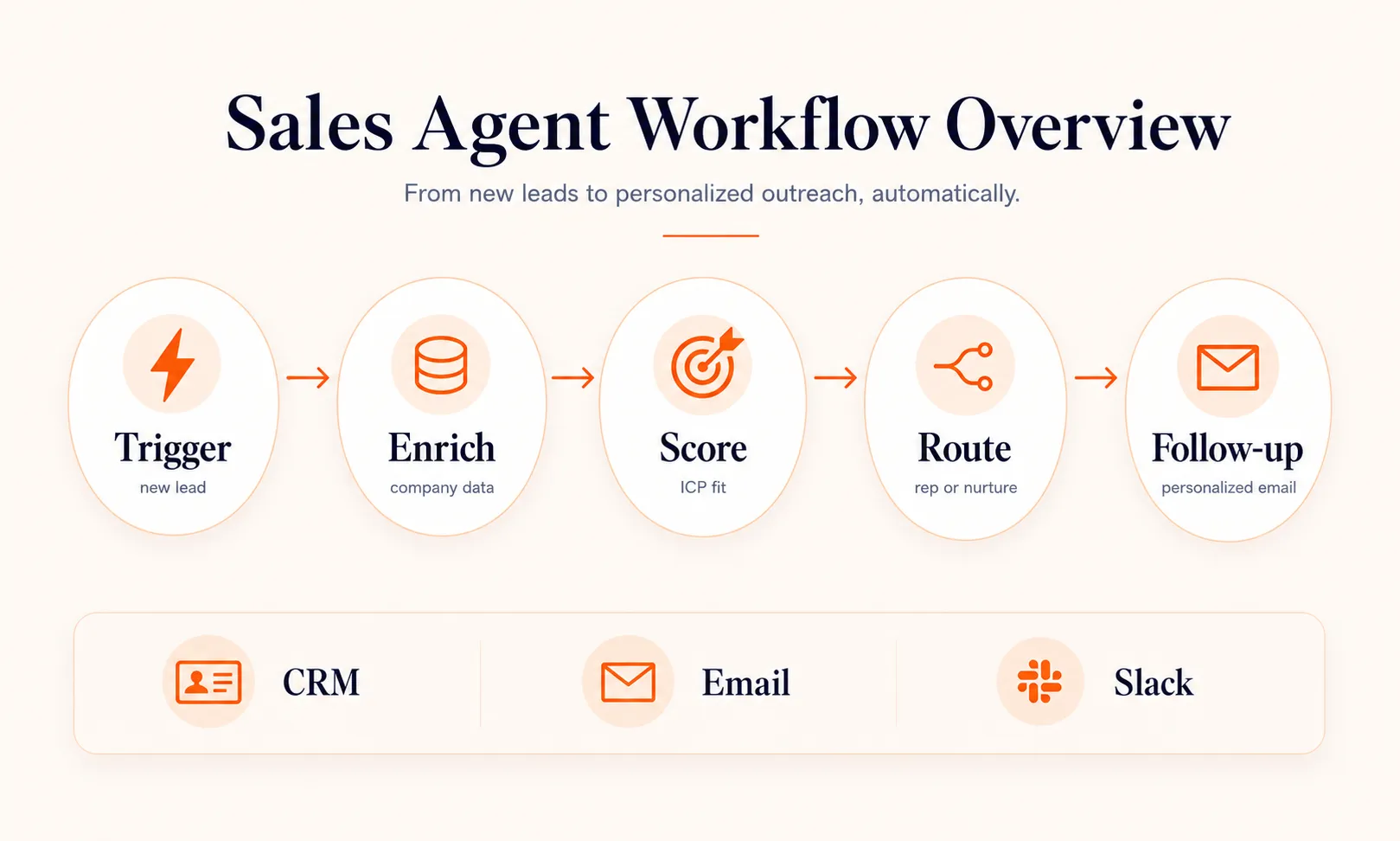
For example, when a new lead fills out a form on your website, a sales agent can pull the lead’s company data from an enrichment API, check it against your ideal customer profile, score it, update your CRM, draft a personalized email, and either send it or flag it for review. That entire chain happens without someone manually doing each step.
Understanding what an agent can do is one thing. Knowing which sales tasks are actually worth automating is where the real decisions start.
Sales Tasks Worth Automating with an AI Agent
Not every sales task benefits from an agent. The best candidates are high-frequency, rule-based, and time-consuming. Here is where agents deliver the most value.
Lead Qualification and Scoring
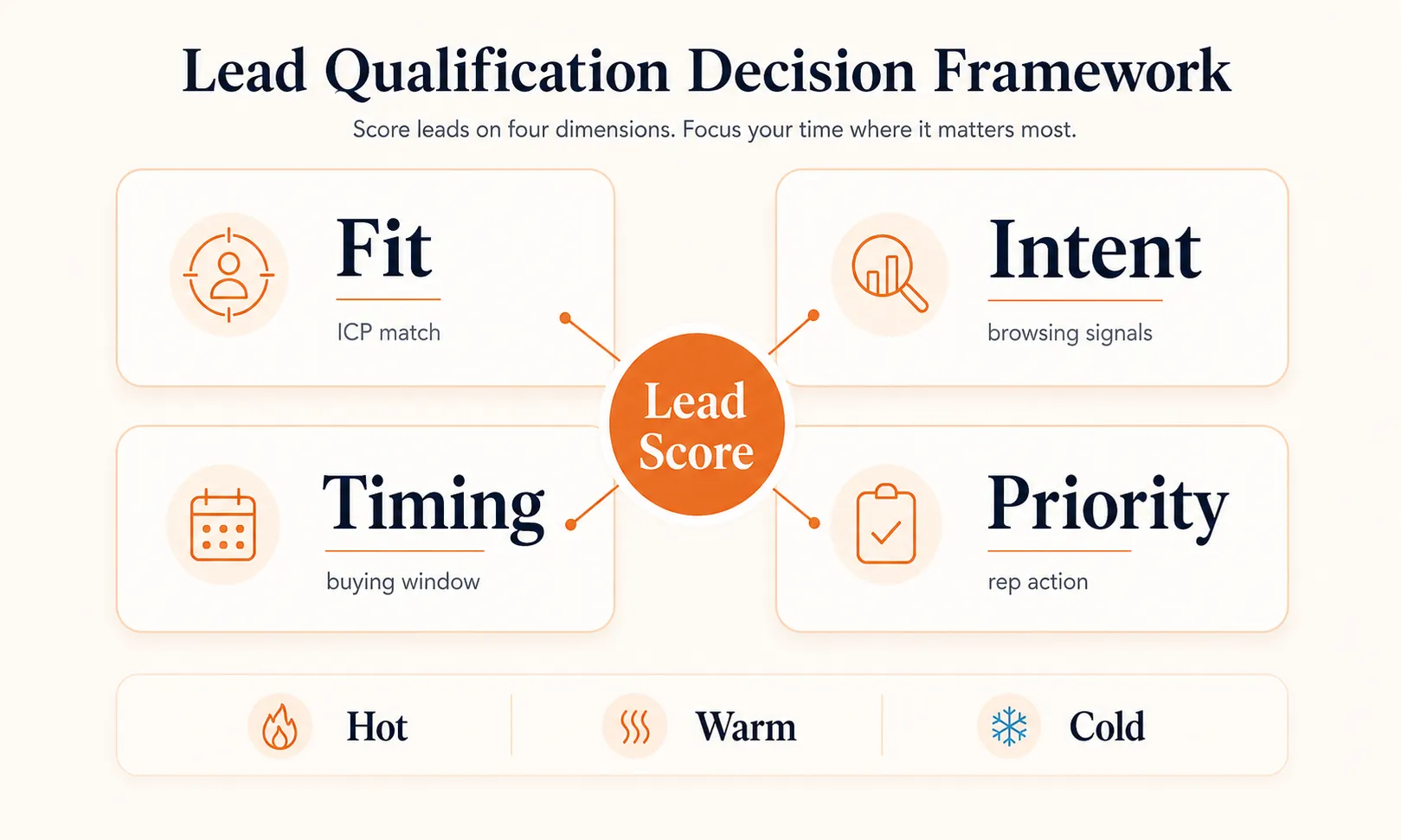
This is the most common starting point for sales AI agents. The agent evaluates incoming leads against your ideal customer profile by checking firmographic data (company size, industry, revenue), behavioral signals (pages visited, content downloaded), and demographic fit (job title, seniority).
Instead of a rep spending 10 minutes researching each inbound lead, the agent scores it in seconds and routes it to the right person. Salesforce found that sellers expect agents to cut prospect research time by 34% once fully implemented.
Prospect Research and Enrichment
Before any outreach, someone needs to understand who they’re reaching out to. An agent can pull LinkedIn data, company news, recent funding rounds, tech stack information, and existing relationship history from your CRM. It compiles a brief that gives your rep everything they need before a call or email.
Outbound Email and Follow-Up
55% of sales professionals already use AI for prospecting. An agent takes this further by managing entire outbound sequences: drafting personalized first-touch emails based on research, scheduling sends at optimal times, monitoring for replies, and drafting follow-ups when prospects go quiet.
The key difference from a basic email automation tool: the agent adjusts its approach based on what is happening. If a prospect opens an email but doesn’t reply, the follow-up takes a different angle than if they never opened it at all.
CRM Updates and Pipeline Hygiene
CRM data decay is a real problem. Contacts change jobs, companies get acquired, phone numbers go stale. An agent can run regular checks against enrichment APIs, flag outdated records, merge duplicates, and fill in missing fields. This is low-risk, high-value work that nobody wants to do manually.
These are just a few of the most common AI agent use cases in sales, but the pattern is the same: high volume, clear rules, and a human who would rather be selling.
Quick check
According to Salesforce, by how much do sellers expect AI agents to cut prospect research time?
How to Scope Your Sales Agent Before You Build
The biggest mistake teams make is trying to automate too much at once. A sales agent that handles lead scoring, outreach, follow-up, CRM updates, and meeting scheduling from day one will take months to build and will be fragile. Start with one workflow.
Pick your first workflow
Choose a task that is high-frequency, has clear rules, and where the cost of a mistake is low. Lead qualification is the most popular choice for a reason: it happens with every new lead, the scoring criteria are definable, and a bad score gets caught before it causes real damage.
Map the manual process
Write down every step a human currently takes to complete this task. Include where they get information, what decisions they make, what tools they use, and what the output looks like. Be specific. “Research the lead” is not a step; “check LinkedIn for job title, company size, and recent posts” is.
Define inputs, decisions, and outputs
For each step, identify what data goes in, what logic determines the next action, and what comes out. This becomes the blueprint for your agent’s workflow.
Set success criteria
How will you know the agent is working? Define metrics before you build. For a lead qualifier, that might be: scoring accuracy compared to human reps, time to first response, and conversion rate of agent-qualified leads.
Decide where humans stay in the loop
For internal actions like CRM updates, the agent can run autonomously. For customer-facing actions like sending emails, start with human review and remove it only after you have confidence in the output quality.
Once you have a clear scope, the next decision is which tools and frameworks will bring it to life.
Choosing the Right Tools and Frameworks
Your choice of tools depends on your team’s technical ability, the complexity of the workflow, and how quickly you need something running. Here are the three main approaches.
No-code platforms are the fastest path to a working agent. Tools like n8n give you a visual canvas to connect triggers, AI reasoning steps, and actions without writing code. You can build a working lead qualification agent in an afternoon. The tradeoff is less flexibility when the workflow gets complex. Craze lets you build agents with any AI model and connect them to your existing sales tools, which is useful if you want flexibility without managing infrastructure.
Multi-agent frameworks like CrewAI and LangGraph let you define multiple specialized agents that collaborate on a task. For example, one agent handles research, another handles qualification, and a third handles email drafting. Each agent has its own instructions and tools. This approach works well when your sales workflow has distinct phases that benefit from different reasoning strategies. For a deeper comparison of framework options, see this guide to agentic AI frameworks .
Full-code approaches using LangChain or custom Python give you maximum control. You define every decision point, every API call, every prompt. This is the right choice if you have engineering resources and need tight integration with proprietary systems. The tradeoff is development time and ongoing maintenance.
If you are comparing options side by side, this breakdown of AI agent builders covers the major platforms in more detail.
| Approach | Best For | Setup Time | Flexibility |
|---|---|---|---|
| No-code (n8n, Craze) | Fast prototyping, non-technical teams | Hours to days | Moderate |
| Multi-agent (CrewAI, LangGraph) | Complex multi-step workflows | Days to weeks | High |
| Full code (LangChain, Python) | Custom integrations, proprietary systems | Weeks to months | Maximum |
With your tools chosen, here is how to actually build the thing.
Step-by-Step: Build Your First AI Sales Agent
Here is a concrete walkthrough using inbound lead qualification as the example. The principles apply regardless of which tool you use.
Step 1: Define the Trigger
Every agent needs a starting event. For lead qualification, the trigger is typically a new form submission, a new contact in your CRM, or an inbound email. Configure your agent to listen for this event through a webhook, a CRM integration, or an email parser.
Step 2: Connect Your Data Sources
The agent needs information to make decisions. Connect it to your CRM for existing contact data, an enrichment API (like Clearbit or Apollo) for company and contact details, and any internal databases that contain customer history. The architecture of your agent determines how these data sources feed into the decision flow.
Step 3: Build the Qualification Logic
This is the core of your agent. Define your ideal customer profile as a set of rules the agent can evaluate. For example:
- Company size: 50 to 500 employees = high fit, under 50 = low fit
- Industry: SaaS, fintech, e-commerce = high fit
- Job title: VP Sales, Head of Revenue, CRO = decision maker
- Behavior: Visited pricing page + downloaded case study = high intent
The agent checks each lead against these criteria and assigns a score or tier (hot, warm, cold). You can implement this as structured rules, a prompt-based evaluation, or a combination of both.
Step 4: Design the Actions
Based on the qualification result, the agent takes different actions:
- Hot lead: Create a task for the assigned rep, send a personalized email within 5 minutes, add to high-priority sequence
- Warm lead: Add to nurture sequence, enrich the record, schedule a check-in for next week
- Cold lead: Update CRM status, add to low-priority nurture list
Step 5: Add Human Review Gates
For any customer-facing output, build in a review step. The agent drafts the email and sends it to a Slack channel or review queue. A rep approves, edits, or rejects it. Over time, as you build confidence in the agent’s output, you can remove the gate for specific scenarios.
Step 6: Test with Historical Data
Before going live, run the agent against your last 100 or 200 leads. Compare its scoring and routing decisions to what your team actually did.
Look for disagreements. Some will reveal agent errors to fix, while others will expose inconsistencies in your current manual process.
Step 7: Deploy and Monitor
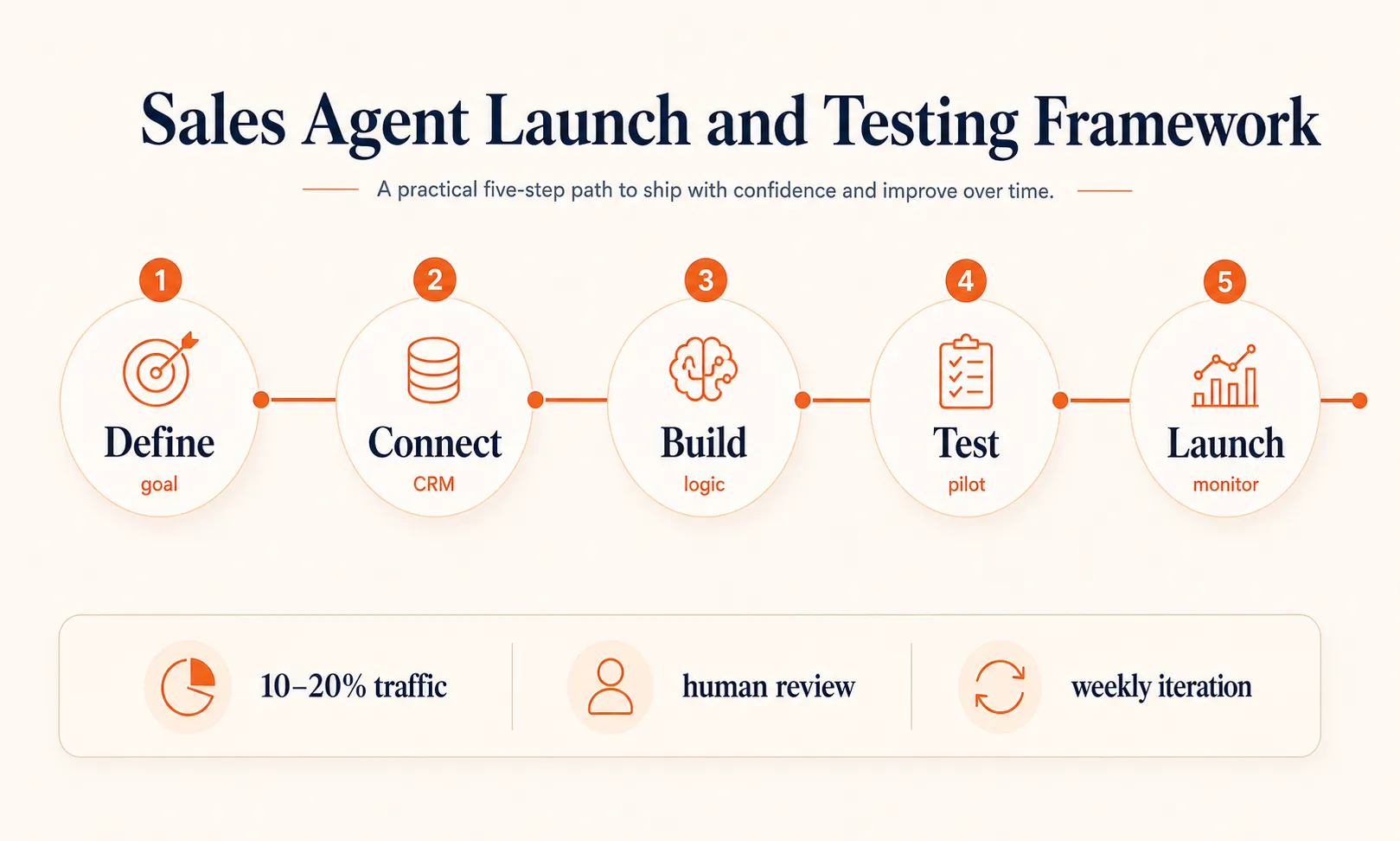
Start with a small percentage of live leads (10 to 20%) flowing through the agent while the rest follow your existing process. Compare outcomes over two to four weeks. Once the agent performs at or above human baseline, increase the volume. This guide covers lead qualification specifically, but the same principles apply when you build an AI agent for any use case.
Now that you have the build process down, here are three complete workflows you can adapt for your team.
Quick check
When deploying a new AI sales agent, what percentage of live leads should you start routing through it?
Three Sales Agent Workflows You Can Copy
Here are three practical workflows with the specific inputs, agent actions, and outputs for each.
Workflow 1: Inbound Lead Qualifier
Trigger: New form submission on website
Agent actions:
- Pull lead data from form fields (name, email, company, role)
- Enrich with company data (size, industry, funding, tech stack)
- Check CRM for existing relationship or prior conversations
- Score against ICP criteria (firmographic fit + behavioral signals)
- Assign tier: hot, warm, or cold
Output by tier:
- Hot: Create CRM opportunity, assign to rep, send personalized welcome email, notify rep in Slack
- Warm: Add to nurture sequence, schedule enrichment check in 7 days
- Cold: Log in CRM, add to general newsletter list
Key metric: Time from form fill to first response (target: under 5 minutes for hot leads)
Workflow 2: Outbound Research and Personalization Agent
Trigger: New prospect added to target account list
Agent actions:
- Pull company profile (recent news, job postings, funding, tech stack)
- Find the right contact (decision maker matching your buyer persona)
- Research the contact (LinkedIn activity, published content, shared connections)
- Identify a personalization angle (recent company milestone, mutual connection, relevant pain point)
- Draft a first-touch email using the research
- Queue for human review
Output: A ready-to-review outbound email with a research brief attached in the CRM record. The rep spends 30 seconds reviewing instead of 15 minutes researching.
Key metric: Reply rate on agent-drafted vs. manually drafted outreach
Workflow 3: Follow-Up and Re-Engagement Agent
Trigger: No reply 3 days after last outreach (or configurable delay)
Agent actions:
- Check CRM for any activity since last touch (email opens, page visits, ad clicks)
- If activity detected: draft a follow-up referencing the specific activity (“I noticed you checked out our pricing page”)
- If no activity: draft a different-angle follow-up (new value prop, relevant case study, or a direct question)
- Check if follow-up limit has been reached (e.g., max 4 touches)
- If limit reached: mark as “revisit in 30 days” and stop sequence
Output: Personalized follow-up email queued for review, or sequence closed with a future reminder.
Key metric: Re-engagement rate (replies after follow-up) and pipeline velocity
Getting any of these workflows running is a solid start, but the real gains come from what you do after launch.
Testing and Improving Your Sales Agent
Building the agent is half the work. The other half is making it better over time.
Test with real historical data first
Run your last 100 to 200 leads through the agent and compare its decisions to what your team did. This gives you a baseline before any live traffic touches the agent.
A/B test agent output against human output
For email outreach, send half your leads agent-drafted emails and half human-drafted emails. Track open rates, reply rates, and conversion rates. This removes guesswork about whether the agent is actually performing.
Track conversion at every funnel stage
Do not just measure whether the agent sends emails. Measure whether agent-qualified leads convert to meetings, meetings convert to opportunities, and opportunities convert to revenue. An agent that scores leads fast but scores them wrong is worse than no agent at all.
Iterate weekly
Review the agent’s output every week. Look at the worst-performing emails, the most inaccurate scores, and the cases where a human had to override the agent. Each of these is a prompt or rule to improve.
NVIDIA’s 2026 State of AI survey found that 88% of respondents said AI increased their annual revenue. The teams that get there fastest are the ones that treat the agent as a system to continuously improve, not a project to finish.
Even with solid testing habits, there are a few traps that catch almost every team building their first sales agent.
Quick check
According to NVIDIA's 2026 State of AI survey, what percentage of respondents said AI increased their annual revenue?
Common Mistakes When Building Sales AI Agents
Automating too many tasks at once
Start with one workflow. Get it working well. Then add the next one. Teams that try to build a full-stack sales agent from day one end up with something that does everything poorly.
Skipping the human review step
Even the best agent makes mistakes. For customer-facing actions, always start with a human review gate. You can loosen it later once you have confidence in the output.
Building on bad CRM data
An agent that enriches and scores leads is only as good as the data it starts with. If your CRM is full of duplicates, outdated contacts, and incomplete records, fix that first. The agent will amplify your data quality problems, not solve them.
Ignoring compliance
Email outreach has regulations (CAN-SPAM, GDPR). Your agent needs to respect opt-outs, include required disclosures, and follow sending limits. Build these constraints into the workflow from the start, not as an afterthought.
Measuring activity instead of outcomes
“The agent sent 500 emails this week” is not a success metric. “Agent-qualified leads converted to meetings at 18%, up from 12%” is. Tie every agent metric to a downstream business outcome.
Start Small, Then Scale
Building an AI sales agent is less about the technology and more about picking the right task, defining clear rules, and improving the system week over week. Start with one workflow, keep a human in the loop for anything customer-facing, and let the data tell you when to expand. The teams that get the most out of sales agents are the ones that treat them as systems to iterate on, not projects to finish and forget.
FAQs
How do you make an AI agent for sales?
Start by picking one sales workflow to automate, like inbound lead qualification. Map the manual steps your team currently follows, then build the agent using a platform that matches your technical skill level. Connect it to your CRM and data sources, add qualification or personalization logic, set up human review gates for high-stakes actions, and test with historical data before going live. Start narrow, measure results, and expand from there.
Can an AI agent handle sales tasks on its own?
An AI sales agent can handle structured, repeatable tasks like lead scoring, prospect research, email drafting, CRM updates, and follow-up sequencing with minimal human input. For high-stakes decisions like pricing negotiations, contract terms, or handling sensitive objections, you still want a human in the loop. The best approach is letting the agent handle volume and prep work while your sales team focuses on conversations that need judgment and empathy.
What sales tasks should you automate with AI first?
Start with high-frequency, low-risk tasks where mistakes are easy to catch. Lead scoring and qualification is the most common starting point because it is high volume, follows clear rules, and a bad score is caught before it causes damage. CRM data hygiene is another safe bet since it is tedious, time-consuming, and errors are visible. Avoid starting with customer-facing outreach until you have tested the agent's output quality internally.
More Articles
The 8 Best Lindy AI Alternatives in 2026 (Tested & Compared)

The 8 best Lindy AI alternatives for 2026, anchored to why people leave Lindy, with current pricing, third-party ratings, honest pros and cons, and the best pick for each reason to switch.
The 7 Best Make Alternatives in 2026 (Tested & Compared)
The 7 best Make.com alternatives for 2026, anchored to why people leave Make, with current pricing, third-party ratings, honest pros and cons, and the best pick for each reason to switch.
The 8 Best Zapier Alternatives in 2026 (Tested & Compared)
The 8 best Zapier alternatives for 2026, anchored to why people leave Zapier, with current pricing, third-party ratings, honest pros and cons, and the best pick for each reason to switch.


