
Personal AI Agent: What It Is and How to Build One That Works
Learn what a personal AI agent is, how to build one for your own workflows, and how to make it reliable. Covers scoping, tools, memory, privacy, and common mistakes.

By: Kabir Nagral
Co-Founder and CEO
Published
Updated
Edited by Craze Editorial Team · See our Editorial Process
You’ve got AI tools that answer questions. You ask ChatGPT to draft an email, and it gives you a paragraph. You ask Claude to summarize a document, and it delivers. But when you close the tab, everything resets. Nobody is checking your calendar, triaging your inbox, or pulling together a briefing for tomorrow’s meetings while you sleep.
That’s the gap a personal AI agent fills. It’s not a smarter chatbot. It’s a system that works on your behalf, across your tools, using what it knows about you and your preferences. This guide covers what personal AI agents actually are, how to pick the right workflow to automate first, how to build one without writing code, and how to keep it reliable and your data safe.
TL;DR
- It’s not a chatbot, it’s a system that works for you. A personal AI agent combines an LLM, memory, tools, and an execution loop to complete tasks on your behalf across your personal apps and data. It works proactively, not just when you ask.
- Pick one workflow first. Before building, choose one personal task that’s repetitive, predictable, and easy to verify. Don’t try to automate everything at once.
- No-code gets you there in under an hour. You can build a useful personal agent without writing code. Framework-based builds take 1-2 days if you want more control.
- Your data, your risk. Privacy matters more for personal agents than enterprise ones. You’re exposing your own emails, finances, and calendar, so guardrails are essential.
- Ship simple, then expand. Start with real data, test thoroughly, and grow the agent’s scope gradually. A reliable agent that handles one task well beats an ambitious one that breaks.
What a Personal AI Agent Actually Is
The term “AI agent” gets used loosely, so it helps to be specific about what a personal AI agent is and what separates it from tools you’ve already tried .
An AI assistant responds when you ask it something. You type a prompt, you get an answer. A personal AI agent goes further: it works on your behalf across multiple tools, maintains memory of your preferences and past decisions, and completes multi-step tasks without you managing every step.
The core components are the same as any AI agent:
- LLM (the brain): reasons about what to do next based on your instructions and the current situation.
- Memory: retains context within a session and, for more advanced agents, across sessions. This is what lets the agent learn your preferences over time.
- Tools: the connections to your personal apps like email, calendar, notes, finance trackers, and messaging platforms.
- Guardrails: the constraints you set on what the agent can and can’t do. For personal agents, these are especially important because the agent is accessing your real data.
Here’s what this looks like in practice. You tell a personal agent: “Prep me for tomorrow’s meetings.” It checks your calendar, pulls up context on each attendee from your email history, reviews any shared documents, and drops a briefing into your notes app. You didn’t manage any of those steps. The agent figured out the sequence, used your tools, and delivered the result.
That’s fundamentally different from typing “summarize this document” into a chat window. The agent has context, persistence, and the ability to act across your personal tools.
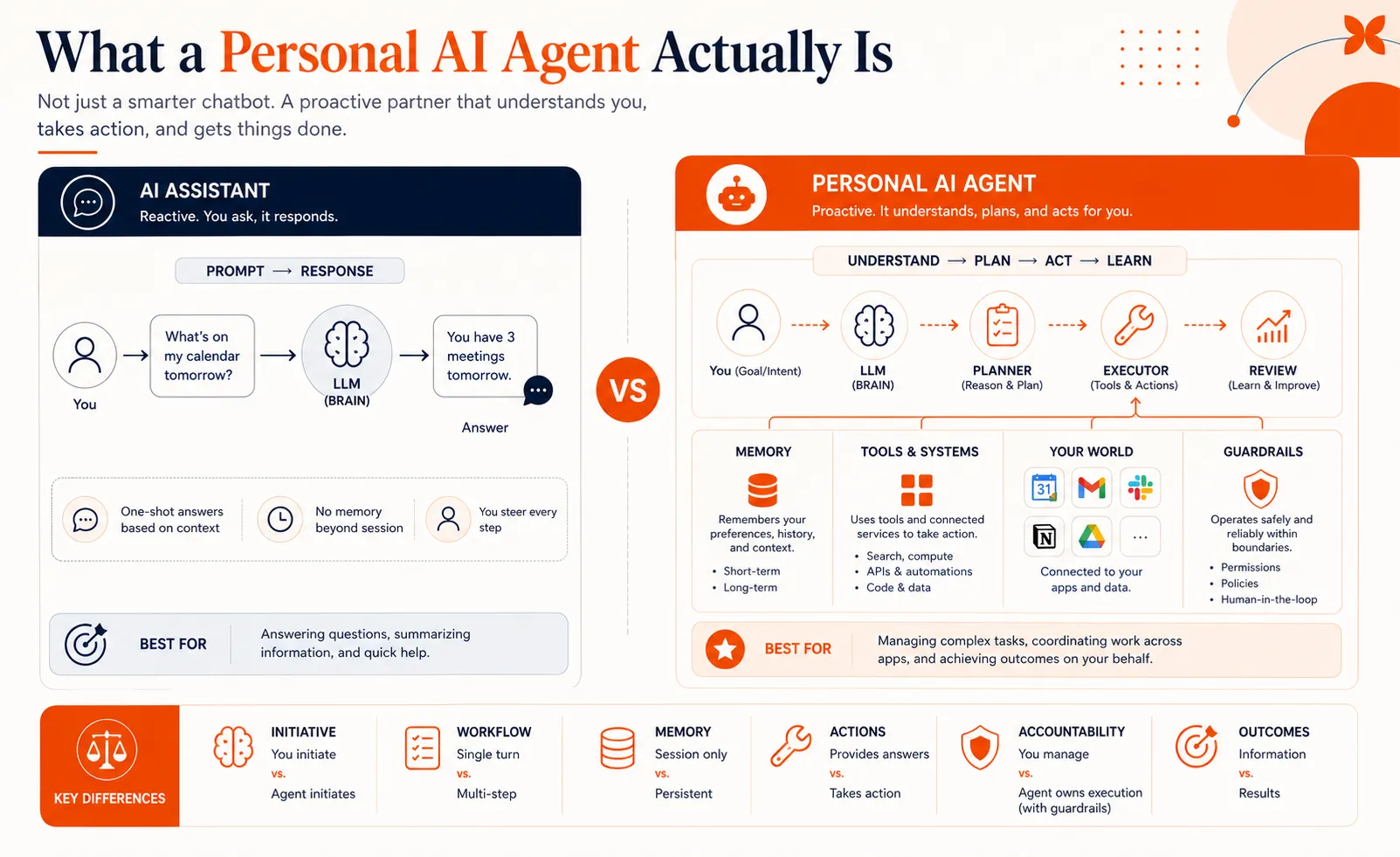
This broader shift from reactive AI tools to proactive AI agents is accelerating. Industry analysts project that agents will be embedded in a growing share of applications by end of 2026, and the trend is reaching personal productivity tools just as quickly as enterprise software.
Understanding the definition is useful, but the more practical question is: what should your personal agent actually do?
Which Personal Tasks Are Worth Automating
This is where most personal agent projects succeed or fail, well before you choose a platform or connect a single tool. The biggest mistake is trying to build an agent that “handles everything.” The agents that actually work start with one clearly defined workflow.
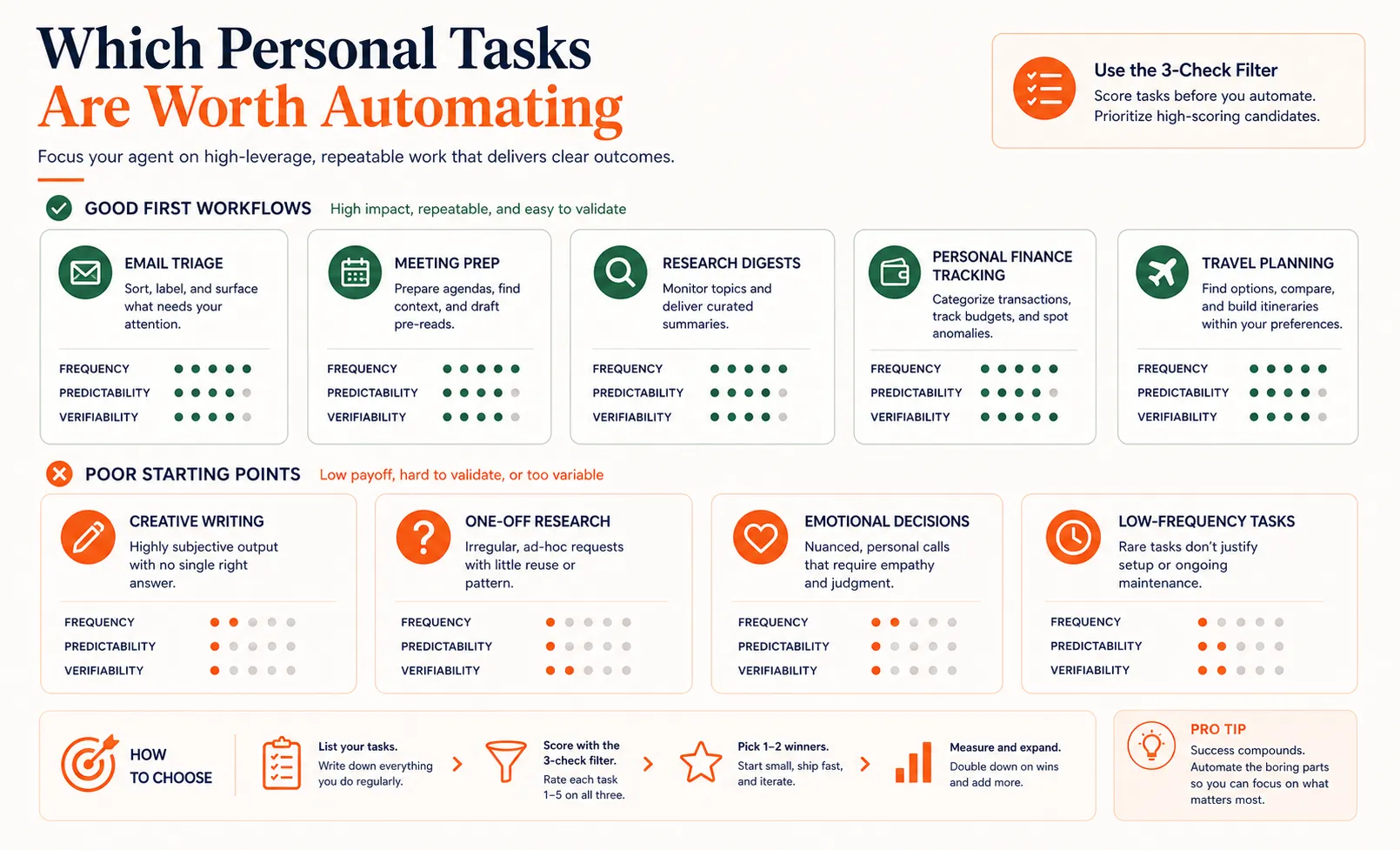
Here’s a simple filter. Your first personal agent should handle a task that passes all three checks:
- You do it at least a few times per week. High frequency means you’ll see results quickly and have enough data to test with.
- It follows a predictable pattern. If the steps are roughly the same each time, an agent can learn them. If every instance requires fresh judgment calls, an agent will struggle.
- You can tell if the output is right or wrong. You need a quick way to verify quality. If you can’t spot a bad output in 30 seconds, the agent isn’t saving you time.
Good first personal agents:
- Email triage: sorting incoming messages by priority and drafting quick replies
- Meeting prep: gathering context on attendees and recent conversations before each meeting
- Research digests: compiling daily summaries of news, industry updates, or topics you follow
- Personal finance tracking: categorizing transactions and flagging unusual spending
- Travel planning: comparing options based on your preferences and schedule constraints
Bad first personal agents:
- Creative writing projects (too subjective to verify)
- One-off research tasks (not repeatable enough to justify the setup)
- Decisions involving emotion or nuance (choosing a career path, resolving a conflict)
- Tasks you do once a quarter (the setup cost outweighs the time saved)
The pattern is clear: start with something repeatable, rule-based, and measurable. You can always expand the agent’s scope later. For more examples beyond personal workflows, the broader catalog of AI agent use cases covers enterprise and team applications too.
Quick check
Which of these is a BAD choice for your first personal AI agent?
Once you’ve identified a workflow worth automating, the next step is building the agent itself.
How to Build a Personal AI Agent
Building a personal AI agent is more structured than you might expect. You don’t need a computer science degree, and for most personal workflows, you don’t need to write code. The process breaks down into five steps.
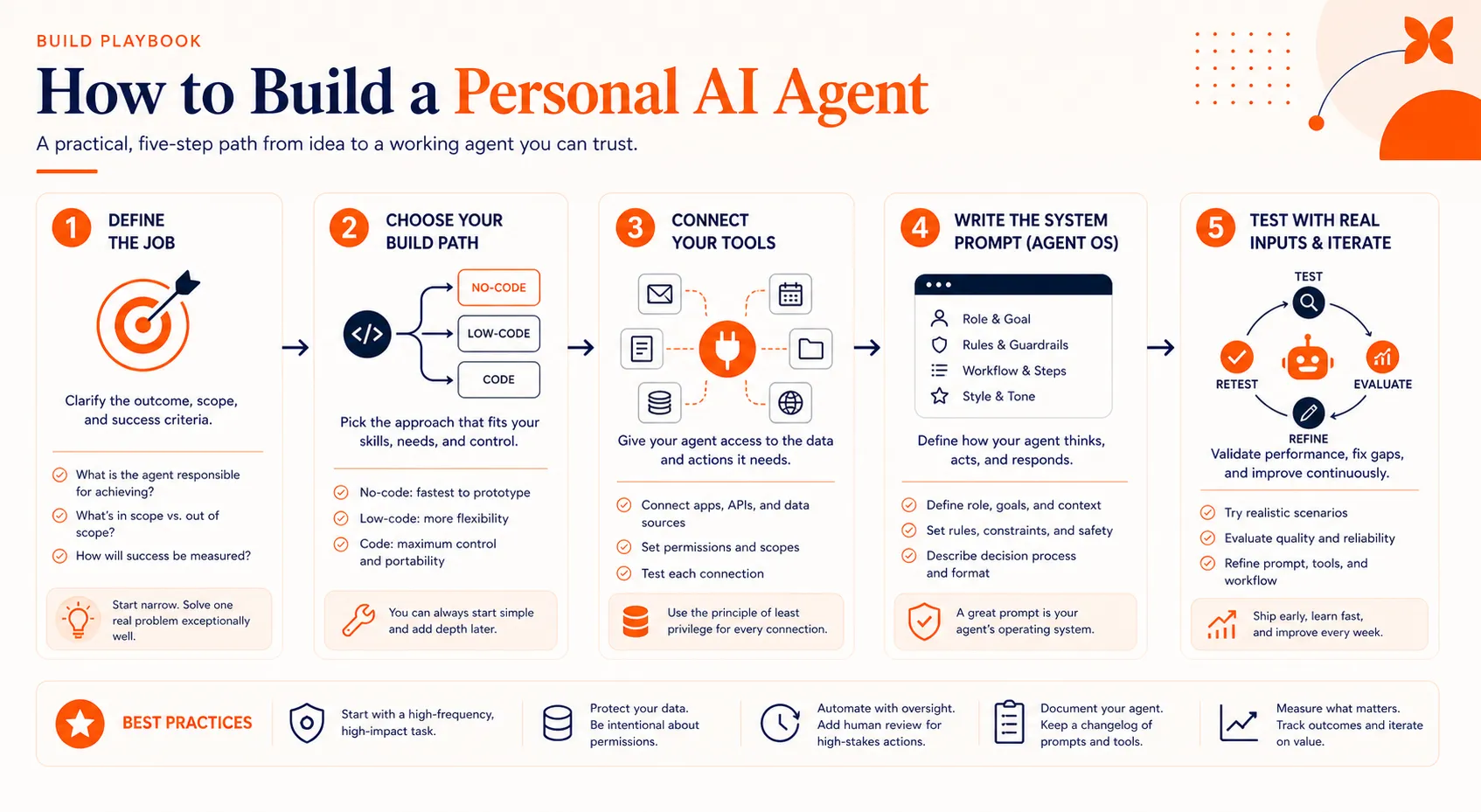
Define What Your Agent Should Do
Before you touch any tool, write a one-sentence job description for your agent. This sounds simple, but it forces you to be specific about what you’re building.
A good agent definition includes:
- Trigger: what starts the agent (a schedule, a new email, a manual request)
- Action: what the agent does (reads, categorizes, drafts, summarizes, creates)
- Output: what it produces (a briefing, a sorted inbox, a categorized expense report)
- Boundaries: what it must not do (send emails without approval, access financial accounts, delete anything)
Example: “Every morning at 7 AM, this agent checks my inbox, flags messages that need a reply today, drafts responses matching my usual tone, and sends me a summary in Slack. It does not send any replies without my review.”
That’s specific enough to build. “Make an AI agent that manages my life” is not.
Pick Your Build Path
You’ve got two practical options for personal agents:
No-code platforms let you build agents using visual interfaces. You connect your tools, define the workflow steps, set conditions, and test. This is the right path for most people building their first personal agent. Setup typically takes 15 to 60 minutes.
Framework-based tools like CrewAI or LangChain give you more control over the agent’s reasoning, memory, and tool use. If your workflow involves complex conditional logic or you want fine-grained control over how the agent makes decisions, a framework gives you that. Expect 1-2 days to get something working with basic Python skills. For a detailed comparison of build approaches, the general guide on building AI agents covers all three paths in depth.
For your first personal agent, start with no-code. You can always migrate to a framework later if you hit limitations.
Connect Your Personal Tools
This is where your agent gets its hands. The tools you connect determine what the agent can actually do.
Common personal tool connections:
- Email (Gmail, Outlook)
- Calendar (Google Calendar, Apple Calendar)
- Notes (Notion, Apple Notes, Obsidian)
- Finance (bank APIs, budgeting apps)
- Messaging (Slack, WhatsApp, Telegram)
- File storage (Google Drive, Dropbox)
Model Context Protocol (MCP) is an emerging standard that makes these connections more structured and reliable. Instead of building custom integrations for each tool, MCP provides a consistent way for agents to discover and use tools. As the agent architecture ecosystem matures, MCP is becoming a key building block.
One important note: every tool you connect gives the agent access to that data. Be intentional about what you connect. Your email agent doesn’t need access to your bank account.
Write the System Prompt
The system prompt is where you define your agent’s personality, constraints, and operating rules. Think of it as the instruction manual for your agent.
A good system prompt for a personal agent covers:
- Role: “You are my personal email assistant.”
- Tone: “Write replies that match my casual, direct communication style.”
- Constraints: “Never send a message without my explicit approval. Never access or reference financial information.”
- Output format: “Deliver your daily summary as a bulleted list with the sender name, subject, and your recommended action.”
- Escalation rules: “If you’re unsure about a message’s priority, flag it as ‘needs review’ instead of categorizing it.”
The constraints section is the most important part for personal agents. This is where you define what the agent must not do, which protects you from costly mistakes.
Quick check
What is the MOST important section of a personal AI agent's system prompt?
Test with Real Inputs
Don’t test your agent with made-up data. Use your actual emails, your real calendar, your genuine messages. Synthetic data won’t reveal the edge cases and surprises that real personal data contains.
For the first 10 to 20 runs:
- Review every output manually
- Note where the agent gets things wrong
- Adjust the system prompt based on what you see
- Tighten or loosen tool permissions as needed
- Keep a simple log of errors and fixes
This testing phase is where your agent goes from “kind of works” to “actually reliable.” Don’t skip it.
Building the agent is the more visible part of the work. Making it reliable and keeping your data safe is what determines whether you actually trust it long term.
Making Your Personal Agent Reliable and Private
A personal AI agent that works 80% of the time and occasionally sends an embarrassing email or miscategorizes a financial transaction is worse than no agent at all. Reliability and privacy aren’t optional extras here.
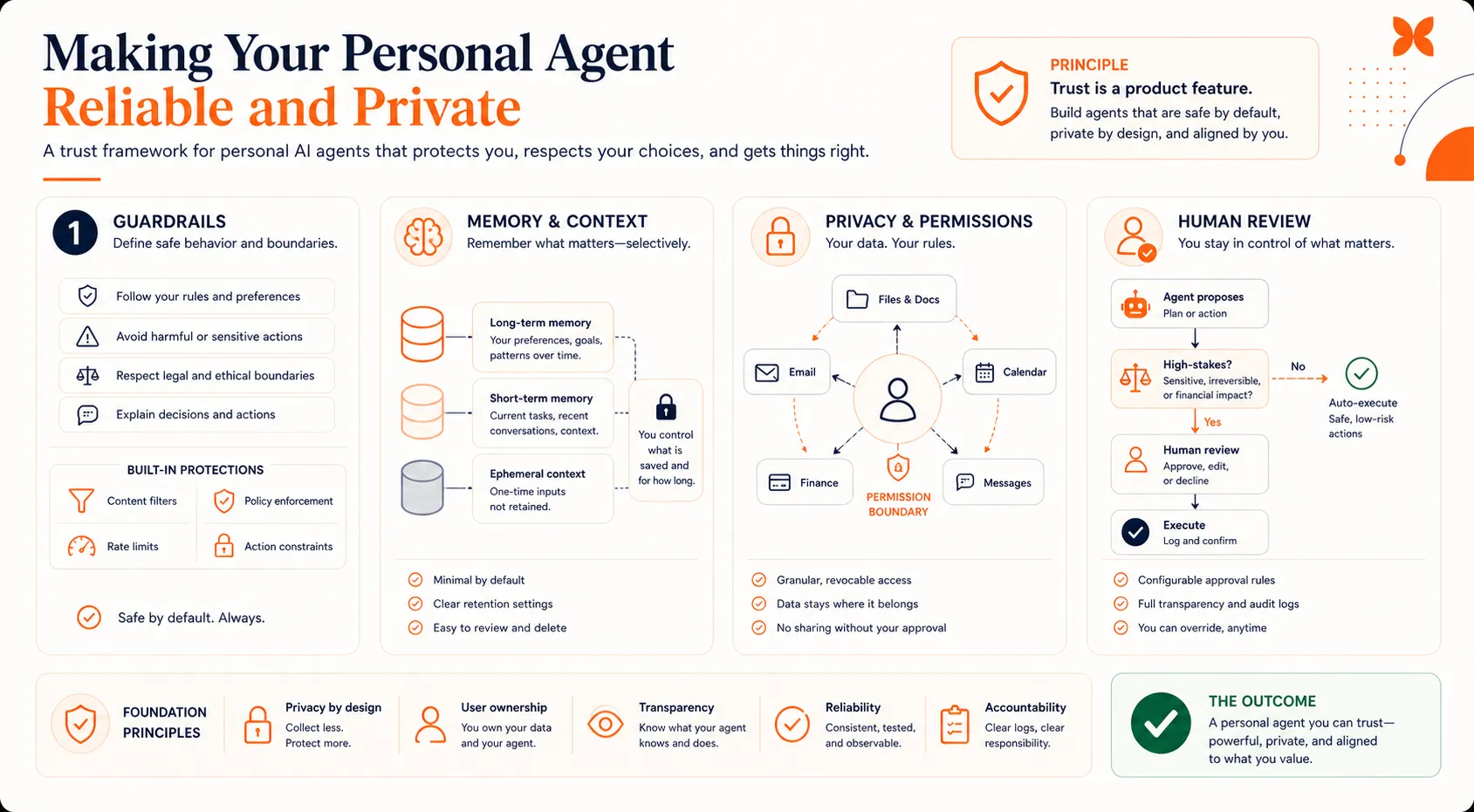
Guardrails That Matter for Personal Use
Guardrails are the rules that keep your agent from doing something you’ll regret. For personal agents, the most important ones are:
- Human-in-the-loop for high-stakes actions. Any action that’s hard to undo (sending a message, moving money, deleting files) should require your approval before the agent executes it.
- Output constraints. Define the format, length, and tone for the agent’s outputs. This prevents drift where the agent gradually changes how it communicates on your behalf.
- Escalation rules. Tell the agent when to stop and ask you. Ambiguous situations, new patterns it hasn’t seen before, and anything involving sensitive personal information should trigger an escalation.
Memory and Context
Memory is what makes a personal agent personal. Without it, the agent starts fresh every time, with no knowledge of your preferences, past decisions, or ongoing projects.
Short-term memory (within a session) lets the agent keep track of what it’s doing right now. Most agents handle this well out of the box.
Long-term memory (across sessions) is harder but more valuable. This is what lets the agent know that you prefer morning meetings, that you always want your manager’s emails flagged as high priority, or that you’re tracking a specific project across multiple weeks.
A practical approach: start with short-term memory only. Get the core workflow stable first. Then layer in long-term memory once you trust the agent’s basic behavior. Adding memory to a broken workflow just creates a more persistently broken workflow.
Privacy and Data Security
Personal agents access your most private data: emails, messages, financial records, calendar entries, location data. This makes privacy a more pressing concern for personal agents than for enterprise ones, where IT teams manage access controls.
Key considerations:
- Data residency: Where does the data go when your agent processes it? Is it stored on the platform’s servers? For how long?
- Minimum permissions: Give the agent access only to what it needs. An email triage agent doesn’t need to see your financial data.
- Local vs cloud processing: Some tools let you run agents locally, which keeps data on your device. The trade-off is usually less capability and slower processing.
- Review what the agent accesses: Periodically check what data your agent has touched. Most platforms provide logs. Use them.
The trend toward privacy-first personal agents is growing. Local LLMs and on-device processing are becoming more capable, and new tools are building privacy into the agent architecture from the start.
These reliability and privacy practices separate a personal agent you can trust from one that’s just a demo. But even with good practices, some mistakes are common enough to call out directly.
Quick check
Why is privacy MORE pressing for personal AI agents than enterprise ones?
Common Mistakes and How to Avoid Them
Most personal agent projects that stall share a few predictable patterns:
-
Automating too much at once. Pick one workflow. Get it working reliably. Then expand. The temptation to build an agent that handles everything is strong, but agents that try to do too much fail at all of it.
-
Skipping guardrails. It takes five minutes to add constraints like “never send without my approval.” It takes hours to undo the damage when an agent sends a bad email to your boss or miscategorizes a financial transaction.
-
Testing with fake data. Synthetic test data won’t show you the edge cases that matter. Use your real emails, real calendar, real messages. That’s the only way to know if the agent handles your actual workflow.
-
Over-sharing data access. Every tool you connect is data you’re exposing. Connect only what the agent needs. You can always add more tools later.
-
Expecting perfection on day one. Your first agent will make mistakes. That’s normal. The goal is a reliable agent that improves over time, not a perfect one on the first try. Plan to iterate.
What to Do Next
Personal AI agents are practical right now, not a future concept. The tools, platforms, and model capabilities exist to build a useful agent for your own workflows today.
The path forward is straightforward: pick one repetitive personal task, define what the agent should do and what it must not do, build it using a no-code tool or framework, test it with real data, and expand once it’s reliable. Your first agent doesn’t need to be impressive. It needs to work.
If you want to explore building agents across different AI models in one place, Craze is an AI platform designed for exactly that, letting you create and run agents without being locked into a single provider.
FAQs
Can I have my own personal AI?
Yes. You can build a personal AI agent today using no-code tools that require no programming experience. The range goes from simple assistants that handle one task (like email sorting) to more autonomous agents that manage multiple personal workflows. Start with a single task and expand from there.
How do you build a personal AI agent?
Pick one repetitive personal workflow. Define what the agent should do, what it should produce, and what it must not do. Choose a build path (no-code for speed, framework-based for control). Connect the tools the agent needs (email, calendar, notes). Write a system prompt with clear constraints. Test with your real data and iterate until it's reliable. Platforms like Craze let you build agents across multiple AI models without being locked into a single provider.
How much does an AI agent cost?
For personal use, most first agents cost very little. Free-tier platforms let you build simple agents at no cost. Moderate usage with API-based models typically runs $5 to $30 per month in token fees. Costs increase with complexity, more tools, more processing, and higher usage.
What is the difference between an AI assistant and a personal AI agent?
An AI assistant responds when you ask it a question or give it a task. A personal AI agent works proactively on your behalf: it connects to your tools, maintains memory of your preferences across sessions, and completes multi-step tasks autonomously. The key difference is autonomy and persistence.
What can personal AI agents do?
The most practical personal use cases include email triage and response drafting, meeting preparation and briefing, daily research and news digests, personal finance tracking and categorization, travel planning based on your preferences, and social media scheduling. The best candidates are tasks that are repetitive, follow predictable patterns, and have outputs you can quickly verify.
More Articles
The 8 Best Lindy AI Alternatives in 2026 (Tested & Compared)

The 8 best Lindy AI alternatives for 2026, anchored to why people leave Lindy, with current pricing, third-party ratings, honest pros and cons, and the best pick for each reason to switch.
The 7 Best Make Alternatives in 2026 (Tested & Compared)
The 7 best Make.com alternatives for 2026, anchored to why people leave Make, with current pricing, third-party ratings, honest pros and cons, and the best pick for each reason to switch.
The 8 Best Zapier Alternatives in 2026 (Tested & Compared)
The 8 best Zapier alternatives for 2026, anchored to why people leave Zapier, with current pricing, third-party ratings, honest pros and cons, and the best pick for each reason to switch.


