
Conversational AI Agents: What They Are, How They Work, and When to Use Them
Learn what conversational AI agents are, how they differ from chatbots, and how to evaluate the right approach for your workflows.

By: Deepit Patil
Co-Founder and CTO
Published
Updated
Edited by Craze Editorial Team · See our Editorial Process
Most teams that add a chatbot to their workflow hit the same wall: the bot handles greetings and FAQs, but the moment a customer needs something done, like a refund processed, an appointment rescheduled, or a billing error fixed, it falls apart. The bot can’t reason, can’t connect to your systems, and can’t act. That’s the gap conversational AI agents are built to close.
If you’re new to AI agents as a concept, this guide explains what makes the conversational variety different, how they work under the hood, where they’re delivering real results, and how to evaluate whether you need one.
TL;DR
- Conversational AI agents don’t just chat, they act. Unlike chatbots that retrieve scripted answers, these agents reason about your request, pull data from connected systems, and take actions like processing refunds or updating records on your behalf.
- The architecture is fundamentally different from a chatbot. Chatbots run a single retrieval pass. Conversational AI agents run a reasoning loop (observe, think, act, respond) that repeats until the task is done, connecting to CRMs, billing systems, and databases along the way.
- Customer service is the most proven use case. German telecom provider Telekom saw agents resolve tickets 25% faster after deploying AI, and Gartner predicts agentic AI will autonomously resolve 80% of common service issues by 2029.
- Not every problem needs one. If you’re handling a small set of predictable questions, a rule-based chatbot works fine. Conversational AI agents make sense when interactions involve multiple steps, require pulling live data, or demand the ability to take actions.
- Run a 30-to-60-day evaluation before committing. Test NLU quality, integration depth, latency, and compliance against your actual data and traffic patterns rather than choosing based on feature comparisons.
What Are Conversational AI Agents
A conversational AI agent is software that uses large language models, natural language processing, and integrated tools to hold human-like conversations and complete tasks on its own. Unlike a basic chatbot that matches keywords to scripted answers, a conversational AI agent reasons about what you’re asking, pulls information from connected systems, and takes actions to resolve your request.
Think of the difference this way: a chatbot reads your message and retrieves a preset response. A conversational AI agent reads your message, figures out what you actually need, checks your account in one system, updates a record in another, and responds with a resolution. It’s the difference between looking up a FAQ and having a knowledgeable colleague handle the problem for you.
The key capabilities that set conversational AI agents apart include intent understanding through NLP, contextual reasoning across multiple conversation turns, persistent memory that carries information between sessions, and the ability to call external tools and APIs to get things done.
That definition only gets you so far. The real differences show up when you compare the architectures side by side.
Conversational AI Agents vs Traditional Chatbots
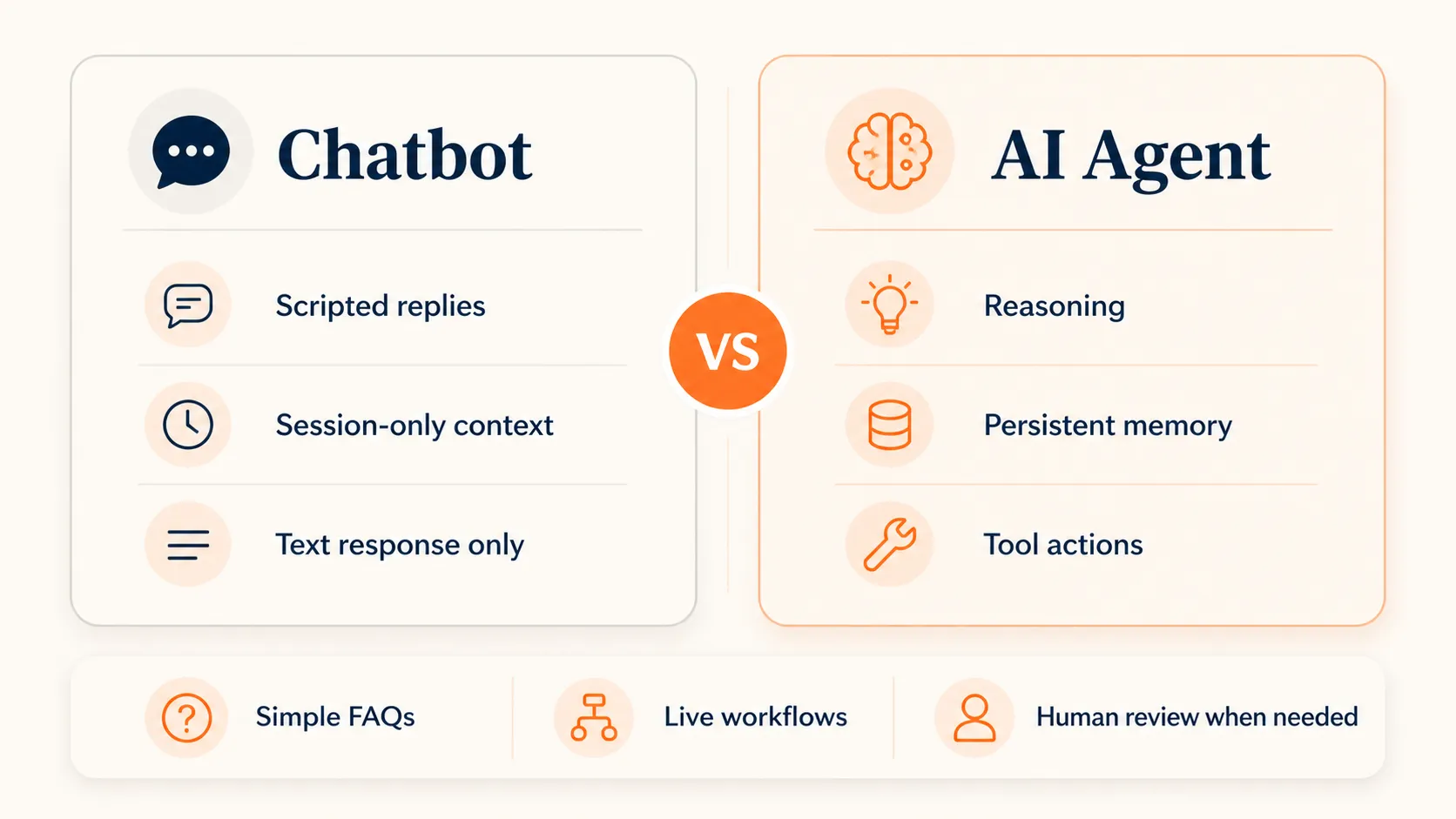
The gap between a traditional chatbot and a conversational AI agent isn’t just about smarter responses. It’s an architectural difference in how they process requests and interact with the world.
Read-only vs read-write systems
A traditional chatbot is a read-only retrieval system. It takes user input, searches a knowledge base, and returns a response. A conversational AI agent is a read-write reasoning system that connects to your data in real time, reasons across multiple systems, and acts on what it finds.
Single call vs reasoning loop
A typical chatbot works in one pass: user sends message, system retrieves context, LLM generates response, done. A conversational AI agent runs a reasoning loop, sometimes called a ReAct (Reason + Act) loop. It observes the input, decides whether it needs more information or should take an action, executes that step, evaluates the result, and repeats until the task is complete.
Session memory vs persistent context
Most chatbots treat every conversation as a fresh start or carry only basic session context. Conversational AI agents maintain both short-term session state and long-term persistent memory covering your preferences, past issues, and account history. They don’t ask you to repeat information you already provided last week.
Limited tools vs deep integrations
Chatbots typically respond with text. Conversational AI agents connect to CRMs, billing systems, calendars, databases, and other tools through APIs. They don’t just tell you what to do. They do it.
These differences map to distinct agent types : informational agents that retrieve and synthesize knowledge, transactional agents that complete actions like booking or purchasing, proactive agents that initiate conversations based on triggers or patterns, and multimodal agents that work across text, voice, and visual interfaces. Many production agents combine multiple types, and the line between them and traditional chatbots keeps shifting as the underlying models improve.
Understanding these architectural differences is useful, but what does the system actually look like under the hood?
Quick check
What is the key architectural difference between a traditional chatbot and a conversational AI agent?
How Conversational AI Agents Work
The Core Components
Every conversational AI agent relies on a stack of interconnected components working together.
The LLM serves as the reasoning engine. It interprets meaning, generates responses, and decides what actions to take next. Modern agents typically use models like GPT-4.1, Claude Opus, or Gemini, though the specific model matters less than how well it’s integrated into the overall workflow.
The NLP/NLU layer handles the front end of understanding. It performs intent recognition (what does the user want?), entity extraction (what specific details did they mention?), and sentiment analysis (are they frustrated or satisfied?). This layer translates raw human language into structured data the agent can reason about.
The dialog manager orchestrates conversation flow. It tracks where the conversation is, what has been resolved, and what still needs attention. Modern dialog management uses conditional routing to adjust the conversation path based on context rather than following rigid decision trees.
The memory layer operates on two levels. Short-term memory maintains context within the current session, including message history, tool call results, and temporary variables. Persistent memory stores information across sessions, such as user preferences, past interactions, and account details.
The tool integration layer connects the agent to external systems through APIs, and it’s what separates a conversational AI agent from a smart chatbot. The agent can query databases, update records, trigger workflows, send emails, and interact with virtually any system that exposes an API. The way these components fit together follows patterns common to most AI agent architectures .
The Reasoning Loop
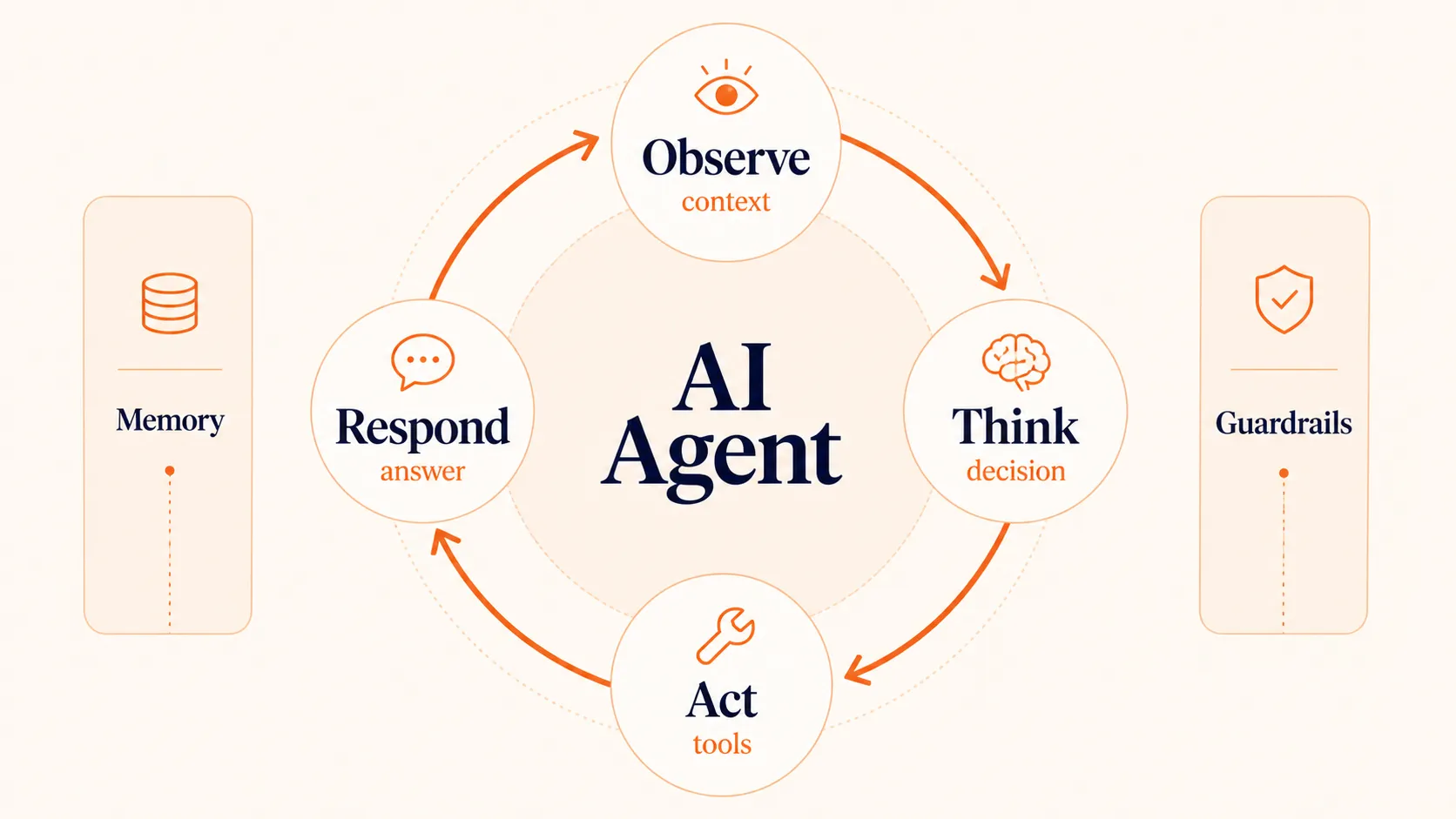
The reasoning loop is what gives conversational AI agents their autonomy. Here’s how it works in practice:
- Observe: The agent receives the user’s message along with conversation history, system instructions, and any previously retrieved context.
- Think: The LLM evaluates the situation. Does it have enough information to respond? Does it need to call a tool? Should it ask a clarifying question?
- Act: If the agent determines it needs data or must take an action, it calls the appropriate tool, retrieves the result, and feeds it back into the reasoning loop.
- Respond: Once the agent has gathered enough information and completed any necessary actions, it generates a natural language response to the user.
This loop can repeat multiple times within a single user request. A complex query might require the agent to check an account, look up a policy, calculate a refund amount, process the refund, and confirm the resolution, all within one conversational turn. At scale, orchestration layers coordinate these steps across multiple agents working in parallel.
Quick check
In a conversational AI agent's ReAct reasoning loop, what happens AFTER the agent calls a tool and retrieves results?
A Customer Service Resolution in Action
Here’s how these components work together when a customer contacts support about a billing discrepancy:
- The customer types: “I was charged twice for my subscription this month.”
- The NLP layer identifies intent (billing dispute) and entity (duplicate charge, subscription).
- The dialog manager sets the conversation state to “billing investigation.”
- The agent’s reasoning loop kicks in. It determines it needs account data, so it calls the billing API to retrieve recent transactions.
- The tool integration layer queries the billing system and returns the last 30 days of charges.
- The LLM analyzes the transactions and finds two identical charges three days apart.
- The agent determines a refund is warranted based on business rules.
- It calls the refund API to process the duplicate charge reversal.
- It responds: “I found the duplicate charge of $29.99 on May 3rd and have processed a refund. You should see it in your account within 3 to 5 business days.”
No human agent was involved. No ticket was created. The entire resolution happened in one conversation.
That billing example is one pattern, but conversational AI agents are proving their value across several categories of work.
Where Conversational AI Agents Create the Most Value
The conversational AI market reached $14.79 billion in 2025 and is projected to hit $17.97 billion in 2026. That growth maps to specific use cases where conversational AI agents consistently outperform traditional automation.
Customer Service and Support
Customer service is the most mature use case for conversational AI agents. Agents handle order tracking, billing questions, password resets, appointment scheduling, and policy explanations. They resolve straightforward issues on their own and escalate complex cases to human agents with full context attached.
The results are measurable. German telecom provider Telekom deployed an AI system that suggests knowledge base articles to agents handling complex tickets. Their agents resolved tickets 25% faster and reported a 30% reduction in repetitive stress. Gartner predicts that agentic AI will autonomously resolve 80% of common customer service issues by 2029, cutting operational costs by 30%.
The value goes beyond cost savings. Customers get faster answers, and human agents can focus on the problems that actually need human judgment, which is exactly the pattern that makes AI-powered customer support work at scale.
Quick check
According to Gartner, what percentage of common customer service issues will agentic AI autonomously resolve by 2029?
Sales Qualification and Conversion
Conversational AI agents handle the top of the sales funnel differently. Instead of routing every inbound lead to a human rep, an agent qualifies prospects through natural conversation. It asks about budget, timeline, requirements, and use case before handing high-intent leads to the right salesperson with a full summary attached.
These agents also work during the buying process itself. They detect checkout hesitation, offer real-time product recommendations based on browsing behavior and order history, and answer product questions that might otherwise stall a purchase. The key advantage is that they operate around the clock and handle multiple conversations simultaneously, something no human sales team can match.
Internal Knowledge Retrieval
One application that doesn’t get enough attention is internal: helping employees find information and complete processes. HR policy questions, IT troubleshooting, expense report status, PTO balances. These are exactly the kinds of repetitive queries that eat into productivity across every department.
A conversational AI agent connected to an HRIS, ticketing system, and internal knowledge base can handle most of these requests instantly. Instead of submitting a ticket and waiting two days, an employee asks a question and gets an answer with the specific policy section or status update they need. The pattern works across dozens of use cases beyond the three covered here.
Knowing where conversational AI agents create value is one thing. Picking the right approach for your specific situation is another.
How to Choose the Right Conversational AI Approach
Not every problem needs a conversational AI agent. If you’re handling a small set of predictable questions with clear answers, a well-designed rule-based chatbot or FAQ page will serve you fine. Conversational AI agents make sense when the interaction involves multiple steps, requires pulling data from connected systems, or demands the ability to take actions on behalf of the user.
Here’s a practical evaluation framework:
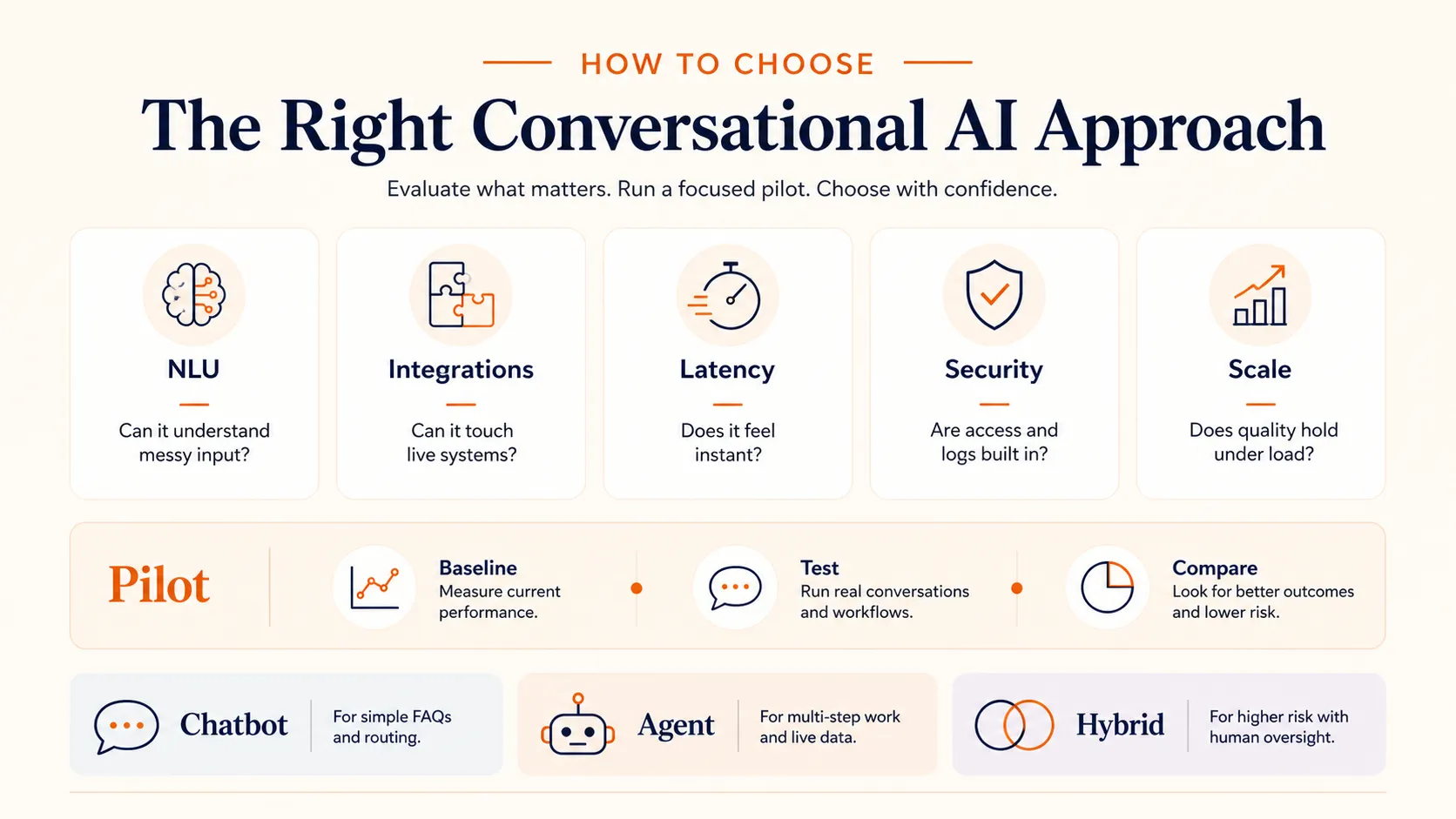
NLU quality
Test with messy, real-world input. Does the system handle slang, incomplete sentences, language switching, and compound questions? The best implementations handle ambiguity gracefully rather than defaulting to “I didn’t understand that.”
Integration depth
Can the agent actually connect to your existing systems and take actions? Responding with “please contact support” defeats the purpose. Look for the ability to read from and write to your CRM, billing system, knowledge base, and other tools your team uses daily.
Latency
Industry benchmarks sit at sub-500ms for chat and sub-800ms for voice. If your use case involves voice interactions, latency requirements are significantly stricter than text-based chat.
Security and compliance
Depending on your industry, you may need HIPAA, PCI-DSS, CCPA, or SOC 2 compliance. Evaluate data residency, encryption standards, access controls, and audit logging before anything else.
Scalability
Test under realistic load conditions. How does accuracy hold up during peak volume? Can the system handle the concurrency your business actually experiences?
Rather than choosing based on feature lists, run a focused 30-to-60-day evaluation against your actual data and traffic patterns. An AI platform like Craze lets you build conversational agents using any model and test different approaches without locking into a single vendor. If you want to get hands-on, our guide on building an AI agent walks through the process step by step.
The Bottom Line
Conversational AI agents aren’t chatbots with better marketing. They’re a different class of system: one that reasons, connects to your tools, and takes actions on behalf of the user. The technology is mature enough to handle customer service, sales qualification, and internal knowledge retrieval today, with Gartner projecting 80% autonomous resolution of common service issues by 2029.
The practical question isn’t whether conversational AI agents work. It’s whether your specific workflows need one. Start with the evaluation framework above, test against your real data, and let the results tell you whether a chatbot, a conversational AI agent, or something in between is the right fit.
FAQs
What is an AI conversational agent?
An AI conversational agent is software that uses large language models and natural language processing to have human-like conversations and complete tasks autonomously. Unlike simple chatbots that follow scripts, conversational AI agents can reason about context, remember past interactions, connect to external tools, and take actions like processing refunds, booking appointments, or retrieving account information.
What are the 4 types of AI agents?
The four main types of conversational AI agents are informational agents (retrieve and synthesize knowledge from databases and documents), transactional agents (complete actions like purchases, bookings, or account changes), proactive agents (initiate conversations based on triggers, patterns, or time-based events), and multimodal agents (work across text, voice, and visual interfaces simultaneously). Many production agents combine multiple types.
What is an example of a conversational AI agent?
A practical example is a customer support agent that handles billing disputes end-to-end. When a customer reports a duplicate charge, the agent identifies the intent, pulls transaction records from the billing system, verifies the duplicate, processes a refund through the payment API, and confirms the resolution in a single conversation without human intervention.
Which conversational AI is best?
There is no single best conversational AI. The right choice depends on your specific use case, integration requirements, compliance needs, and traffic patterns. For simple FAQ handling, a rule-based chatbot may be sufficient. For multi-step workflows requiring tool integration, you need a full conversational AI agent. The most useful approach is running a 30-to-60-day evaluation against your actual data rather than choosing based on feature comparisons.
More Articles
The 8 Best Lindy AI Alternatives in 2026 (Tested & Compared)

The 8 best Lindy AI alternatives for 2026, anchored to why people leave Lindy, with current pricing, third-party ratings, honest pros and cons, and the best pick for each reason to switch.
The 7 Best Make Alternatives in 2026 (Tested & Compared)
The 7 best Make.com alternatives for 2026, anchored to why people leave Make, with current pricing, third-party ratings, honest pros and cons, and the best pick for each reason to switch.
The 8 Best Zapier Alternatives in 2026 (Tested & Compared)
The 8 best Zapier alternatives for 2026, anchored to why people leave Zapier, with current pricing, third-party ratings, honest pros and cons, and the best pick for each reason to switch.


