AI Agent for Research: How to Pick the Right Tool and Build a Workflow That Works
Learn how AI research agents work, which tools fit academic vs. market research, and how to build a reliable workflow with verification steps.

By: Deepit Patil
Co-Founder and CTO
Published
Updated
Edited by Craze Editorial Team · See our Editorial Process
You already know AI can answer questions. But if you have spent any time doing real research, you have probably noticed the gap between asking a chatbot a question and actually getting a reliable, well-sourced answer you can use.
That gap is where AI research agents come in.
An AI research agent is a system that breaks down a complex research question into subtasks, searches multiple sources (databases, the web, uploaded documents), synthesizes findings across those sources, and produces a structured output like a report, summary, or literature review. Unlike a standard chatbot that responds from memory in a single pass, a research agent plans its approach, executes multiple searches, cross-references what it finds, and delivers something you can actually work with.
With 75% of knowledge workers now using AI tools regularly, the question is no longer whether to use AI for research. It is which tool fits your specific research needs, and how to build a workflow that produces results you can trust.
This guide covers how AI research agents actually work under the hood, which tools fit which types of research, and how to set up a verification process that catches the mistakes these tools still make.
TL;DR
- It searches, not guesses. An AI research agent autonomously plans, searches external sources, synthesizes findings, and produces structured deliverables. It is not a chatbot answering from memory.
- Match the tool to your research type. Academic work needs Consensus, Elicit, or Undermind. Market research fits ChatGPT Deep Research or Gemini Deep Research. Document analysis works best with NotebookLM. Quick facts go to Perplexity.
- Four stages run under the hood. Most research agents follow a triage, planning, search, and writing pipeline. Understanding this helps you get better results from any tool.
- Always verify the output. Check that citations exist, sources say what the agent claims, and the data is current. This step is not optional.
- Build your own without code. You can create a custom research agent using an AI platform like Craze , which is free to use and lets you pick the right model for each step.
What Is an AI Research Agent (And How Is It Different from a Chatbot)?
The simplest way to understand an AI research agent is to compare it to what most people already use.
When you ask ChatGPT or Claude a question in a normal chat, the model generates an answer from its training data. It is working from memory. If that memory is incomplete, outdated, or wrong, you get a confident-sounding answer that might not hold up when you check the sources.
A research agent works differently. It takes your question, breaks it into smaller subtasks, searches real databases and the web for each one, cross-references what it finds across sources, and then synthesizes everything into a structured output with citations. The key differences come down to three things:
- Autonomy. A research agent plans and executes a multi-step workflow on its own. You give it a question; it figures out the research plan, runs the searches, and delivers the result. A chatbot responds to one prompt at a time.
- Tool use. Research agents query external sources: academic databases with 220M+ peer-reviewed papers, live web search, uploaded documents, and APIs. A chatbot pulls from its training data.
- Output format. Research agents produce structured deliverables: reports, literature reviews, comparison tables, summaries with citations. Chatbots produce conversational responses.
This distinction matters because the AI agent market is growing fast. The AI agents market was valued at $7.63 billion in 2025 and is projected to reach $182.97 billion by 2033 at a 49.6% CAGR. Gartner predicts that 40% of enterprise applications will feature task-specific AI agents by the end of 2026, up from less than 5% in 2025. Research is one of the highest-value use cases driving that adoption.
If you want a deeper look at how AI agents differ from chatbots , we have a full breakdown. But for this article, the key takeaway is this: a research agent does the work of searching, organizing, and synthesizing. You do the work of thinking, evaluating, and deciding.
Understanding what these agents are is one part. Knowing how they actually execute research behind the scenes will help you get significantly better results from them.
How AI Research Agents Work: The Multi-Agent Pipeline
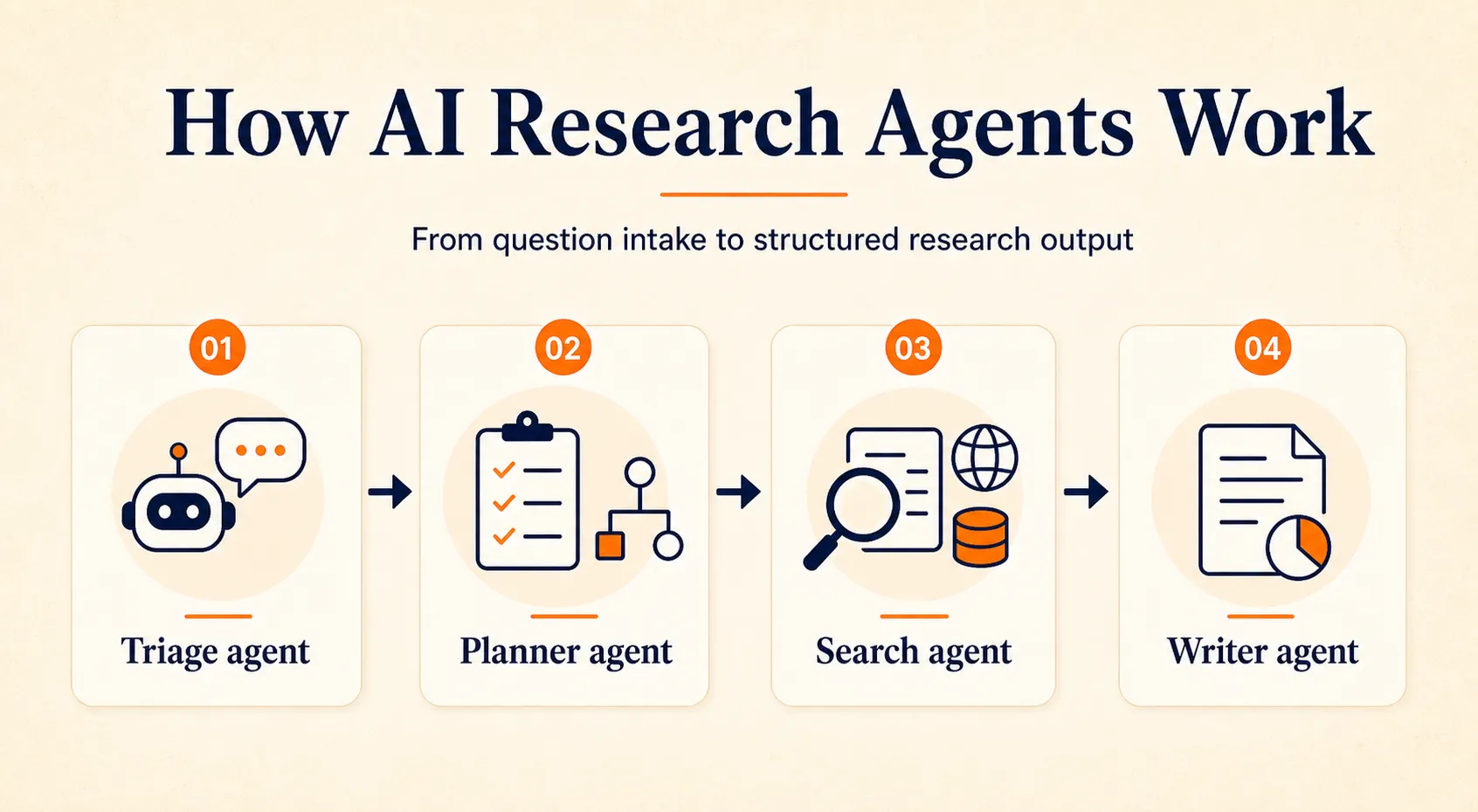
Most AI research agents follow a similar pattern under the hood, even if the specific implementation varies across tools. The process breaks down into four stages.
Triage Agent
The triage agent is the first checkpoint. It assesses your research question, determines whether it is specific enough to act on, and identifies what kind of research is needed. If your prompt is too vague (“tell me about AI in healthcare ”), a good triage agent will ask for clarification or narrow the scope automatically.
Planner Agent
Once the question is clear, the planner agent breaks it into subtasks and milestones. For a question like “What are the compliance requirements for AI in healthcare in the US?”, the planner might create subtasks for federal regulatory framework, state-level variation, current enforcement actions, and practical compliance steps. It decides which sources to query for each subtask and sets an execution order.
Search Agent
The search agent runs parallel lookups across the web, academic databases, or uploaded documents for each subtask. It cross-references findings between sources and flags contradictions. This is where the real time savings happen. What would take a human researcher hours of searching and reading, a search agent handles in minutes by processing dozens of sources simultaneously.
Writer Agent
The writer agent takes everything the search agent found, resolves contradictions, normalizes the information into a consistent format, adds citations, and produces the final output. Depending on the tool, this could be a structured report, a summary with inline citations, or a literature review with categorized findings.
Not every tool exposes this pipeline directly. Perplexity runs something similar internally but shows you only the final answer with citations. Tools like ChatGPT Deep Research and Gemini Deep Research show you a progress feed as the agent works through its plan. Custom multi-agent setups built on platforms like Craze let you configure each stage separately and choose different AI models for different steps.
Google Research demonstrated this approach with PaperVizAgent, which uses five specialized agents (retriever, planner, stylist, visualizer, and critic) working in sequence to handle complex academic tasks. Practitioners on Reddit describe using similar triage-plan-search-write pipelines for business research.
The practical takeaway: when your research output feels thin or unfocused, the issue is usually in the planning stage. Giving the agent a more specific question with clear scope (topic, geography, timeframe, depth) produces dramatically better results at every stage downstream.
Which brings up the most practical question: which research agent should you actually use?
Which AI Research Agent Fits Your Work
The right tool depends entirely on what kind of research you do. An academic researcher looking for peer-reviewed papers has completely different needs from a market analyst tracking competitive trends. Here is how to match the tool to the work.
For Academic and Scientific Research
Best fit: Consensus, Elicit, Undermind
These tools search real academic databases (PubMed, Semantic Scholar, and proprietary indexes) rather than the general web. Consensus indexes over 220M peer-reviewed papers and classifies citations as supporting, contradicting, or neutral. Elicit covers 125M papers and can automate parts of systematic reviews. Undermind is built for deep literature discovery in niche academic topics and is highly rated by researchers in academic communities.
Why this matters: when your research needs to be grounded in peer-reviewed evidence, general web search is not good enough. These tools reduce hallucination risk because their outputs are tied to actual published papers, not generated from a language model’s memory.
Limitation: These tools only work for topics that have been studied in published research. If you are researching an emerging trend, proprietary competitive data, or anything without an academic paper trail, they will not help much.
Cost: Consensus offers a free tier, with Pro at $10/month and Deep at $45/month. Elicit has a free tier with paid upgrades. Undermind pricing varies.
Also worth noting: Litero AI is a newer tool focused specifically on writing literature reviews from academic sources. If your primary need is producing structured literature review drafts, it is worth checking out alongside the broader discovery tools.
For Market and Business Research
Best fit: ChatGPT Deep Research, Gemini Deep Research
For market research, competitive analysis, and business intelligence, you need tools with broad web access that can synthesize information from diverse, non-academic sources. ChatGPT Deep Research (powered by the GPT-5 family) runs autonomous research sessions lasting 15 to 30 minutes, searching and synthesizing dozens of web sources into structured reports. Gemini Deep Research Max, launched in April 2026 and powered by Gemini 3.1 Pro, integrates directly with Google Search and supports a 2 million token context window.
Limitation: Web sources are not peer-reviewed. Reports from these tools can be excessively long (ChatGPT sometimes produces 30+ page outputs), and claims need more careful verification since the sources themselves vary in reliability.
Cost: ChatGPT Plus starts at $20/month (with rate-limited Deep Research access), and Pro is $200/month. Gemini is available in Google One AI Premium. Both offer substantial capability at the Plus/Premium tier for most business research needs.
For Document Analysis and Proprietary Research
Best fit: NotebookLM, Claude Projects
When your research material is internal (contracts, reports, proprietary data, legal documents), you need tools that analyze only what you provide rather than searching externally. NotebookLM keeps all analysis grounded in your uploaded documents with effectively zero hallucination risk on the material you give it. Claude offers a 200K token context window and persistent project environments for ongoing research across large document sets.
Limitation: No web search. These tools can only work with what you upload. They are not useful for discovering new sources.
For Quick Facts and Verification
Best fit: Perplexity
Perplexity provides fast, cited answers with inline source links for every claim. It is excellent for spot-checking facts, verifying specific data points, or getting a quick overview of a topic before diving deeper.
Limitation: Not designed for deep, systematic research. If you need synthesis across dozens of sources or a structured research report, use one of the tools above.
| Research Type | Best Tools | Strength | Key Limitation | Starting Price |
|---|---|---|---|---|
| Academic/Scientific | Consensus, Elicit, Undermind | Peer-reviewed sources, citation classification | Only published research | Free tier available |
| Market/Business | ChatGPT Deep Research, Gemini Deep Research | Broad web synthesis, long reports | Sources not peer-reviewed | $20/mo |
| Document Analysis | NotebookLM, Claude Projects | Zero hallucination on uploads | No web search | Free |
| Quick Facts | Perplexity | Fast, inline citations | Not for deep research | Free tier available |
Once you have picked the right tool for your research type, the next step is building a workflow that produces reliable, verifiable results.
How to Build a Research Workflow You Can Trust
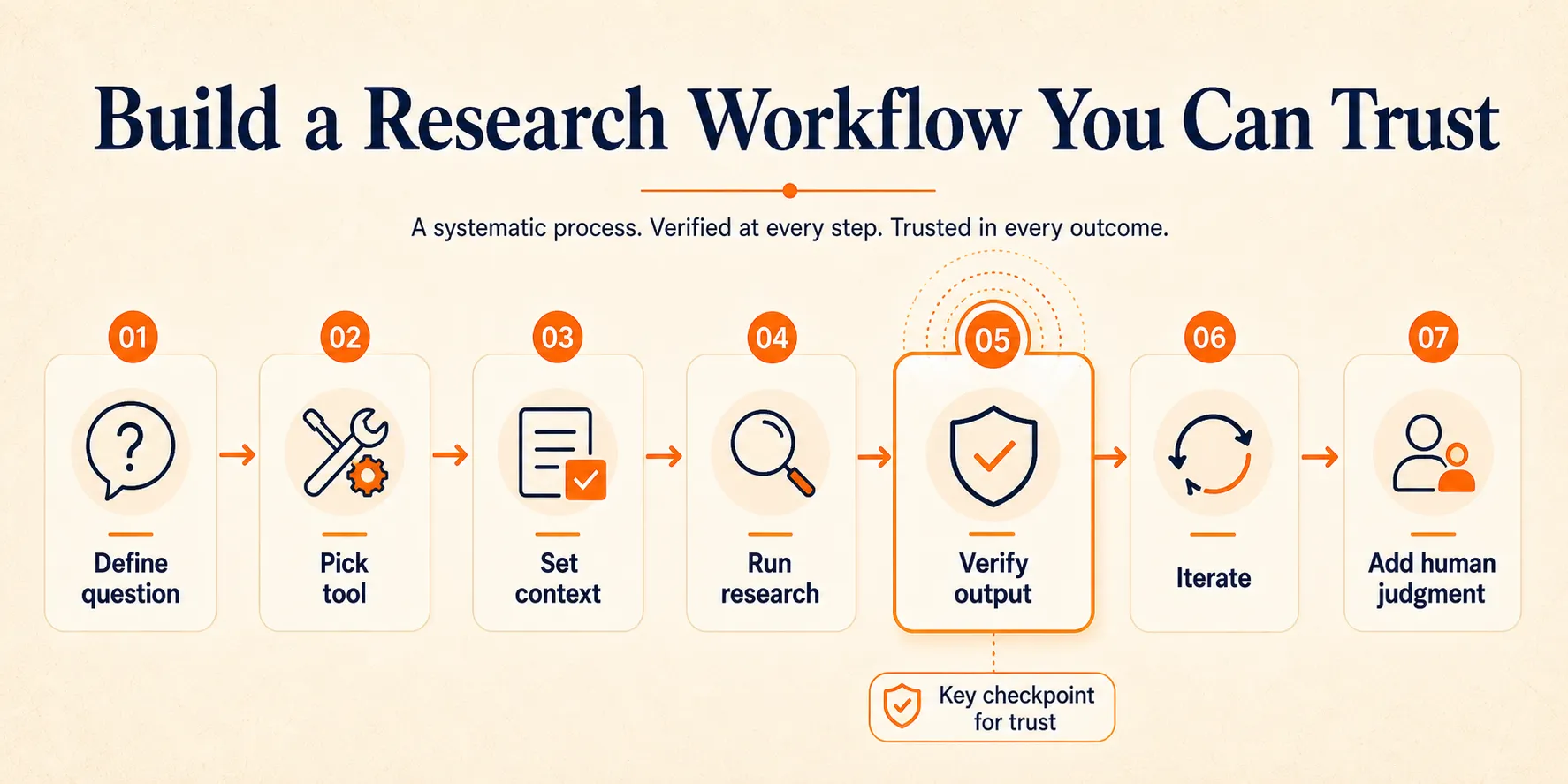
Picking the right tool is the first step. Using it well is where most people fall short. Here is a seven-step workflow that works regardless of which research agent you use.
- Define your research question precisely. Scope it by topic, geography, timeframe, and depth needed. “What are the trends in AI adoption?” is too vague. “What percentage of US enterprises deployed AI agents in production in 2025, and which industries led adoption?” gives the agent something concrete to work with.
- Pick the right tool for the job. Use the decision framework from the previous section. Academic research? Start with Consensus or Elicit. Market research? Use ChatGPT or Gemini Deep Research. Document analysis? Use NotebookLM. Do not force a general tool to do specialized work.
- Set up context before running. Upload relevant documents, specify preferred databases or source types, and set output format expectations. The more context you provide upfront, the better the output. If your agent supports it, specify what you do not want: “Do not include sources older than 2023” or “Focus only on peer-reviewed studies.”
- Run the research. Let the agent execute its pipeline. Most deep research sessions take 5 to 30 minutes for comprehensive topics. Resist the urge to interrupt mid-process.
- Verify the output. This is the step that separates useful research from unreliable content, and it is the step most people skip:
- Check that cited sources actually exist (click the links)
- Verify that each source says what the agent claims it says
- Check publication dates: is the data current enough for your needs?
- Check geographic scope: is a US-specific stat being applied to a global claim, or vice versa?
- Look for missing perspectives: what did the agent not cover?
- Iterate. Use follow-up prompts to fill gaps you identified during verification. “You covered regulatory requirements but missed enforcement actions in 2025. Can you search for recent FTC enforcement related to AI compliance?”
- Combine with human analysis. The agent gathered and organized the information. Now you interpret, contextualize, and make decisions. Research teams that combine AI speed with human judgment show 60% greater productivity compared to human-only teams.
The verification step in particular is what turns an AI research agent from a convenient shortcut into a genuinely reliable tool. Skip it, and you are trusting a system that still makes mistakes. Build it into your process, and you get the time savings without the risk.
If off-the-shelf tools do not quite fit your needs, there is another option worth considering.
Building a Custom Research Agent Without Code
Off-the-shelf research tools work well for common use cases. But if your research involves a specific database, a recurring template, a particular output format, or a combination of steps that no single tool handles, you might want something custom.
The good news: you do not need to write code to build one.
Multi-model AI platforms let you combine different AI models, connect them to specific data sources, and create reusable research workflows. You could set up an agent that searches academic databases for recent papers on a topic, uses one AI model to summarize findings, and uses another to draft a structured report in your preferred format. Save it as a reusable workflow and run it whenever you need to research a new topic.
Craze is an AI platform where you can chat with any AI model, build agents, and create research workflows. It is free to use and lets you pick the right model for each step of your research process. If you want to explore building your own AI agent , Craze is a good place to start without needing a technical background.
That said, most researchers will get plenty of value from the existing tools listed above. Custom agents are worth building when you find yourself repeating the same multi-step process regularly and want to automate it.
When an AI Research Agent Is Not the Right Choice
Research agents are powerful, but they are not the right fit for every situation. Knowing when not to use one saves you time and prevents bad outcomes.
- Highly sensitive or confidential research. If your data is too sensitive to send to a third-party API (legal case files, classified material, pre-announcement financial data), a cloud-based research agent may not be appropriate unless you have an on-premise deployment option.
- Novel or emerging topics. If very little has been published on a topic, research agents will struggle to find sources. In some cases, they fill gaps by generating plausible-sounding but unsupported claims. For truly emerging topics, manual research and direct outreach to experts are still necessary.
- Primary data collection. Interviews, surveys, experiments, focus groups, and original fieldwork cannot be replaced by an agent. Research agents work with existing published or digital information.
- High-stakes decisions requiring certainty. Legal filings, medical treatment decisions, regulatory submissions: these require human expert review, not agent-generated reports. Use agents to gather background research, but the final analysis and decision should come from a qualified professional.
- One-off simple questions. For a single, narrow factual question, Perplexity’s free tier or a quick ChatGPT query is more efficient than configuring a full research workflow.
Being honest about these limitations is part of using research agents effectively. They excel at the gathering, organizing, and synthesizing stages of research. They are not substitutes for expert judgment, original data collection, or working with information that cannot leave your organization.
The space is improving fast, though, and several developments are worth watching.
What’s Next for AI Research Agents
Deep research modes are becoming a standard feature across every major AI platform. ChatGPT, Claude, and Gemini all now offer dedicated research capabilities, and Google launched Deep Research Max in April 2026 with significantly improved accuracy on complex research benchmarks.
Multi-agent orchestration is gaining momentum. Instead of one model doing everything, specialized agents collaborate on complex tasks: one handles planning, another handles search, another handles synthesis. This mirrors how effective human research teams work, and the results are measurably better for complex topics.
Citation verification is improving rapidly. Tools are getting better at tracing claims back to original sources and flagging potential hallucinations before they reach the final output. This is the area where the biggest trust gains will come.
No-code agent building is also lowering the barrier. Platforms increasingly let non-technical users create custom research workflows without writing a line of code.
Gartner predicts that by 2029, at least 50% of knowledge workers will develop skills to work with or create AI agents. The researchers who build reliable AI-assisted workflows now will have a significant advantage as these tools continue to improve.
Final Thoughts
AI research agents compress what used to take days of searching, reading, and organizing into hours or even minutes. But the real value is not just speed. It is the ability to match the right tool to your research type and build a verification workflow you trust.
Start with one research question and one tool. Run it through the seven-step workflow above. Check the output against what you would have found manually. Once you see where the time savings come from (and where the gaps still are), you will know how to build from there.
If you want to experiment with combining different AI models for research, Craze gives you access to multiple models in one platform, free to get started.
FAQs
What is the best AI agent for academic research?
For peer-reviewed literature, Consensus (220M+ papers with citation classification) and Elicit (125M papers with systematic review features) are the strongest options. For deep literature discovery in niche topics, Undermind is highly rated by academic practitioners. If you need to analyze documents you already have without risk of external hallucination, NotebookLM keeps all analysis grounded in your uploaded sources.
How do AI research agents avoid hallucinations?
Research agents reduce hallucinations by searching real databases and the web rather than generating answers from training data alone. Academic-focused tools like Consensus and Elicit ground their outputs in peer-reviewed papers, which further limits fabrication. They also provide citations for claims so you can verify them. However, no tool eliminates hallucinations entirely. Always check that cited sources exist and confirm they say what the agent claims.
How much do AI research agents cost?
Pricing ranges from free to $200/month depending on the tool and tier. Consensus offers Free, Pro ($10/month), and Deep ($45/month). Perplexity has a free tier with Pro at $20/month. ChatGPT Plus is $20/month with rate-limited Deep Research, Pro is $200/month. Gemini is included in Google One AI Premium. NotebookLM is free. Free tiers typically have usage limits that may not support heavy research.
Can AI research agents replace human researchers?
No. AI research agents handle the time-consuming parts of research: finding sources, extracting data, organizing information, and producing first drafts. Humans are still needed to define research questions, evaluate source credibility, apply domain expertise, identify what the agent missed, and make strategic decisions. Teams that combine AI speed with human judgment show 60% greater productivity than human-only teams. The most effective approach treats the agent as a research assistant, not a replacement.
What is the difference between an AI research agent and ChatGPT?
Standard ChatGPT answers questions from its training data in a single response. An AI research agent (including ChatGPT's own Deep Research mode) autonomously plans multi-step research, searches external sources across the web and databases, cross-references findings, and produces structured reports over 5 to 30 minutes. The key differences are autonomy and tool use: agents actively search and synthesize from live sources rather than responding from memory.
More Articles
The 8 Best Lindy AI Alternatives in 2026 (Tested & Compared)
The 8 best Lindy AI alternatives for 2026, anchored to why people leave Lindy, with current pricing, third-party ratings, honest pros and cons, and the best pick for each reason to switch.
The 7 Best Make Alternatives in 2026 (Tested & Compared)
The 7 best Make.com alternatives for 2026, anchored to why people leave Make, with current pricing, third-party ratings, honest pros and cons, and the best pick for each reason to switch.
The 8 Best Zapier Alternatives in 2026 (Tested & Compared)
The 8 best Zapier alternatives for 2026, anchored to why people leave Zapier, with current pricing, third-party ratings, honest pros and cons, and the best pick for each reason to switch.