


When your team is small, tracking leave on spreadsheets or managing hiring via email may seem sufficient. But as your organisation grows, these manual processes start to falter. Employee data gets scattered across folders, onboarding tasks slip through the cracks, and leave approvals get buried in chat threads. Payroll inputs take longer to consolidate, and generating even a basic headcount report for leadership can consume hours of manual effort.
This is exactly where HR tools make a difference. They help standardise workflows, reduce manual follow-ups, and simplify processes for both HR teams and employees.
In this guide, we’ll break down the key categories of HR tools, explain when you need each type, and show how to select tools that your team will actually use. We’ll also cover how to build an HR tech stack that scales seamlessly without adding extra administrative work.
Start with Core Pain Points: Identify processes causing the most errors or delays before buying tools.
Choose the Right Approach: All-in-one platforms simplify adoption; best-of-breed tools suit specialised workflows.
Prepare and Clean Data: Accurate, centralised employee data ensures smooth implementation and reliable reporting.
Train Users Differently: Customise training for HR admins, managers, and employees for faster adoption.
Measure and Adjust: Track usage, approvals, and ticket reductions to fix friction and optimise workflows.
HR tools are software and platforms that help manage HR tasks, including hiring, onboarding, payroll, time and attendance, leave, performance, engagement, compliance, and HR reporting.
In practice, these tools streamline office operations by replacing manual coordination with automated workflows and digital records. Instead of searching through folders, employee data is centralised into a single source of truth. This approach reduces repetitive admin by enabling self-service, letting employees and managers handle updates directly without constant HR intervention.
HR tools typically fall into two categories:
All-in-one HR software platforms covering multiple HR needs.
Point solutions that solve a specific problem, such as recruitment or performance management.
Example: Instead of tracking leave balances in a spreadsheet and chasing approvals in chat, employees submit leave requests through a tool. Managers approve them, and balances update automatically, reducing errors and delays.
Now that we’ve covered what HR tools are, let’s map the main categories and what each one is used for.
As organisations grow, HR processes can become fragmented and slow. You don’t need all the tools at once; start with those that remove the biggest operational pain. The right tools centralise employee data, standardise workflows, and improve everything from compliance to team engagement.
Below, we outline the key HR tool categories, what they manage, and the "buy when" signals that tell you it’s time to automate:
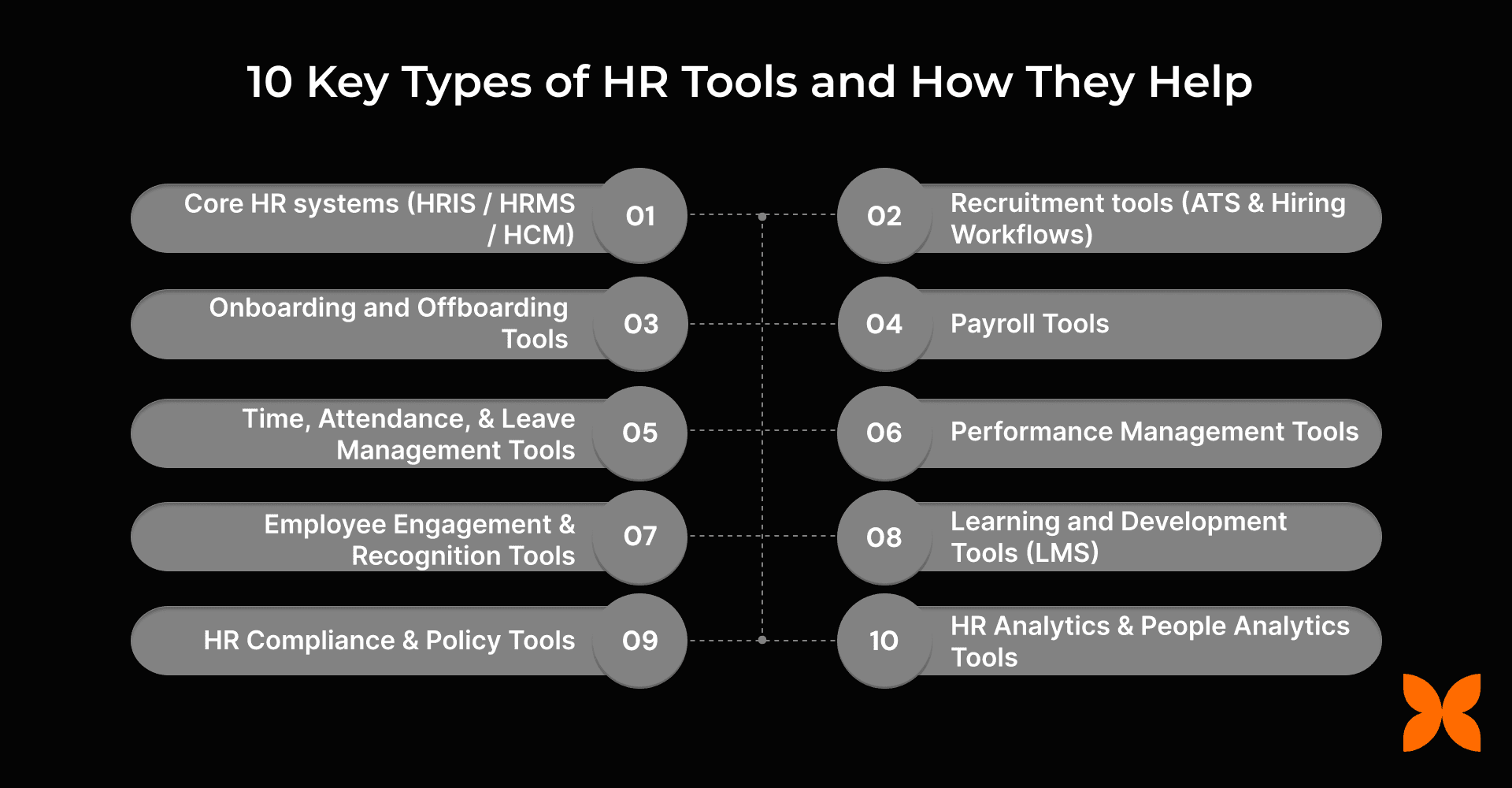
1. Core HR systems (HRIS / HRMS / HCM)
A core HR system, often called HRIS, HRMS, or HCM, is the system of record for all employee data. It centralises information, connecting people, data, policies, and workflows in one place.
What it helps with:
Employee profiles: personal info, job roles, compensation
Organisation structure, reporting lines, role history
Employment documents, contracts, and policy acknowledgements
Approval workflows for role or salary changes
Employee self-service for document access, profile updates, and requests
Who uses it day to day:
HR teams for data management, reporting, and compliance
Managers for approvals and team visibility
Employees for accessing and updating their own information
Buy when:
Headcount reporting differs across teams
Employee data is scattered across multiple systems
Onboarding is error-prone or paperwork-heavy
HR is answering repetitive employee questions
Leadership reports take days to compile
Examples: Craze, Zoho People
2. Recruitment tools (ATS and Hiring Workflows)
Recruitment tools, typically called Applicant Tracking Systems (ATS), manage the entire hiring lifecycle. They centralise job postings, candidate data, and hiring workflows to replace scattered spreadsheets, emails, or ad hoc notes.
What it helps with:
Job requisitions, approvals, and posting to multiple job boards
Centralised candidate pipelines with defined stages
Resume parsing, candidate tagging, and search
Interview scheduling with calendar sync for interviewers
Structured interview feedback tied to roles and competencies
Offer approvals, documentation, and tracking of hiring status
Who uses it day to day:
Recruiters to move candidates through the pipeline and manage interviews
Hiring managers to review shortlists and submit feedback
Interviewers to access candidate profiles and record evaluations
HR teams to monitor hiring progress and compliance
Buy when:
Open roles are increasing, and manual tracking fails
Candidates are missed or followed up on late due to scattered data
Interview feedback is inconsistent, delayed, or hard to compare
Hiring decisions rely on memory rather than recorded evaluations
Time-to-hire increases because coordination slows at each stage
Examples: Greenhouse, Workable
3. Onboarding and Offboarding Tools
Onboarding and offboarding tools manage the transition into and out of the organisation. They coordinate people, systems, and approvals so employee entry and exit processes are consistent, documented, and auditable.
What it Manages:
Offer-to-join document collection and verification
Role-based onboarding task checklists across HR, IT, and managers
System access and asset provisioning coordination
Policy acknowledgements and compliance confirmations
Exit workflows, handovers, access revocation, and final approvals
Who uses it day to day:
HR teams to manage onboarding/offboarding, compliance
Managers for assigning tasks, ensuring readiness
IT/Operations for the provision of access and tracking of assets
Buy when:
Onboarding feels reactive rather than planned
New hires start work without system access or equipment
Different teams follow different joining processes
Exits are delayed or poorly documented
Without structured onboarding and offboarding tools, tasks get missed, experiences vary, and documentation or access risks rise. These tools ensure clear steps, ownership, and visibility.
Examples: Rippling, Sapling
4. Payroll Tools
Payroll tools calculate, process, and distribute employee compensation while ensuring statutory compliance and accurate reporting. They act as the system of record for salary execution.
What it Manages:
Salary calculations, deductions, and net pay generation
Payslip creation and distribution
Statutory calculations and compliance reporting
Payroll inputs from attendance, leave, and variable pay
Payroll audits, corrections, and historical records
Who uses it day to day:
HR/Payroll teams to process payroll and ensure compliance
Employees for viewing payslips, deductions
Buy when
Payroll corrections are frequent
Calculations rely on spreadsheets or manual checks
Employees lack visibility into payslips or deductions
Monthly payroll runs consistently run over timelines
Payroll errors harm trust and increase legal risk. Payroll tools standardise calculations, reduce manual corrections, and give HR and employees clear visibility into payroll.
Examples: Craze, Zoho Payroll
5. Time, Attendance, and Leave Management Tools
These tools track employee work hours and absences, ensuring data is accurate, policy-aligned, and visible across teams. They act as the control layer between daily workforce activities and downstream processes such as payroll and compliance.
What it helps with:
Clock in/out tracking via web, mobile, or biometric systems
Timesheet capture for hourly, shift-based, or project-linked work
Shift scheduling and roster visibility for managers
Leave request submission, approvals, and balance tracking
Holiday calendars, weekly offs, and policy-based accrual rules
Exception handling for late arrivals, early exits, overtime, and missed punches
Who uses it day to day:
Employees to log time, request leave, and view balances
Managers to approve requests, monitor availability, and manage schedules
HR and operations teams to enforce policies and prepare payroll inputs
Buy when:
Leave approvals happen via chat or email threads
Managers lack real-time visibility into team availability
Attendance data requires manual cleanup before payroll
Policy exceptions like comp offs, overtime, or shift changes are frequent and hard to track
Examples: Craze, TSheets
6. Performance Management Tools
Performance management tools provide a structured framework for setting, tracking, and evaluating employee performance. They support continuous feedback, goal alignment, and data-driven insights beyond annual reviews.
What it helps with:
Setting individual, team, and organisational goals, including OKRs
Continuous feedback and check-ins between managers and employees
1:1 meeting tracking, coaching notes, and development plans
Performance review cycles, including 360-degree feedback
Calibration support to ensure fair and consistent ratings across teams
Reporting on goal completion, performance trends, and skill gaps
Who uses it day to day:
Employees for goal tracking, feedback reception, and self-reflection
Managers for structured feedback, objective tracking, and employee development
HR for coordinating reviews, reporting trends, and ensuring fair evaluations
Buy when:
Performance cycles are cumbersome, delayed, or inconsistent
Managers struggle to give timely, actionable feedback
Goals are unclear, misaligned, or not measurable
Talent development and succession planning lack data-driven insights
Examples: Craze, 15Five
7. Employee Engagement and Recognition Tools
These tools help organisations monitor, measure, and enhance employee experience. They combine surveys, real-time feedback, and recognition programmes to drive engagement and retention.
What it helps with:
Conducting pulse surveys and eNPS to track employee satisfaction and engagement trends
Managing recognition programmes, peer-to-peer shoutouts, and reward initiatives
Capturing continuous feedback loops for managers and teams
Reporting on engagement metrics, attrition risk signals, and participation trends
Who uses it day to day:
HR for survey deployment, analytics, and engagement initiatives
Managers to monitor team sentiment, recognise achievements, and address retention risks
Employees to provide feedback and recognise peers
Buy when:
Employee sentiment is unclear or inconsistent
Attrition surprises leadership
Engagement initiatives are ad hoc or informal
Retention strategies lack data-driven insights
Examples: Culture Amp, TINYpulse
8. Learning and Development Tools (LMS)
Learning Management Systems (LMS) centralise training, development, and compliance programmes. They provide structured access to courses, certifications, and onboarding content while tracking completion and progress.
What it helps with:
Creating, assigning, and tracking training modules, including compliance training
Monitoring employee progress, certification completion, and skill development
Delivering onboarding learning content and structured role-based programmes
Reporting on training effectiveness, participation rates, and knowledge gaps
Who uses it day to day:
Employees for self-paced learning, completing modules, and accessing resources
Managers for monitoring team progress and identifying skill gaps
HR for course management, compliance reporting, and learning analytics
Buy when:
Training is inconsistent or difficult to track
Compliance training deadlines are often missed
Managers lack visibility into development initiatives
Onboarding or role-specific learning is fragmented
Examples: TalentLMS, Docebo
9. HR Compliance and Policy Tools
HR compliance and policy tools help organisations manage policies, regulatory requirements, and compliance workflows. They ensure that documentation, acknowledgements, and approvals are consistently tracked to reduce risk and audit pressure.
What it helps with:
Distributing policies and tracking employee acknowledgements
Maintaining audit trails for approvals, changes, and compliance processes
Managing workflows for GDPR, labour law, and internal regulatory compliance
Generating reports for internal audits and external regulators
Who uses it day to day:
HR for policy distribution, compliance reporting, and workflow monitoring
Managers for approvals and tracking team adherence
Employees for acknowledging policies and completing mandatory compliance tasks
Buy when:
Compliance is reactive rather than proactive
Policies are scattered across emails, folders, or spreadsheets
Audits trigger panic due to missing documentation
Approval processes lack traceability or accountability
Examples: Zenefits, Factorial
10. HR Analytics and People Analytics Tools
HR and people analytics tools convert employee and organisational data into actionable insights. They help HR teams and leadership make informed decisions instead of relying on intuition.
What it helps with:
Creating dashboards for headcount, attrition, turnover, and performance metrics
Reporting workforce trends, engagement patterns, and compliance adherence
Identifying insights to improve recruitment, retention, and productivity
Supporting scenario planning and predictive workforce analysis
Uncovering correlations between engagement, performance, and turnover
Who uses it day to day:
HR teams for reporting, analysis, and workforce planning
Managers for team-level insights and performance trends
Leadership for strategic decision-making and organisational planning
Buy when:
Leadership asks HR questions that cannot be answered quickly
Headcount, attrition, or performance reports take days to compile
HR decisions rely on gut feel rather than data
Insights are needed to optimise workforce planning or engagement
Examples: Visier, PeopleInsight
Note: Many modern HR platforms include basic analytics, but deeper insights or predictive capabilities may require specialised tools. |
Here’s a quick reference table summarising each HR tool category, what it manages, and when you should consider implementing it:
HR Tool Category | Purpose | Buy When / Signals |
Core HR (HRIS/HRMS/HCM) | Centralised employee data, approvals, and self-service | Employee data scattered, onboarding error-prone, repeated HR questions |
Recruitment (ATS) | Manage hiring pipeline and interviews | Open roles increasing, inconsistent feedback, time-to-hire rising |
Onboarding/Offboarding | Smooth entry/exit workflows | Onboarding reactive, equipment/system delays, and exits are poorly documented |
Payroll | Salary calculations, statutory compliance | Payroll errors are frequent, manual checks are needed, and employees lack visibility |
Time, Attendance & Leave | Track hours, shifts, leave | Leave approvals via chat, attendance cleanup needed for payroll |
Performance Management | Goals, feedback, reviews | Performance cycles are delayed, feedback is inconsistent, and goal misalignment |
Employee Engagement & Recognition | Surveys, feedback, rewards | Engagement unclear, attrition surprises leadership, ad hoc initiatives |
Learning & Development (LMS) | Training, compliance, skill development | Training hard to track, compliance deadlines missed, and onboarding learning fragmented |
Compliance & Policy | Policies, approvals, audits | Compliance reactive, scattered documents, panic during audits |
HR Analytics | Data-driven insights | Reports are slow, HR decisions are based on gut feel, and leadership wants insights |
Choosing the right tools matters, but before investing, it’s important to recognise the warning signs that your manual processes are holding you back.
As your organisation grows, relying on spreadsheets and scattered tools can create friction, errors, and delays. Below are a few common signs that your HR processes need a more structured system:
Multiple versions of employee data: Changes to addresses, bank details, or roles have to be updated in several places, and records rarely match.
Approvals in email or chat: Leave requests, salary changes, and hiring approvals are buried in threads, with no clear audit trail.
HR chasing people: HR spends most of its time following up on missing forms or incomplete tasks instead of improving processes.
Manual payroll: Salary calculations and deductions rely on spreadsheets, which break down whenever leave, variable pay, or policies change.
Unclear hiring data: Candidate info and interview feedback are scattered, slowing decisions and causing miscommunication.
Slow reporting: Headcount, payroll, and performance reports take hours to compile and are often questioned.
Reactive compliance: Policy acknowledgements and audit documentation are handled at the last minute, increasing risk.
If two or more of these feel familiar, it’s time to evaluate your HR tool stack.
Once you recognise the limits of spreadsheets and patchwork tools, the next step is choosing the right approach to HR software: an all-in-one platform or best-of-breed tools.
HR teams often face a choice: use an all-in-one platform that covers multiple HR functions, or pick best-of-breed tools for specialised needs and integrate them. Each approach has trade-offs that affect adoption, reporting, and operational complexity.
All-in-one platforms offer quicker adoption, a single employee record, simpler reporting, and fewer integrations. The downside is that some modules may be lighter or less flexible for niche workflows.
Best-of-breed tools provide deeper functionality and flexibility in each area but require integration work, increase admin overhead, risk data duplication, and can make reporting more complex.
The table below summarises the key differences across critical factors to help you decide which approach suits your organisation:
Feature | All-in-one | Best-of-breed |
Implementation speed | Fast | Moderate |
Data consistency | High | Can vary |
Reporting | Unified | Fragmented if multiple tools |
Custom workflows | Limited | Deep flexibility |
Total cost | Predictable | Higher with multiple subscriptions |
IT/admin overhead | Low | Higher due to integrations |
Scalability | Good | Flexible if managed |
Guidance: Most growing organisations benefit from all-in-one platforms due to their simplicity and ease of adoption. Best-of-breed makes sense when you have very high hiring volumes or complex, specialised workflows.
Also Read: Top 20 Essential Features of HR Software for Indian Business
Now, let’s identify the must-have features and considerations that help you pick HR tools that actually work for your organisation.
Choosing the right HR tool can be tricky. Let’s focus on the features that make daily HR work simpler, improve data accuracy, and reduce manual tasks. Below are a few key factors to evaluate during demos or trials:
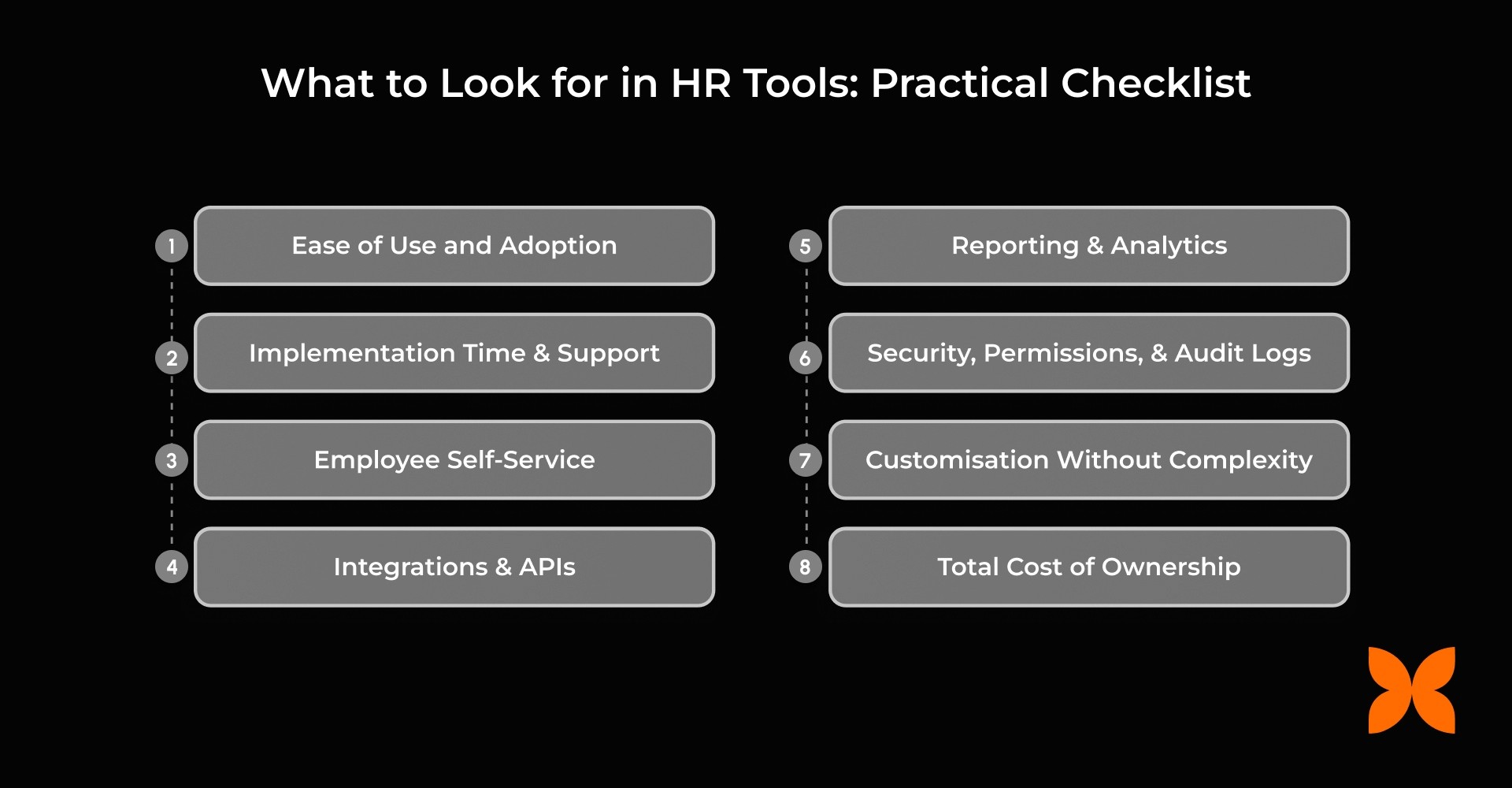
1. Ease of Use and Adoption
If employees and managers find the tool frustrating, they will bypass it. When that happens, HR ends up back in "manual mode," chasing people for data.
What to test: Run common workflows in the demo, like leave requests, onboarding tasks, and manager approvals. Check if the interface is intuitive for different user roles.
2. Implementation Time and Support
Delays in rollout slow adoption and create frustration.
What to check: Realistic timelines for onboarding, data migration, and training. Ask vendors about support during implementation and ongoing help.
3. Employee Self-Service
Reduces repetitive HR queries and increases transparency.
What to include: Access to personal details, payslips, leave balances, documents, and request tracking. Employees should be able to complete tasks independently.
4. Integrations and APIs
HR rarely works in isolation; payroll, finance, identity, and communication systems need to sync.
What to check: Available integrations, data sync frequency, API/webhook support, and error handling. Ensure smooth data flow without manual intervention.
5. Reporting and Analytics
Leadership expects answers quickly; slow spreadsheets undermine credibility.
What to demand: Dashboards and reports on headcount, attrition, attendance, leave trends, payroll changes, and performance. Look for actionable insights in real time.
6. Security, Permissions, and Audit Logs
Protects sensitive employee data and ensures compliance.
What to check: Role-based access, GDPR/region-specific compliance, and audit trails for approvals, changes, and policy acknowledgements.
7. Customisation Without Complexity
Over-customising early creates maintenance headaches.
What to test: Configurable workflows, policy rules, and templates that don’t require engineering resources. Flexibility should not compromise simplicity.
8. Total Cost of Ownership
Subscription fees are only part of the cost; hidden expenses can add up.
What to Consider: Implementation, training, integrations, admin time, extra modules, and support tiers. Evaluate the full cost over time, not just the sticker price.
Also Read: HR Metrics: 10 Trends, Examples & How to Use Them
Now that you know what to look for in HR tools, let’s walk through a clear, step-by-step approach to selecting the right solution for your organisation.
Choosing the right HR tools can feel overwhelming with so many options and features. Below are eight practical steps to guide your evaluation and selection process:
List your Biggest Pain Points and Time Drains: Identify the processes that consume the most time or cause the most errors, such as payroll, approvals, or onboarding gaps.
Map Workflows End-to-end: Document each workflow, for example, onboarding from offer letter to Day 30, to spot inefficiencies or missing steps.
Define Must-haves vs Nice-to-haves: Prioritise features that solve critical problems first, while noting optional features for later consideration.
Identify Stakeholders Early: Engage HR, finance, IT, and managers from the start to ensure buy-in and realistic requirements.
Shortlist Tools Based on Use Cases, not just Features: Focus on how the tool solves your real-world workflows, not on chasing every feature on a checklist.
Run Demos with Real Scenarios and Data: During the demo, ask the vendor to show you your specific workflows using real-world data examples.
Mini prompts:
|
Pilot with a small group and measure adoption: Trial the tool with a subset of employees to identify friction points and gather feedback.
Decide based on ROI and total cost: Consider subscriptions, integrations, admin time, and training. Don’t base your decision solely on product demos.
If you’re reviewing HR tools and want a practical checklist of what to implement first, Craze brings core HR, payroll, time and attendance, leave, and performance into one platform, so your data stays in sync and your team spends less time chasing admin.
Once you’ve chosen the right HR tools, the next challenge is implementing them without disrupting day-to-day operations.
Implementing a new HR tool shouldn't feel like an emergency. Most software failures happen not because of the technology, but because the transition was rushed. To ensure your team actually adopts the new system, follow this four-step implementation plan:
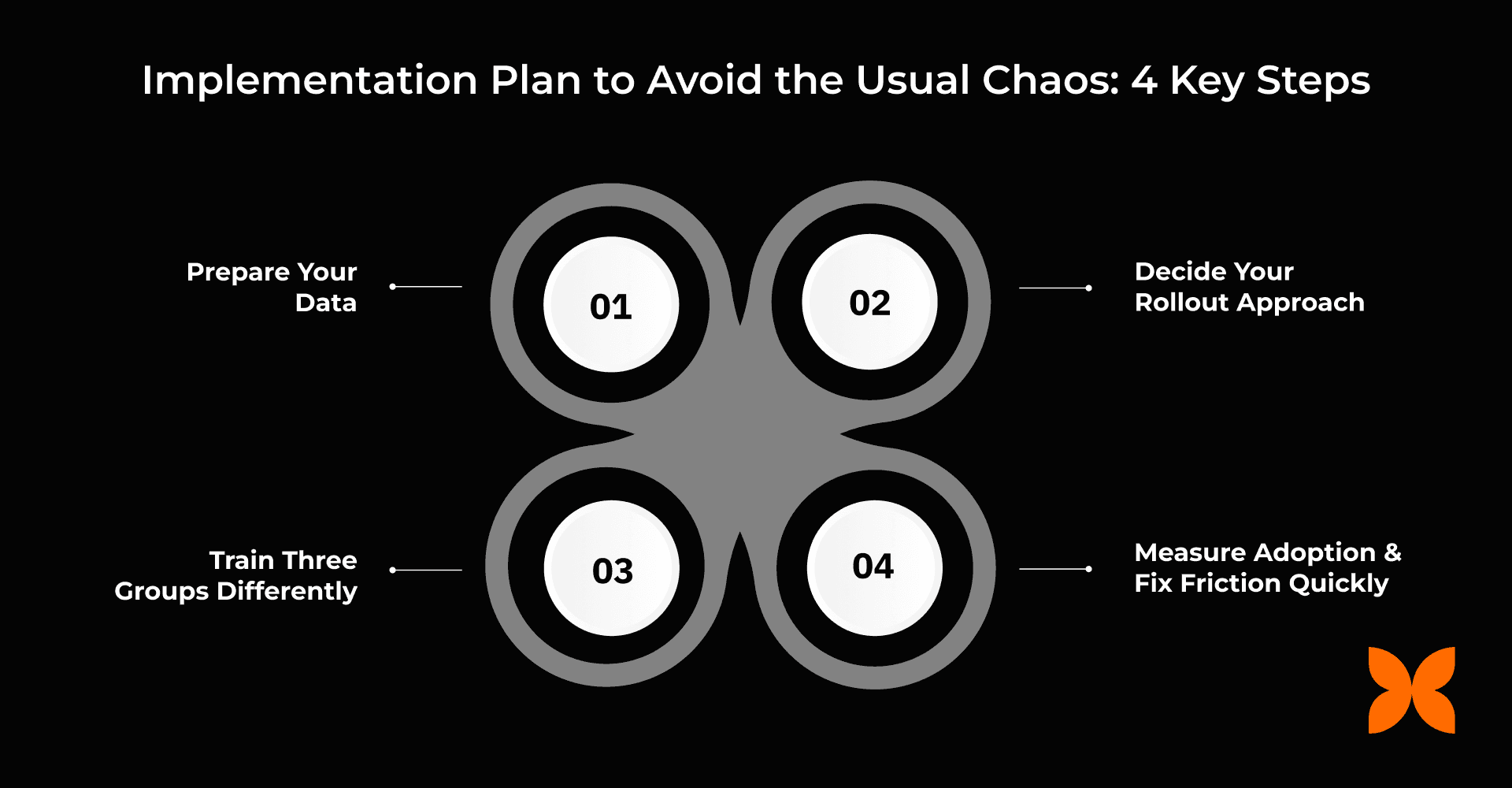
1. Prepare Your Data
Moving messy data into a new system quickly erodes employee trust. Treat this as a “spring cleaning” for HR records.
Consolidate master files: Gather all employee personal details, compensation structures, and reporting hierarchies into a single clean format.
Audit documents: Ensure employment contracts, IDs, and HR policies are digitised and up to date.
Fix inconsistencies: Remove duplicates, standardise naming conventions, and correct formatting errors before migration.
2. Decide Your Rollout Approach
A controlled rollout prevents disruption and helps your team adapt smoothly.
Phased rollout (recommended): Start with core HR and one high-impact module to catch issues early.
Gradual adoption: Let teams begin using certain features while monitoring usage and feedback.
Big bang rollout: Consider only if your data is clean and users are fully trained.
Tip: A phased rollout reduces frustration and allows adjustments without halting operations.
3. Train Each Group Appropriately
Different user roles interact with the system in different ways. Tailor training to their responsibilities.
HR admins: Focus on system setup, workflow configuration, and reporting.
Managers: Train on approvals, team management processes, and monitoring dashboards.
Employees: Cover self-service features, requests, and where to find information.
Tip: Use live demos, short guides, and hands-on exercises rather than long slide decks. Practice builds confidence.
4. Measure Adoption and Fix Friction Quickly
Post-launch monitoring ensures your system doesn’t become another unused tool.
Track usage: Monitor self-service adoption rates and the frequency of employee system access.
Check approvals: Measure turnaround times to identify bottlenecks for managers.
Reduce HR tickets: Watch for recurring manual follow-ups that indicate friction.
Act fast: Adjust workflows, permissions, or training content based on real usage patterns.
Tip: Set a 30-60 day review period to catch issues before they become habits.
With workflows in place and adoption monitored, your HR tool will start delivering value quickly, and your team will avoid the usual chaos of a rushed rollout.
AI can support HR teams by summarising data, surfacing insights, reducing repetitive admin, and speeding up everyday workflows. Used well, it saves time and improves consistency, but it must be applied with clear controls in place.
Practical Applications of AI in HR: AI is most effective in HR when it reduces manual effort and helps teams interpret large volumes of information, not when it replaces decision-making. For example, AI can assist with:
Drafting job descriptions and role summaries
Summarising employee survey or engagement feedback
Spotting patterns in attrition, absenteeism, or engagement data
Assisting with interview scheduling and early-stage candidate screening
Risks and Safeguards for AI in HR: While AI adds efficiency, it also introduces risks that HR teams must actively manage. Potential risks include:
Bias in hiring and performance decisions when models rely on skewed or incomplete data
Data privacy and security risks if employee information is processed or stored incorrectly
Lack of transparency if AI outputs are treated as final decisions
AI should support human judgment, not replace it; sensitive actions must always include human review.
AI Tool Checklist: To ensure safe and effective use of AI in HR, teams should verify these key controls:
Explainability: Can the tool show how it arrived at a specific summary or insight?
Data Control: Is employee data siloed and protected from being used to train public models?
Audit Logs: Is there a clear record of when the AI was used and who reviewed the output?
Human-in-the-loop: Does the workflow force a human review before an action becomes official?
HR tools deliver the most value when they reduce day-to-day admin work and bring consistency to people processes as organisations scale. The objective is not to implement every available module, but to address the specific issues that slow teams down. Starting small helps teams maintain clean data, design a sensible system setup, and ensure employees actually use the tools provided.
Adoption matters more than feature depth. As a practical next step, pick one area that creates the most repeated manual work this month and audit how a tool could remove or simplify that task.
Platforms like Craze simplify HR operations by streamlining approvals, automating workflows, and providing clear visibility. Features such as flexible payroll, compliance-ready reporting, and integrated asset management allow growing teams to handle complexity efficiently.
Schedule a free demo to see how Craze can effortlessly scale HR operations.
1. What is the difference between HRIS and ATS?
An HRIS (or HRMS/HCM) stores and manages all employee data, including roles, compensation, and compliance records. An ATS focuses on recruitment, tracking candidates, managing interviews, and moving hires from job posting to offer.
2. Do small and mid-sized organisations need HR tools?
Yes, even small and mid-sized organisations benefit once manual tracking starts causing errors or delays. Tools help standardise processes, reduce repetitive admin, and minimise compliance risks that spreadsheets alone cannot handle.
3. Should I choose an all-in-one HR platform or separate tools?
All-in-one platforms offer unified data, simpler reporting, and faster adoption for most growing organisations. Best-of-breed tools provide deeper functionality for specific needs but need integrations and careful data management.
4. What HR tool should we implement first?
Begin with a core HR system to centralise employee data and workflows. After that, prioritise the module that addresses your most pressing operational pain, often payroll, time and attendance, or leave management.
5. How do I prove ROI for HR software?
Measure tangible improvements such as reduced manual errors, faster approvals, and time saved for HR teams. Track softer metrics too, like improved employee satisfaction, compliance adherence, and early retention signals.
